Understanding Amazon Q: AWS's AI Assistant for Enterprises and Developers
Discover Amazon Q, AWS's AI assistant for businesses and developers, covering its integration with AWS, roles in enterprise and development, and security advantages.
Amazon Q: AWS’s AI Assistant for Business and Developers
Amazon Q is AWS’s AI assistant designed specifically for businesses and developers. It launched in late 2023 as Amazon’s response to the increasing demand for enterprise AI tools. The service offers two main versions: Amazon Q Developer for coding tasks and Amazon Q Business for enterprise data analysis and productivity. These tools fulfill the need for AI assistants that can work directly with company data and cloud infrastructure without external data transfers. Key features include deep AWS integration, secure data querying, code generation and debugging, and enterprise-grade security controls. Unlike general AI chatbots, Amazon Q is built to operate within the AWS ecosystem and handle sensitive business data.
What is Amazon Q?
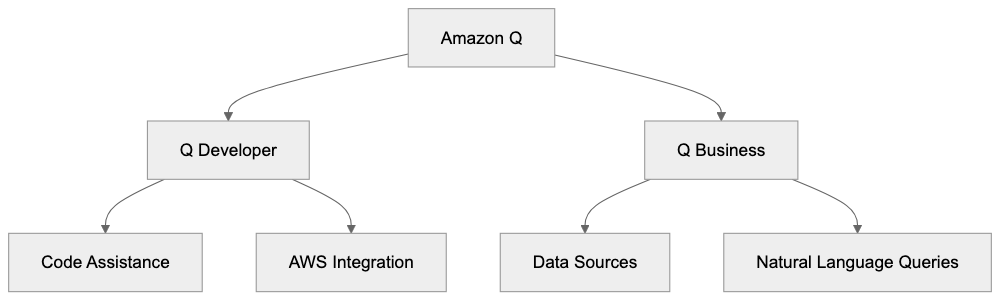
Amazon Q Architecture Overview:
Amazon Q is an AI-powered assistant integrated with AWS services and connected to a company’s data sources. It’s akin to ChatGPT but tailored for business use within AWS cloud operations. Utilizing large language models, it understands questions and generates responses based on company data and AWS documentation. Amazon Q Developer aids in writing code, debugging, and enhancing AWS deployments, while Amazon Q Business allows employees to query company documents, policies, and data stored across various systems. The assistant connects to over 40 data sources, including S3, SharePoint, Salesforce, and Google Drive. When posed a question, Amazon Q searches these data sources and provides answers with citations. All operations occur within the user’s AWS environment, ensuring data remains within the security perimeter.
Why Amazon Q Exists
Companies face two main challenges that Amazon Q addresses: developers spending excessive time on AWS documentation and writing repetitive code, and employees struggling to access dispersed information across numerous systems. Amazon Q simplifies AWS service usage and unlocks the value of siloed company data. Its purpose is straightforward: to reduce the time developers spend on routine tasks and to help employees locate information without relying on colleagues or IT support. AWS developed this tool in response to customer demand for better cloud service interaction and internal data utilization. Enterprise AI assistants enable quicker AI adoption without constructing models or infrastructure from scratch. Businesses can deploy Amazon Q, linking it to existing data sources, thus accelerating AI integration and minimizing technical expertise requirements.
Amazon Q Data Flow:

How Businesses and Developers Use Amazon Q
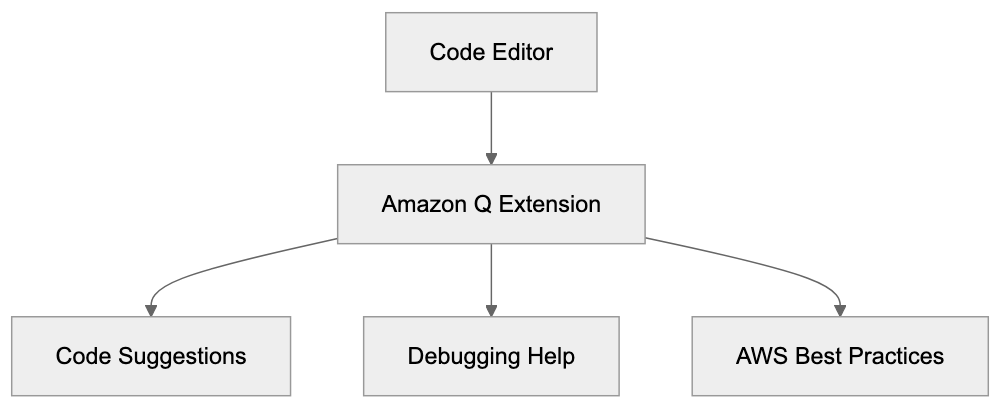
Developers utilize Amazon Q Developer directly in their code editors via extensions for VS Code and JetBrains IDEs. The tool suggests code completions, generates functions from comments, and clarifies existing code. For debugging, developers can input error messages, and Amazon Q offers fixes based on AWS best practices. Development teams use it to expedite AWS CLI command writing and CloudFormation template creation. The assistant scans codebases for security vulnerabilities and recommends improvements for AWS resource management.
Companies deploy Amazon Q Business differently. They link it to SharePoint sites, wikis, databases, and file storage systems. Employees then ask questions in natural language, such as “What is our travel reimbursement policy?” or “Show me sales data from last quarter.” Customer support teams quickly find answers in knowledge bases, HR departments connect it to policy documents, and sales teams query CRM data without SQL. The tool generates responses with links to source documents for verification. Some companies integrate Amazon Q into Slack or Microsoft Teams, allowing employees to ask questions without switching applications.
Key Facts About Amazon Q
Amazon Q was launched at the AWS re:Invent conference in November 2023. It is available in several AWS regions, though not all features are supported in every region. Pricing for Amazon Q Business starts at $20 per user per month, while Amazon Q Developer has a free tier for individual developers and a paid tier starting at $19 per user per month. The assistant supports multiple programming languages, including Python, Java, JavaScript, TypeScript, C#, and Go. Response accuracy heavily depends on the quality and organization of connected data sources. Amazon Q cannot access data without explicit connection and requires proper IAM permissions for each source. The service maintains conversation context within a session but does not retain knowledge across different sessions. All interactions are encrypted, and Amazon states that customer data is not used to train the underlying models; however, reviewing AWS’s data processing terms is advisable for specific use cases.
Amazon Q Compared to Alternatives
Several companies offer similar enterprise AI assistants. Here’s how Amazon Q compares to its main competitors:
| Feature | Amazon Q | Microsoft Copilot | Google Gemini | GitHub Copilot | IBM Watsonx |
|---|---|---|---|---|---|
| Starting Price | $20/user/month | $30 per user per month | $30/user/month | $10 per user per month | Custom pricing |
| Code Generation | Yes | Yes | Yes | Yes | Limited |
| AWS Integration | Native | Via connectors | Via connectors | None | Via connectors |
| Data Sources | 40+ connectors | Microsoft 365 focus | Google Workspace | GitHub only | Custom integration |
| Security Model | Runs in AWS VPC | Microsoft cloud | Google cloud | GitHub cloud | On-premise option |
| Free Tier | Yes for developers | No | No | No | Trial only |
Microsoft Copilot is best if your organization extensively uses Microsoft tools, offering deep integration with Word, Excel, PowerPoint, and Teams at an expense of $30 per user monthly. Although its integration with Microsoft products is more mature than Amazon Q’s third-party connectors, Copilot doesn’t provide the same AWS service integration level. Running infrastructure on AWS makes Amazon Q more attuned to your cloud environment than Copilot. For pure coding assistance, GitHub Copilot is preferred at $10 monthly, yet it is limited to code assistance without business data connectivity. Google’s Duet AI is beneficial for Google Workspace customers but lacks deep AWS integration. A significant advantage of Amazon Q over competitors is its ability to interact with AWS services using natural language and offer context-aware suggestions based on your AWS setup.
Developer Workflow with Amazon Q:
Security and Data Privacy Considerations
Security differentiates Amazon Q from consumer AI tools. It operates inside your AWS account, ensuring data remains within your control. Access is managed via AWS IAM policies, restricting user visibility to specific data sources. If a user lacks access to a SharePoint folder, Amazon Q will not reveal information from it. Data transmission is encrypted, and queries are processed in specified AWS regions. AWS clarifies that customer data is not used for model training, crucial for companies with confidential information or compliance requirements. CloudTrail logging can be enabled to audit all exchanges and monitor user inquiries. The service supports VPC endpoints to ensure traffic avoids the public Internet. For regulated industries, Amazon Q offers features to redact sensitive information like credit card numbers or social security numbers from responses. However, optimal security relies on proper configuration, including IAM roles and data source permissions. Many companies initiate usage with a pilot connecting non-sensitive data before expanding access.
Getting Started with Amazon Q
Setting up Amazon Q requires an AWS account and appropriate permissions. For Amazon Q Developer, begin with the free tier by installing the extension in VS Code or your chosen IDE. Sign in with your AWS Builder ID or AWS IAM credentials to start generating code. The free tier includes code completions and chat but limits some advanced features. For Amazon Q Business, create an application in the AWS console and connect at least one data source. The setup wizard guides you through connecting to systems like SharePoint or S3. Credentials for each data source and configuration of index settings are necessary. Initial indexing might take several hours depending on data volume. After completion, test queries via the web interface before user rollout. Most companies establish a SharePoint site or Slack channel specifically for Amazon Q communication. Training materials can help employees comprehend effective questioning and citation interpretation. Start with a small user group and expand gradually while refining data connections and permissions. Use CloudWatch metrics to track data source queries and address any dead ends.
Limitations and Considerations
Amazon Q has certain limitations to be aware of. Answer quality hinges entirely on connected data source quality: “garbage in, garbage out” applies here. Outdated or poorly organized documentation may lead to inaccurate or confusing answers. The service may generate confident responses that are incorrect, especially with ambiguous data; always verify crucial information against source documents. Response time varies based on data source complexity and query type; simple questions may take seconds, while others may take longer. The 40+ data connectors may not cover every system, so niche software might require custom integration. Amazon Q Developer’s code suggestions are best for common patterns and struggle with specialized or proprietary frameworks. The assistant cannot execute code or modify AWS resources without explicit permission; it only suggests actions. Conversation context resets between sessions, preventing references to past conversations. Costs can quickly accumulate for large enterprises: 1000 users at $25 monthly equals $250,000 annually. Some competitors offer volume discounts that AWS doesn’t publicly advertise. Lastly, like all AI assistants, Amazon Q can produce false information, so human verification is essential for crucial decisions.
Amazon Q is AWS’s venture into enterprise AI assistants with products for developers and business users. It excels in AWS integration, maintaining the security boundaries required by enterprise customers. Developers receive code assistance directly in IDEs, while business users can query company data across numerous connected systems. Compared to Microsoft Copilot, Amazon Q offers superior AWS integration and more affordable starting prices, though Copilot has more mature Microsoft 365 integration. The main advantages include native AWS service understanding and robust security controls, all while operating entirely within your AWS environment. Key limitations are data quality dependency, occasional errors, and scalable costs. Companies invested in AWS infrastructure should evaluate Amazon Q, especially development teams working daily with AWS services. The secure model suits regulated industries that can’t employ consumer AI tools. Success hinges on proper setup, organized data, and user training.
Frequently Asked Questions
What are the prerequisites for using Amazon Q?
To use Amazon Q, you'll need an AWS account with appropriate permissions. For developers, starting with the free tier requires installing the extension in your IDE and signing in with your AWS credentials. For business users, creating an application in the AWS console and connecting at least one data source is necessary.
How does Amazon Q handle sensitive data?
Amazon Q operates within your AWS environment, ensuring that sensitive data remains secure under your control. Access is managed through AWS IAM policies, meaning users can only see data for which they have permissions. Additionally, the service provides features to redact sensitive information from responses when necessary.
Can Amazon Q be integrated with existing company software?
Yes, Amazon Q supports integration with over 40 different data sources, including popular platforms like SharePoint, Salesforce, and Google Drive. Businesses can link Amazon Q Business to their existing document repositories and databases, allowing employees to query important data easily.
How does the pricing structure work for Amazon Q?
Amazon Q Business starts at $20 per user per month, with pricing for Amazon Q Developer beginning at $19 per user per month, but it also offers a free tier for individual developers. It's essential to consider user scale, as costs can accumulate significantly, particularly in larger organizations.
What are the limitations of using Amazon Q?
Several limitations exist, such as the quality of responses depending heavily on the organization and accuracy of connected data sources. Additionally, Amazon Q cannot execute code or modify AWS resources without explicit permissions, and it doesn't retain conversation context across different sessions.
How can businesses ensure effective use of Amazon Q?
To ensure effective use, companies should start with a well-structured data setup and provide training to employees on how to leverage the tool effectively. Testing queries in the initial phase and refining data connections and permissions based on user interactions can also enhance the overall experience.
Is Amazon Q suitable for regulated industries?
Yes, Amazon Q's architecture and security measures make it well-suited for regulated industries. It maintains strict control over data, operates within the AWS ecosystem, and offers features to protect sensitive information, making it a viable option for companies with compliance requirements.