Exploring Codeium: Your Free AI Code Completion Tool
Learn about Codeium, the free AI code assistant. Discover its features, including autocomplete, Windsurf IDE, and how it compares to alternatives.
Table of Contents
- What is Codeium and Why It Matters
- Understanding AI Code Assistants and Their Purpose
- How Codeium Works for Developers
- Codeium’s Business Model and Data Practices
- Codeium Features Breakdown
- Comparing Codeium to Copilot and Cursor
- Windsurf IDE Deep Dive
- Privacy and Security Considerations
- Getting Started with Codeium
- Real World Use Cases and Limitations
- Performance and Accuracy Metrics
- Enterprise Features and Team Usage
- What is Codeium and Why It Matters
- Understanding AI Code Assistants and Their Purpose
- How Codeium Works for Developers
- Codeium’s Business Model and Data Practices
- Codeium Features Breakdown
- Comparing Codeium to Copilot and Cursor
- Windsurf IDE Deep Dive
- Privacy and Security Considerations
- Getting Started with Codeium
- Real World Use Cases and Limitations
- Performance and Accuracy Metrics
- Enterprise Features and Team Usage
What is Codeium and Why It Matters
Codeium is a free AI-powered code completion and assistant tool designed for developers, offering intelligent code suggestions, autocomplete functionality, and chat-based coding assistance directly in your IDE. It provides intelligent code suggestions, autocomplete functionality, and chat-based coding assistance directly in your IDE. Supporting over 70 programming languages, it integrates with more than 40 code editors, including VS Code, JetBrains IDEs, and Visual Studio.
AI code assistants like Codeium accelerate development workflows. They reduce repetitive typing, help find APIs faster, and suggest entire code blocks based on context. These tools significantly boost productivity, especially for developers working on tight deadlines or learning new frameworks. Codeium stands out with its completely free AI coding tier for individual developers with no usage limits or trial periods. The company announced Windsurf, an upcoming standalone IDE built around AI-first development principles.
Understanding AI Code Assistants and Their Purpose
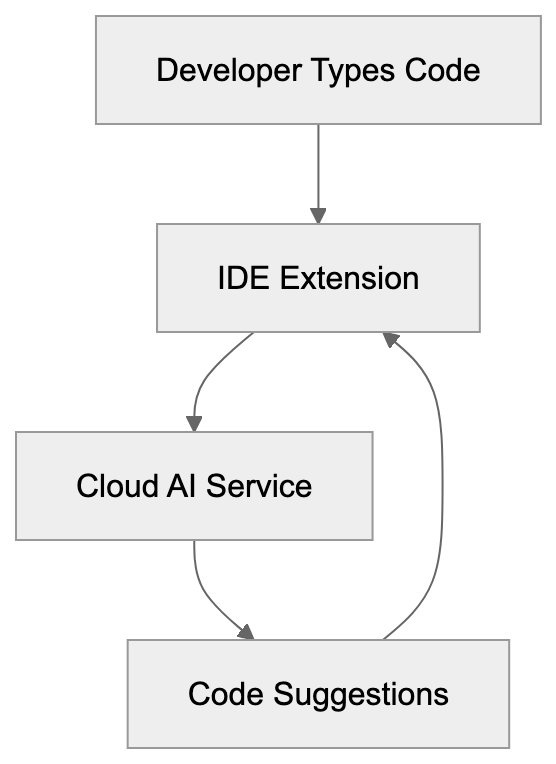
AI code completion tools analyze your existing code, comments, and context to predict what you’re trying to write next. They use large language models trained on billions of lines of public code repositories. When you start typing a function name or variable, the AI suggests complete lines or entire code blocks.
These tools serve multiple purposes:
- Speed up boilerplate code writing
- Assist with syntax recall
- Help learn new languages or frameworks
AI Code Assistant Architecture:
Before Codeium launched in 2022, most advanced AI code tools required paid subscriptions. Codeium’s founders wanted to provide enterprise-grade AI coding capabilities without cost barriers, hence the free AI coding model. Their business model relies on enterprise customers who need team features, security controls, and on-premise deployment options.
How Codeium Works for Developers
Codeium operates through IDE extensions and now through Windsurf, their dedicated editor. After installing the extension, it runs locally on your machine while connecting to Codeium’s cloud servers for AI inference. The tool analyzes your current file, open tabs, and project structure to provide contextual suggestions.
Key features include:
- Autocomplete: Triggers as you type and appears as grey ghost text
- Chat Interface: Ask questions about your codebase, request refactoring suggestions, or generate functions from natural language
The announced Windsurf IDE aims to embed AI throughout the development experience, with features like Cascade allowing AI to make multi-file edits.
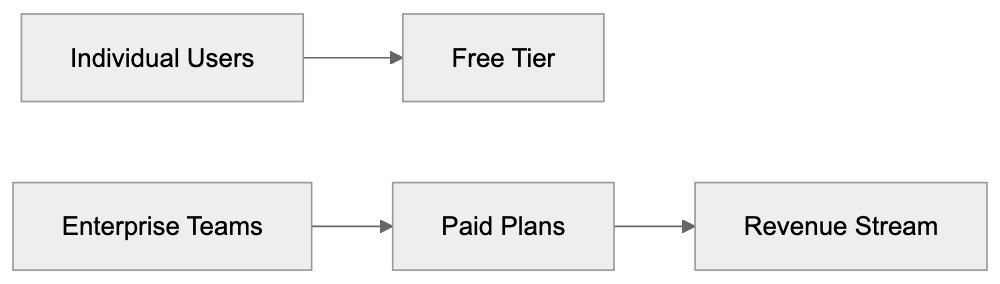
Codeium Revenue Model:
Codeium’s Business Model and Data Practices
Codeium offers its core features free for individual developers, raising sustainability and data usage questions. Revenue comes from enterprise plans, which include self-hosting, fine-tuning on private codebases, advanced security controls, and team management tools.
Key considerations:
- Codeium does not train their models on user code by default
- Enterprise customers can have complete data isolation with on-premise options
The free tier exists as a growth strategy. By providing value to individual developers, Codeium builds brand recognition and creates a pipeline of users who might bring the tool into their companies.
Codeium Features Breakdown
Codeium provides several core capabilities across its platform:
- Autocomplete: Handles single-line and multi-line code suggestions in real-time
- Chat Functionality: Allows natural language exchanges for code explanations, refactoring requests, or function generation
- Windsurf IDE: Introduces Cascade mode for agentic AI workflows
Codeium supports context awareness through its indexing system, analyzing your repository structure for accurate suggestions. The tool also includes command features for common tasks like generating docstrings and explaining complex code blocks.
Comparing Codeium to Copilot and Cursor
GitHub Copilot, Cursor, and Codeium represent different approaches to AI-assisted coding. Each has distinct strengths and pricing models appealing to various user segments.
| Feature | Codeium | GitHub Copilot | Cursor |
|---|---|---|---|
| Individual Price | Free | $10/month | $20/month |
| Languages Supported | 70+ | 40+ | 40+ |
| IDE Support | 40+ editors | VS Code, JetBrains, others | Cursor IDE only |
| Chat Interface | Yes | Yes | Yes |
| Standalone IDE | Windsurf | No | Yes |
| Self-Hosting | Enterprise only | No | No |
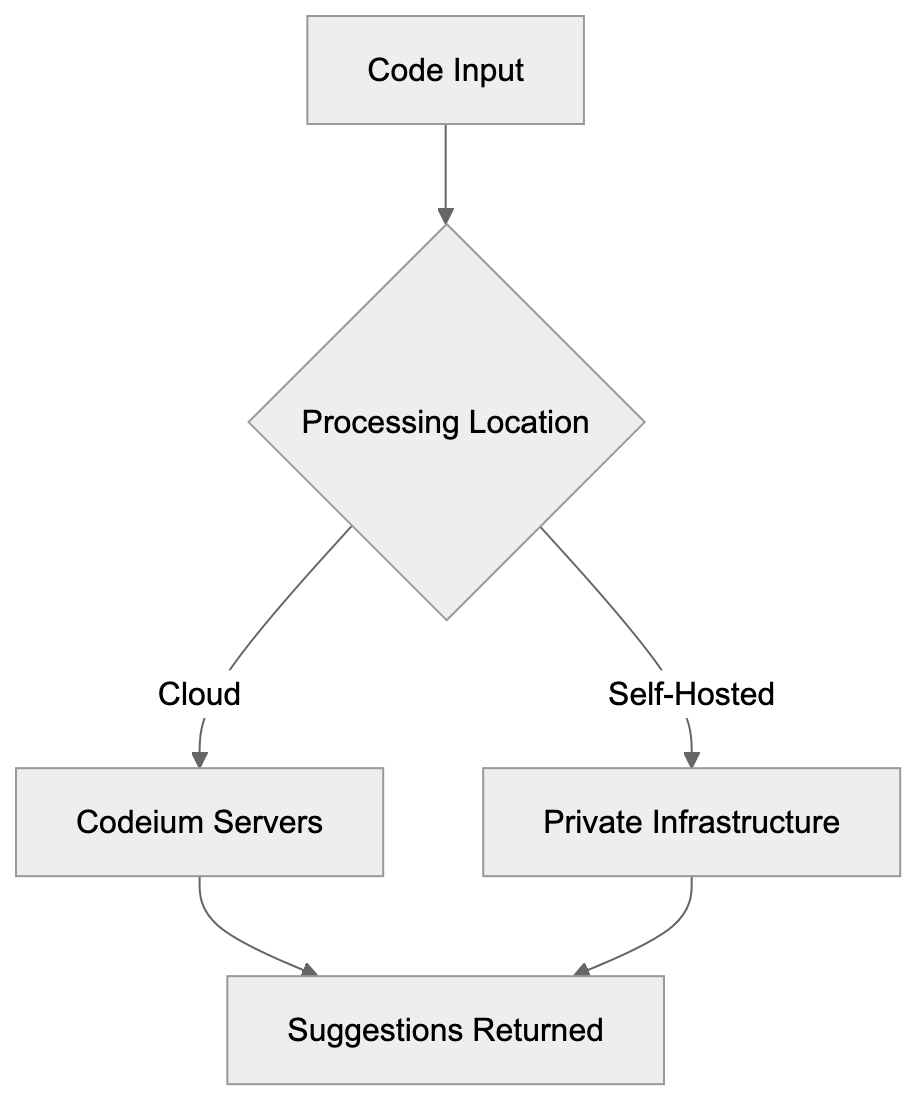
Data Flow and Privacy:
Codeium’s advantage is being completely free for individuals, offering comparable functionality to paid alternatives.
Windsurf IDE Deep Dive
Windsurf represents Codeium’s vision for AI-native development environments. Announced in late 2024, it competes directly with Cursor by offering a complete IDE.
Notable features:
- Cascade: Allows AI to understand your entire codebase context for coordinated changes across multiple files
- Flows: Enables creating reusable AI workflows for common tasks
Windsurf maintains compatibility with VS Code extensions, themes, and settings, allowing straightforward migration.
Privacy and Security Considerations
Understanding data handling is essential when using any AI coding tool. Most cloud-based AI assistants send code snippets to remote servers for processing, raising potential privacy and security concerns.
For Codeium:
- Processes code on their servers to generate suggestions, but user code is not stored or used for model training by default
- Offers self-hosted deployments for maximum security
Always review privacy policies carefully and enable AI features only in non-sensitive projects if cloud processing is a concern.
Getting Started with Codeium
Setting up Codeium is straightforward:
- Visit codeium.com and create a free account.
- Install the Codeium extension from your editor’s marketplace.
- Customize suggestion behavior as per your preferences.
The extension activates automatically after authentication. Start typing in any supported language file to see suggestions.
Real World Use Cases and Limitations
Developers use Codeium across various scenarios. It’s effective for web development tasks like generating React components, API routes, and database queries. Backend development benefits from boilerplate reduction, while data science and machine learning workflows see good results.
Limitations include:
- Complex algorithms requiring deep problem-solving might produce incorrect suggestions
- Occasionally suggests outdated patterns or deprecated features
Security is a concern. Never blindly accept suggestions for sensitive areas like authentication and cryptography.
Performance and Accuracy Metrics
Measuring AI code assistant quality varies by language and task complexity. Codeium’s acceptance rates are around 35-40%, aligning with industry averages.
Key metrics:
- Response latency is typically within 100-300 milliseconds
- Language support quality varies, with excellent suggestions for popular languages
Multi-line suggestion accuracy can drop, with developers often modifying suggestions rather than using them verbatim.
Enterprise Features and Team Usage
Enterprises require additional capabilities. The enterprise tier adds centralized management, security controls, and deployment flexibility.
Notable features:
- Team management with provisioning and usage analytics
- Self-hosting for maximum data control
- Fine-tuning on private codebases for more relevant suggestions
Priority support provides faster response times and dedicated success managers, crucial when deploying AI tools to large teams.
Frequently Asked Questions
What programming languages does Codeium support?
Codeium supports over 70 programming languages, enabling developers to utilize its features across a wide range of coding environments. This includes popular languages like JavaScript, Python, Java, and many others.
How does Codeium ensure my code remains private?
Codeium does not store user code or use it for model training by default. Users can opt for self-hosted deployments for enhanced security, ensuring complete data isolation.
Is Codeium truly free for individual developers?
Yes, Codeium offers its core features for free to individual developers without any usage limits or trial periods. This allows users to leverage its capabilities without financial barriers.
What should I do if I encounter incorrect suggestions?
While Codeium offers high-quality suggestions, it may occasionally provide incorrect or outdated suggestions, especially for complex algorithms. It's advisable to review and modify suggestions based on your understanding of the code.
How can I get started with Codeium?
To get started, visit codeium.com to create a free account, then install the Codeium extension from your code editor's marketplace. Once authenticated, you can start typing in supported language files to receive suggestions.
What features does the Windsurf IDE offer?
The Windsurf IDE introduces AI-native features like Cascade for multi-file edits and Flows for creating reusable AI workflows. It aims to integrate AI deeply into the development process, enhancing productivity and efficiency.
How does Codeium's pricing model work for enterprises?
Codeium's enterprise pricing includes advanced features like self-hosting, team management tools, and fine-tuning options. These features cater to the specific needs of businesses, providing enhanced security controls and usage analytics.