Cohere Command R+ Enterprise AI Chatbot Complete Guide
Deep dive into Cohere Command R+ chatbot features, 128K context window, RAG optimization, multilingual support, and how it compares to alternatives.
Introduction
Cohere Command R+ serves as a powerful enterprise AI chatbot tailored for businesses requiring sophisticated language processing capabilities, specializing in tasks such as summarizing documents, answering questions based on provided information, and communicating in multiple languages. With features like RAG optimization and an impressive 128K context window, this AI solution supports tasks such as automating customer support, processing extensive documents, and handling multilingual communications. Cohere Command R+ fits seamlessly into existing enterprise workflows without exposing sensitive data to consumer platforms. Competing with other enterprise AI tools like Claude, GPT-4, and Gemini, Command R+ is specifically optimized for RAG tasks and business applications, offering enhanced multilingual support and advanced retrieval-augmented generation capabilities. Interaction primarily takes place through the Coral chat interface, designed for environments demanding citation tracking and multilingual AI support.
What is Cohere Command R+
Command R+ Core Architecture:
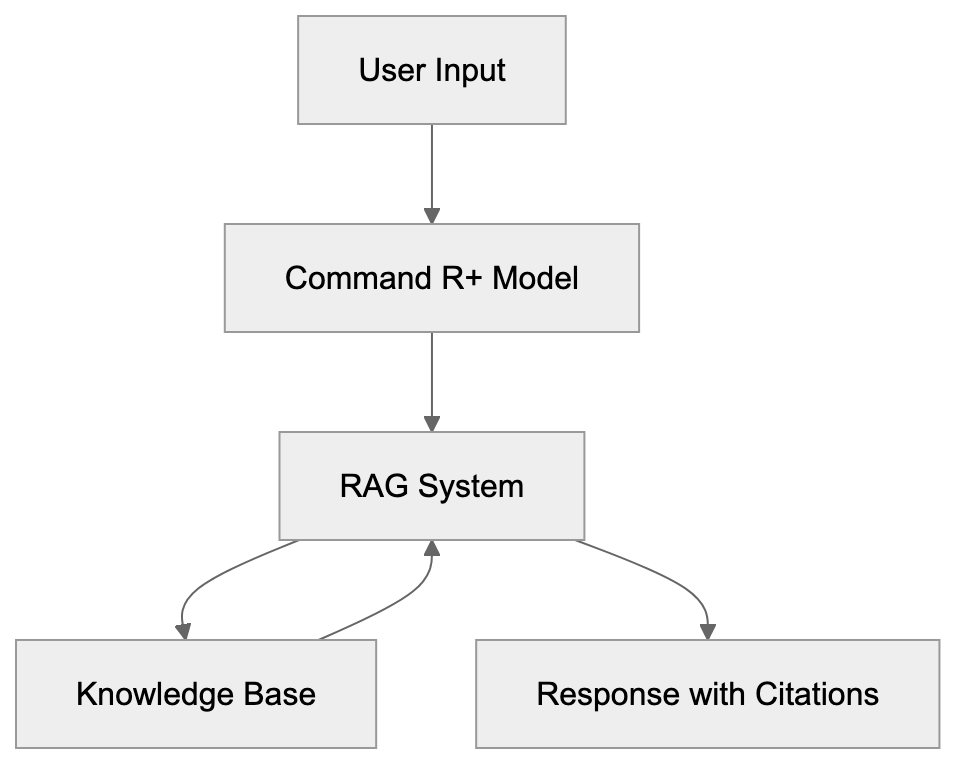
Cohere Command R+ is a large language model engineered for enterprise applications. Its capabilities include processing text, generating responses, and retrieving information from external knowledge bases with citations. Unlike consumer AI chatbots, Command R+ addresses business needs like document analysis and multilingual support in 10 languages, including English, French, and Spanish. The 128K context window enables the processing of about 100,000 words in a single request, ideal for large contracts and research papers, and is one of the largest in enterprise AI, supporting approximately 96,000 words. Retrieval-augmented generation is central to Command R+, integrating seamlessly with company databases for accurate, source-cited responses. Users interact through the Coral chat interface, accessible via web browser.
Why Command R+ Exists and Its Purpose
Enterprise companies encounter challenges that consumer AI tools often overlook. They must secure proprietary data, comply with regulations, and integrate AI efficiently into workflows. Command R+ is built to meet these specific needs, offering RAG optimization as a core function. Businesses utilize it for creating customer support bots that reference internal documentation, research assistants that cite sources accurately, and automation of document processing. The 128K context window is crucial for handling extensive legal and technical documents. Command R+ supports multilingual communication, essential for international enterprises. Cohere provides deployment flexibility, allowing companies to choose between their own infrastructure or Cohere’s API.
RAG Integration Process:

How Businesses Use Command R+
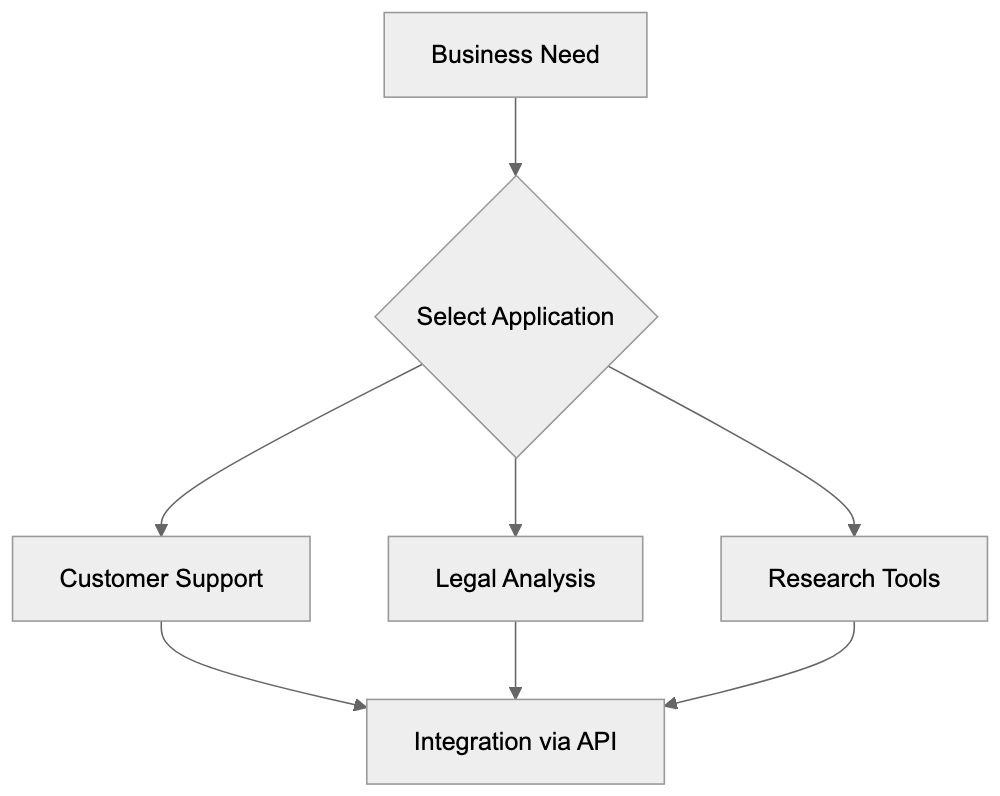
Businesses implement Command R+ in various ways:
- Customer Support: AI-powered chatbots use help documentation, product manuals, and support tickets to answer inquiries. The citation feature enables verification of AI responses.
- Legal Compliance: The AI analyzes contracts, regulations, and policy documents, handling entire contracts effortlessly due to the extensive context window.
- Research Analysis: Enterprises use Command R+ for academic papers and market research. Its multilingual capabilities are beneficial for maintaining performance across language markets.
- Development Integration: Command R+ is integrated with applications through Cohere’s API, facilitating the creation of custom tools. The Coral chat interface serves as a testing platform for prompts and RAG configurations prior to deployment.
Key Features and Technical Specifications
Command R+ boasts several standout features:
- 128K Token Context Window: One of the largest in enterprise AI, supporting approximately 96,000 words.
- Multilingual Support: Native support for 10 languages, emphasizing precise training over translation.
- RAG Optimization: Built-in, allowing the model to work efficiently with external knowledge bases.
- Citation System: Tracks source usage for portions of responses, ensuring accuracy.
- API Access: Available with varying pricing tiers according to usage.
- Coral Interface: Offers a ChatGPT-like experience with enterprise-specific features like document uploads and citation displays.
Enterprise Use Case Flow:
Command R+ Compared to Alternatives
Here’s how Command R+ stacks up against other enterprise AI chatbots:
| Feature | Command R+ | GPT-4 Turbo | Claude Opus 4 | Gemini 1.5 Pro | Llama 3 70B |
|---|---|---|---|---|---|
| Context Window | 128K tokens | 128K tokens | 200K tokens | 1M tokens | 8K tokens |
| Multilingual | 10 languages | 50+ languages | Multiple languages | Multiple languages | Limited |
| RAG Optimization | Built-in | Plugin-based | Available | Available | Requires setup |
| Citation Tracking | Built-in | Limited | Available | Available | Not native |
| Enterprise Focus | High | Medium | High | Medium | Low |
| Deployment Options | API, Cloud, On-prem | API only | API only | API only | Open source |
Command R+ offers a middle-range context window size suitable for most business documents. Its native RAG optimization and citation tracking provide a competitive edge. GPT-4 Turbo has wider language support, but Command R+ focuses deeply on business-relevant languages. While broad context windows exist in models like Gemini 1.5 Pro, Command R+‘s specialized focus and enterprise features remain distinctive.
Coral Chat Interface Details
The Coral chat interface is a crucial component for user interaction with Command R+. It features document upload capabilities, citation panels, and conversation management tools like project organization and link-sharing. Markdown formatting is supported, making it ideal for structured content and coding tasks. The interface allows response customization and is accessible via desktop and mobile browsers without requiring app installation. Cohere continuously updates Coral based on enterprise user feedback.
Data Privacy and Security Considerations
Cohere prioritizes data privacy and security through:
- Data Handling Policies: Differ by subscription tier, with enterprise plans offering options to restrict data usage for training.
- Data Residency and Retention: Customizable options available for enterprise customers.
- Compliance Certifications: Such as SOC 2 and ISO 27001, with emphasis on user verification of current status.
Companies handling sensitive data should carefully review enterprise agreements and potentially consider on-premises deployments or private cloud solutions.
Practical Implementation Tips
For successful Command R+ implementation:
- Start with a Clear Use Case: Focus on areas like document search or customer support for measurable results.
- Prepare RAG Features: Organize knowledge bases effectively to enhance retrieval quality.
- Test Prompt Engineering: Utilize the Coral interface for initial testing and refinement.
- Monitor Multilingual Performance: Expect variation, with English, Spanish, and French often yielding the strongest results.
- Budget API Costs Wisely: Be mindful of scaling usage.
- Plan System Integration Early: Work closely with development teams for custom integrations.
Conclusion
Cohere Command R+ stands out as a robust enterprise AI chatbot, tailored for retrieval-augmented generation and optimized for business applications. Its 128K context window, RAG capabilities, and citation tracking meet crucial enterprise needs. While competing against solutions like GPT-4 Turbo and Claude 3 Opus, Command R+ distinguishes itself through focus on essential enterprise features. Businesses must assess their specific needs regarding context window size, language support, and deployment options when selecting Command R+ or other alternatives. For those handling sensitive information, a thorough review of data privacy terms and considering on-premises deployment is essential.
Frequently Asked Questions
What industries can benefit from using Cohere Command R+?
Cohere Command R+ can be particularly beneficial for industries such as legal, finance, healthcare, and customer service. These sectors often require extensive document analysis, multilingual communication, and efficient customer support automation, making the AI's capabilities indispensable.
How does the citation system in Command R+ work?
The citation system in Command R+ tracks the sources of information used in AI-generated responses. This allows users to verify the accuracy of the information provided, which is crucial for maintaining trust and compliance, especially in regulated industries.
Can Command R+ be integrated with existing business applications?
Yes, Command R+ can be integrated with existing business applications through Cohere's API. This facilitates the development of custom tools tailored to specific workflows and enhances the efficiency of business processes across various departments.
What should companies consider before implementing Command R+?
Companies should begin with a clear use case, assess their knowledge management practices, and consider the costs associated with API usage. Additionally, it's important to monitor performance across different languages and plan for system integration with existing infrastructure.
Is there support for languages beyond the native ten in Command R+?
While Command R+ natively supports ten languages, its primary focus is on providing efficient and accurate responses in these languages. For businesses requiring additional language support, leveraging translation tools or services may be necessary.
How does Command R+ ensure data privacy?
Cohere prioritizes data privacy through strict data handling policies that vary by subscription tier, allowing for customizable data residency and retention options. They also maintain compliance with industry certifications such as SOC 2 and ISO 27001.
What are some practical tips for success with Command R+?
Some practical tips include starting with a specific use case, organizing your knowledge bases effectively, testing prompts in the Coral interface, and monitoring multilingual performance. Additionally, budgeting for API costs and planning early for system integration can help streamline implementation.
Track Your AI Visibility
See how AI chatbots like ChatGPT, Claude, and Perplexity discover and recommend your brand.