Cursor AI Code Editor: Features, Composer & Copilot Compare
Cursor AI code editor with GPT-4 and Claude integration. Learn about Composer feature, codebase understanding, and how it compares to GitHub Copilot.
Table of Contents
- TL;DR
- What is Cursor AI Code Editor?
- The Composer Feature Explained
- How Cursor Understands Your Codebase
- Who Uses Cursor and Why
- Cursor vs. GitHub Copilot and Alternatives
- Privacy and Data Usage in Cursor
- Setting Up and Getting Started with Cursor
- Practical Use Cases for Development Teams
- Limitations and What Cursor Cannot Do
- The Future of AI Code Editors
- Conclusion
- TL;DR
- What is Cursor AI Code Editor?
- The Composer Feature Explained
- How Cursor Understands Your Codebase
- Who Uses Cursor and Why
- Cursor vs. GitHub Copilot and Alternatives
- Privacy and Data Usage in Cursor
- Setting Up and Getting Started with Cursor
- Practical Use Cases for Development Teams
- Limitations and What Cursor Cannot Do
- The Future of AI Code Editors
- Conclusion
Cursor AI: Revolutionizing AI-First Code Editing with GPT-4 and Claude
Cursor is an AI-first code editor that integrates advanced GPT-4 and Claude models directly into your development workflow. Built on top of Visual Studio Code, it exceeds the capabilities of simple autocomplete tools, offering features like multi-file editing and context-aware code suggestions. If you’re a developer seeking an AI coding assistant that comprehends your entire codebase, not just the current file, Cursor AI is designed for you. With modern complex codebases, having an AI that can read and understand thousands of files simultaneously changes the way you code.
TL;DR
Cursor AI is a cutting-edge AI code editor that combines GPT-4 and Claude AI capabilities within a familiar VS Code environment. The Composer tool supports multi-file edits, providing deep codebase understanding, inline AI chat, and smart code generation. Cursor is an ideal GitHub Copilot alternative, offering superior codebase awareness and AI pair programming.
What is Cursor AI Code Editor?
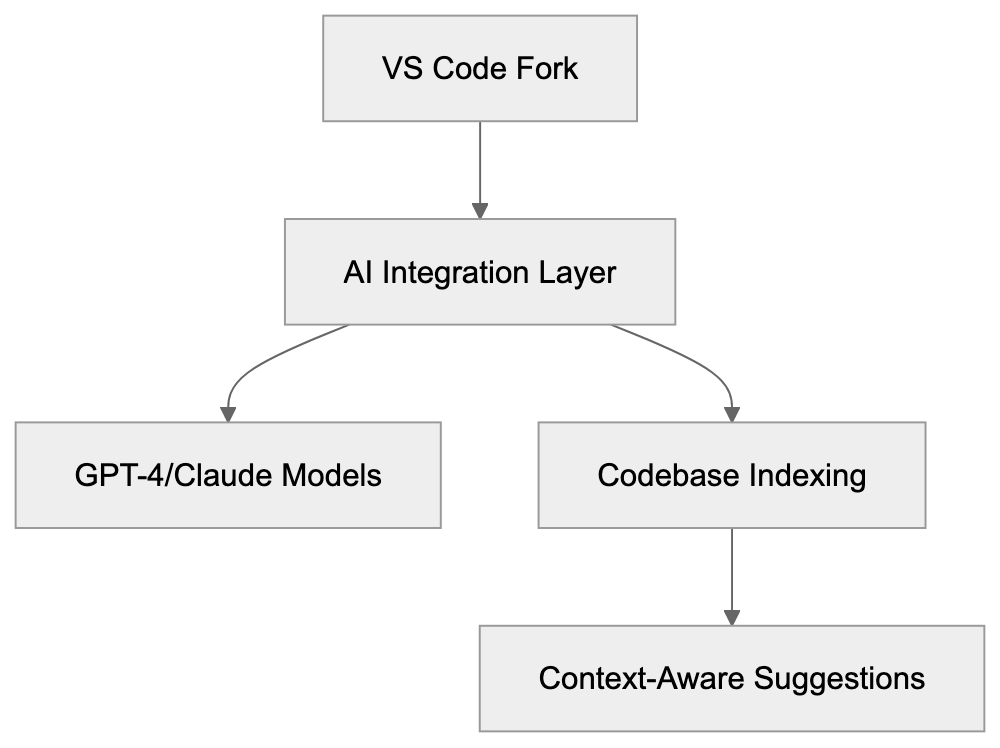
Cursor AI code editor is a fork of VS Code that integrates advanced AI directly into the editing experience. Unlike mere plugins or extensions, the entire editor is restructured around AI assistance. Download it like any other code editor; if you’ve used VS Code, its familiar interface remains, maintaining compatibility with existing extensions. However, when you begin coding, the difference is clear. You can show code, ask questions, and describe what you want to build, enabling Cursor Composer to write across multiple files. By indexing your entire project, the AI knows what functions you have, the libraries you use, and your code’s structure, ensuring suggestions are relevant to your actual project, not just generic snippets.
Cursor AI Architecture Overview:
The Composer Feature Explained
Composer is Cursor AI’s standout feature for making changes across multiple files at once. Open it with a keyboard shortcut and describe what you want to change in plain language. The AI proposes edits to multiple files simultaneously, allowing you to preview all changes before accepting them. This is invaluable for refactoring work or adding features that span several parts of your codebase.
Imagine needing to rename a function used in 15 different files. With Composer, you describe the change once, and it handles all the files. If you want to add a new API endpoint with routes, controllers, and tests, Composer generates everything in one go. The AI understands file relationships and dependencies by accessing your full codebase index, making it far more powerful than traditional find-and-replace or advanced refactoring tools.
How Cursor Understands Your Codebase
Composer Multi-File Edit Flow:

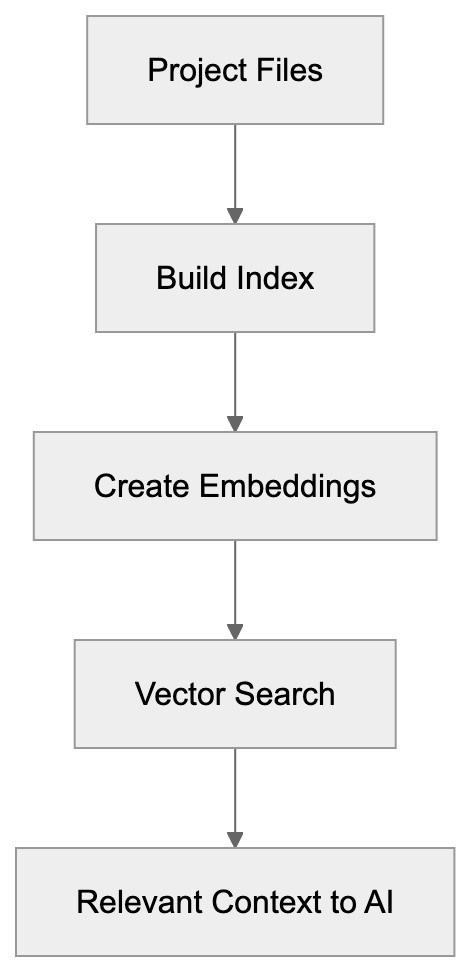
When you open your project, Cursor AI builds an index that includes all files, function definitions, variable names, imports, and code structure. This index is used by AI for context-aware suggestions. When you ask a question or request code generation, Cursor automatically draws relevant information from the index. No need to manually copy-paste context into a chat window; the editor already knows what’s in your project.
This process works through embeddings and vector search technology, converting code into mathematical representations for quick searchability. Cursor identifies the most relevant codebase parts and includes them in its AI prompts, tailoring responses to your specific project rather than generic possibilities.
Who Uses Cursor and Why
Developers across startups and tech companies use Cursor AI to accelerate their coding workflows. It’s especially popular among web developers, full-stack engineers, and teams using TypeScript and JavaScript. While the tool works with any language, it’s exceptional with web technologies. Early-stage startups utilize it to move faster with smaller teams, allowing one developer to achieve what typically requires multiple people.
Codebase Understanding Process:
Companies dealing with heritage codebases tap into Cursor’s capabilities to quickly understand older code, as the AI can explain complex functions without deep documentation dives. Freelancers use it to manage the breadth of client projects, letting Cursor handle boilerplate while they focus on core development.
Cursor vs. GitHub Copilot and Alternatives
Cursor AI stands as a prominent GitHub Copilot alternative, alongside other AI coding assistants, each with unique strengths:
- Cursor AI: Offers full project indexing, multi-file edits (via Composer), uses GPT-4 and Claude, priced at $20/month.
- GitHub Copilot: Limits its understanding to open files, lacks multi-file editing, uses GPT-4, priced at $10/month.
- Tabnine: Focuses on privacy and operates locally, custom models, priced at $12/month.
- Codeium: Provides basic context, uses custom models, free or $10/month.
- Amazon CodeWhisperer: Tailored for AWS, free for individuals.
AI Code Editor Comparison:
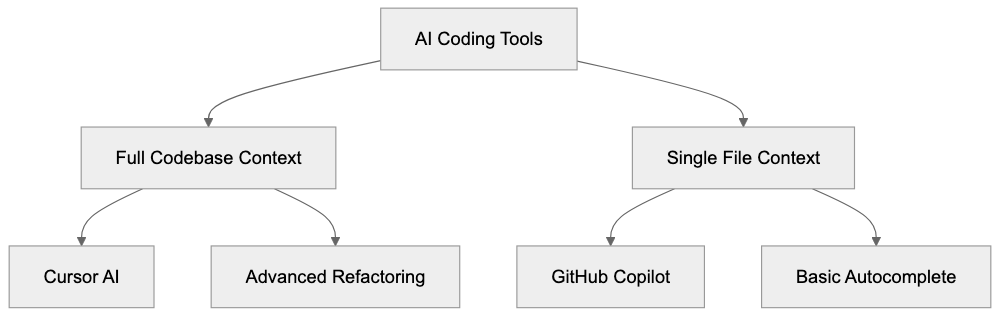 While GitHub Copilot offers wide adoption and affordability, its lack of multi-file editing limits context awareness compared to Cursor. Tabnine’s privacy-focused local models are less powerful than larger models but ensure data security. Codeium offers a free tier with basic utilities, and Amazon CodeWhisperer excels in AWS environments.
Privacy and Data Usage in Cursor
Cursor processes your code to provide AI suggestions. Using cloud-based models like GPT-4 or Claude implies sending code to those providers, which is crucial for sensitive projects. Cursor’s privacy mode prevents storing your code on servers, and local models can be used through Ollama to keep everything on your machine.
Understand your company’s policies regarding cloud AI features if dealing with proprietary code. Cursor allows configuring model usage or disabling AI for specific projects, giving you control over data sharing.
Setting Up and Getting Started with Cursor
Download Cursor from the official site and install it like any other application. On launch, it resembles VS Code due to its architecture. Import existing VS Code settings and extensions effortlessly, making the transition painless.
Sign up for an account to access AI features. The free tier offers limited AI requests monthly, while the Pro plan at $20/month provides unlimited slow requests and 500 fast premium requests. These use advanced models like GPT-4 and Claude 3.5 Sonnet.
Open your project folder post-setup, and indexing begins immediately. For large codebases, indexing takes a few minutes. Once complete, AI features become available. Press Ctrl+K (or Cmd+K on Mac) for inline chat or Ctrl+Shift+L for Composer.
Practical Use Cases for Development Teams
Development teams leverage Cursor AI for:
- Faster Onboarding: New developers ask AI about the codebase rather than bothering senior developers.
- Efficient Bug Fixing: Describe the bug, allowing Cursor AI to locate related codebase areas.
- Writing Tests: Generate test files for existing functions automatically.
- Speedy Documentation: AI reads your code and drafts comments or README files.
- Comprehensive Refactoring: Composer enables consistent changes across numerous files.
- Library Migration: AI assists in updating import statements and API calls.
Limitations and What Cursor Cannot Do
Despite its power, Cursor AI has limitations:
- AI-generated code may contain bugs or security issues, requiring review.
- Large codebases can overwhelm the context window, possibly missing important details in complex projects.
- Requires an internet connection for cloud AI features unless local models are set up.
- Cannot replace understanding code; it’s a productivity enhancer.
The Future of AI Code Editors
The evolution of AI code editors is rapid. Cursor AI frequently updates, integrating new features and models, moving towards more autonomous coding. Competition drives improvement, with better code understanding and accurate suggestions evolving.
As AI coding assistants become standard, they handle repetitive tasks, freeing developers to focus on architecture and problem-solving. While there are concerns about over-reliance on AI tools, they are becoming integral to the developer toolkit.
Conclusion
Cursor AI represents a new era of AI-first code editors, transcending simple autocomplete. With the powerful Composer feature for multi-file editing and full codebase awareness, it ensures AI suggestions are relevant. By incorporating GPT-4 and Claude, it provides access to the most capable AI models. As a superior alternative to GitHub Copilot, Cursor AI is utilized by startups and tech firms to expedite development, apprehend heritage code, and manage full-stack development.
Frequently Asked Questions
What platforms is Cursor compatible with?
Cursor is built on top of Visual Studio Code, making it compatible with any system that supports VS Code, including Windows, macOS, and Linux. Users can easily transition from regular VS Code to Cursor without losing existing settings or extensions.
Can I use Cursor AI offline?
While certain features of Cursor require an internet connection for cloud AI capabilities, you can set up local models through Ollama to work offline. This is particularly useful for sensitive projects where data privacy is a concern.
How does the pricing model work for Cursor AI?
Cursor AI offers a free tier that allows limited AI requests monthly. The Pro plan is priced at $20 per month, which provides unlimited slow requests and 500 fast premium requests utilizing advanced models like GPT-4 and Claude 3.5 Sonnet.
What programming languages does Cursor support?
Cursor is versatile and works with any programming language, though it is particularly effective with web technologies such as TypeScript and JavaScript. Users from various disciplines, including web development and full-stack engineering, find it beneficial.
How does Cursor AI ensure data privacy?
Cursor has a privacy mode that prevents storing your code on external servers when using cloud-based AI features. You can also configure model usage settings to disable AI for specific projects, maintaining control over your code's exposure.
What are the main use cases for development teams using Cursor AI?
Teams utilize Cursor AI for faster onboarding of new developers, debugging, generating tests, drafting documentation, and comprehensive refactoring. Its capability to handle multi-file changes efficiently makes it especially valuable for collaborative projects.
Are there any known limitations of Cursor AI?
Yes, while Cursor AI significantly enhances productivity, it may generate code with bugs or security issues that need manual review. Large projects may also pose challenges if the context window is overloaded. Moreover, a good understanding of code remains essential as Cursor acts primarily as a productivity tool.