GitHub Copilot: AI-Powered Coding Assistant Guide
Learn about GitHub Copilot's AI code completion, IDE integrations, pricing and how it compares to Cursor and Codeium for developers.
What is GitHub Copilot
GitHub Copilot is an AI coding assistant developed by GitHub in partnership with OpenAI, leveraging advanced AI models to assist developers in writing code more efficiently. It leverages AI to help developers write code faster by suggesting code completions and entire functions as you type. It integrates seamlessly into your code editor, analyzing context from your current file and related project files to provide relevant code suggestions.
Tools like GitHub Copilot have emerged to address the repetitive nature of coding, streamlining tasks such as syntax lookup and documentation reading. Developers often look up syntax, read documentation, and write similar code structures. An AI coding assistant can expedite this by predicting your next move.
Key Features
- Real-time Code Suggestions: Provides instant code completions.
- Multi-Line Code Completion: Supports complex code blocks.
- Wide Language Support: Compatible with dozens of programming languages.
- Copilot Chat: Allows you to ask coding questions directly in your IDE.
GitHub Copilot is powered by OpenAI’s Codex model, trained on extensive public code datasets, with recent versions incorporating GPT-4 for improved accuracy and contextual understanding.
Technical Foundation and How It Works
GitHub Copilot operates on OpenAI’s language models, initially utilizing Codex and later integrating GPT-4 for enhanced code generation capabilities. Initially using Codex, a model fine-tuned on code from public repositories, current iterations use GPT-4 for better code generation and conversational capabilities through Copilot Chat.
Contextual Analysis
How GitHub Copilot Works:
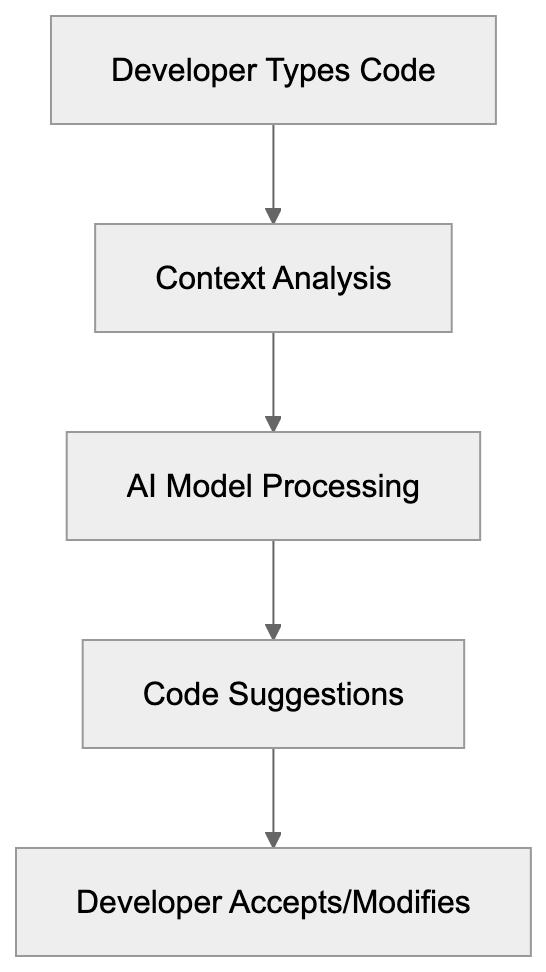
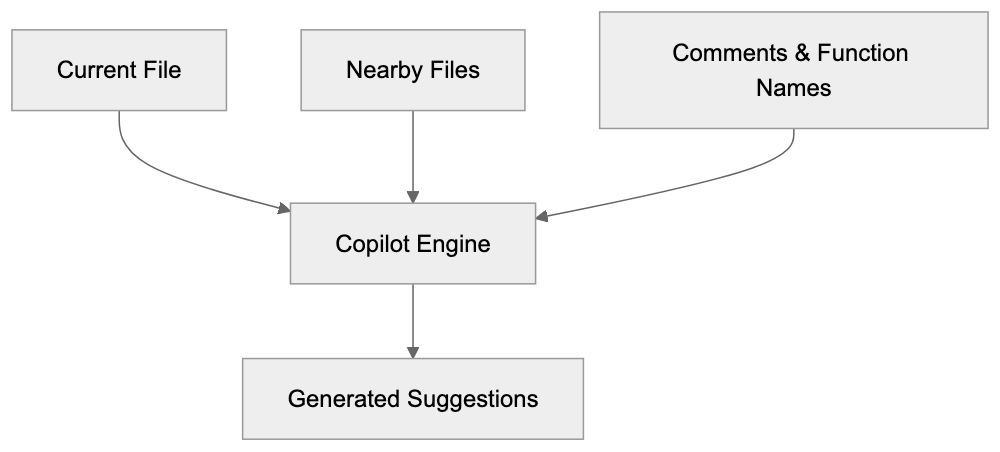
- It analyzes context, including your current file, nearby files, comments, and function names, to generate real-time suggestions.
- Supports multiple programming languages: Python, JavaScript, TypeScript, Ruby, Go, C#, C++, and many others.
- It can generate functions, write tests, add comments, and even translate code between languages.
Copilot Chat enhances conversational capabilities, utilizing GPT-4 technology, improved for coding tasks, allowing developers to interact with the AI assistant more naturally.
Data Handling
GitHub collects code snippets and user engagement data by default to improve service quality, with options to disable telemetry in settings. You can disable telemetry in settings. Enterprise versions don’t retain code snippets for model training.
IDE Integrations and Platform Support
GitHub Copilot integrates as an extension or plugin in major development environments, including:
Copilot Context Sources:
- Visual Studio Code: Most popular, feature-rich extension available on the VS Code marketplace.
- JetBrains IDEs: Dedicated plugin available via JetBrains Marketplace.
- Neovim: Plugin for terminal-based development workflows.
All integrations need an active GitHub Copilot subscription and internet connection as AI processing is server-based.
Copilot CLI
A separate tool for the command line, suggesting shell commands, explaining command syntax, and aiding in git operations.
Pricing and Subscription Plans
IDE Integration Architecture:

GitHub Copilot offers several pricing tiers:
- Individual Plan: $10/month or $100/year.
- Business Plan: $19/user/month with added features.
- Enterprise Plan: $39/user/month for customization and documentation integration.
Free access is available for students, teachers, and open-source project maintainers, with a 30-day free trial requiring no credit card.
Real-World Usage and Benefits
GitHub Copilot accelerates coding tasks, such as:
- Writing boilerplate code and test cases faster.
- Learning patterns quickly for junior developers.
- Reducing time spent on repetitive code for senior developers.
Comparison with Alternative AI Coding Assistants
Here’s how GitHub Copilot compares to alternatives like Cursor, Codeium, Tabnine, and Amazon CodeWhisperer:
| Feature | GitHub Copilot | Cursor | Codeium | Tabnine | Amazon CodeWhisperer |
|---|---|---|---|---|---|
| Base Model | GPT-4/Codex | GPT-4 | Proprietary | Proprietary | CodeWhisperer |
| Monthly Cost | $10 | $20 | Free tier, $12 Pro | Free tier, $12 Pro | Free |
| IDE Support | VS Code, JetBrains, Neovim | Cursor IDE only | VS Code, JetBrains, many others | VS Code, JetBrains, many others | VS Code, JetBrains, AWS Cloud9 |
| Chat Feature | Yes | Yes | Yes | Yes (Pro) | Yes |
| Enterprise Option | Yes ($39) | Yes (custom) | Yes (custom) | Yes (custom) | Yes (custom) |
| Offline Mode | No | No | No | Yes (Pro) | No |
GitHub Copilot is backed by Microsoft and GitHub, offering robust IDE support and community resources, making it a valuable tool for developers.
Data Privacy and Code Ownership
When using GitHub Copilot, your code snippets are sent to GitHub’s servers for processing, with options to disable telemetry in settings. GitHub collects telemetry data by default but offers business and enterprise plans that ensure additional privacy controls. Code ownership remains with you.
Getting Started with GitHub Copilot
To begin:
- Sign into your GitHub account.
- Go to the Copilot section in your settings and start a free trial or select a plan.
- Install the extension in your IDE and sign in with your GitHub account.
Once installed, Copilot automatically assists with code suggestions.
Limitations and Considerations
- Suggestions are pattern-based and may not always fit specific requirements.
- Always review suggestions for bugs or security vulnerabilities.
- The AI works best with popular languages and frameworks.
Summary
GitHub Copilot uses OpenAI’s GPT-4 and Codex models to provide real-time code suggestions across major IDEs. Pricing starts at $10/month for individuals, with free access for students and open-source maintainers. The 30-day free trial lets you test it before committing. Compared to alternatives like Cursor, Codeium, and Tabnine, Copilot is competitive on features but consider data privacy implications since code snippets are sent to GitHub’s servers by default.
Frequently Asked Questions
What programming languages does GitHub Copilot support?
GitHub Copilot supports a wide range of programming languages, including Python, JavaScript, TypeScript, Ruby, Go, C#, and C++. This broad compatibility helps developers across different fields to benefit from its suggestions.
How does GitHub Copilot ensure the quality of its code suggestions?
Copilot's suggestions are generated based on contextual analysis of your code and comments, leveraging extensive training on public code repositories. However, users should still review suggestions to ensure they are appropriate and secure for their specific projects.
Can I use GitHub Copilot offline?
No, GitHub Copilot requires an internet connection to function, as its AI processing is performed on GitHub's servers. Therefore, it cannot be used in offline mode.
What should I do if I encounter inappropriate suggestions from Copilot?
If you receive inappropriate or irrelevant code suggestions from Copilot, you should not use them. Providing feedback directly to GitHub can help improve the model's future performance and quality.
Is there a free trial for GitHub Copilot?
Yes, GitHub Copilot offers a 30-day free trial for new users, allowing them to experience the service without any initial payment or credit card requirement.
How does GitHub Copilot handle data privacy?
GitHub collects code snippets and telemetry data by default to improve its services, but users can disable telemetry in settings. Business and enterprise plans offer additional privacy controls, ensuring greater data protection.
What are the subscription costs for GitHub Copilot?
GitHub Copilot offers several pricing plans: $10/month for individuals, $19/user/month for businesses, and $39/user/month for enterprise options. Students, teachers, and open-source project maintainers can access it for free.
Track Your AI Visibility
See how AI chatbots like ChatGPT, Claude, and Perplexity discover and recommend your brand.