Google Gemini Guide: Features, Integration & Comparison
Complete guide to Google Gemini AI chatbot. Learn about features, pricing, Google Workspace integration, and how it compares to ChatGPT and Claude.
What is Google Gemini
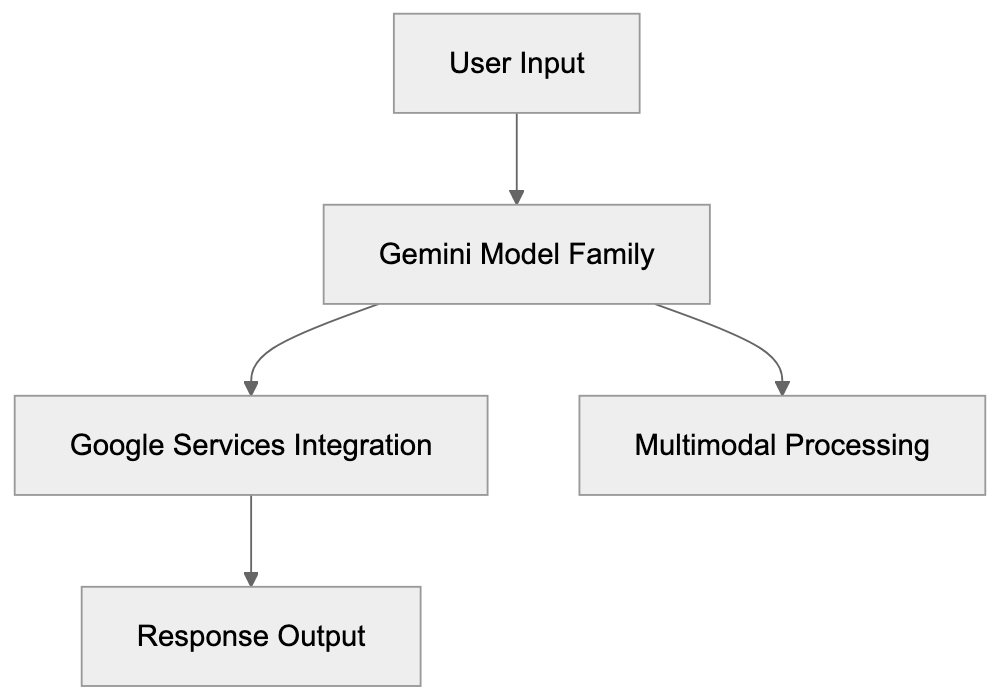
Google Gemini is Google’s AI chatbot and assistant, formerly known as Bard, rebranded to Gemini in February 2024. Google’s AI chatbot This rebranding highlights Google’s move to a unified AI brand across its products. Google Gemini can answer questions, generate text, write code, analyze images, and create content. It operates as a standalone web and mobile app and is integrated into Google Workspace apps like Gmail and Docs. Powered by the Gemini model family, these AI models come in varying sizes for different tasks. The free version runs on Gemini Pro, while the more advanced paid tier is powered by Gemini Ultra. Google consolidated its AI branding to have one clear name for its consumer AI products.
Google Gemini Architecture Overview:
Why Google Gemini Exists
Google developed Gemini as a strategy to compete in the AI assistant market. With OpenAI’s launch of ChatGPT in late 2022, conversational AI quickly became significant. Needing a public-facing AI product, Google strategically positioned Gemini to offer users access to its advanced AI research through a simple chat interface. Millions of interactions with Google Gemini provide real-world feedback, accelerating model improvements beyond what lab testing alone could achieve. Additionally, from a business standpoint, AI assistants are seen as future revenue streams through potential paid services and advertising platforms beyond traditional search ads.
How Users and Businesses Use Google Gemini
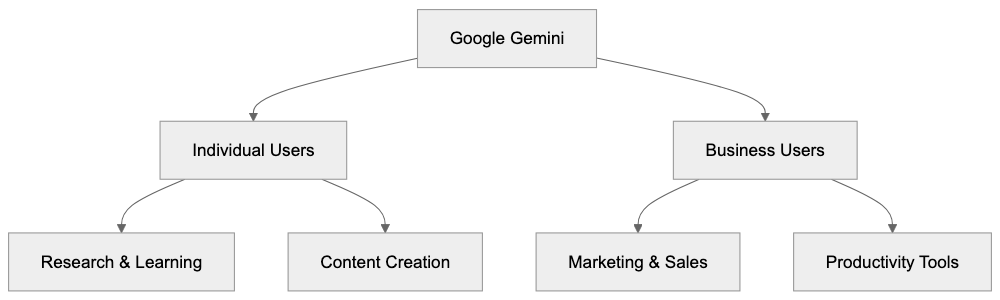
Regular users rely on Google Gemini for a variety of daily tasks:
- Students use it for research.
- Writers brainstorm ideas and draft content.
- Developers request debugging assistance.
- Image analysis helps identify items, like determining plant species.
Business applications include:
- Marketing to generate ad copy and social media content.
- Sales teams drafting emails and proposals.
- Project managers creating meeting summaries.
Google Workspace integration is a standout feature. In Gmail, Gemini drafts replies and summarizes emails. In Docs, it crafts drafts based on brief prompts. In Sheets, it analyzes data and creates formulas. Google Workspace admins can control access, and some companies may restrict features over data privacy.
Key Features and Capabilities
Google Gemini Use Cases by User Type:
Google Gemini offers several advanced features: Google Gemini features
- Multimodal AI Capabilities: Google Gemini processes text, images, audio, and video within a single conversation.
- Context Window: Gemini 1.5 Pro offers over 1 million tokens for vast context comprehension.
- Google Combining: By linking with services like Search, Maps, and YouTube, Gemini can offer real-time information.
- Extensions: Connections to Google Flights, Hotels, and Workspace apps allow for tasks such as flight finding or data extraction from emails.
Most features are present in the free tier, albeit with usage limits. Google Gemini Advanced lifts these limitations, providing access to the most advanced models.
Subscription Plans and Pricing
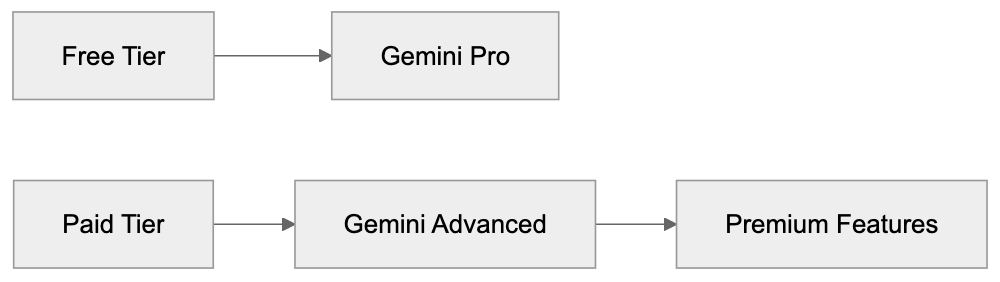
Google provides Google Gemini in two tiers:
- Free Tier: Access to Google Gemini Pro without needing an account.
- Paid Tier (Gemini Advanced): At $19.99/month in the US, this plan includes Google One AI Premium with 2TB of cloud storage and uses Gemini Ultra 1.0 or Gemini 1.5 Pro for tasks. Subscribers get priority during high demand and extended conversation capability.
Business and enterprise pricing varies, with custom arrangements for larger organizations.
Google Gemini vs Competitors
In the AI assistant space, noticeable comparisons can be made with competitors like ChatGPT: Google Gemini vs ChatGPT
- Google Gemini: Known for its integration with Google services and substantial context window.
- ChatGPT: Recognized for its plugin ecosystem and broader third-party applications.
- Claude: Excelled in safe, extended document handling with a then-leading 200K context window.
- Microsoft Copilot: Deeply integrated with Microsoft products, making it preferable for those ecosystems.
- Perplexity AI: Focused on specialized search tasks, distinct from general chat capabilities.
Google Gemini Service Tiers:
Gemini’s integration with Google’s ecosystem forms a significant edge over competitors.
Privacy and Data Usage
Using Google Gemini involves accepting certain data practices. Conversations are collected to improve the AI models. Google may utilize human reviewers for quality enhancement. Without signing in, conversation data is still collected in anonymized form. Users can adjust settings to limit data storage, though data collection for model improvement continues.
Getting Started with Google Gemini
To begin using Google Gemini:
- Visit gemini.google.com and sign in with your Google account.
- Engage with the chat interface by typing questions.
- Use the image upload feature for multimodal queries.
- On mobile, download the app from the App Store or Google Play.
For developers, API access is available through Google AI Studio and Vertex AI, allowing for integration into custom applications.
Common Use Cases and Examples
Google Gemini serves various user needs:
- Developers: Use for coding assistance, including debugging and unit test generation.
- Content creators: Generate blog outlines and social media posts.
- Students and researchers: Upload papers for summarization and comparison analysis.
- Business analysts: Analyze data patterns and suggest formulas in Sheets.
- Language learners: Practice and verify grammar in conversations.
Limitations and Considerations
Users should be aware of Google Gemini’s limitations:
- It may generate inaccurate data, requiring verification, particularly in sensitive domains.
- Information based on training data might be outdated; users should cross-reference current sources.
- Free tier usage limits could lead to rate limiting.
- Privacy concerns arise when integrating with Google services, necessitating careful extension management.
Future Development and Updates
Google plans consistent updates to Google Gemini, focusing on:
- Enhanced multimodal capabilities.
- Expanded integration within more Google services.
- Increased enterprise features.
- Competitive API pricing and capabilities.
Google Gemini is a robust AI assistant, especially advantageous to users within the Google ecosystem, thanks to its deep integration capabilities. It offers a considerable context window and multimodal features, making it competitive against other AI assistants. While privacy remains a concern, used judiciously, Google Gemini can greatly enhance productivity across various tasks.
Frequently Asked Questions
How can I access Google Gemini?
You can access Google Gemini by visiting gemini.google.com and signing in with your Google account. You can also download the mobile app from the App Store or Google Play for on-the-go access.
What are the differences between the free and paid tiers of Google Gemini?
The free tier offers access to Google Gemini Pro with usage limits, while the paid tier, Gemini Advanced, costs $19.99/month and includes more advanced features and fewer restrictions. Paid subscribers also get priority access during peak times and extended conversation capabilities.
Is my data secure when using Google Gemini?
While Google Gemini does collect conversation data to improve its AI, users can manage their privacy settings to limit data storage. However, it's important to understand that data may be used by human reviewers for quality assurance purposes, and anonymized data is collected even when not signed in.
What types of tasks can Google Gemini assist with?
Google Gemini can help with a variety of tasks such as research for students, content generation for writers, coding assistance for developers, and summarization of emails in Gmail. Its multimodal capabilities also allow it to analyze images and provide real-time information by integrating with other Google services.
What are the limitations of Google Gemini?
Users should be aware that Google Gemini may generate inaccurate information and should verify responses, especially in sensitive areas. Additionally, the free tier's usage limits could lead to delays in response, and some users may have privacy concerns regarding data management within the Google ecosystem.
How do businesses benefit from using Google Gemini?
Businesses can leverage Google Gemini for various applications including generating marketing content, drafting proposals, and summarizing meetings. Its integration with Google Workspace makes it a practical tool for enhancing productivity and collaboration within teams.
What future developments can we expect for Google Gemini?
Google plans to continually enhance Gemini's capabilities, focusing on improved multimodal functionality, more extensive integration within Google services, and features tailored for enterprises. Updates will also include better competitive pricing for API access, ensuring that Gemini remains a strong player in the AI assistant market.
Track Your AI Visibility
See how AI chatbots like ChatGPT, Claude, and Perplexity discover and recommend your brand.