Grammarly AI Writing Assistant: Features & Pricing Guide
Complete guide to Grammarly's AI features, pricing tiers, plagiarism detection, and how it compares to other writing tools. Used by 30M+ daily.
Introduction
Grammarly AI is one of the most renowned AI-powered writing assistants available today. Over 30 million users rely on it daily to enhance their writing. Originating as a basic grammar checker, it has evolved into comprehensive AI writing software with generative AI capabilities. Writing assistants like Grammarly AI assist users in crafting clearer, more effective content by identifying grammar mistakes and style issues often overlooked by humans. Key features include real-time grammar checking, tone detection, plagiarism detection, and AI-generated text suggestions. Small business owners use it for emails and marketing content, content marketers depend on it for blog posts and social media, and software developers utilize it for documentation and technical writing. The tool is indispensable for anyone writing professionally and striving to uphold quality standards.
What is Grammarly AI
Grammarly AI Core Capabilities:
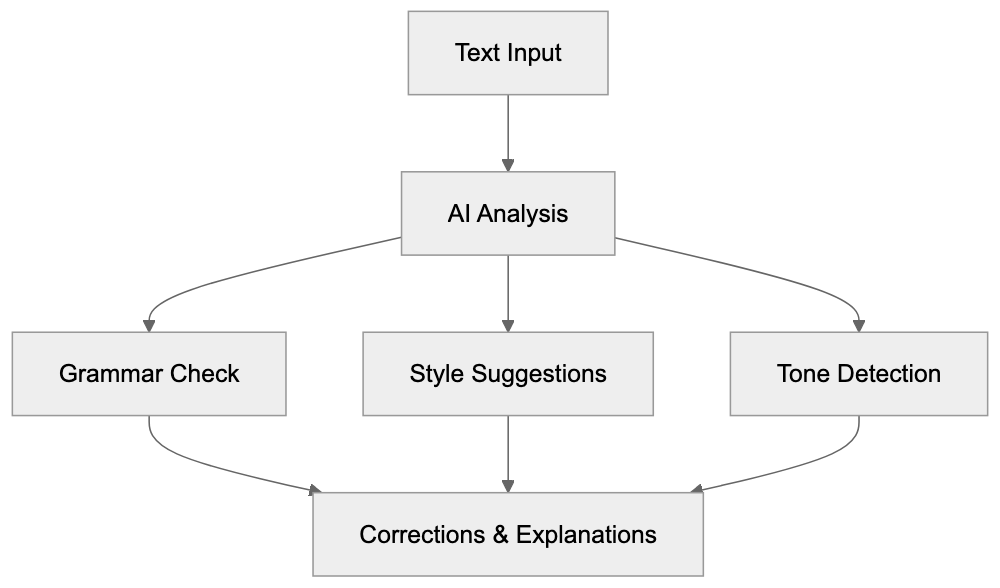
Grammarly AI is a cloud-based writing assistant utilizing artificial intelligence and natural language processing to analyze text, ensuring user data is protected by industry-leading security standards. This writing tool checks your writing in real-time across various platforms, including web browsers, Microsoft Office, Google Docs, and mobile devices. As you type, Grammarly AI scans instantly, pointing out potential issues from basic spelling errors to complex sentence structures. The AI engine assesses context to understand your intent and suggests improvements based on grammar rules, style guidelines, and readability metrics. The generative AI feature, GrammarlyGO, can craft entire paragraphs from prompts you provide, leveraging large language models akin to ChatGPT, focusing on writing tasks. This feature leverages large language models akin to ChatGPT, focusing on writing tasks. Grammarly AI is accessible as a browser extension, desktop app, or mobile keyboard, and users can also edit directly on the Grammarly website.
Why Grammarly Exists and Its Purpose
Writing tools like Grammarly AI were developed because everyone makes writing mistakes. Even professional writers can miss typos, grammar errors, and awkward phrasing. Companies must ensure their communications appear professional, whether in customer emails, marketing materials, or internal documents. A single grammar mistake in a business proposal can damage credibility. Grammarly AI’s purpose extends beyond error detection; it aims to improve writers over time by explaining errors and offering solutions. Each suggestion includes an explanation, teaching users grammar rules as they write. This is particularly beneficial for non-native English speakers, allowing them to write confidently, knowing the AI will catch language mistakes. The plagiarism detection feature serves to ensure content originality. Students use it to confirm their academic work doesn’t unintentionally match existing sources, while content creators use it to verify the uniqueness of their articles before publication.
How Businesses and Users Use Grammarly
Businesses deploy Grammarly across teams to maintain consistent writing quality. Marketing teams refine blog posts, email campaigns, and social media content before publishing. Customer support teams ensure responses are clear and professional, while sales teams use it for proposals and client communications. The Grammarly Business tier allows administrators to create custom style guides for brand voice consistency across all team writing. For instance, a company can set preferences for American vs. British English, formality levels, and specific terminology to use or avoid. Individuals generally use the free version or subscribe to Grammarly Premium for personal writing needs. Web developers use Grammarly AI for writing documentation and README files. SEO experts utilize it to enhance content readability, which impacts search rankings. The tool integrates with content management systems and email clients, eliminating the need for manual copy-pasting. GrammarlyGO also helps overcome writer’s block by generating draft content for editing.
Grammarly AI User Journey:

Grammarly Pricing Tiers: Free vs Premium vs Business
Grammarly offers three main pricing tiers with distinct features, including a Free version, Pro at $12 per member per month billed annually, and Enterprise plans for larger organizations. The Free version includes basic grammar and spelling checks, tone detection, and limited suggestions but lacks advanced style recommendations and complex grammar explanations. Grammarly Premium, costing around $12 per month annually or $30 per month for monthly billing (prices as of 2024; verify rates on Grammarly’s site), adds full-sentence rewrites, vocabulary suggestions, plagiarism detection scanning against 16+ billion web pages, tone adjustments, word choice improvements, and formality level controls. The plagiarism detection tool is exclusive to Premium and Business tiers. The Business tier starts at $15 per user per month annually (prices as of 2024; confirm rates on Grammarly’s site) and includes everything in Premium plus centralized billing, priority email support, style guides for brand consistency, an analytics dashboard, and SAML single sign-on for enterprise security. Educational institutions can access special rates through Grammarly for Education. There’s also a one-week free trial of Premium, allowing users to test advanced features without commitment, and users can cancel anytime.
Plagiarism Detection Features
Grammarly AI’s plagiarism detection feature scans your text against over 16 billion web pages and academic databases to identify passages matching existing published content. Upon running a plagiarism check, Grammarly displays matching text and original sources, providing an overall originality score as a percentage. Content marketers use this tool before publishing articles to prevent accidental copying from research sources. Students employ it to ensure their papers are properly paraphrased and cited. The plagiarism checker isn’t flawless, as it only scans content Grammarly has indexed, excluding some internet content. Paywalled academic journals and certain subscription sites aren’t wholly covered. The feature is effective for catching obvious copying but not sophisticated plagiarism. SEO experts value this tool because duplicate content can damage search rankings. Running a plagiarism check pre-publication helps identify potential issues.
Comparison With Alternative Writing Tools
Several competitors offer similar writing assistance features with varying strengths and pricing models. Here’s how Grammarly AI compares:
| Tool | Monthly Price | Plagiarism Check | Generative AI | Browser Extension | Key Difference |
|---|---|---|---|---|---|
| Grammarly Premium | $30 ($12 annual) | Yes | Yes (GrammarlyGO) | Yes | Most complete features, largest user base |
| ProWritingAid | $30 ($10 annual) | Yes (extra fee) | Limited | Yes | Better for long-form fiction, detailed reports |
| QuillBot | $20 ($8.33 annual) | Yes | Paraphrasing focus | Yes | Stronger paraphrasing, weaker grammar |
| Microsoft Editor | Free (Microsoft 365) | Limited | Yes (Copilot) | Yes | Free with Microsoft 365, Office combining |
| Hemingway Editor | $20 (one-time) | No | No | No | Focuses on readability, no subscription |
Grammarly AI generally provides the most polished user experience and captures the widest range of issues. ProWritingAid offers more detailed writing reports, ideal for fiction authors analyzing manuscripts. QuillBot excels in paraphrasing and rewording sentences but lacks thorough grammar checking. Microsoft Editor, free with Microsoft 365, is attractive for businesses already using Office. Hemingway Editor emphasizes readability and sentence complexity without grammar checks. Most professional writers use multiple tools, using Grammarly for daily grammar checks and ProWritingAid for deeper analysis of longer pieces. The choice depends on writing needs and budget.
Data Privacy and AI Training Concerns
When using Grammarly AI, your text is sent to their servers for analysis, raising concerns about data privacy and AI training use. According to Grammarly’s privacy policy, they do not sell user data to third parties. For free users, Grammarly may use aggregated and de-identified data to refine algorithms. Grammarly Premium and Business users receive stronger privacy protections. Business customers can request data exclusion from product improvement. The company is SOC 2 Type 2 certified, utilizing encryption for data transit and at rest. For highly confidential content like legal documents, review the privacy policy carefully. Some organizations discourage cloud-based writing tools for sensitive documents. Grammarly offers settings to disable data collection, and Business administrators can control these for the entire team. Though Grammarly has never experienced a major data breach, inherent cloud service risks are present.
Technical Integration and Platform Support
Grammarly AI Privacy and Security Framework:
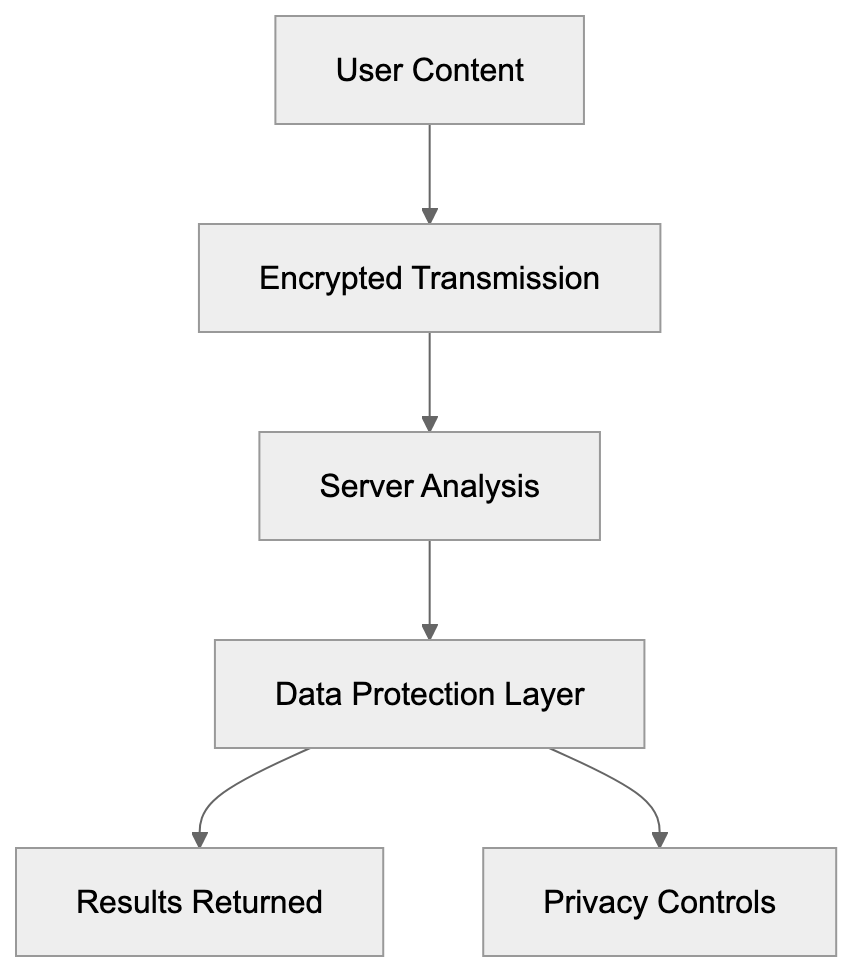
Grammarly integrates with numerous platforms and applications used by developers and content creators daily. The browser extension works on Chrome, Firefox, Safari, and Edge, automatically activating on web-based text editors such as Gmail, Google Docs, LinkedIn, Twitter, Facebook, and WordPress. Native Windows and Mac apps provide desktop support. A Microsoft Office add-in is available for Word and Outlook on Windows and Mac. Mobile users can install the Grammarly Keyboard for iOS and Android, which replaces the default keyboard. Web developers can integrate Grammarly AI into their applications via the Grammarly Text Editor SDK, embedding Grammarly’s checking capabilities directly into web apps. API access is available for Business and Enterprise customers. The tool requires an active internet connection, as all processing occurs on Grammarly’s servers. The browser extension may slow certain websites or conflict with other extensions, while desktop apps perform better for intensive writing tasks.
Accuracy and Limitations
Grammarly AI reliably detects common grammar mistakes but isn’t flawless. The AI may suggest technically correct but awkward or unnatural changes. It struggles with creative writing, poetry, or intentional style choices breaking traditional grammar rules. Technical writing with industry jargon or specialized terminology may trigger false positives, marking correct terms as misspelled if not in its dictionary. Users can add words to a personal dictionary to resolve this. The tone detection feature provides guidance but can misinterpret sarcasm or subtle emotional content. The plagiarism checker identifies exact or near-exact matches only, missing sophisticated paraphrasing or idea plagiarism. For academic writing, dedicated tools like Turnitin offer more comprehensive checking. GrammarlyGO’s generative AI produces decent draft content but requires significant editing, serving as a starting point rather than a replacement for human writing. Suggestions are based on general rules and do not comprehend specific audience or context without detailed prompts.
Conclusion
Grammarly AI is the leading AI writing assistant, utilized by over 30 million daily users across diverse industries. It serves developers creating documentation, content marketers writing articles, small business owners drafting emails, and other professionals needing writing support. The free version covers basic grammar checks, while Grammarly Premium adds advanced AI features and plagiarism detection for $12 monthly on annual plans. Grammarly Business supports team collaboration and style guides starting at $15 per member monthly. Compared to alternatives like ProWritingAid, QuillBot, and Microsoft Editor, Grammarly AI offers the most complete feature set and refined user experience. Data privacy concerns arise since text is sent to Grammarly’s servers for processing. However, the tool integrates smoothly with browsers, desktop apps, and mobile devices, providing accessibility wherever writing occurs. Despite some limitations, Grammarly AI captures most common errors, helping users enhance writing skills through explanations and suggestions.
Frequently Asked Questions
What are the main features of Grammarly AI?
Grammarly AI includes real-time grammar checking, tone detection, plagiarism detection, and advanced suggestions for vocabulary and style. Its generative AI feature, GrammarlyGO, can even generate content based on user prompts, making it a comprehensive tool for various writing needs.
How does Grammarly AI help non-native English speakers?
Grammarly AI provides explanations for grammar mistakes, helping non-native speakers understand language rules as they write. This support enables them to improve their writing skills and write confidently, knowing that their errors will be corrected in real-time.
Is my data safe when using Grammarly AI?
Grammarly prioritizes user data protection and does not sell personal information to third parties. They utilize strong encryption and have a robust privacy policy, especially for Premium and Business users, who receive enhanced protections.
Can I integrate Grammarly AI into other applications?
Yes, Grammarly AI integrates seamlessly with web browsers, Microsoft Office, and various platforms. Users can also utilize the browser extension and native apps on both desktop and mobile devices for enhanced writing support across different environments.
How does Grammarly's plagiarism detection work?
The plagiarism detection feature scans text against over 16 billion web pages to identify potential matches. It provides an originality score and highlights the matching text, which helps users avoid accidental plagiarism in their work.
What are the pricing options for Grammarly AI?
Grammarly offers three pricing tiers: a Free version with basic features, Premium at approximately $12 per month for advanced capabilities, and Business starting at $15 per user per month, which includes additional tools for team collaboration and style consistency.
What are the limitations of Grammarly AI?
While Grammarly AI effectively catches many grammar mistakes, it can struggle with creative writing and context-specific nuances. Additionally, its plagiarism checker may miss sophisticated paraphrasing, requiring users to be aware of its limitations, especially in academic settings.
Track Your AI Visibility
See how AI chatbots like ChatGPT, Claude, and Perplexity discover and recommend your brand.