HuggingChat: Open-Source Chatbot by Hugging Face
HuggingChat is an open-source chatbot interface by Hugging Face. Free access to Llama, Mistral and other models with privacy focus.
What is HuggingChat
HuggingChat is a free AI chatbot that is both open-source and offered by Hugging Face AI. This open-source chatbot platform provides users with various large language models at no cost, including models from Meta’s Llama and Mistral AI. Among these models are Meta’s Llama chat, Mistral AI, and other innovations from the open-source community. Unlike proprietary alternatives, HuggingChat prioritizes transparency and a user-centric privacy approach, as emphasized in IBM’s overview of Hugging Face. It allows developers and researchers to test different AI models in one centralized location, similar to the functionalities offered by Hugging Face’s Model Hub. Users can switch between models to compare their responses and capabilities, a feature highlighted in TechRadar’s analysis of Hugging Face. HuggingChat also integrates web search, enabling the chatbot to access current information beyond its training data. The platform is built entirely on open-source AI technology, allowing anyone to inspect its workings. Hugging Face designed HuggingChat as an alternative to closed-source chatbots such as ChatGPT or Claude.
Why HuggingChat Exists and Its Purpose
HuggingChat Architecture Overview:
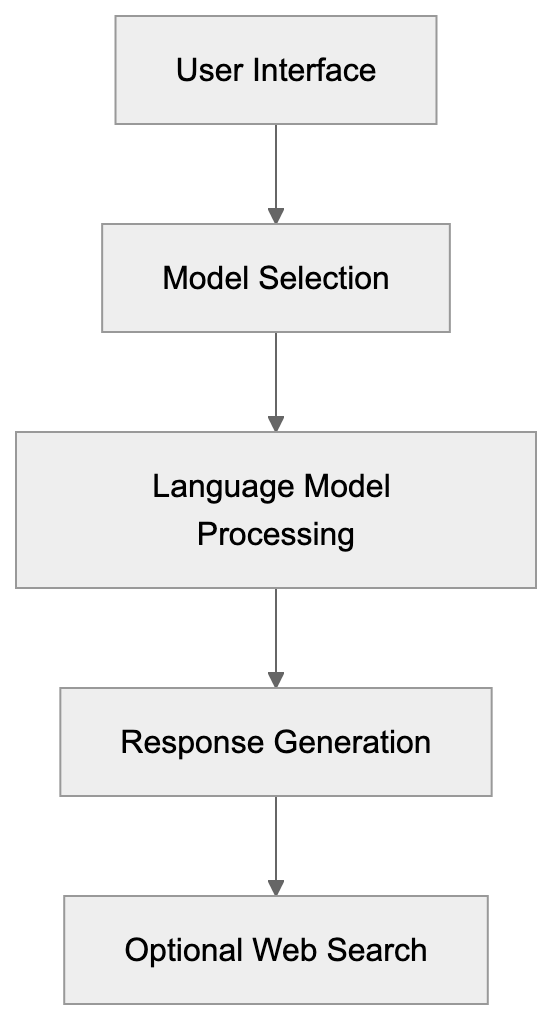
Hugging Face developed HuggingChat to illustrate that robust AI chatbots can be open-source and affordable. The company sought to showcase the capabilities of open-source AI models to a broader audience. While many are familiar with ChatGPT, they may not realize that open-source alternatives exist and perform similarly. HuggingChat serves as a demo platform for models hosted on the Hugging Face Hub. It assists researchers and developers in quickly testing various models without needing their own infrastructure. Small businesses and individual developers benefit by using it without concerns over API costs or usage limits. The privacy approach is crucial as HuggingChat doesn’t require user accounts for basic usage, allowing anonymous interaction with AI models—something not typically possible with most commercial chatbots. The platform also educates users about diverse AI architectures and their strengths, promoting AI democratization and reducing barriers to entry.
How the Hugging Face Platform Works
Hugging Face is a platform hosting thousands of AI models, datasets, and applications. Originally a chatbot startup, it evolved into the GitHub of machine learning. Developers can upload their trained models to the Hugging Face Hub for others to download and use. The platform supports various AI tasks, including text generation, image creation, and speech recognition. HuggingChat specifically uses models from this hub, refined for conversational AI. When you send a message through HuggingChat, it is processed by the model you selected. Hugging Face’s servers manage all backend infrastructure, allowing users to interact without needing powerful computers. The web search feature connects to search engines to pull in real-time information when necessary, making AI accessible to non-technical users. The platform offers tools for fine-tuning models and creating custom AI assistants, enabling businesses to build their own AI applications efficiently.
Key Features of HuggingChat
HuggingChat offers several distinct features that differentiate it from other chatbot platforms:
- Multi-model selection, enabling users to choose from open-source models like Llama 3, Mistral, and Zephyr.
- Web search functionality to access current events and other information not in training data.
- Creation and saving of conversation threads for organizing different topics or projects.
- Code syntax highlighting to aid developers in programming queries.
- Adjustable parameters like temperature and max tokens for customized responses.
- Accessibility without login for basic usage; creating an account unlocks additional features.
- Open-source nature, with the codebase available on GitHub for inspection and self-hosting options.
- Ability to create custom assistants with specific instructions and behaviors.
- Privacy approach ensures conversations aren’t used for training without explicit consent.
Privacy and Data Usage in HuggingChat
HuggingChat Interaction Flow:

HuggingChat has a unique privacy approach compared to commercial chatbots. When using HuggingChat without an account, conversations aren’t permanently stored or linked to your identity. However, like most AI services, the platform may collect usage data for improvement and abuse prevention. Creating an account allows conversations to be saved for later access across devices. Hugging Face assures that conversations won’t be used to train models without user permission, contrasting with some commercial services that default to using user exchanges for model improvement. Since the open-source models used in HuggingChat are already trained, your inputs don’t automatically feed into training pipelines. Users should still avoid sharing sensitive personal information as conversations pass through Hugging Face servers. The web search feature sends queries to external search providers, each with their own privacy policies. For maximum privacy, developers can self-host HuggingChat using the open-source code, ensuring transparency about model usage and training data sources.
Use Cases for Developers and Researchers
HuggingChat is beneficial for various user groups:
- Developers: Prototype AI features before constructing custom implementations and test different models to identify suitable architectures for specific use cases.
- Researchers: Compare model outputs to understand capabilities and limitations.
- Content Creators: Use for brainstorming and drafting initial content.
- Students: Experiment with different models without technical setup.
- Small Businesses: Explore customer service strategies and FAQ development.
- Data Scientists: Test prompt engineering techniques before production deployment.
- Open-Source Enthusiasts: Appreciate inspecting underlying code and models.
- Educators: Teach students about AI capabilities and limitations.
- Marketing Professionals: Evaluate content ideas and SEO strategies.
The platform’s free access removes financial barriers for individuals and small teams exploring AI applications.
Comparing HuggingChat to Alternative Chatbots
HuggingChat competes with a variety of chatbot platforms in the AI assistant space, each offering unique approaches:
| Platform | Cost | Open Source | Model Selection | Privacy Focus | Web Search |
|---|---|---|---|---|---|
| HuggingChat | Free | Yes | Multiple models | High | Yes |
| ChatGPT | Free/Paid tiers | No | GPT-3.5/GPT-4 | Medium | Yes (paid) |
| Claude | Free/Paid tiers | No | Claude models | Medium | No |
| Bing Chat | Free | No | GPT-4 | Low | Yes |
| Perplexity | Free/Paid tiers | No | Multiple models | Medium | Yes |
OpenAI’s ChatGPT remains the most popular option with advanced reasoning capabilities in GPT-4, though it costs $20 per month for the best model, with all data routed through OpenAI’s systems. Anthropic’s Claude emphasizes safety with longer context windows and can incorporate web search through extended thinking and tool usage (beta). Bing Chat integrates GPT-4 with Microsoft’s search engine but involves extensive data collection. Perplexity focuses on research and citations with robust web search but limits free usage. HuggingChat is notable for being entirely open-source and supporting multiple model options. Its privacy approach and zero cost make it appealing for users concerned about data collection, though proprietary models like GPT-4 and Claude often deliver higher-quality responses for complex tasks. The best choice depends on specific needs regarding cost, privacy, model quality, and features.
Technical Details About Model Selection
HuggingChat supports several major open-source language models:
- Meta’s Llama models, including Llama 3, offer strong general performance across various tasks.
- Mistral AI’s models provide excellent quality despite smaller parameter counts.
- Zephyr, based on Mistral, is fine-tuned for improved instruction following.
User Categories and Primary Use Cases:
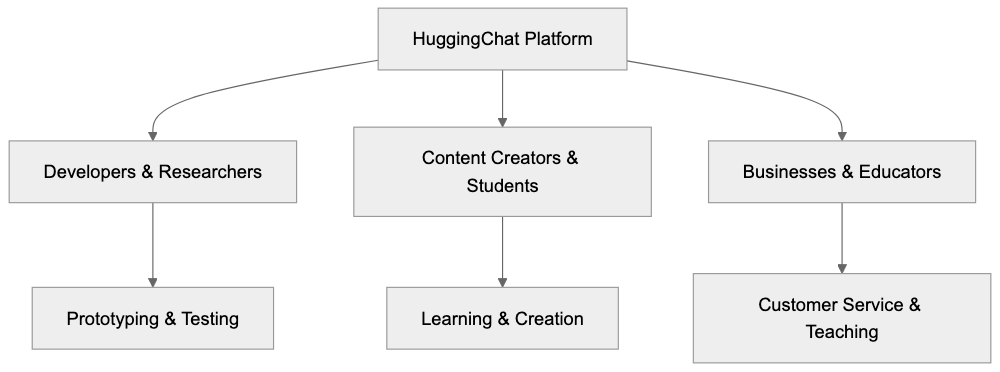
Each model features different context window sizes, affecting how much text they can process at once. Some models excel at coding tasks, while others perform better for creative writing. Parameter counts generally correlate with capability but also influence response speed. Larger models may take longer to generate responses but often produce more detailed outputs. HuggingChat enables model switching mid-conversation to compare responses. The platform regularly updates its model selection as new open-source options become available. Understanding these differences helps users choose the right model for their specific tasks.
Self-Hosting and Customization Options
An advantage of HuggingChat being open-source is the ability to self-host. Developers can download the code from GitHub and run it on private servers, providing total control over data privacy and model selection. While self-hosting requires technical knowledge and resources, it removes reliance on Hugging Face infrastructure. Users can modify the interface and add features not available in the public version. Organizations with strict data policies can keep all interactions within their own network. The platform supports creating custom assistants with specific instructions and personality traits for specialized tasks like code review or content editing. Developers can integrate HuggingChat into their applications using APIs, making it suitable for building internal tools and customer-facing chatbots. However, self-hosting entails responsibility for maintenance, updates, and security. For most users, the hosted version at huggingface.co provides ample features without technical overhead.
Limitations and Considerations
While HuggingChat has many advantages, it also has certain limitations:
- Open-source models may not match the performance of top proprietary models like GPT-4 or Claude 4.5.
- Response quality varies significantly across available models.
- Free hosting can result in slower response times during peak usage.
- Some models have smaller context windows, limiting conversation history.
- Web search integration, though functional, isn’t as refined as specialized research tools like Perplexity.
- Without an account, saving conversation history is impossible, which can be inconvenient for ongoing projects.
- The platform focuses on text generation and lacks support for image creation or advanced multimodal features.
- Model availability changes as Hugging Face updates hosted models.
- Community-driven nature means relying more on documentation than dedicated support.
Understanding these limitations helps set realistic expectations for HuggingChat’s capabilities.
Getting Started with HuggingChat
Starting with HuggingChat is straightforward and requires no setup. Visit chat.huggingface.co in your web browser to access the interface immediately. The homepage displays available models. Select one to commence chatting. Enter your question or prompt in the text box and press enter for a response. You can switch between models via the model selector at the top of the screen. Creating a free account allows you to save conversations for later access. The settings menu lets you adjust parameters like temperature and maximum response length. Enable web search if current information is needed. Experiment with different models to find the best fit for your needs. The platform provides example prompts to guide your questions. Review the privacy policy if concerned about data collection. Developers interested in self-hosting can refer to the GitHub repository for installation instructions, and the Hugging Face documentation offers detailed guides on using features and troubleshooting common issues.
End
HuggingChat represents a significant step toward democratizing access to AI chatbots. The platform proves that open-source models can deliver effective conversational AI without the financial costs and privacy concerns associated with proprietary alternatives. Hugging Face has developed a valuable tool for developers, researchers, and anyone interested in AI. The multi-model approach allows users to compare different architectures and find the best fit for their requirements. While it might not match the peak performance of paid services like ChatGPT Plus, it offers robust capabilities at zero cost. The privacy approach and open-source foundation make it particularly attractive for users and organizations with data sensitivity concerns. As open-source AI models improve, platforms like HuggingChat will increasingly compete with commercial options. Whether you’re building prototypes, conducting research, or exploring AI, HuggingChat provides an accessible entry point into the world of large language models.
Frequently Asked Questions
What are the main advantages of using HuggingChat?
HuggingChat offers a free, open-source alternative to proprietary chatbots, emphasizing user privacy and transparency. Users can access multiple language models without incurring costs, allowing for diverse experimentation. The platform supports easy switching between models, facilitating comparisons and testing.
How do I start using HuggingChat?
To begin using HuggingChat, simply visit the website at chat.huggingface.co. You can select from available models and start chatting immediately, no installation needed. Creating a free account also allows you to save conversations across devices.
Can I self-host HuggingChat, and what are the benefits?
Yes, HuggingChat is open-source, enabling users to download and self-host it. Self-hosting offers complete control over data privacy and model selection, making it suitable for organizations with strict data policies. However, it requires technical knowledge to maintain and update the system.
What privacy measures does HuggingChat implement?
HuggingChat prioritizes user privacy by not linking conversations to user identities without an account. While it may collect usage data for improvement, user inputs are not automatically used for training models. Users are encouraged not to share sensitive information during interactions.
How does HuggingChat compare with proprietary chatbots?
While HuggingChat offers features such as model selection and web search functionalities, it may not achieve the same level of performance as leading proprietary models like GPT-4. HuggingChat stands out for its zero cost and strong privacy focus, making it suitable for users who prioritize these aspects.
What types of users benefit from HuggingChat?
HuggingChat serves various users, including developers, researchers, students, and small businesses. Developers can prototype AI features, while researchers can compare model outputs. Additionally, content creators and educators can utilize the platform for brainstorming and teaching about AI capabilities.
Are there any limitations to using HuggingChat?
Yes, users may encounter slower response times during peak usage and variable response quality across models. Some advanced features found in proprietary systems, such as extensive multimodal capabilities or more refined web search options, may be lacking. Users should weigh these limitations when selecting HuggingChat for their needs.
Track Your AI Visibility
See how AI chatbots like ChatGPT, Claude, and Perplexity discover and recommend your brand.