IBM watsonx Assistant: Leading Enterprise Conversational AI
Explore IBM watsonx Assistant for enterprise AI, covering customer service automation, NLP, and hybrid cloud solutions.
Table of Contents
- Introduction
- What is IBM watsonx Assistant
- Purpose and Benefits of IBM watsonx Assistant
- Use Cases for Watson Assistant in Enterprises
- Key Features and Technical Capabilities
- Comparison with Salesforce and Microsoft Solutions
- Pricing Model and Cost Structure
- Alternative Enterprise Conversational AI Platforms
- Implementation Considerations and Success Factors
- Security and Compliance Features
- Conclusion
- Introduction
- What is IBM watsonx Assistant
- Purpose and Benefits of IBM watsonx Assistant
- Use Cases for Watson Assistant in Enterprises
- Key Features and Technical Capabilities
- Comparison with Salesforce and Microsoft Solutions
- Pricing Model and Cost Structure
- Alternative Enterprise Conversational AI Platforms
- Implementation Considerations and Success Factors
- Security and Compliance Features
- Conclusion
Introduction
IBM watsonx Assistant is an enterprise-grade conversational AI platform, designed to help businesses automate customer service exchanges and internal support tasks. It helps businesses automate customer service exchanges and internal support tasks. Companies use it to build chatbots and virtual assistants that understand natural language. The tool runs on hybrid cloud infrastructure, allowing deployment on-premises or in the cloud, providing flexibility for various business needs. Watson Assistant combines natural language processing with machine learning to handle complex customer queries. Large enterprises choose this solution for its robust security, compliance features, and seamless integration with existing systems. The platform supports 15 languages and can handle millions of conversations simultaneously. Main features include intent recognition, entity extraction, dialog management, and analytics dashboards.
What is IBM watsonx Assistant
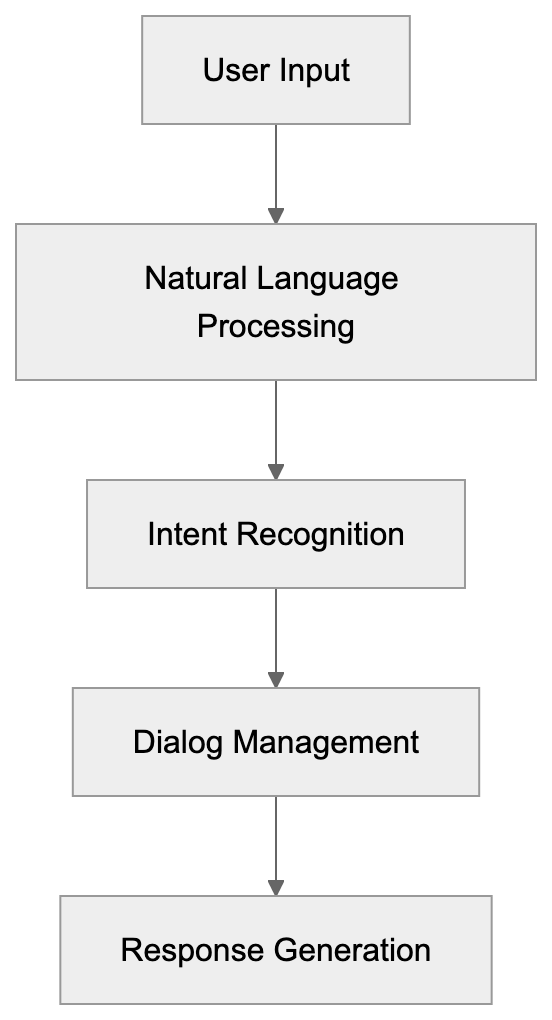
Watson Assistant Architecture Overview:
IBM watsonx Assistant is a conversational AI service that lets you create AI-powered chatbots and virtual agents. It uses natural language processing (NLP) to understand what users are asking and provides relevant responses. The system learns from exchanges over time and gets better at handling queries. You build conversation flows using a visual interface without needing to write code for basic implementations. For advanced use cases, developers can add custom code and integrate APIs. The platform processes text and voice inputs across multiple channels like websites, mobile apps, messaging platforms, and phone systems. Watson Assistant sits within the broader IBM watsonx platform, which includes other AI and data tools. The service was originally called Watson Conversation Service, then renamed to Watson Assistant, and now exists as watsonx Assistant under the watsonx brand.
Purpose and Benefits of IBM watsonx Assistant
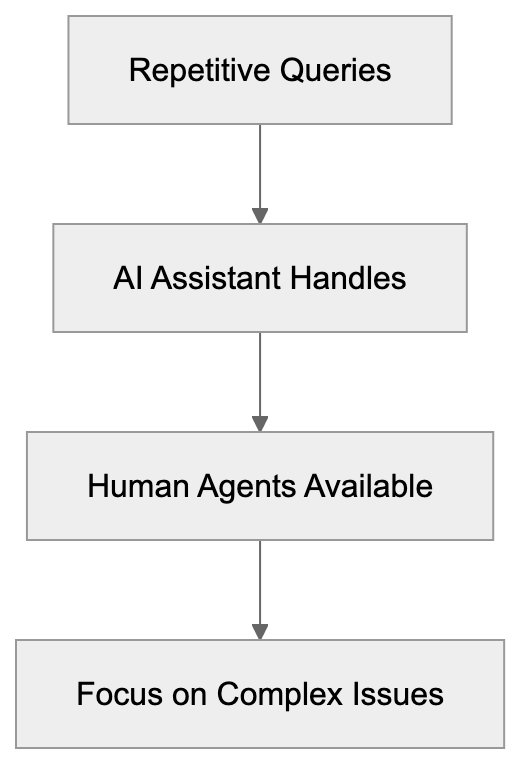
IBM created Watson Assistant to solve a specific business problem: customer service teams get overwhelmed with repetitive questions. Users frequently ask the same things about passwords, account status, product information, and basic troubleshooting. Human agents spend too much time on these simple tasks instead of handling complex issues that need human judgment. Watson Assistant automates responses to common questions so that human agents can focus on high-value exchanges.
Enterprise Deployment Flexibility:
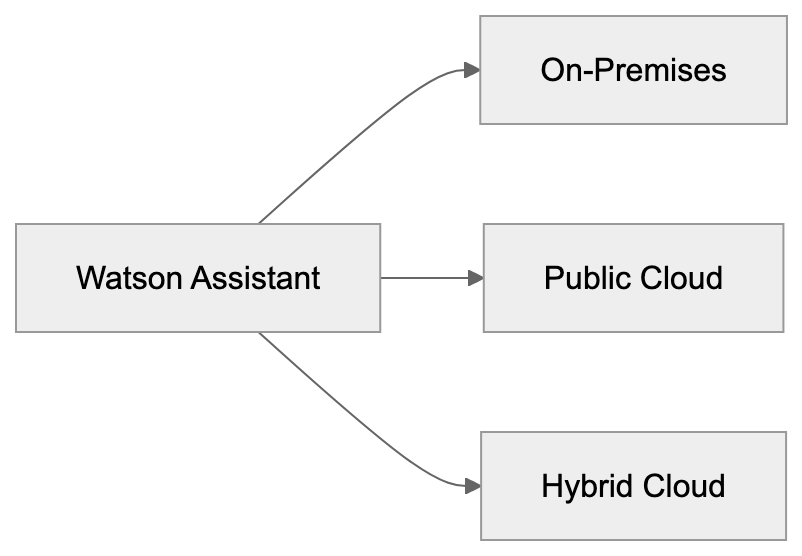
The tool also provides 24/7 availability, which traditional call centers can’t match cost-effectively. Another purpose is consistency. AI gives the same quality answer every time, while human responses vary based on training, experience, and mood. For large organizations, the platform helps maintain brand voice across all customer touchpoints. The hybrid cloud capability addresses security and compliance needs. Banks, healthcare providers, and government agencies often can’t send sensitive data to public clouds. Watson Assistant lets them keep data on-premises while still using AI capabilities.
Use Cases for Watson Assistant in Enterprises
Enterprises deploy Watson Assistant across different departments and use cases:
- Customer Service: The chatbot handles tier 1 support questions about orders, shipping, returns, and account management. When the bot can’t answer, it escalates to human agents with full conversation context.
- IT Departments: Utilize it for internal helpdesk automation. Employees ask about password resets, software access, and hardware requests.
- HR Teams: Build assistants for benefits questions, PTO policies, and onboarding processes.
- Sales Teams: Use conversational AI to qualify leads and schedule demos. The assistant asks qualifying questions and routes hot leads to sales reps.
- Banks: Employ Watson Assistant for account inquiries, transaction disputes, and loan applications.
- Telecom Companies: Handle billing questions and service activations.
- Healthcare Providers: Use it for appointment scheduling and prescription refills while staying HIPAA compliant.
- Retailers: Integrate the assistant into eCommerce sites to help with product selection and checkout issues.
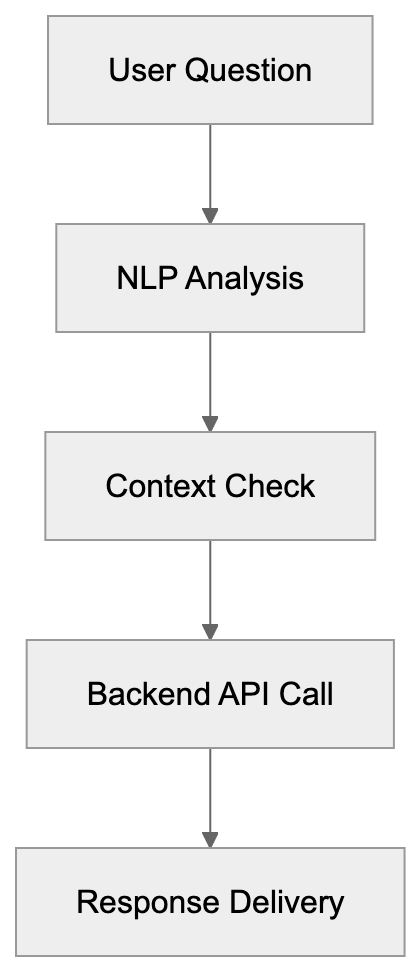
The platform connects to backend systems through APIs, allowing real-time data retrieval, like order status or account balances.
Key Features and Technical Capabilities
Automation Benefits Flow:
Watson Assistant includes several technical features vital for enterprise deployments:
- NLP Capabilities: Handles intent recognition to determine what the user wants to do and does entity extraction to identify important data points.
- Dialog Management System: Controls conversation flow and manages multi-turn conversations where context matters.
- Contextual Understanding: Remembers earlier parts of the conversation, adding coherence to exchanges.
- Custom Models: Build or use pre-built industry solutions for banking, telecom, and retail.
- Analytics Dashboard: Displays metrics like conversation volume, containment rate, and user satisfaction.
- Webhooks Support: Allows extending functionality by calling external APIs during conversations.
- A/B Testing Capabilities: Test different responses and see which one works better.
- Voice Combining: Deploy the same assistant to phone channels using speech-to-text and text-to-speech.
- Security Features: Includes encryption, access controls, and audit logs to meet compliance standards such as SOC 2, ISO 27001, and GDPR.
Comparison with Salesforce and Microsoft Solutions
Watson Assistant competes directly with Salesforce Einstein Bots and Microsoft Azure Bot Service. Here’s how they compare on key factors:
| Feature | IBM watsonx Assistant | Salesforce Einstein Bots | Microsoft Azure Bot Service |
|---|---|---|---|
| Primary Strength | Enterprise security and hybrid cloud | CRM integration | Developer flexibility |
| NLP Quality | Strong, pre-trained models | Good, Salesforce focused | Strong with LUIS integration |
| Deployment Options | On-premises, cloud, hybrid | Cloud only | Cloud-focused, limited hybrid |
| Integration Complexity | Medium, REST APIs | Easy with Salesforce, harder outside | Medium, requires coding |
| Pricing Model | Usage-based tiers | Per conversation | Pay as you go |
| Best For | Regulated industries | Salesforce customers | Developer-heavy teams |
Salesforce Einstein Bots work best if you already use Salesforce CRM. Microsoft Azure Bot Service gives developers maximum control and flexibility. You write more code but get exactly what you want. Watson Assistant offers visual builders for business users but also supports custom development. The hybrid cloud capability is the main differentiator.
Conversation Processing Pipeline:
Pricing Model and Cost Structure
IBM watsonx Assistant uses a tiered pricing model based on monthly active users. A monthly active user is someone who has at least one conversation with the assistant during the billing month.
- Lite Plan: Free and includes up to 10,000 messages per month for testing and proof of concept projects.
- Plus Plan: Starts at $140 per month and includes 1,000 monthly active users. Additional users cost extra based on volume.
- Enterprise Plan: Custom pricing with features like advanced security, dedicated support, and higher rate limits.
Voice minute usage for phone integration is billed separately, and SMS and WhatsApp channels have per-message costs from the channel providers. The pricing structure favors high-volume deployments.
Alternative Enterprise Conversational AI Platforms
Several other platforms compete in the enterprise conversational AI space:
| Platform | Best Use Case | Starting Price | Cloud Options |
|---|---|---|---|
| IBM watsonx Assistant | Regulated industries, hybrid cloud | $140/month | Hybrid, multi-cloud |
| Google Dialogflow | Google Cloud users | Pay per request | Google Cloud only |
| Amazon Lex | AWS ecosystem | Pay per request | AWS only |
| Kore.ai | Employee virtual assistants | Custom pricing | Multi-cloud |
| Microsoft Azure Bot | Developer-focused projects | Pay as you go | Azure, hybrid |
The choice between platforms depends on your existing tech stack, compliance needs, and internal skills. If you’re all-in on AWS, then Lex makes sense. If you need hybrid deployment, Watson Assistant or Azure Bot Service are better fits. Google Dialogflow works well for companies with strong Google Workspace or GCP usage.
Implementation Considerations and Success Factors
Successful Watson Assistant deployments share common characteristics:
- Clean Training Data: The assistant learns from example conversations, so quality data is crucial.
- System Integration: The assistant needs to pull data from CRM, order management, and knowledge base systems.
- Right Metrics: Focus on containment rate and user satisfaction scores.
- Human Support: Keep humans in the loop for complex cases where AI might struggle.
- Regular Updates: Review conversation logs monthly and add new intents as patterns appear.
By considering these factors, businesses can maximize the potential of Watson Assistant.
Security and Compliance Features
IBM built Watson Assistant with enterprise security requirements in mind:
- Data Encryption: Covers both data in transit and data at rest.
- Role-Based Access Controls: Limits who can view conversations and modify the assistant.
- Audit Trails: Logs all administrative actions.
- Compliance Support: Supports HIPAA compliance, PCI DSS, SOC 2 Type 2, and ISO 27001.
The hybrid cloud option allows retaining sensitive data on-premises while leveraging cloud resources.
Conclusion
IBM watsonx Assistant provides enterprise-grade conversational AI for customer service automation and internal support. The platform combines natural language processing with dialog management to handle complex conversations. Key strengths include hybrid cloud deployment, strong security and compliance certifications, and integration capabilities with enterprise systems. It competes with Salesforce Einstein Bots and Microsoft Azure Bot Service but differentiates through hybrid cloud support. Pricing is usage-based, with tiers starting at $140 per month for production deployments. The platform works best for regulated industries, large enterprises, and organizations that need on-premises deployment options. Success requires good training data, proper system integration, and ongoing improvement based on real usage patterns. Watson Assistant sits within IBM’s broader watsonx AI platform and benefits from IBM’s decades of enterprise software experience.
Frequently Asked Questions
What types of businesses can benefit from IBM watsonx Assistant?
IBM watsonx Assistant is suitable for various businesses, especially large enterprises in regulated industries such as banking, healthcare, and government. These organizations need robust security and compliance features while automating customer service and support tasks.
How does Watson Assistant improve customer service?
Watson Assistant automates responses to common customer queries, allowing human agents to focus on more complex issues. With 24/7 availability and consistent responses, it enhances customer satisfaction by providing prompt and accurate information.
What integration capabilities does Watson Assistant offer?
The platform can connect to various backend systems via APIs, facilitating real-time data retrieval. It allows integration with CRM, order management, and knowledge bases to support seamless customer interactions.
What is the pricing structure for IBM watsonx Assistant?
Watson Assistant has a tiered pricing model based on monthly active users. The Lite Plan is free, while the Plus Plan starts at $140 per month, and the Enterprise Plan offers custom pricing featuring advanced capabilities.
How does speech recognition work with Watson Assistant?
Watson Assistant supports voice functionality by utilizing speech-to-text and text-to-speech technologies, allowing the same assistant to operate across phone channels. This feature enhances accessibility for users who prefer voice interactions.
What are some implementation best practices for Watson Assistant?
Key best practices include maintaining clean training data, ensuring proper system integration, and regularly reviewing conversation logs for updates. Focusing on metrics like containment rate and user satisfaction can also drive successful outcomes.
What compliance standards does Watson Assistant adhere to?
IBM watsonx Assistant complies with various industry standards, including HIPAA, PCI DSS, SOC 2 Type 2, and ISO 27001. Its security features, like data encryption and role-based access controls, help ensure sensitive data is protected.