Microsoft Copilot: Your AI Assistant for Windows & 365
Learn about Microsoft Copilot features, GPT-4 integration, subscription plans, and enterprise deployment in Windows 11 and Microsoft 365.
What is Microsoft Copilot
Microsoft Copilot is an AI assistant built into Windows 11 and Microsoft 365 applications, leveraging Microsoft AI. It is based on OpenAI’s GPT-4 language model and aids users in writing, coding, research, and productivity tasks. This tool evolved from Bing Chat, which Microsoft launched in early 2023. Now, it’s integrated directly into the Windows operating system and Office apps like Word, Excel, PowerPoint, and Outlook.
Businesses require AI assistance without switching between different apps, making tools like Microsoft Copilot essential. Instead of opening a separate chatbot website, users can ask questions and receive help directly where they work. This enhances efficiency and accessibility for daily tasks. The main features include text generation, code completion, data analysis in Excel, presentation creation in PowerPoint, and email drafting in Outlook. Microsoft designed it to work seamlessly with existing files and documents stored in OneDrive and SharePoint.
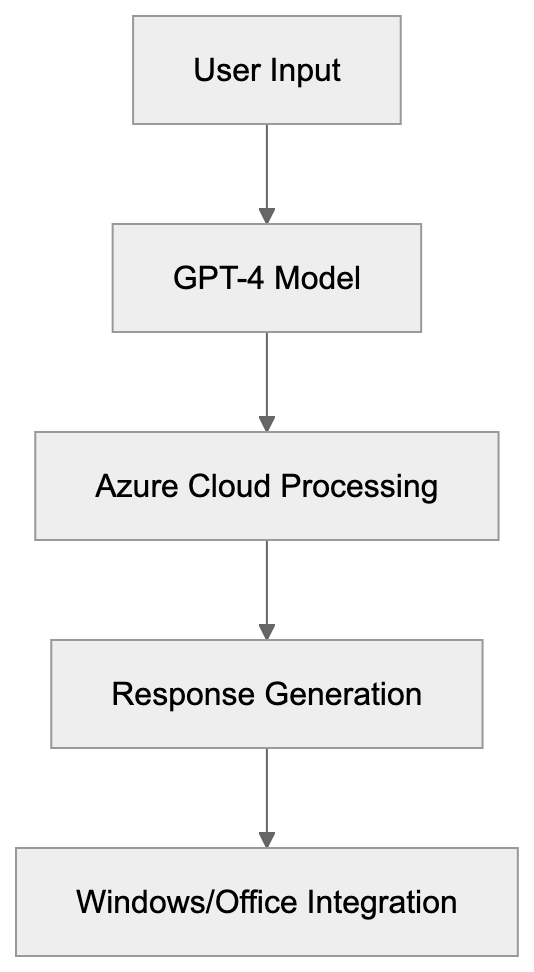
Microsoft Copilot Architecture:
Evolution from Bing Chat to Copilot
Microsoft first released Bing Chat in February 2023, a chatbot within the Bing search engine powered by GPT-4 technology from OpenAI. As part of their strategy to compete with Google in AI-powered search, users could ask questions and receive conversational answers complete with web citations.
By September 2023, Microsoft rebranded Bing Chat as Copilot, unifying the name for all their AI assistants across products. While the functionality remained mostly the same, the branding change simplified the user experience. By November 2023, Microsoft integrated Copilot into Windows 11 as a sidebar feature named Windows Copilot, accessible through the Windows key + C. This integration allowed users to request AI help without leaving their desktops.
GPT-4 Foundation and Technical Details
Evolution of Microsoft Copilot:

Microsoft Copilot operates on GPT-4 and GPT-4 Turbo models from OpenAI. The free version provides access to GPT-4 with certain limitations, while Copilot Pro subscribers enjoy priority access to GPT-4 Turbo. Additionally, Microsoft Copilot connects to cloud services to process queries through Azure servers. For Microsoft 365 Copilot, the enterprise version, it also accesses company data stored in Microsoft Graph, offering context-aware responses without using enterprise data to train AI models.
Subscription Plans and Pricing
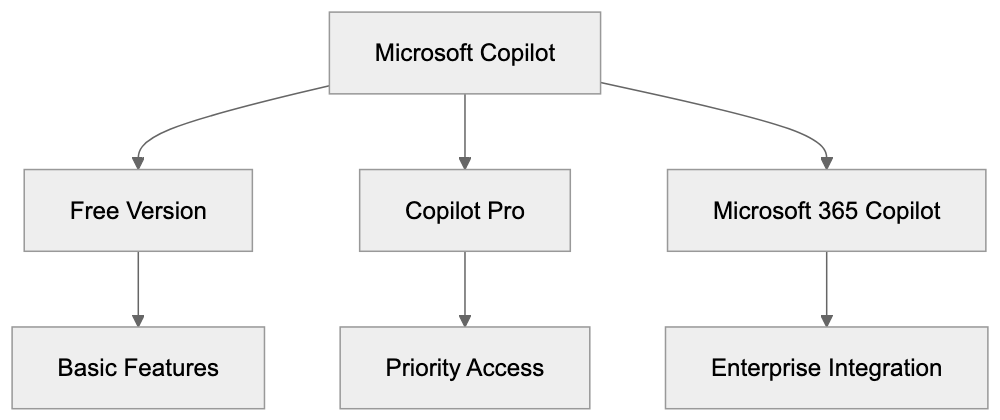
Microsoft Copilot is available in several tiers. The basic version is free for individuals with a Microsoft account, accessible via copilot.microsoft.com or through Windows Copilot. The free tier has daily limits and employs standard GPT-4.
Copilot Pro, priced at $20 per month, offers benefits like priority access, faster responses with GPT-4 Turbo, and integration with Office apps for Microsoft 365 Personal or Family subscribers. Subscribers receive early access to new features and custom GPT model creation.
The enterprise version, Microsoft 365 Copilot, costs $30 per user per month and requires a Microsoft 365 E3 or E5 license. It connects to company data and spans all Microsoft 365 apps, including admin controls and compliance features. However, the pricing may be steep for smaller organizations.
How Businesses and Users Deploy Copilot
Large enterprises deploy Microsoft 365 Copilot through IT departments, enabling it via the Microsoft 365 admin center and reviewing accessible data to ensure privacy. Testing in a pilot group before a complete rollout helps identify issues and benefits. Software developers use Copilot in Visual Studio Code for coding assistance, while marketing professionals utilize it in Word and PowerPoint for content creation. Small business owners leverage Copilot or Copilot Pro for tasks like email management in Outlook.
Microsoft Copilot Subscription Tiers:
Comparison with Alternative AI Assistants
Microsoft Copilot offers deep integration with Windows and Office apps, beneficial for businesses invested in the Microsoft ecosystem. Alternative options like ChatGPT Plus, Google Gemini Advanced, Claude Pro, and GitHub Copilot provide AI capabilities but lack Microsoft Copilot’s level of integration. For coding tasks, developers often choose between Microsoft Copilot and GitHub Copilot, both leveraging similar technology.
Privacy and Data Usage Concerns
The free version of Microsoft Copilot collects user data to enhance services, raising privacy concerns. The enterprise version in Microsoft 365 Copilot handles data differently, with prompts and responses remaining within the organization’s domain. Businesses can use sensitivity labels in Microsoft Purview to manage data access but should still review the AI’s permissions with documents.
Enterprise Deployment Best Practices
IT administrators deploying Microsoft 365 Copilot should establish a governance framework and train employees on prompt crafting. Monitoring Copilot usage through admin centers can help measure productivity, while feedback channels refine deployment. Developers are advised to integrate Copilot gradually into their workflow and always review AI-generated code.
Future Development and GPT-5 Speculation
Microsoft continues to update Copilot with features such as third-party plugin support and multimodal capabilities using GPT-4 Vision. While the release of GPT-5 is speculative, Microsoft is expected to integrate it swiftly due to its partnership with OpenAI. Future versions may further integrate Windows features, blurring the lines between the operating system and AI assistance.
Conclusion
Microsoft Copilot, leveraging GPT-4 powered AI, enhances Windows 11 and Microsoft 365 apps. It offers robust capabilities for writing, coding, data analysis, and more, without needing to switch applications. Despite being a comprehensive tool for businesses within the Microsoft ecosystem, privacy considerations remain significant, especially for free version users. Compared to competitors like ChatGPT and Google Gemini, Microsoft’s integration provides unique advantages, making it a valuable addition for enterprises and individuals alike.
Frequently Asked Questions
What types of tasks can I accomplish with Microsoft Copilot?
Microsoft Copilot assists with a variety of tasks, including writing, coding, data analysis, and creating presentations. It's designed to help users increase productivity within applications like Word, Excel, PowerPoint, and Outlook.
What is the difference between the free and Pro versions of Microsoft Copilot?
The free version offers access to standard GPT-4 with daily usage limits, while Copilot Pro, priced at $20 per month, provides priority access, faster responses with GPT-4 Turbo, and integration with more features across Microsoft 365 apps.
How does user data privacy factor into the use of Microsoft Copilot?
The free version collects user data to enhance services, raising privacy considerations. In contrast, the enterprise version ensures prompts and responses remain within the organization, allowing businesses to implement data management strategies effectively.
How can businesses deploy Microsoft 365 Copilot effectively?
Businesses should have their IT departments manage the deployment, utilizing the Microsoft 365 admin center to control access and data privacy. Conducting pilot tests before full rollout is also recommended to identify potential challenges and benefits.
Can Microsoft Copilot integrate with existing enterprise data?
Yes, Microsoft 365 Copilot connects to company data stored in Microsoft Graph, allowing for context-aware responses without using enterprise data for training AI models.
How does Microsoft Copilot compare to other AI assistants?
Microsoft Copilot is highly integrated with Windows and Office applications, which provides significant advantages for users within the Microsoft ecosystem. Other AI assistants like ChatGPT or Google Gemini offer similar capabilities but lack such integration.
What future developments can we expect for Microsoft Copilot?
Future updates are expected to include third-party plugin support and enhancements utilizing GPT-4 Vision. Speculation about GPT-5 suggests that Microsoft will quickly integrate new technologies to keep the tool at the forefront of AI assistance.
Track Your AI Visibility
See how AI chatbots like ChatGPT, Claude, and Perplexity discover and recommend your brand.