Ultimate Guide to Zendesk AI for Customer Service Automation
Complete guide on Zendesk AI features, benefits, and comparisons. Learn about intelligent triage, routing, pricing, and alternatives like Intercom Fin.
Introduction
Customer service automation has become essential for businesses managing support tickets at scale. Zendesk AI is a platform designed to automate customer exchanges through intelligent Zendesk bots and AI agents. It helps companies reduce response times and handle more tickets without hiring additional staff. The system uses machine learning to understand customer questions and ensure automated routing to the right place. Major features include intelligent triage, automated ticket routing, AI-powered chatbots, and sentiment analysis. Businesses of different sizes use Zendesk AI to enhance their support operations. The platform seamlessly integrates with Zendesk’s existing customer service tools. This guide covers what Zendesk AI does, why it exists, how companies use it, as well as comparisons to other market alternatives.
What is Zendesk AI
Zendesk AI is a set of artificial intelligence tools built into the Zendesk customer service platform. The system analyzes incoming support requests and automatically categorizes them based on content and intent. It can respond to common questions without human involvement, thanks to pre-trained chatbots. The AI learns from past ticket data to improve accuracy over time. Service automation occurs through workflow rules triggered by ticket properties identified by the AI. The platform supports multiple channels, including email, chat, social media, and messaging apps. Zendesk bots handle initial customer contact and can escalate issues to human agents when necessary. The AI component works alongside human agents rather than replacing them entirely. Companies can customize AI behavior to suit their specific support needs and customer base.
Why Zendesk AI Exists and Its Purpose
Zendesk AI Core Components:
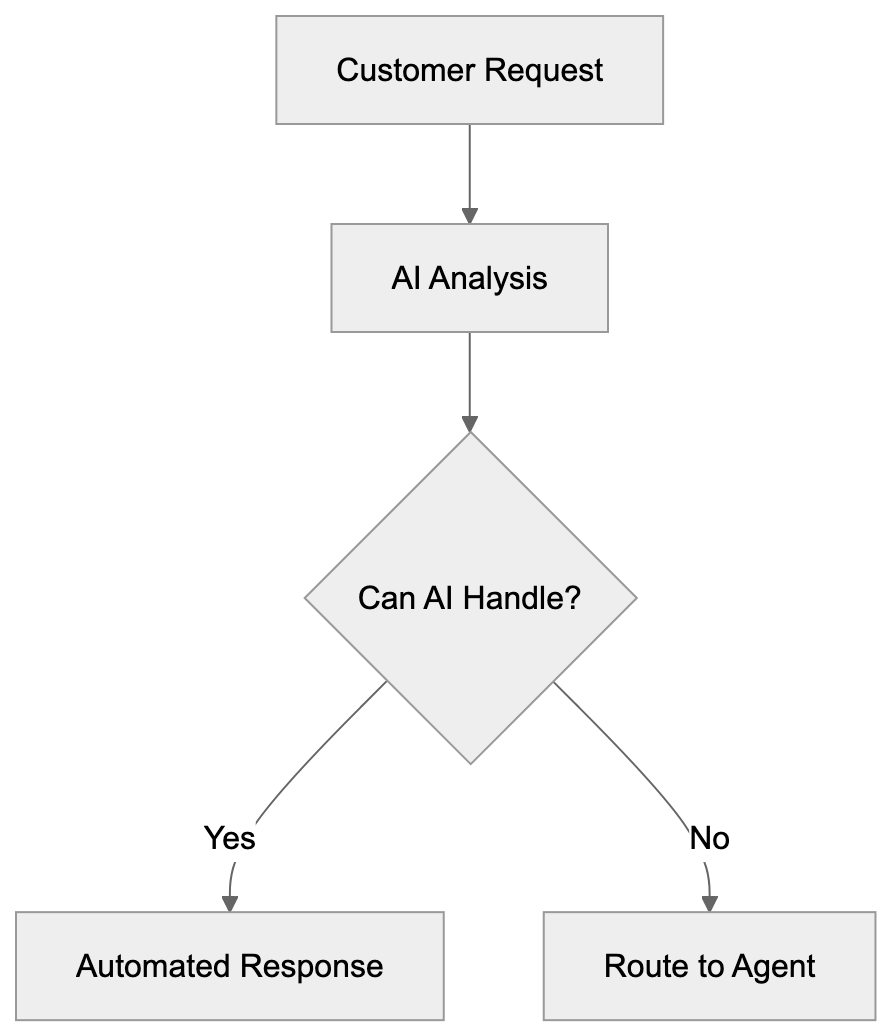
Customer service teams face growing ticket volumes as businesses scale. Hiring proportionally more agents becomes costly and unsustainable. Zendesk AI addresses this scalability problem through automation. Its main purpose is to reduce the time customers wait for responses to common questions. Another goal is to free human agents to focus on complex issues requiring judgment and empathy. Service automation also helps maintain consistent response quality across customer exchanges. The AI can operate around the clock without breaks. It reduces operational costs while maintaining or improving customer satisfaction scores. Companies use it to handle seasonal spikes in support volume without temporary hiring. The technology bridges the gap between customer expectations for instant responses and traditional support limitations.
How Businesses Use Zendesk AI
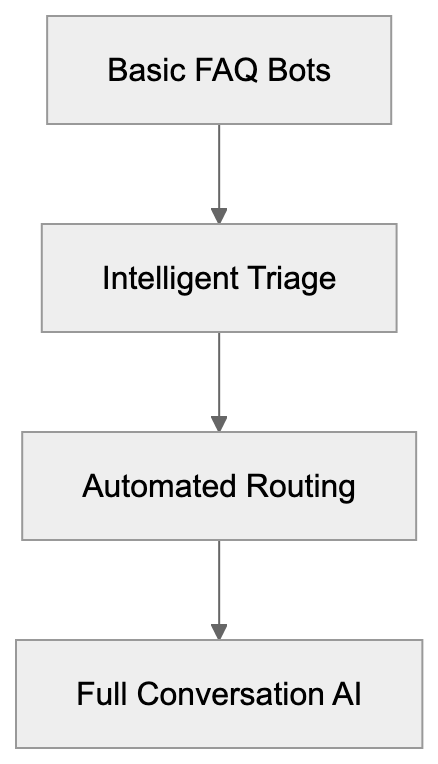
Companies implement Zendesk AI in stages based on their maturity and requirements. Most start with basic chatbots that answer frequently asked questions about products or services. The bots manage password resets, order status checks, and basic troubleshooting steps. Intelligent triage automatically tags and prioritizes incoming tickets based on urgency and topic. Automated routing sends tickets to the right team or agent based on skills and availability. E-commerce businesses use it to automatically handle return requests and shipping inquiries. SaaS companies deploy AI agents to guide users through common technical issues. Customer service automation reduces average handle time by instantly resolving simple cases. Teams use sentiment analysis to flag angry or frustrated customers for priority attention. The system suggests relevant help articles to agents working on tickets. Companies track automation rates and customer satisfaction to measure ROI. Marketing professionals use collected data to identify common pain points and product issues.
Zendesk AI Features and Capabilities
The platform includes several core AI-powered features for customer service automation. Intelligent triage uses natural language processing to understand ticket content and assign categories. Automated routing directs tickets to appropriate teams based on skills, workload, and availability. AI agents can handle entire conversations from start to finish for common scenarios. The system provides suggested responses to human agents based on similar past tickets. Intent detection identifies what customers are aiming for, even with vague wording. Language detection automatically routes tickets to agents who speak that language. Sentiment analysis flags emotional tones to prioritize urgent or upset customers. The chatbot builder enables teams to create custom conversation flows without coding. Zendesk bots can authenticate users and access account information during conversations. The platform integrates with knowledge bases to suggest or send relevant articles. Workflow automation triggers actions based on AI-identified conditions. Analytics dashboards track automation performance and identify improvement opportunities.
Zendesk Pricing Plans
Ticket Automation Workflow:

Zendesk offers multiple pricing tiers with varying levels of AI functionality, starting at $55 per agent per month for the Suite Team plan, which includes standard automation and pre-built chatbots. Zendesk Pricing Plans The Suite Team plan starts at $55 per agent per month when billed annually. This basic tier includes standard automation and pre-built chatbots. The Suite Growth plan is priced at $89 per agent monthly when billed annually and offers more advanced features. Suite Professional costs $115 per agent monthly when billed annually, including AI-powered features. The Suite Enterprise tier requires custom pricing and adds advanced AI capabilities. AI add-ons are available for existing Zendesk customers as separate purchases. The Advanced AI add-on incurs additional costs on top of base plans. Pricing varies based on the number of agents and contract length. Many AI features require higher-tier plans to access. Small business owners should expect to pay at least $89 per agent monthly for meaningful automation. Web developers combining Zendesk need API access, which comes with Professional plans and above. Free trials are available for 14 days. Custom enterprise pricing includes volume discounts and dedicated support.
Comparison with Alternatives
Several platforms compete with Zendesk AI in the customer service automation space. Here’s how major alternatives compare:
| Platform | Starting Price | AI Capabilities | Best For | Key Difference |
|---|---|---|---|---|
| Zendesk AI | $55/agent/month | Intelligent triage, routing, bots, sentiment analysis | Mid to large businesses | Complete platform with deep customization |
| Intercom Fin AI | $74/seat/month | GPT-4 powered answers, resolution bot | SaaS companies | Uses advanced language models for more natural responses |
| Freshdesk | $15/agent/month (Starter plan) | Basic bots, ticket automation | Small businesses | Lower cost entry point |
| Salesforce Service Cloud | Starting at $25/user/month (Growth edition) | Einstein AI, predictive routing | Enterprise organizations | Deep CRM combination |
| Help Scout | $20/user/month (Standard plan) | Limited automation, saved replies | Small teams | Simple interface, fewer AI features |
| Kustomer | Custom pricing | AI routing, timeline view | E-commerce | Customer context across channels |
Intercom Fin specifically uses GPT-4 and GPT-4 mini to generate responses based on help center content, offering advanced language models for more natural responses. AI Customer Service Costs 2025: Real Pricing Guide It can answer questions without pre-programmed flows. The system costs more but requires less setup time. Zendesk AI offers more control over bot behavior and conversation paths. Intercom Fin works better for companies wanting plug-and-play solutions. {Zendesk bots need more configuration but handle edge cases better. Both platforms support multiple languages and channels. Intercom Fin has a simpler pricing model with fewer tiers. Zendesk AI integrates with more third-party tools and systems. Marketing professionals often prefer Intercom’s analytics and customer data platform. SEO experts and content marketers find Zendesk’s reporting more detailed. Software developers get better API documentation from Zendesk. Small business owners might find Intercom easier to set up initially.
Key Considerations for Implementation
Successful customer service automation requires proper planning and setup. Companies need clean historical ticket data for the AI to learn from. The quality of automation depends heavily on knowledge base content. Teams should start with high-volume, low-complexity use cases. Monitor bot performance closely in the first weeks and adjust flows as needed. Customer support AI should not handle cases it shouldn’t, as it could impact satisfaction. Always provide clear paths to human agents when AI cannot assist. Train support teams on working alongside AI tools. Set realistic expectations about what automation can and cannot do. Service automation works best when combined with human oversight. Regular reviews of automated conversations help identify improvement areas. Consider privacy implications of AI analyzing customer interactions. Some industries have regulations about automated customer exchanges. Testing with small customer segments before full rollout reduces risk. Budget for ongoing improvement time beyond initial setup costs.
Technical Requirements and Integration
Zendesk AI runs entirely in the cloud with no on-premise installation needed. The platform supports integrating through REST APIs for custom development. Web developers can embed chat widgets on websites using JavaScript snippets. Mobile SDKs are available for iOS and Android app integration. The system connects with popular business tools through native integrations and Zapier. CRM platforms like Salesforce sync customer data bidirectionally. E-commerce platforms including Shopify and WooCommerce have pre-built connectors. Slack integration allows agents to manage tickets without leaving their workspace. SSO support includes SAML and JWT for enterprise authentication. Webhooks enable real-time event notifications to external systems. API rate limits vary by pricing tier. Custom apps can be built using the Zendesk Apps framework. Data export capabilities support compliance and analytics needs. The platform meets SOC 2 and GDPR requirements for data handling.
Measuring Success and ROI
Tracking the right metrics proves the value of customer service automation. First response time typically decreases significantly after implementing AI agents. Resolution time drops for cases the AI can handle completely. Ticket volume per agent increases as automation handles routine requests. Customer satisfaction scores should maintain or improve with proper setup. Self-service rate shows what percentage of customers find answers without agent help. Automation rate indicates how many tickets AI resolves without human intervention. Cost per ticket decreases as more cases are automated. Agent productivity metrics show whether teams can focus on complex work. Deflection rate measures questions answered before ticket creation. These numbers justify continued investment in Zendesk AI. Most companies see ROI within 6 to 12 months of setup. The exact timeline depends on ticket volume and automation complexity. Regular reporting keeps stakeholders informed about automation performance.
Conclusion
Zendesk AI provides a comprehensive solution for customer service automation across multiple channels. The platform combines intelligent triage, automated routing, and AI-powered chatbots to reduce support costs. Businesses use these tools to scale customer service without proportionately increasing headcount. While pricing starts at $55 per agent monthly, meaningful AI features require higher-tier plans. Alternatives like Intercom Fin offer different approaches with GPT-4 powered responses versus rule-based automation. The best choice depends on company size, technical resources, and specific support needs. Successful setup requires good data, clear use cases, and ongoing improvement. Customer service automation continues evolving as AI technology improves. Companies investing in these tools now position themselves for future capabilities while solving current scalability challenges.
AI Agent Implementation Stages:
Frequently Asked Questions
What types of businesses can benefit from Zendesk AI?
Zendesk AI is suitable for businesses of varying sizes, particularly mid to large businesses that experience high ticket volumes. It serves e-commerce, SaaS, and service-oriented companies by automating responses and improving customer service efficiency.
How does Zendesk AI integrate with existing systems?
Zendesk AI integrates seamlessly with other Zendesk tools and allows for custom development through REST APIs. It also includes native integrations with popular platforms such as Salesforce and e-commerce solutions like Shopify.
Can I try Zendesk AI before committing to a subscription?
Yes, Zendesk offers a free trial for 14 days, allowing potential users to explore the platform's capabilities and assess its fit for their customer service needs before making a financial commitment.
What is the difference between the Zendesk pricing tiers?
The pricing tiers for Zendesk range from $55 to custom enterprise pricing, with each tier offering progressively advanced features. Lower-tier plans include standard automation, while higher-tier plans unlock comprehensive AI capabilities, making them suitable for businesses with more complex support needs.
How do I measure the success of implementing Zendesk AI?
Success can be measured through metrics like first response time, resolution time, automation rate, and customer satisfaction scores. Regular reporting helps track these metrics to justify the ongoing investment in the automation tools provided by Zendesk AI.
What steps should I take for a successful implementation of Zendesk AI?
Start with clean historical ticket data and focus on high-volume, low-complexity use cases. Train your support teams to work alongside the AI, and maintain oversight to ensure effective customer interactions. Regularly review automated conversations for improvement opportunities.
How does Zendesk AI handle customer privacy?
Zendesk AI complies with regulations such as SOC 2 and GDPR concerning data handling. Companies should ensure their implementation considers privacy implications, especially when dealing with sensitive customer data.
Track Your AI Visibility
See how AI chatbots like ChatGPT, Claude, and Perplexity discover and recommend your brand.