Understanding AdIdxBot: Microsoft's Advertising Crawler
Learn how AdIdxBot validates landing pages and verifies ad quality for Microsoft Advertising campaigns. Technical details for developers.
Table of Contents
- What is AdIdxBot and Why It Matters
- Technical Details of AdIdxBot
- How Microsoft Uses AdIdxBot for Campaign Quality
- Real-World Applications and Use Cases
- AdIdxBot Compared to Similar Advertising Crawlers
- Technical Considerations for Developers
- Monitoring and Troubleshooting AdIdxBot Access
- Best Practices for AdIdxBot Compatibility
- The Relationship Between AdIdxBot and Bingbot
- Conclusion and Key Takeaways
- What is AdIdxBot and Why It Matters
- Technical Details of AdIdxBot
- How Microsoft Uses AdIdxBot for Campaign Quality
- Real-World Applications and Use Cases
- AdIdxBot Compared to Similar Advertising Crawlers
- Technical Considerations for Developers
- Monitoring and Troubleshooting AdIdxBot Access
- Best Practices for AdIdxBot Compatibility
- The Relationship Between AdIdxBot and Bingbot
- Conclusion and Key Takeaways
What is AdIdxBot and Why It Matters
AdIdxBot is Microsoft’s specialized web crawler designed for advertising quality verification and landing page validation. When businesses run ad campaigns through Microsoft Advertising (formerly Bing Ads), they must ensure their landing pages are accessible and meet quality standards. This is where AdIdxBot, the Microsoft Ads bot, comes in.
The bot automatically visits landing pages associated with ad campaigns to verify they load properly, contain appropriate content, and comply with advertising policies. For web developers and SEO experts, understanding AdIdxBot is crucial because it directly affects ad campaign approval and performance. If the Bing Ads crawler AdIdxBot can’t access your landing page or finds policy violations, your ads might get rejected or suspended. Content marketers and small business owners running paid campaigns need to make sure their sites are accessible to this ad crawler. Marketing professionals must know that blocking AdIdxBot in robots.txt will likely cause campaign issues.
Technical Details of AdIdxBot
AdIdxBot operates as part of Microsoft’s broader crawling infrastructure but serves a very specific purpose in landing page validation. Unlike Bingbot, which crawls the web for search indexing, AdIdxBot focuses exclusively on advertising-related tasks.
The user-agent string for AdIdxBot typically appears as: Mozilla/5.0 (compatible; adidxbot/1.1; +http://www.bing.com/bingbot.htm). It references the Bingbot documentation URL because AdIdxBot shares technical infrastructure with Bingbot and follows similar crawling protocols. However, the distinct identifier “adidxbot” in the user-agent string allows webmasters to differentiate it from regular Bingbot activity in their server logs.
The crawler respects robots.txt directives and crawl-delay settings. It also follows standard HTTP status codes and redirects. Software developers should configure their servers to treat AdIdxBot requests similarly to how they handle legitimate search engine crawlers. Blocking this bot will prevent Microsoft from verifying your ad landing pages.
How Microsoft Uses AdIdxBot for Campaign Quality
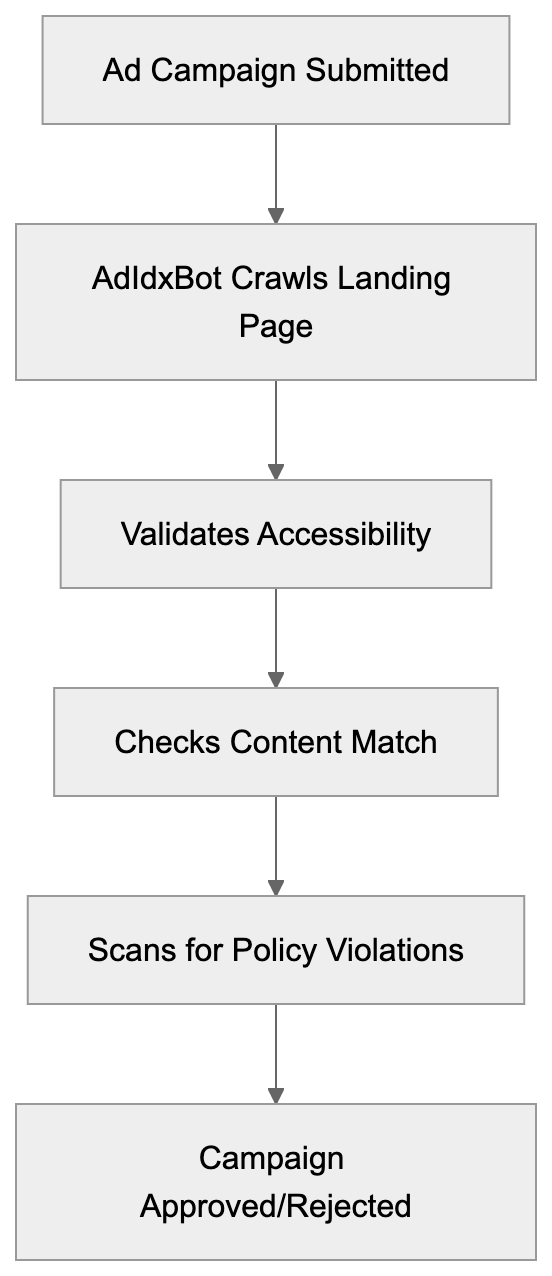
Microsoft Advertising employs AdIdxBot as an automated quality control mechanism. When advertisers submit new campaigns or update existing ones, the system deploys AdIdxBot to validate the destination URLs. The bot checks multiple factors during its validation process.
First, it verifies the landing page is reachable and loads without errors. Server errors, DNS failures, or extremely slow load times will trigger warnings or rejections. Second, AdIdxBot analyzes the page content to ensure it matches the advertised product or service. Misleading ads that promise one thing but link to unrelated content violate policies. Third, the crawler looks for prohibited content like malware, phishing attempts, or violations specific to restricted industries.
Validation occurs both during initial campaign setup and periodically throughout the campaign lifecycle. This ongoing monitoring helps maintain ad quality standards across the Microsoft Advertising network. Small business owners should understand that even after approval, their landing pages remain subject to periodic checks. Web developers need to ensure consistent accessibility and avoid changes that might trigger policy flags.
Real-World Applications and Use Cases
AdIdxBot Validation Process:
Companies running Microsoft Advertising campaigns interact with AdIdxBot whether they realize it or not. E-commerce businesses with changing product pages need to ensure AdIdxBot can access and render these pages correctly. This includes handling any authentication requirements, geo-targeting, or device-specific redirects appropriately.
Marketing professionals managing multiple campaigns should monitor their server logs for AdIdxBot activity. Unusual patterns like repeated crawls or error responses might indicate technical issues affecting campaign performance. SEO experts working on paid search landing pages need to optimize not just for user experience but also for crawler accessibility.
Software developers building custom e-commerce platforms or content management systems should test how their applications respond to AdIdxBot requests. Some security solutions or bot detection systems might inadvertently block legitimate advertising crawlers. Web developers implementing JavaScript-heavy single-page applications should verify that AdIdxBot can properly render and evaluate their content. While modern crawlers have improved JavaScript support, server-side rendering or pre-rendering solutions might still be necessary for complex applications.
AdIdxBot Compared to Similar Advertising Crawlers
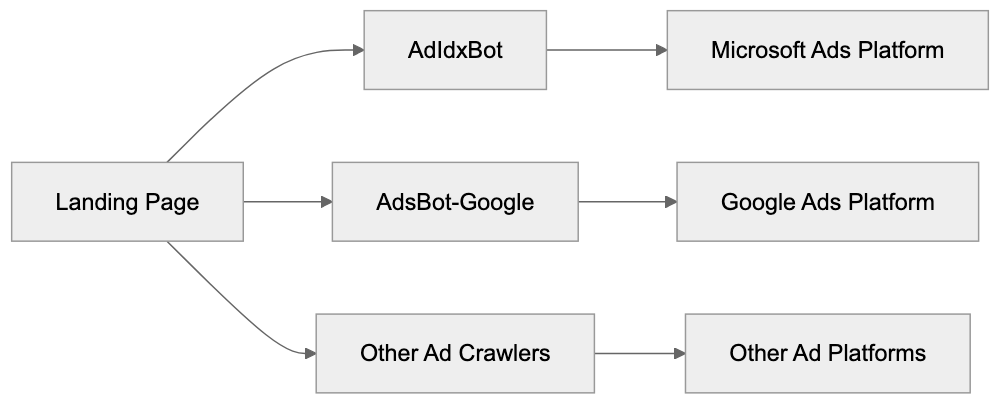
Microsoft’s AdIdxBot is not unique in its purpose. Other major advertising platforms deploy similar crawlers for quality verification. Understanding how these bots compare helps webmasters configure their systems appropriately.
| Crawler | Platform | Primary Purpose | User-Agent Pattern | Respects robots.txt |
|---|---|---|---|---|
| AdIdxBot | Microsoft Advertising | Landing page validation and ad quality | adidxbot/1.1 | Yes |
| AdsBot-Google | Google Ads | Ad quality verification and rendering | AdsBot-Google | Yes |
| FacebookExternalHit | Meta Ads | Link preview and content validation | facebookexternalhit | Partial |
| LinkedInBot | LinkedIn Ads | Content preview and validation | LinkedInBot | Yes |
| PinterestBot | Pinterest Ads | Pin validation and content quality | Pinterestbot | Yes |
These crawlers serve similar functions but differ in setup details. AdIdxBot shares infrastructure with Bingbot, benefiting from Microsoft’s search crawling technology. Google’s AdsBot-Google includes multiple variants for different ad types, including mobile ads. Facebook’s crawler focuses heavily on Open Graph metadata for generating link previews in ad content.
For web developers managing multi-platform advertising campaigns, the key is ensuring all these bots can access landing pages. Most platforms provide documentation and testing tools. Microsoft offers the Bing Webmaster Tools where you can verify crawler access. Small business owners don’t need to configure each bot individually. Standard best practices for crawler accessibility generally work across all platforms.
Technical Considerations for Developers
Advertising Crawler Ecosystem:
When working with AdIdxBot, software developers should follow several technical guidelines. First, avoid blanket bot blocking in your robots.txt file. If you need to restrict certain bots, use specific user-agent directives rather than blocking all automated traffic. The proper approach is to explicitly allow AdIdxBot while blocking problematic scrapers.
Implement proper HTTP status codes. Return 200 for successful requests, 404 for missing pages, and 301 or 302 for redirects. Temporary issues should return 503 with appropriate retry-after headers. AdIdxBot interprets these codes when evaluating landing page quality.
Improve page load speed. While AdIdxBot is patient compared to user attention spans, extremely slow pages might time out or receive lower quality scores. Aim for server response times under 2 seconds. Content marketers should work with developers to ensure landing pages load quickly without sacrificing conversion elements.
Handle redirects carefully. While AdIdxBot follows redirects, excessive redirect chains or loops will cause validation failures. Keep redirect chains to three hops maximum. Marketing professionals running A/B tests or using tracking redirects should verify these don’t interfere with crawler access.
Ensure your SSL/TLS certificates are valid and up-to-date. AdIdxBot validates HTTPS connections and will flag security certificate errors. This is increasingly important as advertising platforms push for secure landing pages across all campaigns.
Monitoring and Troubleshooting AdIdxBot Access
Webmasters should actively monitor AdIdxBot activity through server logs. Most web servers log the user-agent string, which makes identifying AdIdxBot requests straightforward. Look for entries containing “adidxbot” in your access logs. High error rates or blocked requests might explain ad disapprovals.
Microsoft Advertising provides campaign-level feedback when landing page issues are detected. The platform interface shows warnings or errors related to destination URL problems; however, these messages don’t always provide detailed technical information. Cross-referencing platform warnings with server logs gives a complete picture.
Common issues include DNS resolution failures, server timeouts, SSL certificate problems, and content policy violations. DNS issues typically stem from recent domain changes or misconfigured nameservers. Server timeouts might indicate capacity problems or inefficient application code. SSL problems usually involve expired certificates or incomplete certificate chains.
For content policy violations, the feedback is often vague for security reasons. Microsoft doesn’t want to provide a roadmap for bypassing policy enforcement. If you receive policy violation notices, review Microsoft Advertising policies thoroughly and compare your landing page content against stated requirements. SEO experts familiar with policy compliance can help identify potential issues.
Developers can use Microsoft’s URL inspection tools in Bing Webmaster Tools to test how crawlers see their pages. While this primarily shows Bingbot’s view, the shared infrastructure means AdIdxBot sees similar content. Testing destination URLs before launching campaigns prevents approval delays.
Best Practices for AdIdxBot Compatibility
Small business owners running their first Microsoft Advertising campaigns should follow these straightforward practices. Make sure your landing pages load quickly and display correctly across devices. AdIdxBot crawls from desktop user agents primarily, but page quality affects mobile ad delivery too.
Avoid cloaking or showing different content to bots versus users. Microsoft’s policies strictly prohibit this practice, and automated systems detect it. Your landing page should deliver the same experience to AdIdxBot that actual customers receive. Content marketers should match ad copy closely with landing page content to avoid misleading advertising flags.
Keep landing pages stable during active campaigns. Major redesigns or URL structure changes mid-campaign can trigger re-validation. If you must make significant changes, consider pausing campaigns temporarily or be prepared for potential approval delays. Marketing professionals should coordinate landing page updates with campaign schedules.
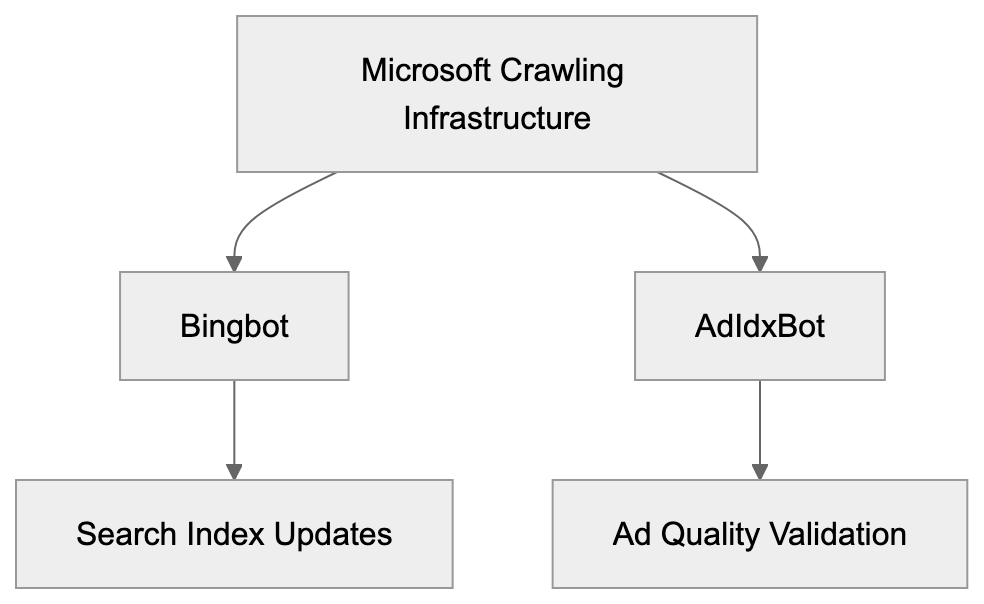
AdIdxBot and Bingbot Relationship:
Use clean, semantic HTML that clearly communicates your page structure and content. While AdIdxBot can handle JavaScript, server-side rendered HTML is more reliable for crawler interpretation. Web developers should implement progressive enhancement where basic content loads without JavaScript dependencies.
Implement proper canonical tags if you have multiple URLs serving similar content. This helps AdIdxBot understand your preferred destination URL and prevents duplicate content issues. SEO experts should ensure technical SEO setup supports both organic search and paid advertising requirements.
The Relationship Between AdIdxBot and Bingbot
AdIdxBot and Bingbot are related but distinct crawlers within Microsoft’s ecosystem. Bingbot is the primary web crawler for Bing search index updates. It crawls billions of pages to keep search results fresh and relevant, while AdIdxBot focuses on advertising quality.
The two crawlers share technical infrastructure and crawling protocols, respecting robots.txt directives, following similar rate limiting, and using comparable rendering engines. The user-agent string for AdIdxBot even references Bingbot documentation; however, their crawl patterns differ significantly.
Bingbot crawls broadly across the web based on link discovery and crawl priority algorithms. AdIdxBot only visits specific URLs associated with advertising campaigns. Bingbot might crawl a site weekly or monthly depending on update frequency and importance, while AdIdxBot typically crawls during campaign setup and periodically for active campaigns.
For webmasters, this relationship means allowing Bingbot generally ensures AdIdxBot access too. However, some might want to allow AdIdxBot while restricting Bingbot (though this is unusual). The distinct user-agent identifiers make selective access control possible through robots.txt or server configuration.
Software developers should understand that AdIdxBot benefits from improvements Microsoft makes to Bingbot’s rendering and crawling capabilities. As Bingbot gets better at handling modern web technologies, AdIdxBot inherits those improvements. This shared infrastructure means investing in Bingbot compatibility often improves AdIdxBot compatibility as well.
Conclusion and Key Takeaways
AdIdxBot plays an important role in Microsoft Advertising’s quality control system. This specialized crawler validates landing pages, verifies ad compliance, and helps maintain advertising network integrity. Understanding how it works is valuable for anyone running Microsoft Advertising campaigns.
Web developers should ensure their sites are accessible to AdIdxBot by following standard crawler best practices. Avoid blocking the bot in robots.txt, implement proper HTTP status codes, and improve page load performance. Marketing professionals need to coordinate landing page changes with active campaigns to prevent validation issues. Small business owners should monitor campaign feedback for landing page warnings and address technical issues promptly.
The bot shares infrastructure with Bingbot but serves a distinct advertising-focused purpose. Its user-agent string clearly identifies it in server logs as adidxbot/1.1. SEO experts and content marketers should regard AdIdxBot access as vital for paid search success. While it operates behind the scenes, its validation directly affects campaign approval and ad delivery. Proper technical setup ensures smooth campaign operations and increases advertising effectiveness on the Microsoft Advertising platform.
Frequently Asked Questions
What should I do if AdIdxBot cannot access my landing page?
If AdIdxBot cannot access your landing page, check your server logs for blocked requests or errors. Ensure that your site is configured to allow AdIdxBot and that it is not being blocked by your robots.txt file. Additionally, confirm that your URL is accessible, loads quickly, and does not contain server errors.
How can I monitor AdIdxBot's activity on my site?
You can monitor AdIdxBot activity by checking your server logs for requests that include the user-agent string "adidxbot/1.1". Keeping an eye on these logs will help you identify any issues such as high error rates that could lead to campaign disapproval.
What are common reasons for AdIdxBot rejection of my ads?
Common reasons for rejection include landing page accessibility issues, server errors, or content that violates advertising policies. Your landing page should load without errors and align with the advertised content to avoid misleading advertisements, which can lead to disapprovals.
How frequently does AdIdxBot check my landing page during a campaign?
AdIdxBot initially verifies your landing page during campaign setup and conducts periodic checks throughout the campaign lifecycle. This continual validation helps ensure that your ads remain compliant and effective over time.
Can I use modern web technologies like JavaScript with AdIdxBot?
Yes, AdIdxBot can handle modern web technologies, including JavaScript. However, for the best results, ensure that your content is server-side rendered or pre-rendered to guarantee that it is fully accessible to the crawler.
What should I avoid in my robots.txt file regarding AdIdxBot?
Avoid blocking AdIdxBot in your robots.txt file. If you need to restrict access for other bots, be specific and only block those bots, allowing AdIdxBot to crawl your landing pages without restrictions.
How can I ensure my SSL/TLS certificates are valid for AdIdxBot?
Ensure that your SSL/TLS certificates are up-to-date and valid. AdIdxBot validates HTTPS connections, and issues such as expired or incomplete certificate chains can lead to landing page validation failures.