Amazonbot: Web Crawler for Alexa AI Complete Guide
Learn about Amazonbot web crawler, its role in Alexa AI, user-agent details, and how to manage or block its crawling activities on your site.
Table of Contents
- What is Amazonbot
- Why Amazonbot Exists and Its Purpose
- How Amazonbot Works
- Managing Amazonbot on Your Website
- Verifying Amazonbot Traffic
- Amazonbot Compared to Other Web Crawlers
- Privacy and Data Usage Concerns
- Technical Details for Developers
- Impact on Website Performance
- Future of Amazonbot and Web Crawling
- Conclusion
- What is Amazonbot
- Why Amazonbot Exists and Its Purpose
- How Amazonbot Works
- Managing Amazonbot on Your Website
- Verifying Amazonbot Traffic
- Amazonbot Compared to Other Web Crawlers
- Privacy and Data Usage Concerns
- Technical Details for Developers
- Impact on Website Performance
- Future of Amazonbot and Web Crawling
- Conclusion
What is Amazonbot
Amazonbot is Amazon’s official web crawler. It scans and indexes websites across the internet to collect data for various Amazon services. The bot primarily supports Alexa AI and other Amazon products that need web data to function properly. Web crawlers like Amazonbot exist because companies need to gather information from the public web to power their services, including search engines, AI assistants, and shopping comparison tools. This includes search engines, AI assistants, shopping comparison tools, and more.
Without crawlers, these services wouldn’t have access to fresh web content, which is essential for providing up-to-date information to users. Amazonbot specifically helps Amazon understand web content, improve search results, and train AI models, thereby enhancing the overall user experience. The Amazon crawler respects standard web protocols like robots.txt and provides clear identification through its user-agent string. Website owners can control how Amazonbot interacts with their sites through standard blocking methods.
Why Amazonbot Exists and Its Purpose
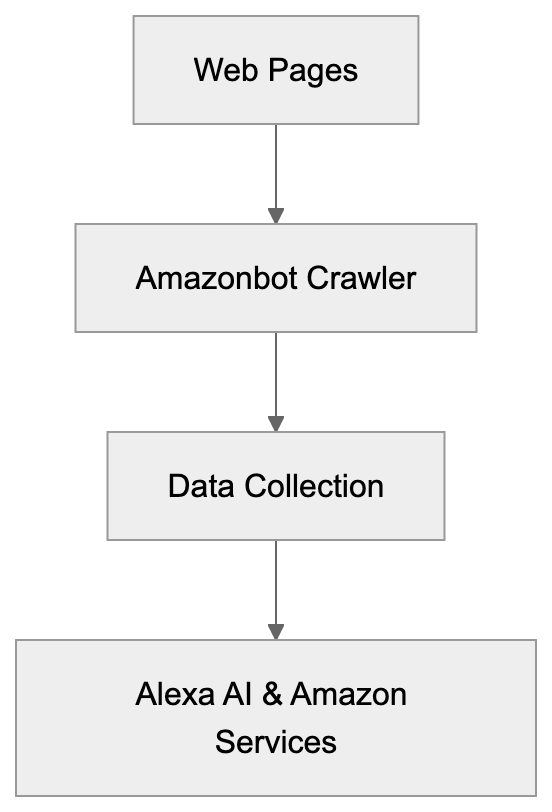
Amazon created Amazonbot to gather web data for multiple purposes. The primary goal is supporting Alexa, Amazon’s voice assistant and AI platform. Alexa needs up-to-date information from the web to answer user questions accurately. When someone asks Alexa about the weather, news, or general knowledge, the system relies on crawled web data.
The Amazon web scraper also helps Amazon’s shopping services by collecting product information, prices, and reviews from across the web. This data improves search results and product recommendations on Amazon’s platform. Another purpose is training AI models. Machine learning systems need large amounts of text data to learn language patterns and improve their responses. Amazonbot collects this training data from publicly available websites.
Amazonbot Web Crawling Process:
The crawler also helps Amazon monitor web trends, understand user behavior, and improve their overall services. By analyzing web content, Amazon can identify what information users search for most and adjust their products accordingly.
How Amazonbot Works
Amazonbot operates like most shopping crawlers. It starts with a list of URLs and visits each page systematically. The bot downloads page content, follows links, and adds new URLs to its crawl queue. The user-agent string for Amazonbot looks like this: “Mozilla/5.0 (compatible; Amazonbot/0.1; +https://developer.amazon.com/support/amazonbot).” This identifier lets website owners know exactly which bot is accessing their content.
The crawler follows standard protocols including robots.txt files. If your robots.txt file blocks Amazonbot, the crawler will respect those rules and skip your content. The bot crawls at a reasonable rate to avoid overloading servers. It doesn’t try to bypass security measures or access password-protected areas.
Amazon provides official documentation about Amazonbot on their developer portal. Website owners can verify that traffic actually comes from Amazonbot by doing reverse DNS lookups. Legitimate Amazonbot traffic comes from IP addresses in Amazon’s verified ranges.
Managing Amazonbot on Your Website
How Amazonbot Operates:

Website owners have several options for controlling Amazonbot access. The simplest method is using a robots.txt file.
Add these lines to block Amazonbot completely:
User-agent: Amazonbot
Disallow: /
This tells the crawler not to access any part of your site. You can also block specific directories while allowing others. For example, block your admin area but allow public pages.
Another option is using meta tags in your HTML. Add this tag to individual pages you want to block:
<meta name="Amazonbot" content="noindex, nofollow">This prevents the bot from indexing that specific page. You can also control the crawl rate through your server configuration. Set rate limits if you notice Amazonbot consuming too much bandwidth.
Some content management systems have plugins that help manage crawler access. These tools provide user-friendly interfaces for setting crawler rules without editing files manually. Always test your blocking rules to make sure they work correctly. Use webmaster tools or log files to verify Amazonbot respects your settings.
Verifying Amazonbot Traffic
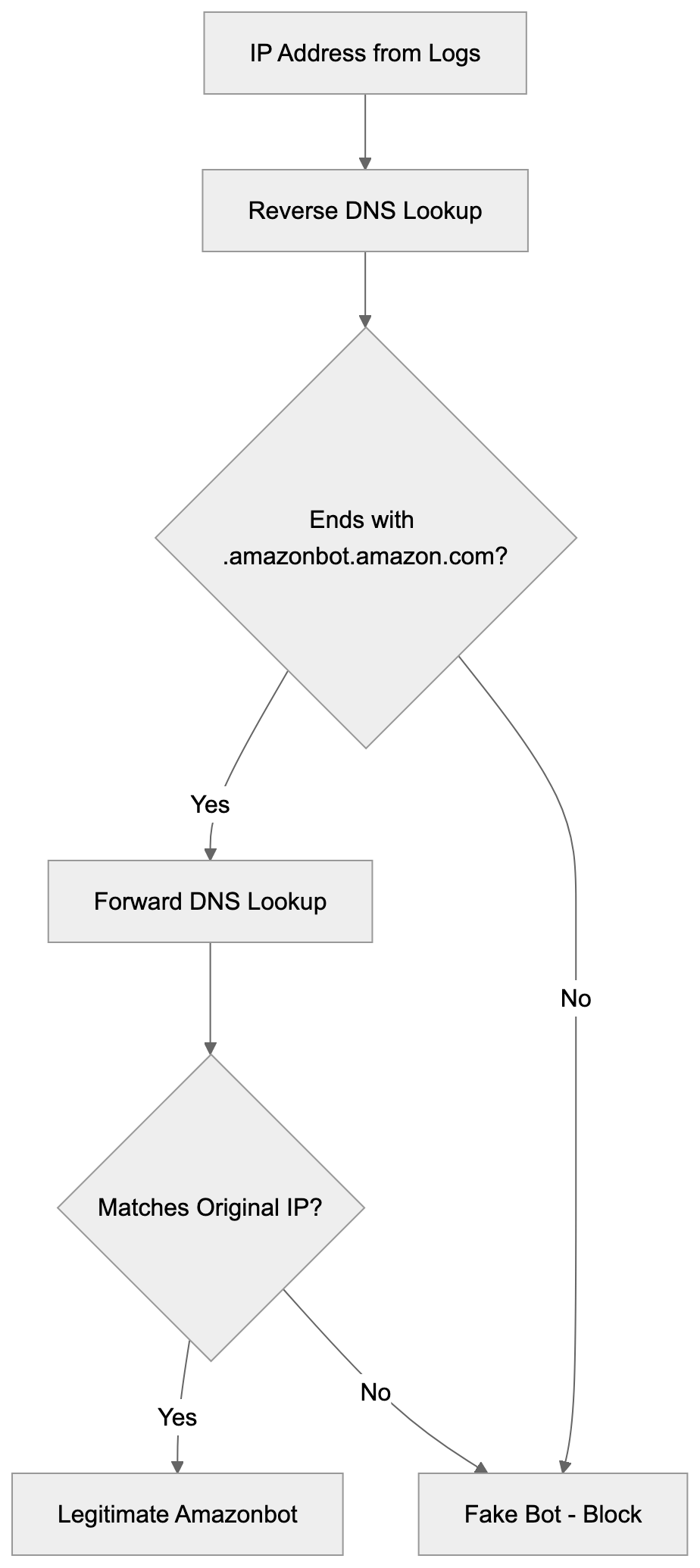
Not all traffic claiming to be Amazonbot actually comes from Amazon. Malicious bots sometimes fake user-agent strings to bypass filters. Website owners should verify Amazonbot traffic is legitimate. The official method is performing a reverse DNS lookup on the IP address.
Real Amazonbot traffic comes from hosts ending in “.amazonbot.amazon.com.”
Here’s the verification process:
- Take the IP address from your server logs
- Do a reverse DNS lookup to get the hostname
- Verify the hostname ends with .amazonbot.amazon.com
- Do a forward DNS lookup on that hostname
- Confirm it resolves back to the original IP address
This two-step verification ensures the traffic really comes from Amazon’s infrastructure. If the IP doesn’t pass this test, it’s a fake bot. You can then block those IPs at your firewall level.
Amazon publishes official IP ranges for Amazonbot on their developer documentation, but these ranges can change, so DNS verification is more reliable. Some security tools and CDN services can automatically verify crawler authenticity. These services maintain updated lists of legitimate crawler IPs and block imposters.
Amazonbot Compared to Other Web Crawlers
Many companies run web crawlers for similar purposes. Understanding how Amazonbot compares helps website owners make informed decisions about crawler access. Here’s a comparison of major web crawlers:
| Crawler | Company | Primary Purpose | Respects Robots.txt | Verification Method |
|---|---|---|---|---|
| Amazonbot | Amazon | Alexa AI, Shopping | Yes | Reverse DNS lookup |
| Googlebot | Search indexing | Yes | Reverse DNS lookup | |
| Bingbot | Microsoft | Search indexing | Yes | Reverse DNS lookup |
| GPTBot | OpenAI | AI training | Yes | IP range verification |
| CCBot | Common Crawl | Public dataset | Yes | Reverse DNS lookup |
Amazonbot Verification Process:
Googlebot is the most well-known crawler. It indexes content for Google Search and has been operating for over 20 years. Bingbot serves Microsoft’s search engine and follows similar practices to Googlebot. Both crawlers are needed for website visibility in search results.
GPTBot is newer and specifically collects data for training ChatGPT and other OpenAI models. It became controversial because many website owners don’t want their content used for AI training. CCBot creates public datasets that researchers and companies use for various purposes.
All these crawlers respect robots.txt and provide verification methods. The main difference is their purpose. Search engine crawlers help websites get discovered. AI training crawlers collect data for machine learning models. Shopping crawlers gather product information and prices.
Privacy and Data Usage Concerns
Web crawlers raise privacy questions that website owners should understand. When Amazonbot crawls your site, it collects publicly available content. This data may be used for AI training, product development, and other Amazon services.
Amazon’s privacy policy covers how they use crawled data, but the details can be complex. Unlike user-generated content on Amazon’s platforms, crawled web data doesn’t require direct user consent. If you publish content publicly, crawlers can legally access it in most jurisdictions, but you can opt-out by blocking the crawler.
Some website owners block AI training bots because they don’t want their content used to train commercial AI systems. Others allow crawling because it helps their content reach more users through AI assistants. The decision depends on your business model and values.
E-commerce sites might benefit from Amazonbot crawling product pages. This could lead to better product visibility in Alexa results. Publishers might have different concerns about content being used without compensation.
Technical Details for Developers
Developers managing web infrastructure need specific technical information about Amazonbot. The crawler supports standard HTTP/HTTPS protocols and follows redirects appropriately. It handles both 301 permanent and 302 temporary redirects correctly.
The bot respects crawl-delay directives in robots.txt files. If you set a crawl-delay of 10 seconds, Amazonbot waits that long between requests. This helps prevent server overload on smaller sites.
Amazonbot processes JavaScript-rendered content to some extent, but it works best with server-side rendered HTML. If your site relies heavily on client-side JavaScript, make sure important content appears in the initial HTML.
The crawler supports common content types including HTML, PDF, and text files. It may not process multimedia files like videos or audio directly. For sites with changing content, Amazonbot can handle URL parameters, but prefers clean URL structures. Use canonical tags to indicate preferred versions of duplicate content. The bot respects these tags and consolidates duplicate pages appropriately.
Server logs show Amazonbot visits with the user-agent string mentioned earlier. Monitor these logs to understand crawl patterns and frequency. If you notice unusual activity, verify it’s legitimate Amazonbot traffic using DNS lookups.
Impact on Website Performance
Web crawler activity affects server resources and website performance. Amazonbot typically crawls at moderate rates that shouldn’t impact most sites, but smaller sites with limited resources might notice increased server load. Monitor your server metrics when crawler activity increases.
Key metrics include CPU usage, memory consumption, bandwidth, and response times. If Amazonbot causes problems, adjust your robots.txt to slow down crawling. The crawl-delay directive helps manage request frequency. For high-traffic sites, crawler activity is usually negligible compared to regular user traffic.
Amazon’s infrastructure is sophisticated enough to avoid overloading servers. The crawler adapts its rate based on server response times. If your server responds slowly, Amazonbot automatically reduces its request rate. This adaptive behavior prevents crashes and maintains site stability.
Content delivery networks and caching help reduce crawler impact. Cached content serves faster and uses fewer server resources. CDNs can also provide crawler-specific optimizations and rate limiting. Some hosting providers offer crawler management tools. These tools let you set global rules for all crawlers or specific rules for individual bots.
Future of Amazonbot and Web Crawling
Web crawling continues to evolve as AI becomes more important. Amazonbot will likely expand its capabilities to support new Amazon AI services. As Alexa and other Amazon AI tools improve, they’ll need more complete web data. This means Amazonbot might increase crawl frequency and coverage.
The broader trend in web crawling involves more AI-focused bots. Companies training large language models need massive amounts of text data. This has led to debates about web scraping ethics and copyright. Some jurisdictions are creating new regulations around AI training data. These laws might affect how crawlers operate and what data they can collect.
Website owners are becoming more selective about which crawlers they allow. Many now block AI training bots while permitting search engine crawlers. This selective approach recognizes different crawler purposes and impacts.
Amazon might introduce more granular controls for Amazonbot in the future. Website owners could potentially specify which Amazon services can use their data. The relationship between content creators and AI companies continues to develop. Expect more tools and standards for managing crawler access as AI becomes more prevalent.
Conclusion
Amazonbot is Amazon’s web crawler that collects data for Alexa AI and other Amazon services. The bot operates transparently with clear identification and respects standard web protocols. Website owners can control Amazonbot access through robots.txt files, meta tags, and server configurations. Verification methods exist to confirm traffic actually comes from Amazon’s legitimate infrastructure.
Compared to other crawlers like Googlebot and GPTBot, Amazonbot serves specific purposes related to Amazon’s ecosystem. Understanding these purposes helps website owners make informed decisions about allowing or blocking the crawler. The crawler generally has minimal impact on website performance, but owners should monitor server resources. As AI technology advances, web crawling will continue evolving with new considerations around data usage and privacy. Website owners should stay informed about crawler policies and adjust their access rules based on their specific needs and values.
Frequently Asked Questions
What should I do if I want to block Amazonbot from crawling my site?
You can block Amazonbot using a robots.txt file by adding the lines: User-agent: Amazonbot. This will prevent the bot from accessing any part of your site. Alternatively, you can use HTML meta tags on specific pages to control access.
Disallow: /
How can I verify that the traffic coming to my site is from Amazonbot?
To verify Amazonbot traffic, perform a reverse DNS lookup on the IP address. Legitimate traffic will display a hostname ending with .amazonbot.amazon.com. Additionally, you can conduct a forward DNS lookup to ensure it resolves back to the original IP.
What impact does Amazonbot have on my website's performance?
Amazonbot generally crawls at moderate rates, but smaller websites with limited resources may notice server load increases. It's recommended to monitor key server metrics and adjust the crawl rate via settings in your robots.txt file if necessary.
Can I control how often Amazonbot crawls my website?
Yes, you can manage the crawl rate by specifying a crawl-delay directive in your robots.txt file. This tells Amazonbot how long to wait between requests, helping to prevent excessive load on your servers.
What types of content does Amazonbot process?
Amazonbot processes common content types such as HTML, PDF, and text files. However, it might not handle multimedia files like videos or audio directly. Ensuring that important content is available in the initial HTML can optimize crawling.
What ethical considerations exist regarding Amazonbot and web crawling?
Web crawling raises various ethical questions, particularly around content usage for AI training and privacy. While crawlers can legally access publicly available information, many website owners are cautious about how their data might be used, leading them to block certain bots.
Is Amazonbot similar to other web crawlers?
Yes, Amazonbot operates similarly to other crawlers like Googlebot and Bingbot, as they all respect robots.txt files and have verification methods. However, the primary focus of Amazonbot is to support Amazon-specific services, whereas others may focus on general search indexing or AI training.