Apple-CloudKit Bot: Features and Developer Insights
Learn about the Apple-CloudKit bot's purpose, user-agent string, developer features, and blocking considerations for web developers.
Table of Contents
- What is the Apple-CloudKit Bot
- Why the Apple-CloudKit Bot Exists
- User-Agent String and Identification
- How Companies and Developers Use CloudKit
- Blocking Considerations and Best Practices
- Relationship with Other Apple Bots
- Comparison with Similar Service Bots
- Technical Implementation for Developers
- Privacy and Data Considerations
- What is the Apple-CloudKit Bot
- Why the Apple-CloudKit Bot Exists
- User-Agent String and Identification
- How Companies and Developers Use CloudKit
- Blocking Considerations and Best Practices
- Relationship with Other Apple Bots
- Comparison with Similar Service Bots
- Technical Implementation for Developers
- Privacy and Data Considerations
What is the Apple-CloudKit Bot
The Apple-CloudKit bot is a web crawler operated by Apple Inc. within its cloud infrastructure, specifically designed to enhance the functionality of CloudKit, Apple’s backend service for iOS and macOS applications. It plays a vital role in Apple’s cloud services ecosystem, specifically aiding Apple’s CloudKit service. This CloudKit bot assists in retrieving and processing web content that users share or reference through CloudKit-enabled applications. CloudKit is Apple’s backend cloud service, essential for developers to store app data, user information, and content in iCloud.
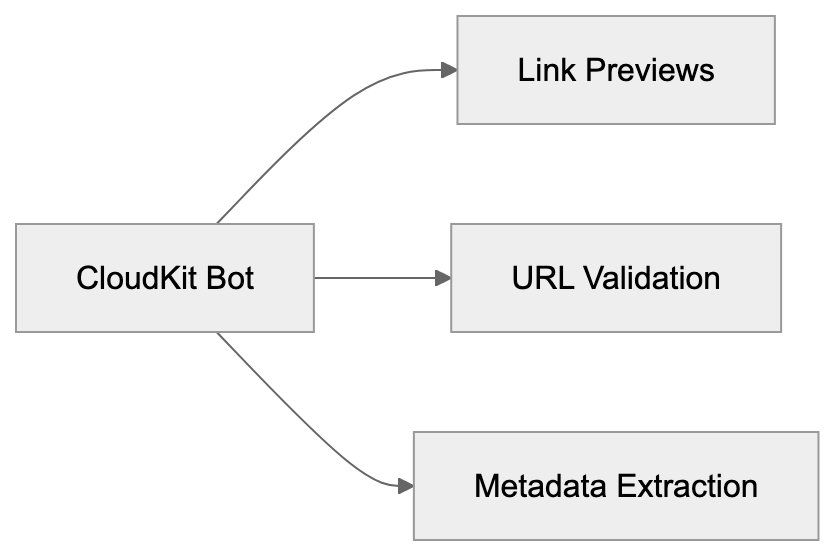
When you notice the Apple-CloudKit bot in your server logs, it indicates Apple’s systems are fetching web content linked to CloudKit services. This typically occurs when CloudKit generates link previews, validates URLs, or fetches metadata from web pages shared in apps using CloudKit. Web developers and server administrators must understand this bot’s function to manage their crawler policies and server resources effectively, ensuring optimal performance and user experience.
Why the Apple-CloudKit Bot Exists
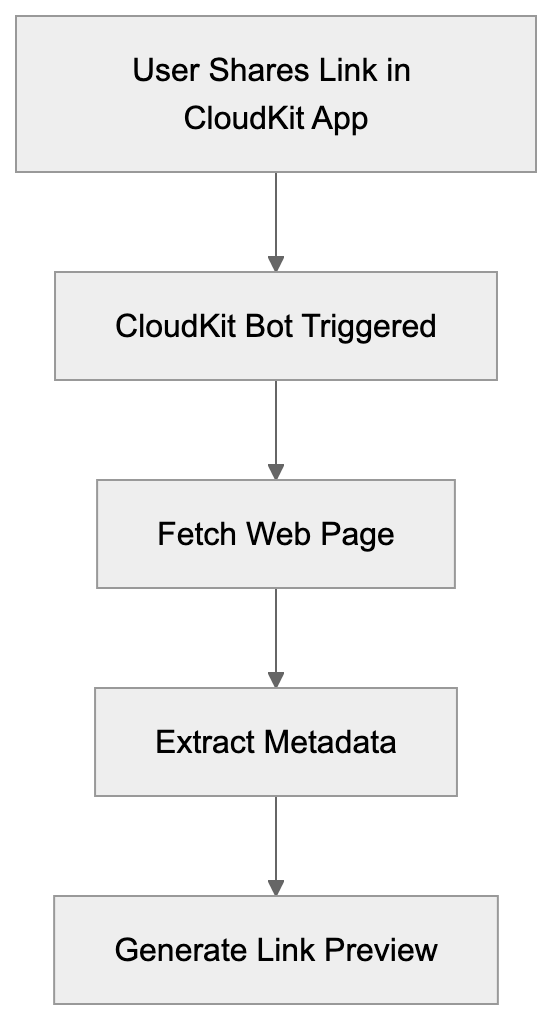
Apple-CloudKit Bot Operation Flow:
Apple developed the CloudKit bot to enhance its cloud services infrastructure and user experience in CloudKit-enabled apps, ensuring efficient data synchronization and storage across devices. When a user shares a link in a CloudKit-based app, the bot fetches the page to create rich previews with images, titles, and descriptions. This process occurs automatically in the background.
Further, the bot validates URLs to ensure links are active and safe, displaying accurate information to users. Millions of iOS, iPadOS, and macOS users share links daily through CloudKit-enabled applications, necessitating this automated system. Without it, apps couldn’t show link previews or verify content authenticity.
The bot functions similar to how Facebook or Twitter crawlers operate when pasting a link on their platforms, reading page metadata and processing information for display. This automation saves developers from creating their link preview systems, providing a consistent user experience across the Apple ecosystem.
User-Agent String and Identification
The Apple-CloudKit bot identifies itself using a specific user-agent string in HTTP requests, similar to other web crawlers like Applebot. Typically, it appears as: com.apple.cloudkit/XXX (YYY), where XXX indicates version information and YYY includes system details.
CloudKit Bot Functions:
Web servers can recognize this bot by checking the user-agent header in incoming requests. Server administrators monitoring their access logs will find this identifier when the bot visits their pages. The user-agent string aids in distinguishing CloudKit bot traffic from regular user traffic or other web crawlers.
Unlike some bots concealing their identity, Apple’s crawler transparently announces itself, enabling webmasters to make informed decisions about permitting or blocking it. As Apple updates CloudKit services, version numbers in the user-agent may vary, possibly including additional information about specific CloudKit operations.
How Companies and Developers Use CloudKit
Developers integrate CloudKit into their iOS, macOS, watchOS, and tvOS applications for cloud storage and synchronization. Apple Cloud Services like CloudKit provide free storage tiers and manage backend infrastructure, eliminating the need for developers to set up their servers.
Apps utilize CloudKit to store user-generated content, app preferences, and shared data. Frequently, apps in note-taking, task management, and content creation categories rely on CloudKit. When users share links in these apps, the CloudKit bot becomes active to process those URLs.
Small business owners developing apps benefit from CloudKit by reducing infrastructure costs and development time. Marketing professionals working on app-based campaigns need to understand CloudKit’s processing of shared links for effective tracking and analytics. It’s crucial for web developers to optimize their pages for the CloudKit web scraper, akin to social media crawlers. This involves implementing proper Open Graph tags, meta descriptions, and ensuring fast page load times for bot visits.
Blocking Considerations and Best Practices
Blocking the Apple-CloudKit bot requires thoughtful consideration. Blocking it results in improper display of links in CloudKit-enabled apps, leading to broken previews or missing information when your content is shared. This can diminish engagement and make your links less appealing.
There are legitimate reasons to block the bot, such as reducing server load on high-traffic sites or protecting paywalled content to prevent previews. Blocking can be executed via the robots.txt file by adding specific rules for the CloudKit user-agent. Server-level blocking using .htaccess rules or firewall configurations is another method.
Keep in mind, blocking may negatively impact user experience. A better approach might involve rate limiting instead of complete blocking, allowing functionality while preventing excessive requests. Consider permitting the bot but serving cached or simplified page versions. Remember, the Apple-CloudKit bot doesn’t heavily execute JavaScript, so your page should function without complex client-side rendering. Test how your links appear in CloudKit-enabled apps before implementing blocks.
Relationship with Other Apple Bots
Apple operates several crawlers for diverse purposes. The Apple-CloudKit bot collaborates with these bots. Apple bots like Applebot, used for Siri, Spotlight, and Safari, and Applebot-Extended, used potentially for AI training, serve different functions within Apple’s ecosystem.
CloudKit bot zeroes in on link preview generation and content validation for CloudKit. Unlike Applebot-Extended, it doesn’t index pages for search or gather training data. Web developers should treat each Apple bot according to its designated purpose.
Allowing the CloudKit bot while blocking Applebot-Extended, if content privacy is a priority, is a possible strategy. User-agent strings differ between these bots, enabling selective blocking. Apple bots generally respect robots.txt directives and adhere to standard web protocols, following crawl-delay rules and honoring nofollow tags.
Understanding distinctions among Apple bots aids in making informed decisions about crawler access. Your robots.txt file can house unique rules for each bot type, enabling granular control over user experience while safeguarding interests.
Comparison with Similar Service Bots
Many tech companies operate similar bots for their cloud and social services. Here’s a comparison with the Apple-CloudKit bot:
| Bot Name | Company | Primary Purpose | User-Agent Identifier | Respects robots.txt |
|---|---|---|---|---|
| Apple-CloudKit | Apple | Link previews for CloudKit apps | com.apple.cloudkit | Yes |
| facebookexternalhit | Meta | Link previews for Facebook/Instagram | facebookexternalhit | Yes |
| Twitterbot | Twitter/X | Link previews and cards | Twitterbot | Yes |
| LinkedInBot | Link previews and content validation | LinkedInBot | Yes | |
| Slackbot | Slack | Link unfurling and previews | Slackbot-LinkExpanding | Yes |
| TelegramBot | Telegram | Link previews in chats | TelegramBot | Yes |
These bots share similar functions, fetching web pages for rich previews upon user link sharing. The Apple-CloudKit bot is specific to Apple’s ecosystem and CloudKit-enabled applications. Facebook’s bot manages billions of shared links, and Twitter’s bot produces tweet cards with images and descriptions, each with distinct crawl rates and resource usage.
Typically, the CloudKit bot has lower traffic volume than Facebook or Twitter bots, activating only for CloudKit exchanges. Web developers must cater to all these bots to ensure content displays correctly across platforms. Setup requirements are similar: precise meta tags, Open Graph data, and fast response times. Most bots adhere to standard web protocols and can be managed through robots.txt configurations.
Technical Implementation for Developers
Link Preview Generation Process:
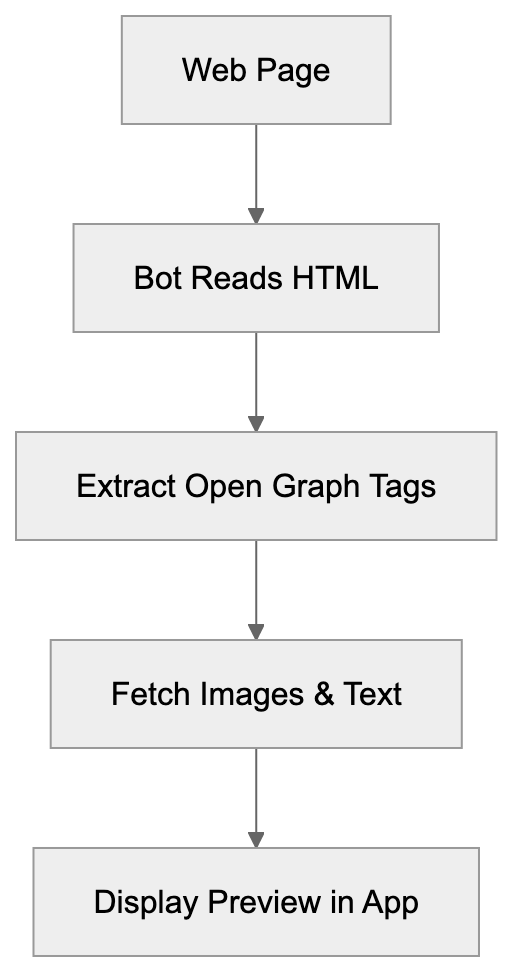 Web developers can enhance their sites for the Apple-CloudKit bot through specific technical measures. Start by inserting appropriate Open Graph meta tags in your HTML pages. These tags instruct the bot on the title, description, and image for previews. The og:title tag defines the link preview headline, the og:description provides preview text, and the og:image specifies the preview image URL.
Ensure your server responds swiftly to requests, as timeout thresholds exist. CloudKit expects responses promptly. Implement caching strategies for managing repeated bot visits effectively. Use CDN services to serve static assets faster when the bot crawls your pages.
Regularly check server logs to monitor CloudKit bot activity patterns, identifying any unusual traffic spikes or potential issues. Some developers serve enhanced lightweight versions to the bot, a strategy worth considering. Validate SSL certificates as Apple bots verify security.
Test your links by sharing them in CloudKit-enabled apps to observe actual preview results. Tools like the Open Graph debugger can assist in troubleshooting issues before deployment. Remember, the bot doesn’t execute complex JavaScript, so crucial preview data should be in the HTML source.
Privacy and Data Considerations
The Apple-CloudKit bot raises privacy and data collection questions. When visiting your page, it accesses publicly available content akin to any web browser. However, this access occurs automatically without direct user interaction on your site.
The bot collects metadata, page titles, descriptions, and images for preview generation, storing this data in Apple’s systems for display in CloudKit-enabled apps. Apple’s privacy policies govern the usage and retention of this information. Unlike Applebot-Extended that might use data for AI training, the CloudKit bot is concentrated on link preview functionality.
Content creators should realize that publicly accessible pages are subject to crawling by this bot. To protect sensitive information, use proper authentication and access controls, as the bot typically does not bypass login pages or paywalls. It solely accesses publicly available content.
For GDPR compliance, the bot’s activity falls under legitimate interest for service functionality. Users sharing links anticipate functioning previews, so web developers do not need special consent mechanisms for standard bot crawling. However, having clear terms of service explaining content appearance on other platforms is advisable.
The CloudKit bot does not track individual users or collect personal browsing data. It responds to link sharing events within CloudKit services.
In conclusion, the Apple-CloudKit bot plays an indispensable role in Apple’s cloud services ecosystem, enabling link previews and content validation across multiple Apple platforms. Web developers and server administrators must grasp the bot’s purpose and behavior. With its clear user-agent string and adherence to standard web protocols, it offers a seamless sharing experience in Apple’s ecosystem. Allowing the CloudKit bot enhances content shareability and user engagement without significant downside, compared to similar bots from Facebook, Twitter, and other platforms.
Frequently Asked Questions
What functionalities does the Apple-CloudKit bot provide?
The Apple-CloudKit bot enhances user experience by generating rich link previews for CloudKit-enabled applications. It fetches webpage metadata, ensuring that the content users share appears accurate and engaging, along with validating URLs for safety.
How can I identify the Apple-CloudKit bot in my server logs?
The bot identifies itself through a specific user-agent string, which appears as 'com.apple.cloudkit/XXX (YYY)'. By checking this string in your access logs, you can confirm when the bot has visited your site.
What should I consider before blocking the Apple-CloudKit bot?
Blocking the Apple-CloudKit bot can lead to issues with link previews in CloudKit-enabled apps, potentially diminishing user engagement. If server load is a concern, consider rate limiting instead of complete blocking to still allow some functionality.
How can developers optimize their sites for the CloudKit bot?
Developers can optimize for the CloudKit bot by adding proper Open Graph meta tags to their HTML to dictate how link previews should appear. Also, ensuring fast server response times and employing caching strategies can improve the crawling experience.
Does the CloudKit bot collect personal user data?
No, the Apple-CloudKit bot does not track individual users or collect personal browsing data. Its role is limited to accessing publicly available content to generate link previews without direct user interaction.
Can I test how my links appear in CloudKit-enabled apps?
Yes, you can test how your links appear by sharing them within CloudKit-enabled applications. This will allow you to see the resulting previews and make any necessary adjustments before full deployment.
Are there similar bots to the Apple-CloudKit bot?
Yes, many tech companies have similar bots, such as Facebook's and Twitter's crawlers, which serve the purpose of generating link previews. Each bot has specific functions tailored to its respective platform, but they generally follow similar web protocols.