Understanding Applebot: Apple's Web Crawler Explained
Learn how Applebot powers Siri and Spotlight searches. Discover user-agent strings, verification methods, and how it compares to other crawlers.
What is Applebot
Applebot is Apple’s web crawler that powers search results in Siri search, Spotlight results, and Safari. Think of it as Apple’s version of Googlebot, but specifically designed for Apple’s ecosystem. The Apple web crawler visits websites across the internet and indexes content. This process ensures that when you ask Siri a question or perform a search in Spotlight on your Mac or iPhone, it can provide relevant answers.
Web crawlers like Applebot are essential because search features need fresh, updated content from the web. Without search engine crawlers constantly scanning websites, your Siri queries would return outdated or incomplete information. Apple launched Applebot publicly around 2015, though the company had been working on search technology internally before that. Apple confirms its ‘Applebot’ is indexing the web for Siri and Spotlight
Applebot Web Crawling Process:
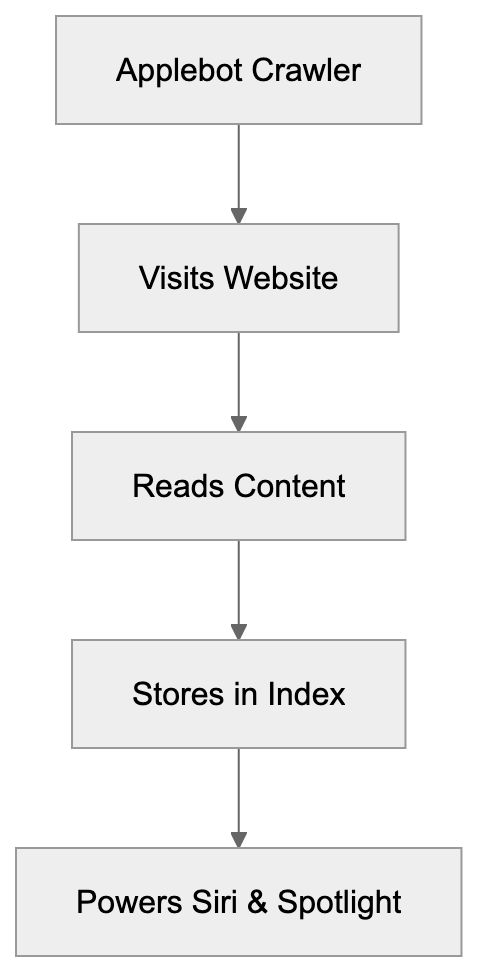
The crawler respects standard web protocols like robots.txt and sends clear identification in its web crawler user agent string. Website owners and developers need to understand Applebot because it affects how their content appears in Apple’s search results. If you block Applebot, your content won’t show up when people use Siri or Spotlight to search.
Why Applebot Exists and Its Purpose
Apple created Applebot to reduce dependency on third-party search engines. Apple confirms the existence of the Applebot and its role in powering Siri and Spotlight. Before Applebot, Apple relied heavily on Bing and Google for search results in its products. Having their own crawler gives Apple more control over search quality and user privacy.
The main purpose is powering Siri’s web search capabilities. When you ask Siri, “what’s the weather” or “show me news about tech,” Applebot’s indexed data helps generate those results. Spotlight search on Mac and iOS also uses Apple search bot’s index to show web results alongside local files and apps.
Another purpose is improving Safari’s features. Applebot helps with Safari’s intelligent tracking prevention and fraud detection. The crawler analyzes web pages to identify patterns that might indicate malicious sites or tracking scripts.
For businesses and content creators, Applebot matters because millions of people use Apple devices daily. If your website is properly crawled and indexed, it can appear in Siri search, Spotlight results, and Safari suggestions. This represents significant traffic potential from Apple’s user base.
Applebot User-Agent Strings
Applebot identifies itself through specific user-agent strings when it visits websites. There are actually multiple variants depending on what the bot is doing. The desktop version looks like this:
Mozilla/5.0 (Macintosh; Intel Mac OS X 10_15_7) AppleWebKit/605.1.15 (KHTML, like Gecko) AppleBot/0.1The mobile version user-agent string is:
Mozilla/5.0 (iPhone; CPU iPhone OS 16_5 like Mac OS X) AppleWebKit/605.1.15 (KHTML, like Gecko) AppleBot/0.1There’s also Applebot-Extended, which is used for training Apple’s AI and machine learning models. This variant was introduced more recently as Apple expanded into AI features. The user-agent includes “Applebot-Extended” in the string.
Website owners can check their server logs for these user-agent strings to see when Applebot visits. The version number after “AppleBot/” may vary as Apple updates the crawler. Most web analytics tools will categorize these visits under bots or crawlers automatically.
If you want to allow regular Applebot but block the AI training crawler, you need to specifically target Applebot-Extended in your robots.txt file. This gives you granular control over how Apple uses your content.
How to Verify Applebot Visits
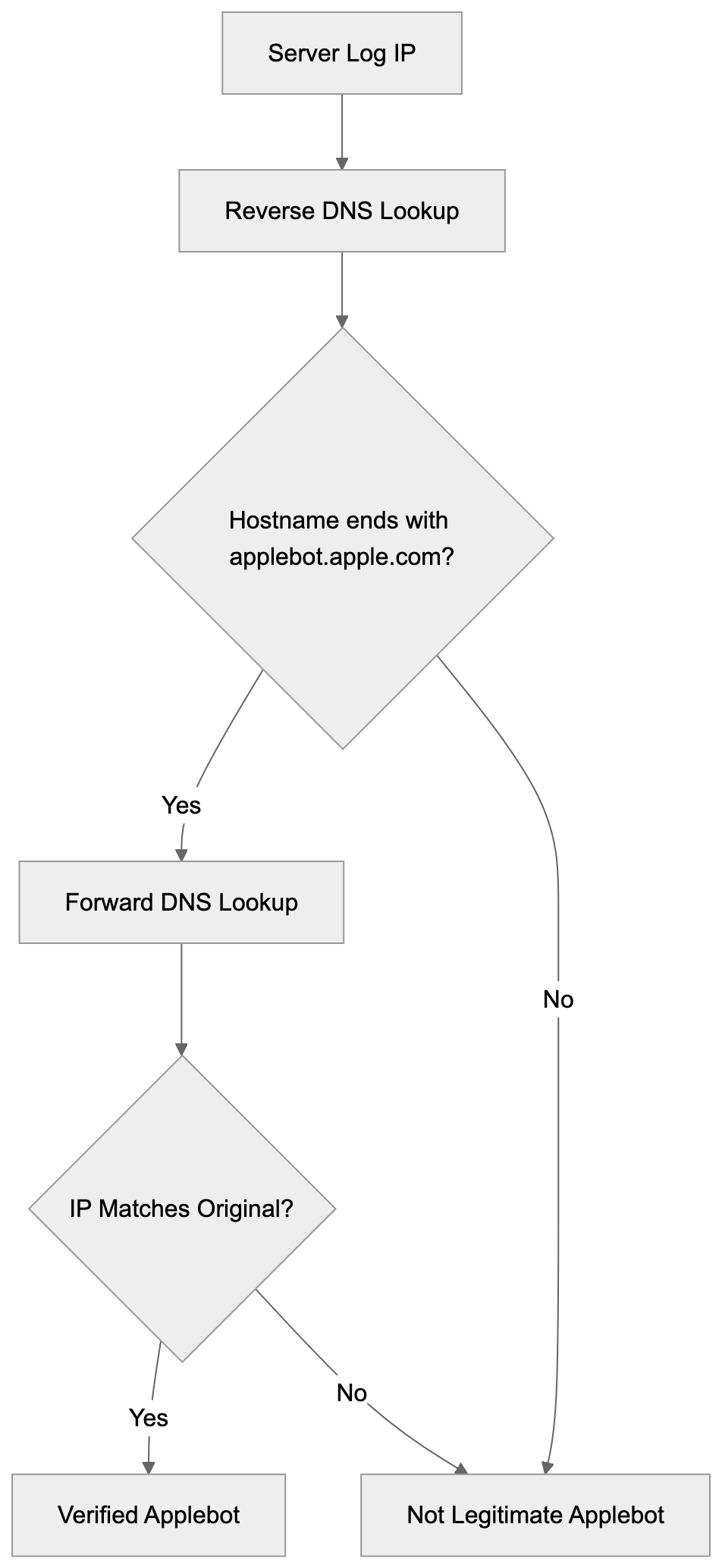
Not every bot claiming to be Applebot is legitimate. Malicious bots sometimes fake user-agent strings to bypass security measures. Apple provides a method for Applebot verification using reverse DNS lookup.
First, take the IP address from your server logs where you see an Applebot visit. Then, run a reverse DNS lookup on that IP. The hostname should end with “applebot.apple.com”. After that, do a forward DNS lookup on that hostname and confirm it matches the original IP address.
Here’s the verification process step by step:
- Get the IP from logs.
- Run
host [ip-address]command. - Check if the result shows applebot.apple.com domain.
- Then run
host [hostname-from-previous-step]and verify the IP matches.
Apple documents this verification method on their support pages. It’s similar to how Google recommends verifying Googlebot. The two-step DNS check prevents IP spoofing because the attacker would need to control both forward and reverse DNS records.
Most website owners won’t need to manually verify every visit, but if you’re seeing unusual traffic patterns or suspected bot abuse, verification helps identify legitimate Apple crawler traffic versus imposters.
Controlling Applebot Access
You control Applebot access through your robots.txt file just like other crawlers. To block all Applebot variants, add this to robots.txt:
User-agent: Applebot
Disallow: /
To block only the AI training crawler while allowing regular indexing:
User-agent: Applebot-Extended
Disallow: /
Applebot Verification Process:
You can also use more granular controls. Block specific directories, allow certain pages, or set crawl delays. Applebot respects standard robots.txt syntax, including wildcards and pattern matching.
The crawl-delay directive can slow down Applebot if it’s hitting your server too hard, but Apple generally crawls at reasonable rates and adjusts based on server response times. Most sites won’t need crawl-delay rules.
Meta robots tags in HTML also work. Adding <meta name="robots" content="noindex"> to a page tells Applebot not to index that specific page. This is useful for pages you want accessible to users, but not in search results.
Remember, blocking Applebot means your content won’t appear in Siri, Spotlight, or other Apple search features. For most businesses, this isn’t desirable since it cuts off a significant user base.
Applebot Ranking Signals
Apple hasn’t published a complete list of ranking factors like Google has, but based on Apple’s documentation and industry observation, several signals matter for Applebot.
- Content relevance and quality are primary factors. Applebot analyzes page content to match search queries. Pages with clear, well-structured content tend to perform better in Apple search results.
- Page load speed matters. Apple emphasizes user experience, and fast-loading pages get preference. Mobile responsiveness is also important since most Siri queries come from iPhones and iPads.
- Structured data helps Applebot understand your content better. Schema markup for articles, products, events, and other content types can improve how your pages appear in results.
- User engagement signals likely play a role, though Apple doesn’t confirm specifics. If users frequently tap your result in Siri and don’t immediately return to search, that probably signals quality.
- Security is also considered. HTTPS sites get preference over HTTP. Sites flagged for malware or phishing get demoted or removed from results entirely.
Applebot vs Other Web Crawlers
How does Applebot compare to other major web crawlers? Here’s a breakdown of the key players:
| Crawler | Owner | Primary Use | Market Share | Special Features |
|---|---|---|---|---|
| Googlebot | Google Search | ~92% search market | Most aggressive crawler, frequent updates | |
| Bingbot | Microsoft | Bing Search | ~3% search market | Powers ChatGPT search, Yahoo results |
| Applebot | Apple | Siri, Spotlight | Not disclosed | Privacy-focused, Apple ecosystem only |
| Yandex Bot | Yandex | Yandex Search | ~1% global, high in Russia | Strong in Eastern Europe |
| Baiduspider | Baidu | Baidu Search | Dominant in China | Improved for Chinese content |
Robots.txt Access Control:

Applebot crawls less aggressively than Googlebot. Google’s crawler visits sites multiple times per day, while Applebot typically crawls less frequently. This is partly because Apple’s search index serves a smaller range of features compared to Google’s full search engine.
Bingbot is probably the closest comparison. Both serve as alternatives to Google, and both power voice assistants (Bing powers Alexa in some regions), but Bingbot handles a full search engine while Applebot focuses mainly on mobile and voice queries.
Applebot puts more emphasis on privacy compared to competitors. Apple doesn’t build detailed user profiles from search data like Google does. The crawler reflects this philosophy by collecting less metadata about user behavior.
For website owners, Googlebot remains the priority because of Google’s market dominance, but Applebot shouldn’t be ignored, especially if your audience includes many Apple device users. The crawler represents a significant portion of mobile search traffic.
Technical Implementation Details
Applebot follows standard web crawling protocols, but has some unique characteristics. The crawler supports JavaScript rendering, which means it can index content loaded dynamically. This puts it ahead of older crawlers that only read static HTML.
The bot respects canonical tags to avoid duplicate content issues. If you have multiple URLs showing the same content, use canonical tags to tell Applebot which version to index.
Applebot handles redirects properly. It follows 301 and 302 redirects and passes ranking signals through permanent redirects. Excessive redirect chains can cause problems, though, so keep redirects minimal.
The crawler supports HTTP/2 and modern web standards. It can handle large pages, but extremely long pages may not be fully indexed. Keep important content in the first few thousand words if possible.
Applebot processes images and can extract text from images using OCR technology. Alt text still matters for accessibility and helps Applebot understand image context better.
For single-page applications built with frameworks like React or Vue, make sure your content is accessible to crawlers. Use server-side rendering or prerendering if client-side rendering causes indexing issues.
Applebot and Privacy Considerations
Apple positions Applebot as more privacy-conscious than competitors. The company states that Applebot doesn’t associate search queries with individual users. When Siri performs a web search, the query goes through Apple’s servers but isn’t tied to your Apple ID.
This contrasts with Google, where search history connects to your account and influences ads across Google’s network. Apple claims not to build advertising profiles from Applebot’s crawling and indexing activities.
The introduction of Applebot-Extended raised privacy questions in the AI training context. Website owners concerned about their content training AI models can block this variant specifically. Apple made it a separate user-agent to give publishers control.
From a website owner perspective, Applebot collects standard crawling data like page content, links, and metadata. It doesn’t gather personal information about your site visitors. The crawler follows GDPR and other privacy regulations.
Apple’s privacy stance affects how Applebot works. The crawler doesn’t build the same detailed web graph that Google does because Apple doesn’t track individual user behavior across the web. This might mean less sophisticated ranking, but more privacy protection.
Common Issues and Troubleshooting
Some websites report that Applebot doesn’t crawl their site or crawls infrequently. This can happen if your robots.txt accidentally blocks the crawler or if your site has technical issues.
- Check your robots.txt file first. Make sure you haven’t blocked Applebot either directly or through wildcard rules. A common mistake is blocking all bots with
User-agent: *andDisallow: /without exceptions for legitimate crawlers. - Server errors and timeouts can prevent crawling. If Applebot encounters repeated 500 errors or timeouts, it may reduce crawl frequency or skip your site. Monitor your server logs for Applebot visits and check for error responses.
- Some sites use aggressive bot protection that accidentally blocks Applebot. If you use services like Cloudflare or other CDNs, check that their bot detection doesn’t flag Applebot as malicious. Whitelist verified Applebot IP ranges if needed.
- Slow page load times can cause incomplete crawling. Applebot may only index part of your page if it loads too slowly. Improve images, minimize JavaScript, and improve server response times.
- If your site recently launched, be patient. Applebot discovers new sites slower than Googlebot. You can’t submit your site directly to Apple like you can with Google Search Console. The crawler will eventually find your site through links from other indexed sites.
Future of Applebot
Apple continues expanding Applebot’s capabilities as AI and search features evolve. The introduction of Applebot-Extended signals Apple’s growing focus on machine learning and AI training using web content.
Apple’s AI initiatives like Apple Intelligence will likely rely more heavily on Applebot’s index. As Siri becomes more sophisticated, the underlying crawler needs to gather richer, more varied content from the web.
We might see Apple launch more specialized crawler variants for specific content types. Video content crawling could become more prominent as Apple expands video search features.
Apple may also increase crawl frequency and depth to compete better with Google and Bing. Currently, Applebot is less aggressive, but that could change as Apple invests more in search technology.
Privacy will remain a differentiator. Apple will probably maintain its privacy-focused approach while other companies move toward more data collection for AI training. This could make Applebot appealing to privacy-conscious publishers.
Conclusion
Applebot serves as Apple’s gateway to indexing the web for Siri, Spotlight, and other Apple services. Understanding how this crawler works helps website owners and developers improve their content for Apple’s ecosystem. The bot uses standard protocols like robots.txt while offering unique features like the separate Applebot-Extended variant for AI training.
Website owners should make sure Applebot can access their content unless they specifically want to exclude Apple’s services. Verify legitimate Applebot visits through DNS lookups and monitor your server logs for crawling patterns. While Applebot doesn’t have the same market dominance as Googlebot, it represents a significant portion of mobile and voice search traffic that shouldn’t be ignored. The crawler’s privacy-focused approach aligns with Apple’s broader philosophy and differentiates it from competitors in the search space.
Frequently Asked Questions
What does Applebot do?
Applebot is Apple's web crawler that indexes content from websites to provide relevant answers during search queries in Siri, Spotlight, and Safari. It ensures users receive updated and accurate information when seeking assistance via Apple devices.
How can I check if Applebot is visiting my website?
You can check for Applebot visits by looking at your server logs for specific user-agent strings associated with Applebot. Use reverse DNS lookup to verify these visits are genuine by confirming the IP address matches Apple's domain.
What should I do if I want to block Applebot?
If you wish to prevent Applebot from indexing your site, you can modify your robots.txt file accordingly. For instance, using 'User-agent: Applebot' followed by 'Disallow: /' will block all Applebot traffic to your website.
How does Applebot differ from Googlebot?
Unlike Googlebot, which crawls aggressively across the web and has a more extensive range of features, Applebot crawls less frequently and is primarily focused on indexing for Apple's services. Applebot is also designed with privacy considerations in mind, not tracking individual user behavior like Google does.
Can I control how Applebot accesses my website?
Yes, you can control Applebot's access through your robots.txt file by specifying whether to allow or disallow certain areas of your site. Additionally, using meta robots tags allows you to instruct Applebot not to index specific pages or directories.
What are some common issues with Applebot?
Common issues include Applebot not crawling your site if it's blocked by robots.txt, encountering server errors, or if your site is protected by aggressive bot-detection services. Slow page load times can also lead to incomplete indexing, so optimizing your site’s performance is crucial.
What future developments can we expect from Applebot?
As Apple continues to invest in AI, we might see expanded capabilities for Applebot, including improved content indexing and possibly the introduction of specialized crawlers for different content types. Privacy will likely continue to be a key focus amid evolving search features.
Track Your AI Visibility
See how AI chatbots like ChatGPT, Claude, and Perplexity discover and recommend your brand.