Applebot-Extended: Apple's AI Training Crawler Explained
Learn about Applebot-Extended, Apple's AI training crawler. Discover how it differs from regular Applebot and how to block it from your site.
Introduction
Apple launched Applebot-Extended in 2025 to advance their efforts in artificial intelligence. This AI training crawler is specifically designed to gather training data for Apple Intelligence and other AI features. Unlike the original Applebot, which supports Siri and Spotlight search results, Applebot-Extended focuses on gathering content for machine learning models. This distinction allows website owners to block Applebot-Extended for AI training while still permitting their content to appear in Apple search features. Understanding how these crawlers operate helps developers and site owners make informed content decisions. Separating search indexing from AI training marks a significant shift in major tech companies’ data collection strategies.
What is Applebot-Extended
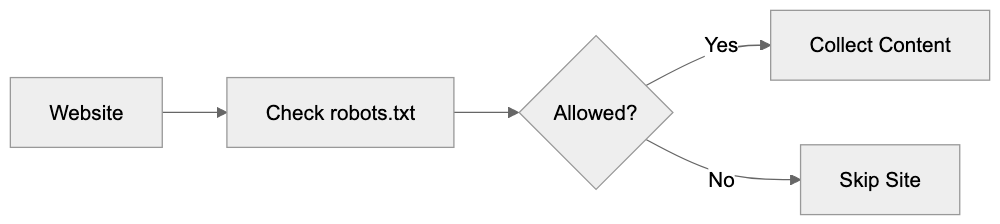
Applebot-Extended is Apple’s dedicated web crawler for AI training purposes. It scans websites to collect text, images, and other content for Apple’s machine learning systems. The crawler uses a specific Applebot user agent string: “Mozilla/5.0 AppleWebKit/609.1.20 (KHTML, like Gecko) Applebot-Extended/1.0 (+https://www.apple.com/applebot-extended/)”. This facilitates easy detection and management via standard web protocols. The crawler respects robots.txt Apple directives and provides clear documentation for webmasters. It operates independently from the standard Applebot, which has been around since 2015, targeting content needed for large language models and visual recognition systems. Apple designed it to be transparent and controllable by site owners.
Why Applebot-Extended Exists
Apple’s Crawler Ecosystem:
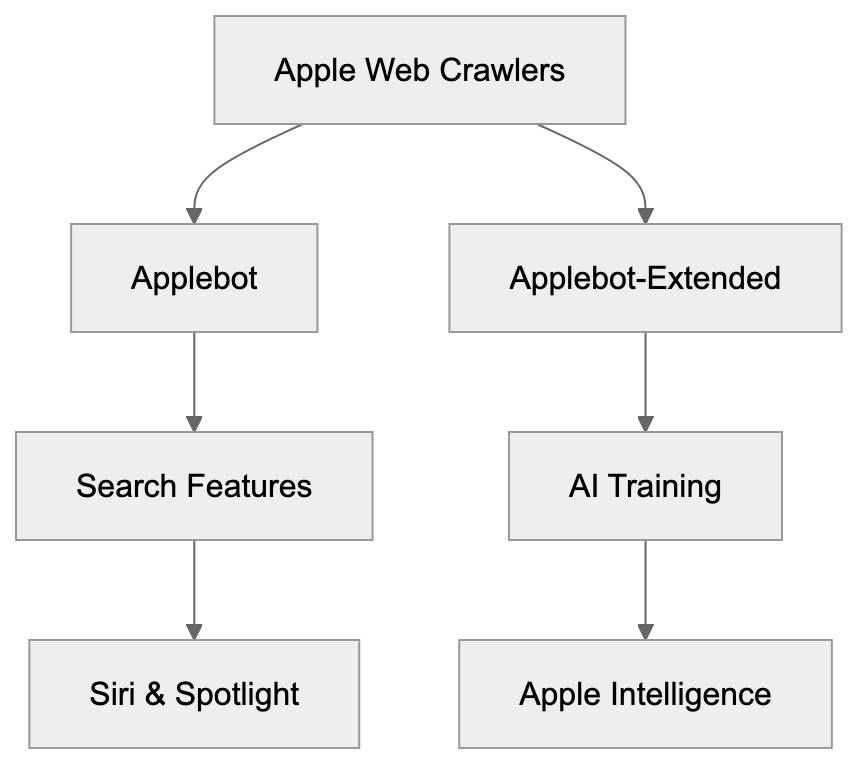
Apple developed Applebot-Extended to build proprietary AI training datasets. The company requires massive web content to train Apple Intelligence features, including advanced Siri capabilities, text generation, and image recognition. Unlike some competitors, Apple chose a separate crawler that site owners can block without affecting search visibility, addressing concerns about AI companies scraping content without permission. This approach balances AI development needs with content creator rights, allowing publishers to control their data.
How Applebot and Applebot-Extended Differ
The primary difference is in purpose and blockability. Regular Applebot drives search functionalities that users interact with, like Siri knowledge and Spotlight suggestions. Applebot-Extended, however, collects data solely for training AI models. Website owners can choose to block Applebot-Extended without losing visibility in Apple search products. Both crawlers respect web crawler blocking directives in robots.txt, but use different user-agent tokens. The original Applebot includes “Applebot,” while the training crawler specifically uses “Applebot-Extended.” Careful specification is needed to restrict one without affecting the other.
Blocking Applebot-Extended from Your Website
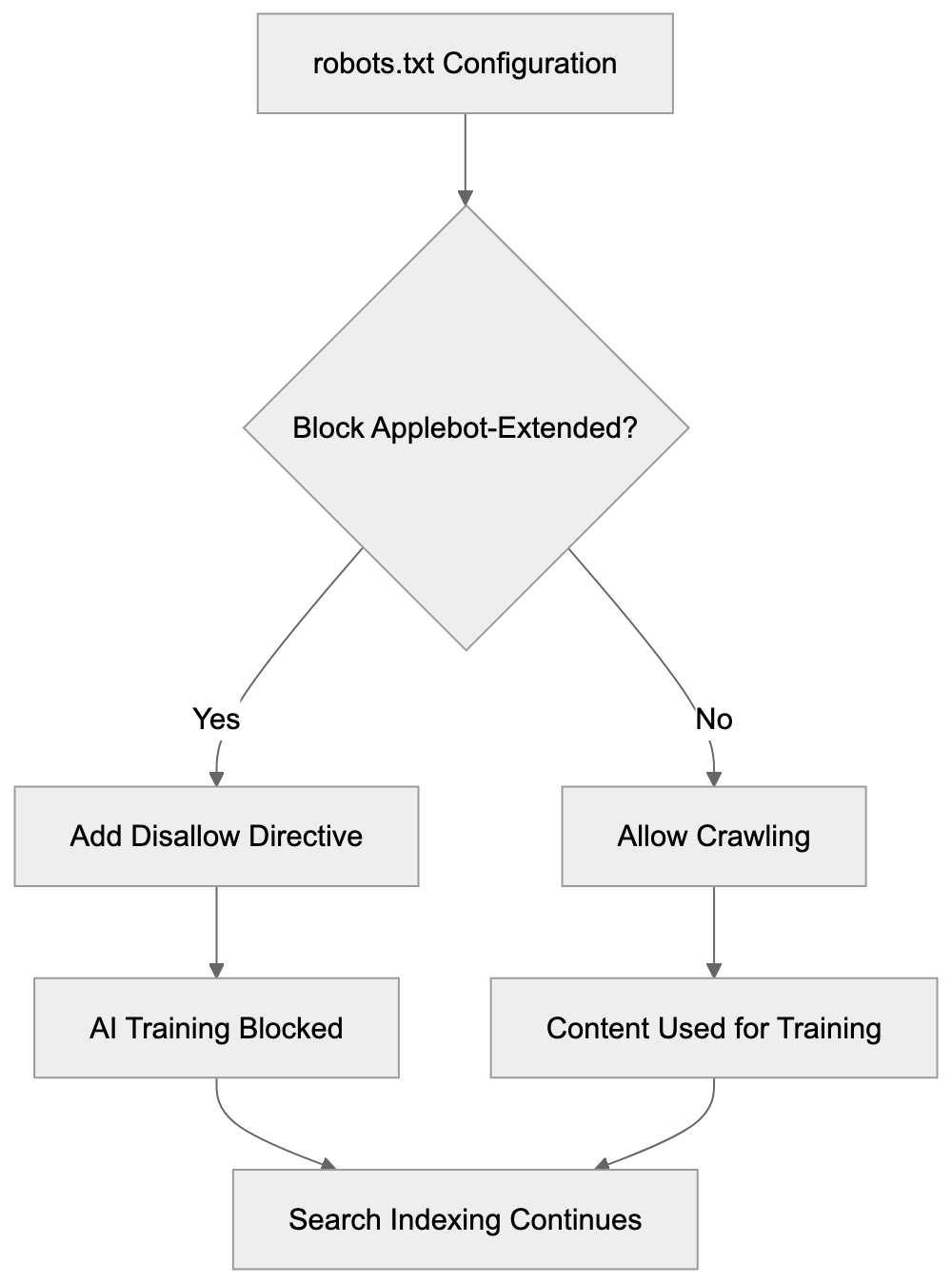
To block Applebot-Extended using your robots.txt file, add:
Applebot-Extended Crawling Process:
User-agent: Applebot-Extended
Disallow: /
This directive blocks the entire site. To restrict only specific sections, such as your blog directory, use:
User-agent: Applebot-Extended
Disallow: /blog/
Blocking Applebot-Extended does not impact regular Applebot, so your content will still appear in Siri and Spotlight. This choice depends on your content strategy and preferences regarding data usage.
How Companies Use Applebot-Extended
Apple uses Applebot-Extended to gather training data for Apple Intelligence features, including Siri enhancements and image generation. The crawler pulls text from various web sources and images for computer vision training. Publishers decide whether to allow this access, with some blocking AI training crawlers to protect content, while others permit crawling as part of a broader web visibility strategy. Companies must weigh AI training exposure potential against the benefits of appearing in Apple’s ecosystem.
Comparison with Other AI Training Crawlers
Major tech firms operate similar AI training crawlers:
Blocking Configuration Flow:
| Crawler | Company | User-Agent Token | Blockable via robots.txt | Separate from Search |
|---|---|---|---|---|
| Applebot-Extended | Apple | Applebot-Extended | Yes | Yes |
| GPTBot | OpenAI | GPTBot | Yes | Yes |
| Google-Extended | Google-Extended | Yes | Yes | |
| CCBot | Common Crawl | CCBot | Yes | N/A |
| FacebookBot | Meta | FacebookBot | Yes | No |
Separated crawlers give webmasters more control compared to unified approaches. Most modern AI training crawlers respect robots.txt directives after industry pressure, allowing blocking without affecting search visibility.
User-Agent Detection and Technical Details
The Applebot-Extended user agent string follows standard browser conventions. A typical request header looks like: “Mozilla/5.0 AppleWebKit/605.1.15 (KHTML, like Gecko) Applebot-Extended/0.1”. This can be monitored in server logs for analytics. Web application firewalls and security tools can filter based on this user agent. Apple recommends using robots.txt for blocking, rather than IP-based restrictions, due to possible IP changes. The operation follows polite crawling practices, spacing requests to avoid server overload.
Privacy and Data Usage Implications
Allowing Applebot-Extended to crawl your site lets that content contribute to Apple’s AI training data. This means your site’s text and images could influence Apple Intelligence. Apple’s privacy commitments cover how they handle this data, although no direct compensation exists for data contribution. Many content creators are concerned about AI models reproducing their work without attribution. Site owners should assess whether they want their content visible in AI features, and use blocking strategies if not.
Impact on SEO and Web Visibility
Blocking Applebot-Extended has no direct effects on traditional SEO metrics. Regular Applebot will continue to index your content for Siri and Spotlight. However, as AI features become more integral to search, training data might indirectly affect visibility. Factors such as content rights should guide the decision to block, rather than SEO concerns.
Best Practices for Managing Applebot-Extended
- Review your robots.txt file to check if you’re blocking AI crawlers.
- Evaluate your content strategy and decide what should be available for AI training.
- Consider blocking high-value proprietary content while allowing general information.
- Test robots.txt changes in a staging environment first.
- Monitor server logs to ensure the crawler respects your directives.
- Update your privacy policy if you allow AI training crawlers.
End
Applebot-Extended exemplifies Apple’s transparent approach to AI training data collection. It gives website owners the choice of whether their content will train Apple Intelligence models. Unlike previous methods of unseen AI training, this separate user-agent and robots.txt support offer a true opt-out mechanism. Understanding the technical details helps developers and publishers make informed decisions about their content strategies, balancing AI training with search visibility priorities.
Frequently Asked Questions
What data does Applebot-Extended collect?
Applebot-Extended gathers a variety of content types, including text, images, and other relevant data, to train Apple's AI systems. This data helps improve features such as Siri, text generation, and image recognition.
How can I check if Applebot-Extended is crawling my website?
You can monitor server logs to identify requests made by Applebot-Extended. Look for the specific user-agent string "Applebot-Extended" in your server logs to confirm its activity.
Can blocking Applebot-Extended affect my web traffic?
No, blocking Applebot-Extended will not impact your site's visibility in standard Apple search products like Siri and Spotlight. Regular Applebot will continue to index your content, allowing it to remain discoverable in these features.
Are there any guidelines for using robots.txt to manage Applebot-Extended?
To block Applebot-Extended, you can use specific directives in your robots.txt file. For example, to block the entire site, you would write: "User-agent: Applebot-Extended Disallow: /". Make sure to test any changes in a staging environment before applying them live.
What should I consider before allowing Applebot-Extended to crawl my site?
Evaluate your content strategy and the potential benefits of contributing to AI training against the risk of your content being used without compensation. Consider blocking certain proprietary or sensitive content while allowing more general information.
Will allowing Applebot-Extended affect my site's SEO?
Allowing Applebot-Extended to crawl your site does not directly impact traditional SEO metrics, as it is separate from the regular Applebot that indexes for search functions. However, understanding how AI features evolve could indirectly influence overall visibility in the future.
What privacy considerations should I keep in mind with Applebot-Extended?
When you allow Applebot-Extended access to your content, your text and images could contribute to Apple's AI models. While Apple has privacy commitments, there is no specific compensation for data contributions, so weigh your privacy preferences against the potential benefits of visibility in Apple's ecosystem.
Track Your AI Visibility
See how AI chatbots like ChatGPT, Claude, and Perplexity discover and recommend your brand.