Understanding BuiltWith's Technology Detection Crawler
Learn how BuiltWith's crawler detects website tech stacks, user-agents, and how businesses use it for sales intelligence and market analysis.
What is BuiltWith and Why Technology Detection Matters
BuiltWith is a technology profiling service that scans websites across the internet to identify the technologies they use. Think of it as a technology detection bot that figures out the software, frameworks, and tools powering websites. The service employs automated BuiltWith crawlers visiting millions of websites to analyze their code, headers, and other technical elements, building a massive database for tech stack analysis.
Why does this matter? Companies use technology detection for sales intelligence and market research. If you sell a WordPress plugin, you want to know which sites use WordPress. If you offer Shopify development services, you need to find Shopify stores. Marketing teams use this data for competitive intelligence tools to track competitors, find potential customers, and understand market trends. Software developers and business owners rely on this information for website profiling to make informed decisions about technology adoption and positioning.
The BuiltWith crawler operates continuously, visiting websites and updating its database with fresh information about technology usage across the web. This creates a valuable resource for anyone needing to understand the technology scene of the internet.
How BuiltWith Technology Detection Works
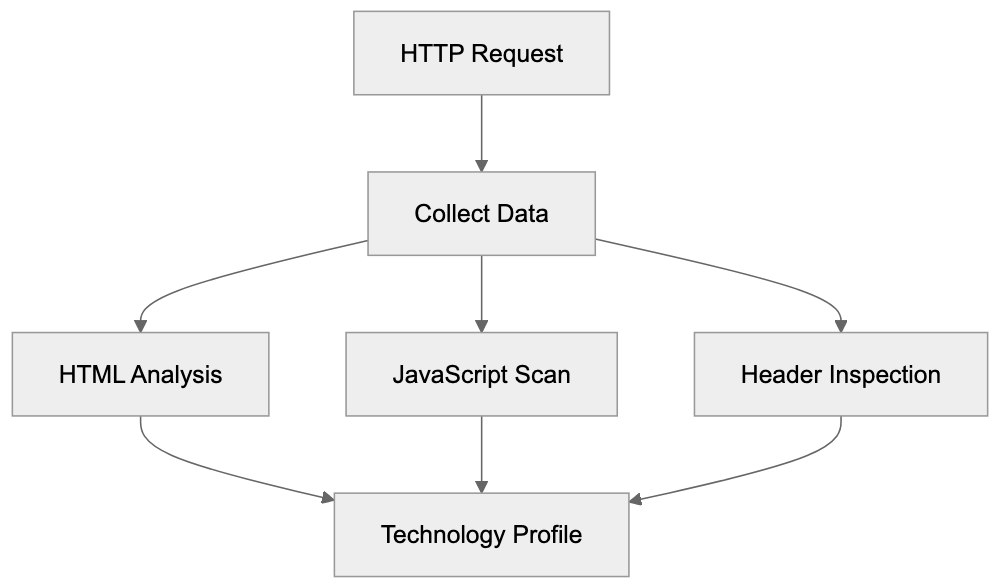
The BuiltWith crawler sends HTTP requests to websites, just like a regular browser. However, instead of rendering the page for a human to read, it conducts tech stack analysis by examining the technical components. The technology detection bot scrutinizes HTML source code, JavaScript files, CSS stylesheets, HTTP headers, and meta tags to identify technologies.
Technology Detection Process:
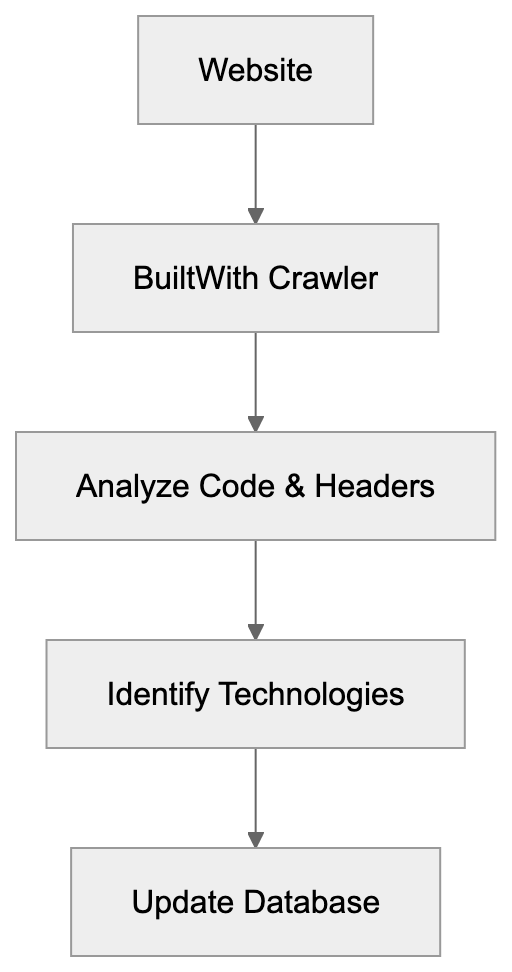
When the bot visits a website, it looks for specific patterns and signatures indicating particular technologies. For example, if it finds certain JavaScript variables or function names associated with Google Analytics, it records that the site uses that tracking tool. If it spots WordPress-specific HTML comments or file paths, it logs WordPress as the CMS platform.
The crawler identifies itself through a specific user-agent string, which website administrators can see in their server logs when BuiltWith visits. The user-agent typically includes the word “BuiltWith” along with a reference to their website. This transparency allows site owners to understand who is accessing their site and why.
BuiltWith can detect hundreds of different technology categories, including content management systems, eCommerce platforms, analytics tools, advertising networks, JavaScript libraries, web servers, and much more. The system updates detection patterns regularly as new technologies appear and existing ones evolve.
Business Applications of BuiltWith Data
Companies utilize BuiltWith data primarily for sales intelligence and marketing purposes. Sales teams create targeted lists of potential customers based on their tech stack analysis. For instance, a company selling Magento migration services can identify all websites currently running on Magento and reach out with relevant offers.
Marketing professionals use the data for competitive intelligence and market analysis. They can see what technologies competitors use, track technology adoption trends over time, and identify market opportunities. If a new technology is gaining rapid adoption, that signals a growing market opportunity.
Web developers and agencies use BuiltWith for website profiling to research potential clients before pitching services. They can see what technologies a prospect uses and tailor their proposal accordingly. SEO experts and content marketers use it for website technology scanner purposes to analyze competitor tech stacks and understand what tools successful sites in their niche are using.
BuiltWith Detection Methods:
Investors and analysts depend on BuiltWith data to track the adoption and market penetration of different technology platforms. This helps them make investment decisions and understand market forces in the technology sector.
The data also aids businesses in making technology decisions. Before adopting a new platform or tool, companies can assess how widely it is used, which industries adopt it, and whether usage is growing or declining.
BuiltWith User-Agent and Crawler Behavior
The BuiltWith crawler announces itself through its user-agent string, which looks like this:
BuiltWith/1.0 (+https://builtwith.com/biup)
This user-agent string helps website administrators identify the bot in their server logs. The URL in the user-agent points to information about the crawler and its purpose. Website owners can use this to verify the bot is legitimate and not a malicious scraper.
The crawler respects robots.txt files according to standard web crawling practices. If a website blocks the BuiltWith technology scanner in its robots.txt file, the crawler should honor that request. However, some site owners report that blocking specific paths does not always prevent detection since BuiltWith can sometimes identify technologies from publicly accessible pages.
Crawling frequency varies depending on the website and subscription level of users interested in that site. Popular websites or sites tracked by BuiltWith customers may be crawled more frequently to keep data current. Most sites likely see the BuiltWith bot visit periodically rather than constantly.
Server load from the BuiltWith crawler is generally minimal since it requests only the homepage or a few key pages rather than crawling entire sites deeply. The bot effectively gathers technology information without causing excessive traffic.
Comparing BuiltWith to Alternative Technology Detection Tools
Several services compete with BuiltWith in the technology detection space, each with different strengths and coverage areas. Here is a comparison:
| Tool | Primary Focus | Coverage | Key Differentiator |
|---|---|---|---|
| BuiltWith | Complete tech profiling | 50+ million sites | Extensive historical data and trends |
| Wappalyzer | Browser extension and API | Real-time detection | Easy browser-based detection |
| SimilarTech | Sales intelligence | 100+ million sites | Deep sales and marketing features |
| Datanyze | B2B sales prospecting | 50+ million sites | CRM combining focus |
| WhatRuns | Browser extension | On-demand detection | Free browser extension |
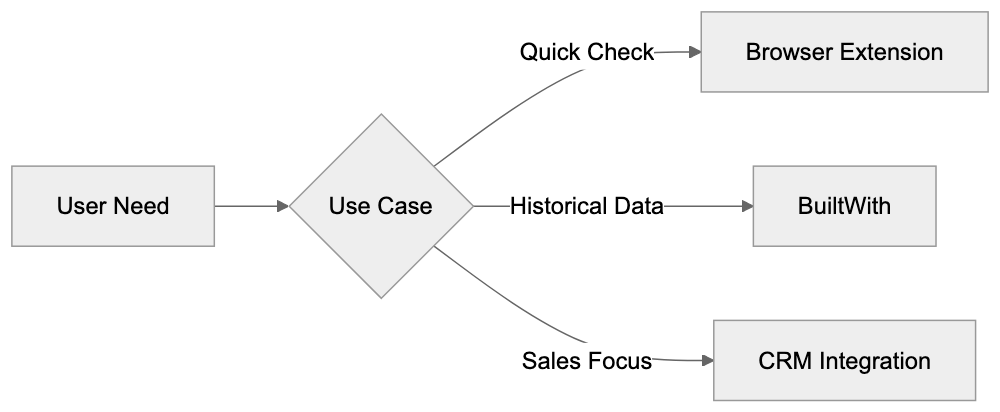
BuiltWith distinguishes itself with extensive historical data, allowing users to see when a site added or removed technologies over time. This temporal data is invaluable for tracking technology migration patterns and market trends that competitors may not offer as completely.
Wappalyzer provides a popular browser extension that makes technology detection accessible to anyone browsing the web. It is convenient for quick checks, but it may not provide the bulk data access or historical tracking that BuiltWith offers.
SimilarTech focuses heavily on sales intelligence features with detailed company information and contact data integrated with technology profiles. This makes it popular with sales teams who want an all-in-one prospecting solution.
Datanyze emphasizes combining with CRM systems and sales workflows, designed for sales teams who want technology data flowing directly into their existing sales processes.
WhatRuns offers a free browser extension for casual users wishing to identify technologies on sites they visit but lacks the complete database and API access of paid services.
Technology Detection Tool Comparison:
Privacy Considerations and Opting Out
BuiltWith collects publicly available information from websites. The data it gathers is technically accessible to anyone who visits a site and inspects the source code or headers. However, some website owners prefer not to have their technology stack catalogued in a searchable database.
The service profiles websites without requiring permission as it only accesses public information, similar to how search engines index web content. However, the difference is that BuiltWith creates a technology profile that competitors and salespeople can search.
Website owners concerned about their technology information being public can take several approaches. They can use robots.txt to block the BuiltWith crawler, though this may not remove existing data already collected. They can also implement techniques to obscure technology fingerprints, like removing version numbers from headers and minimizing obvious technology signatures in HTML.
Some technologies are harder to hide than others. Server-side technologies that do not leave obvious client-side fingerprints are more difficult to detect. Client-side JavaScript frameworks and analytics tools are typically easy to identify.
For businesses using BuiltWith data, there are ethical considerations regarding how aggressively to use technology profiles for sales outreach. Respecting privacy and not being overly intrusive in sales approaches remains important, even when data is technically public.
Technical Details About Detection Methods
BuiltWith employs multiple detection methods to identify technologies accurately. The primary method involves pattern matching against known technology signatures. Each technology has characteristic patterns in HTML, JavaScript, or HTTP headers that the system recognizes.
JavaScript library detection works by looking for specific global variables, function names, or code patterns. For example, jQuery creates a distinctive global variable, and React applications have identifiable code structures. The crawler analyzes JavaScript files and inline scripts to find these patterns.
HTTP header analysis reveals server technologies and certain frameworks. Headers like X-Powered-By often explicitly state what technology serves the page. Others provide clues about caching systems, CDNs, and web servers being used.
HTML meta tags and comments sometimes contain technology information. Content management systems often insert identifying comments into the HTML. Meta tags may reference specific platform versions or plugins.
File path analysis examines URLs for JavaScript, CSS, and image files. Technologies often have characteristic file paths and naming conventions. A file path like /wp-content/ strongly suggests WordPress, while /skin/frontend/ indicates Magento.
Cookie analysis can reveal analytics platforms and tracking tools. Different services set cookies with distinctive names and patterns. The crawler examines cookies set by websites to identify these services.
The system combines all these signals to build a complete technology profile. Multiple detection methods increase accuracy and reduce false positives. The database continually updates as new technologies appear and detection patterns improve.
Accuracy and Limitations of Technology Detection
No technology detection system is perfect. BuiltWith achieves high accuracy for common technologies but can miss or misidentify less common tools. Custom-built solutions and heavily modified platforms are particularly challenging to detect accurately.
False positives occur when the system incorrectly identifies a technology not actually in use. This can happen when websites leave remnants of old technologies in their code or when different technologies share similar signatures.
False negatives occur when technologies are present but not detected. This is more common with server-side technologies that leave minimal client-side traces. Custom implementations and technologies actively hiding their signatures may also evade detection.
Version detection accuracy varies; some technologies clearly announce their version numbers, while others do not. Outdated information in the database may occur if a site changes technologies between crawler visits.
The depth of detection depends on what pages the crawler accesses. Technologies only used on specific pages or in authenticated areas may not be detected if the crawler only analyzes public pages.
Despite these limitations, BuiltWith and similar tools provide valuable directional data. They are most accurate for client-side technologies and major platforms. Users should verify important information rather than relying solely on automated detection.
End
BuiltWith operates a technology detection crawler that profiles websites to identify their tech stacks. The service offers sales intelligence, competitive analysis, and market research data to businesses and professionals. Companies use this information to find potential customers, understand competitors, and track technology trends across the internet.
The BuiltWith crawler announces itself through a clear user-agent string and respects standard web crawling protocols. It analyzes publicly accessible website code, headers, and resources to identify hundreds of different technologies. The resulting database helps sales teams, marketers, developers, and analysts make informed decisions.
Compared to alternatives like Wappalyzer, SimilarTech, Datanyze, and WhatRuns, BuiltWith offers extensive historical data and complete coverage. Each tool has different strengths depending on specific use cases and requirements.
While technology detection is not perfect and raises some privacy considerations, it serves legitimate business purposes by organizing publicly available information into searchable formats. Understanding how these systems work helps both users of the data and website owners who appear in these databases.
Frequently Asked Questions
What types of technologies can BuiltWith detect?
BuiltWith can identify a wide range of technologies, including content management systems, eCommerce platforms, analytics tools, and JavaScript libraries. It also tracks web servers and advertising networks, thus covering an extensive array of technology categories.
How can I use BuiltWith data for my business?
Businesses can leverage BuiltWith data for various purposes such as sales intelligence, competitive analysis, and market research. By understanding what technologies competitors use, companies can make informed decisions on their technology strategies and adapt their offerings accordingly.
Is my website's data private when using BuiltWith?
BuiltWith gathers publicly accessible information, meaning that data is technically open to anyone who inspects a website’s source code. However, website owners can take measures, such as using robots.txt files, to block the BuiltWith crawler in an attempt to protect their technology information.
What should I consider when using technology detection data for outreach?
While utilizing technology detection for sales outreach can be beneficial, ethical considerations are crucial. It's important to respect privacy and avoid intrusive practices, even when data is publicly available. Tailoring outreach approaches based on the detected technologies can improve effectiveness while remaining considerate.
How accurate is BuiltWith in detecting technologies?
BuiltWith is generally accurate for common technologies but can sometimes miss or misidentify custom or less common tools. Users should verify important information due to the possibility of false positives or negatives, especially with heavily modified platforms.
Are there costs associated with using BuiltWith?
BuiltWith offers both free and paid services. While the free version provides limited access, a paid subscription unlocks more extensive data and features, such as historical trends and deeper insights into technology usage across websites.
How does BuiltWith compare to other technology detection tools?
BuiltWith distinguishes itself with its extensive historical data and complete technology profiling across over 50 million sites. While alternatives like Wappalyzer and Datanyze focus on specific aspects such as browser extensions or CRM integration, BuiltWith offers a broader and more in-depth perspective on technology usage.
Track Your AI Visibility
See how AI chatbots like ChatGPT, Claude, and Perplexity discover and recommend your brand.