Understanding Claude-User: Anthropic's Fetch Agent
Complete guide to Claude-User, Anthropic's user-initiated web request agent. Learn how it works, why it exists, and how to manage it.
What is Claude-User and Why It Matters
Claude-User is a web request agent created by Anthropic. Unlike typical web crawlers, it only fetches content when a real user asks Claude to access a specific webpage. This means Claude-User doesn’t crawl websites randomly like search engine bots. It acts on behalf of actual users who need Claude to read and analyze web content during their conversations. The Anthropic user agent plays a crucial role here.
The purpose of Claude-User is straightforward. When you’re chatting with Claude and ask it to read a webpage, the AI needs a way to fetch that content. That’s where Claude-User comes in. It makes HTTP requests to websites, grabs the content, and brings it back so Claude can analyze it and respond to your questions. This real-time fetching capability makes Claude much more useful for tasks that require current information from the web.
Tools like Claude-User exist because modern AI assistants need access to fresh information beyond their training data. Without real-time web access, Claude would be limited to knowledge from its last training update. For developers, marketers, and business owners who need up-to-date information, this browsing capability becomes really important. The main features include user-initiated requests only, respect for robots.txt files, and clear identification as the Anthropic Claude user agent.
Understanding How Claude-User Actually Works
Claude-User Request Flow:
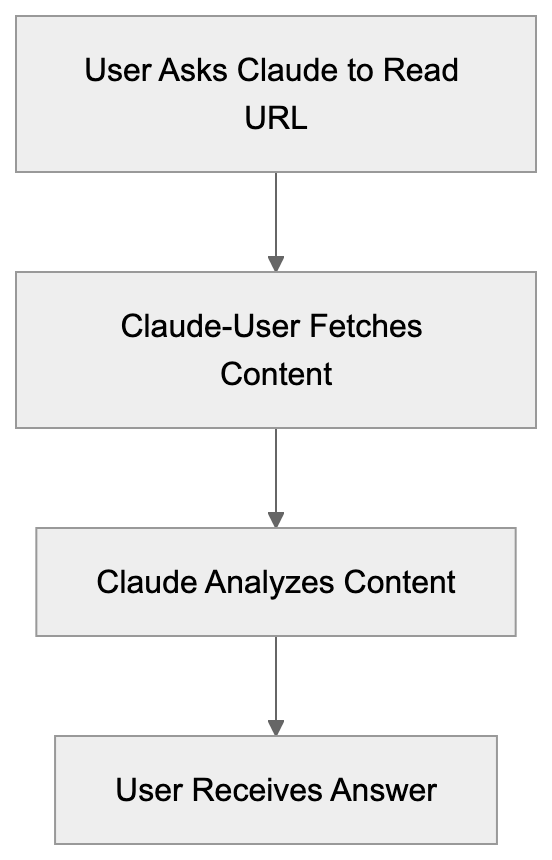
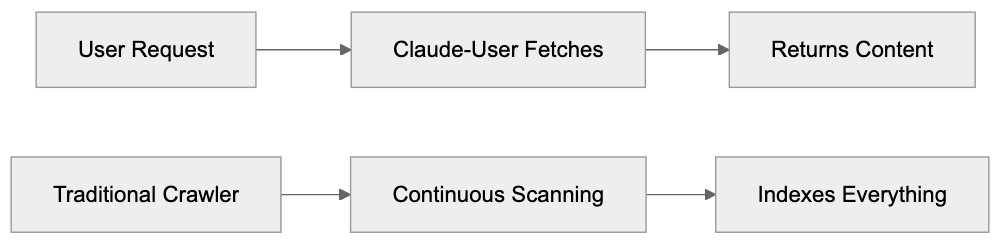
Claude-User operates as a fetch agent rather than a traditional crawler. The key difference is timing and purpose. Traditional crawlers like Googlebot constantly scan the web to index content. Claude-User only makes requests when a specific user asks Claude to access a particular URL during their conversation. This makes it event-driven and user-specific.
The technical setup is simple. When you ask Claude to read a webpage, the system sends an HTTP request identifying itself as Claude-User. The request headers include standard information that web servers use to identify and log the bot. According to Anthropic’s support documentation, Claude-User respects standard web protocols, including robots.txt directives.
The agent doesn’t store or index content for future crawling purposes. It fetches the page, processes it for the current conversation, and that’s it. There’s no massive database being built or site mapping happening. This is fundamentally different from how search engine crawlers operate. The fetched content is used solely to answer the user’s immediate question.
Website owners can control Claude-User access using standard methods. You can block it via robots.txt, configure server-level rules, or use other access control mechanisms. Anthropic provides clear documentation on their user agent strings so webmasters can make informed decisions about allowing or blocking these requests.
Why Anthropic Created This Fetch Agent
The creation of Claude-User addresses a fundamental limitation in AI assistants. Large language models are trained on data up to a certain cutoff date. Without web access, they can’t provide information about recent events, current prices, latest documentation, or any content published after training.
For business users and developers, access to current information is essential. A marketing professional might need Claude to analyze a competitor’s latest blog post. A developer might want Claude to read current API documentation. A small business owner might need help understanding a recent policy change on a government website. All these scenarios require real-time web access.
Anthropic designed Claude-User to be respectful and transparent. Unlike some web scraping bots that try to hide their identity, Claude-User clearly identifies itself. This allows website owners to make conscious decisions about whether to allow these requests. The user-initiated model also means websites won’t get overwhelmed with constant automated requests.
Fetch Agent vs Traditional Crawler:
The business case for this feature is strong. It makes Claude significantly more valuable as a research and analysis tool. Users can have Claude read and summarize articles, compare information across sources, or analyze web-based content without manually copying everything. This saves time and makes the AI assistant genuinely useful for knowledge work.
How Users and Businesses Use Claude-User
The primary users of Claude-User functionality are people interacting with Claude who need web content analyzed. This includes several common scenarios:
- Content marketers use it to analyze competitor content or research trending topics.
- Developers use it to read documentation or check API references.
- Researchers use it to quickly summarize academic papers or news articles.
- Small business owners find value in having Claude read and explain complex documents like terms of service or regulatory guidelines.
From a technical standpoint, the parent company Anthropic uses this capability to improve Claude’s utility. Each successful fetch makes the assistant more helpful and increases user satisfaction. The data flow is simple: user request triggers fetch, content is retrieved, Claude processes it, user gets answer. No intermediate storage or indexing happens.
Web developers and site administrators encounter Claude-User in their server logs. They see requests from this user agent and need to decide how to handle them. Some sites welcome the traffic because it represents real users engaging with their content through AI tools. Others prefer to block AI agents entirely for various reasons, including bandwidth concerns or data usage policies.
Comparing Claude-User to Alternative AI Crawlers
Several AI companies have deployed web crawlers and fetch agents. Each has different characteristics and purposes. Understanding these differences helps website owners make informed decisions about access control. Here’s how Claude-User compares to major alternatives:
| Agent Name | Company | Type | Frequency | Purpose |
|---|---|---|---|---|
| Claude-User | Anthropic | Fetch agent | User-initiated only | Real-time content access for conversations |
| GPTBot | OpenAI | Crawler | Continuous | Training data collection for AI models |
| Google-Extended | Crawler | Continuous | AI training data separate from search | |
| CCBot | Common Crawl | Crawler | Periodic | Open dataset creation for research |
| Applebot-Extended | Apple | Crawler | Continuous | AI feature training and development |
The main distinction is between fetch agents and crawlers. Claude-User is a fetch agent that only acts when users make specific requests. GPTBot, Google-Extended, and similar tools are traditional crawlers that systematically scan websites to collect training data. This makes Claude-User much lighter in terms of server impact.
Another key difference is transparency. Claude-User exists to serve immediate user needs, not to build training datasets. When Claude-User hits your site, it’s because a real person asked Claude to read that specific page. With training crawlers, the relationship is less direct. Your content might end up in a training dataset without any specific user requesting it.
Blocking mechanisms work the same way across these agents. You can use robots.txt entries, server configuration, or firewall rules, but the impact of blocking differs. Blocking Claude-User means users can’t ask Claude to read your public content. Blocking GPTBot means your content won’t be used for OpenAI training. Website owners need to weigh these trade-offs based on their goals.
Some sites block all AI agents by default. Others allow fetch agents like Claude-User while blocking training crawlers. There’s no universal right answer. It depends on your content strategy, bandwidth constraints, and philosophy about AI access to public web content. The important thing is making an informed choice.
Managing and Blocking Claude-User Access
Website administrators have several options for controlling Claude-User access. The simplest method is robots.txt configuration. Adding the appropriate directives tells Claude-User whether it can access your site. According to Anthropic’s documentation on crawler behavior, they respect standard robots.txt protocols.
To block Claude-User specifically, add this to your robots.txt file:
User-agent: Claude-User
Disallow: /
Access Control Decision Tree:
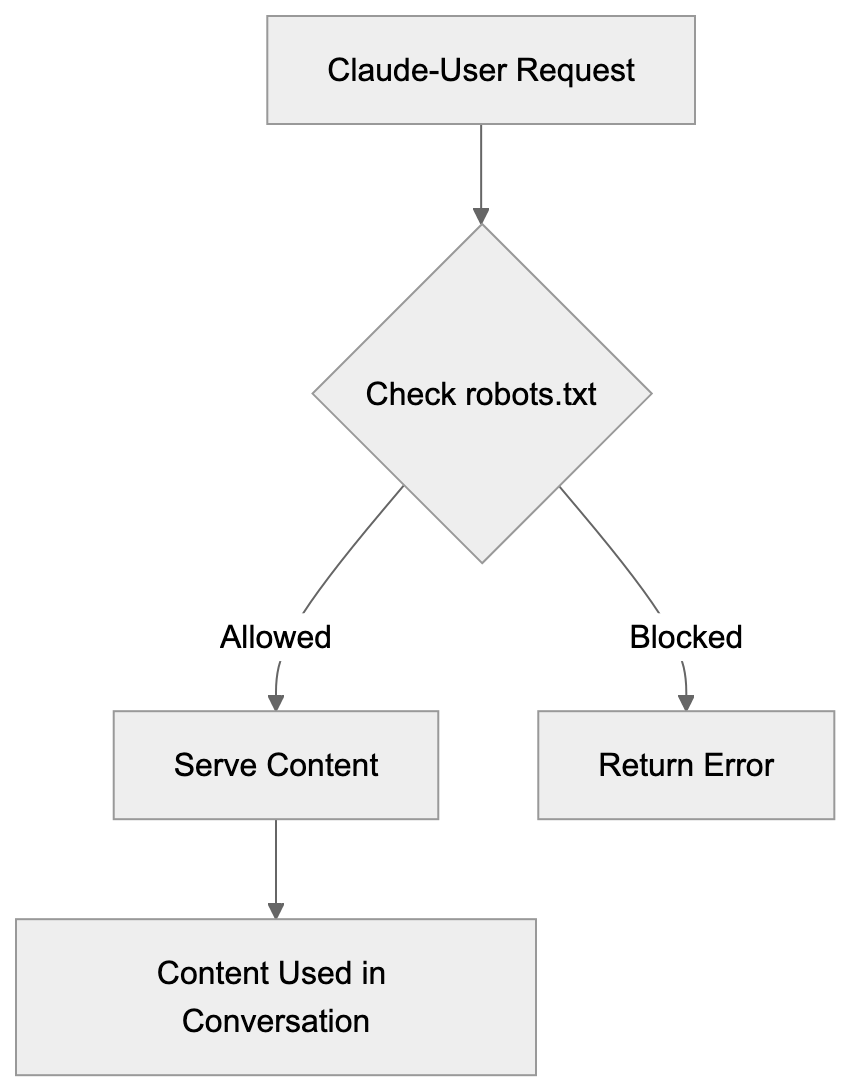
This tells Claude-User it cannot access any part of your site. If you want to allow access to some sections but not others, you can specify different rules. For example, you might allow access to public blog posts but block administrative areas or member-only content.
Server-level blocking provides another option. You can configure your web server to return specific response codes when it detects the Claude-User agent string. Some administrators prefer this method because it works regardless of robots.txt and provides more granular control. You can return 403 Forbidden, 429 Too Many Requests, or other appropriate status codes.
Firewall and CDN rules offer the most robust blocking if you need it. Services like Cloudflare allow you to create rules that block or challenge requests based on user agent strings. This happens before requests even reach your origin server, saving bandwidth and processing resources.
Monitoring your server logs helps you understand the actual impact. Check how often Claude-User appears in your logs and what resources it accesses. For most sites, the traffic will be minimal because it only happens when users specifically request content. If you see an unusual pattern, investigate whether the agent is actually Claude-User or something spoofing the user agent string.
Technical Details and Implementation Notes
The Claude-User agent identifies itself clearly in HTTP headers. The user agent string follows standard formats and includes version information. This transparency allows webmasters to easily identify and log these requests. Unlike some scraping tools that rotate user agents or try to appear as regular browsers, Claude-User makes no attempt to hide its identity.
Request patterns differ significantly from crawler behavior. Claude-User doesn’t follow links, doesn’t map site structure, and doesn’t request robots.txt repeatedly. It makes single targeted requests for specific URLs that users have asked about. This means you won’t see the systematic crawling patterns typical of search engine bots.
Rate limiting usually isn’t necessary for Claude-User because the request volume is naturally limited by actual user behavior. The agent is designed to follow standard protocols and respect server response codes.
Content types matter for how Claude processes fetched data. Claude-User can handle HTML pages, plain text, and some other formats. It doesn’t typically request images, videos, or binary files unless they’re specifically part of what the user asked about.
Security considerations are similar to any web crawler. Standard security practices apply, including protecting sensitive endpoints, requiring authentication where appropriate, and monitoring for unusual access patterns. The fact that Claude-User identifies itself clearly makes security monitoring easier.
Privacy and Data Considerations
When Claude-User fetches content from your website, that content becomes part of the conversation between the user and Claude. Anthropic’s privacy policies govern how conversation data is handled. Website owners should understand that public content fetched by Claude-User may be analyzed and discussed in user conversations.
This is different from training data collection. Claude-User doesn’t automatically add your content to training datasets. It’s fetching content to answer specific user questions in real-time. However, depending on Anthropic’s data retention policies, conversation logs might be stored for quality and safety purposes.
For websites with sensitive or proprietary information, blocking may make sense even if the content is technically public. Some companies don’t want their public documentation or blog posts analyzed by AI tools for competitive reasons.
User privacy intersects with this topic too. When someone uses Claude to fetch a webpage, they’re creating a record that they accessed that content. For most use cases, this doesn’t matter, but users working with sensitive topics should be aware that their content requests go through Anthropic’s systems.
Compliance with data protection regulations is important for both Anthropic and website owners. GDPR, CCPA, and similar laws create requirements around data collection and use. Claude-User’s user-initiated model and clear identification help with compliance, but website owners should still consider their specific regulatory obligations.
End and Key Takeaways
Claude-User represents a new category of web agent focused on real-time content access for AI conversations. Unlike traditional crawlers that systematically index the web, Claude-User only makes requests when actual users ask Claude to read specific pages. This makes it lighter weight and more targeted than training-focused crawlers.
For website owners and developers, understanding Claude-User helps make informed decisions about access control. The agent respects robots.txt, identifies itself clearly, and creates minimal server load due to its user-initiated nature. Blocking is straightforward if you choose to do it, but many sites benefit from allowing access since it helps users engage with their content.
The key points to remember are that Claude-User is a fetch agent, not a crawler. It only acts on user requests and respects standard web protocols. As AI assistants become more capable and widely used, tools like Claude-User will become increasingly common. Making thoughtful decisions about AI agent access is becoming an important part of web administration and content strategy.
Frequently Asked Questions
What types of content can Claude-User access on a webpage?
Claude-User primarily fetches HTML pages and plain text. It is designed to quickly access content requested by users but does not typically download images, videos, or binary files unless they are part of the specific request.
How can I allow or block Claude-User access to my website?
You can control Claude-User access via the robots.txt file, by adding specific directives. Alternatively, server-level blocking or firewall rules can be utilized for more granular control over requests from this user agent.
Is Claude-User similar to traditional web crawlers?
No, Claude-User is a fetch agent that only makes requests based on user-initiated actions. Unlike traditional crawlers, it does not continuously scan websites or index their content.
What happens to the content fetched by Claude-User?
The content Claude-User retrieves is used in real-time to respond to the user's immediate inquiries. It is not stored or indexed for future use, making it different from how search engines operate.
How does Claude-User ensure transparency when accessing websites?
Claude-User clearly identifies itself in the HTTP headers of its requests, which allows website owners to log and differentiate requests from it. This level of transparency helps build trust and allows for informed decision-making regarding access.
Are there privacy concerns associated with Claude-User?
While Claude-User fetches public content for immediate analysis, users should be aware that their requests may be recorded and analyzed. For sensitive information, blocking access or implementing additional security protocols may be advisable.
What types of users typically benefit from Claude-User?
Content marketers, developers, researchers, and small business owners are the primary users that benefit. Each group uses Claude-User to quickly access and analyze current web content to inform their work.
Track Your AI Visibility
See how AI chatbots like ChatGPT, Claude, and Perplexity discover and recommend your brand.