Understanding Cloudflare Always Online: CDN Caching Crawler
Complete guide to Cloudflare Always Online crawler covering purpose, user-agent details, CDN caching benefits, and blocking options for websites.
What is Cloudflare Always Online
Cloudflare’s Always Online is a feature built into Cloudflare’s CDN service that ensures website availability by serving cached versions of web pages even when the origin server is down. The service employs a Cloudflare crawler to archive pages from websites utilizing Cloudflare’s network.
Website downtime can be costly for businesses and harmful to reputations, as it can lead to loss of revenue and customer trust. If your server fails, visitors are met with error messages, not your content. With Always Online, these issues are mitigated by serving cached pages during outages, ensuring that visitors can still access content even when the origin server is down.
A specialized Always Online crawler visits websites periodically to build and update this unique CDN cache. Unlike regular CDN caching, it specifically targets static content, serving it during emergencies. Cloudflare users across all plan tiers, including the free tier, can access this feature.
How Always Online Works:
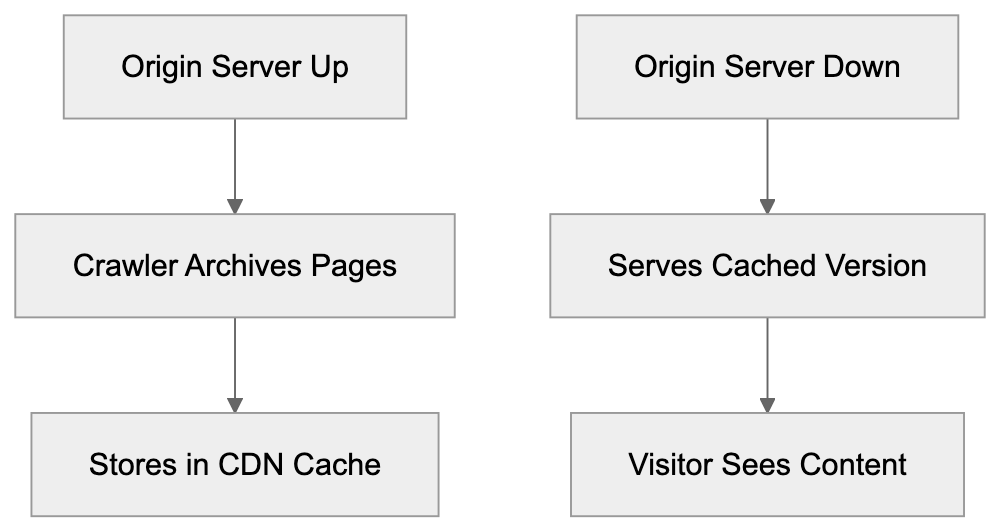
How the Always Online Crawler Works
The Cloudflare Always Online crawler differs from standard CDN caching mechanisms. While typical website caching occurs when users request pages, the Always Online crawler proactively creates backup snapshots.
Identified by the user-agent string “Mozilla/5.0 (compatible; CloudFlare-AlwaysOnline/1.0; +http://www.cloudflare.com/always-online)”, the crawler doesn’t visit every page. Instead, it focuses on pages receiving traffic through Cloudflare’s network, prioritizing frequently accessed and public content. It’s worth mentioning that the crawler respects most robots.txt directives but operates under different guidelines compared to search engine crawlers. Control over its operations can be managed via Cloudflare’s dashboard settings or specific configuration rules.
Purpose and Benefits of Always Online
Always Online Crawler Behavior:

Cloudflare Always Online mitigates the effects of origin server failures, benefiting both small businesses and large enterprises by automatically serving cached pages during downtimes. This CDN cache ensures business continuity by replacing error pages with cached content.
Downtime impacts revenue for e-commerce sites, readership for content publishers, and even search engine rankings and user trust for all websites. Visitors encountering downtime will experience slightly outdated yet accessible content, ideal for informational websites not reliant on real-time updates.
The feature incurs no extra cost for Cloudflare users. It activates automatically when enabled in Cloudflare settings, working seamlessly in the background without manual intervention during server outages. As part of a broader disaster recovery strategy, Always Online is a complement, not a substitute, for proper hosting infrastructure.
Controlling and Blocking the Crawler
Website administrators can manage the Always Online crawler via the Cloudflare dashboard by navigating to the Caching section and toggling the Always Online feature on or off.
Through robots.txt, you can block the crawler by targeting the CloudFlare-AlwaysOnline user-agent, but note that this diminishes its intended benefits during outages. Some opt to exclude specific pages from Always Online caching using Cloudflare Page Rules, which can disable the feature for certain URL patterns—ideal for admin areas, checkout pages, or user dashboards.
Server-side blocking offers fine-grained control by checking the user-agent string in your code, although this requires programming knowledge. It’s important to remember that the crawler captures initial HTML responses without executing JavaScript, so single-page applications and JavaScript-dependent sites benefit less from Always Online caching.
Cloudflare Always Online vs. CDN Alternatives
Several CDN providers offer similar services with distinct implementations, presenting choices based on your site needs:
| CDN Provider | Feature Name | Automatic Crawling | Free Tier | User-Agent |
|---|---|---|---|---|
| Cloudflare | Always Online | Yes | Yes | CloudFlare-AlwaysOnline |
| Fastly | Origin Shield | No | No | Fastlybot |
| Amazon CloudFront | Origin Failover | No | Limited | Amazon CloudFront |
| Akamai | SureRoute | No | No | Akamai-Crawler |
| BunnyCDN | Edge Storage | No | No | BunnyCDN-Crawler |
Cloudflare’s Always Online is notable for its proactive caching and ease of access for non-technical users. Alternative services often require manual configuration or depend solely on visitor-triggered mechanisms.
Practically, Fastly’s Origin Shield doesn’t include automatic backup crawling, targeting enterprises, while Amazon CloudFront’s Origin Failover demands maintaining backup infrastructure, making it robust yet costly. Akamai’s high-end services cater to enterprises, leaving smaller businesses to consider Cloudflare’s free provisions. BunnyCDN, focused on performance, doesn’t cater to proactive caching in its offerings.
Technical Details for Developers
Developers should note that Cloudflare Always Online handles only GET requests, excluding POST and other HTTP methods from its caching form. Additionally, the cached versions remain without user session data due to privacy principles, excluding authentication-required sections from cached pages.
CDN Caching Comparison:
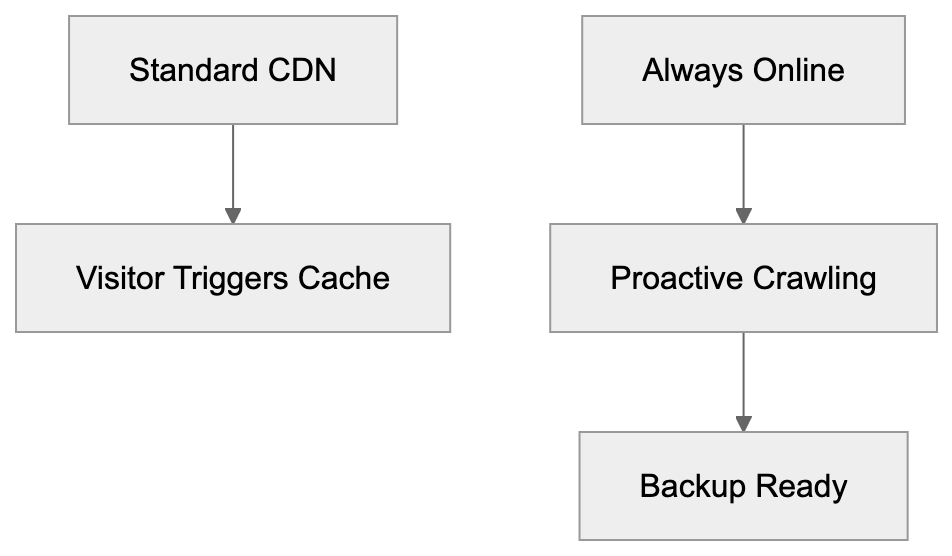
Cache update frequency varies depending on the user’s plan and page popularity, with less frequent updates for free plans. Cloudflare does not publish exact crawl schedules due to varying network conditions.
Importantly, the feature fully supports HTTPS pages, with the crawler treating them like regular HTTP content. While SSL certificate issues on origins don’t affect the CDN cache, developers can leverage Cloudflare’s API for additional control and caching insights.
Impact on SEO and Analytics
The Always Online crawler doesn’t directly affect search engine optimization, as search engines use their own systems. If your site goes down, cached pages may be served by Cloudflare, maintaining access to content during outages rather than displaying error pages. Persistent downtime, however, could lead to deindexing.
Analytics tracking often doesn’t capture events from cached pages due to limitations with JavaScript-based systems. While cached HTML includes analytics codes, events from downtime won’t be recorded in reports.
For SEO professionals, it’s crucial to actively monitor uptime separately from Always Online activities. Though the feature hides downtimes from visitors, it doesn’t resolve the root issue. Proper monitoring tools are necessary for evaluating actual server availability, ensuring marketing campaigns continue uninterrupted.
Best Practices for Using Always Online
Enabling Always Online across all Cloudflare-hosted websites is advisable due to its minimal downsides and significant protective benefits. Initial setup is straightforward, requiring little further management.
Regularly testing cached pages ensures compatibility and performance. Visit your Cloudflare dashboard to review cached pages, verifying that essential pages such as homepages and landing pages are adequately archived.
Incorporate Always Online within broader reliability strategies—leverage quality hosting, monitoring, and maintain backups. Exempt areas with changing content from caching using Page Rules, ensuring shopping carts, user dashboards, and real-time data feeds remain dynamic.
Document your Always Online configuration within your disaster recovery plans, preparing communication strategies for potential outages where visitors might view slightly outdated content.
Proactively monitor your origin server’s health and never over-rely on Always Online. It’s a temporary safeguard, not a permanent solution to infrastructure issues.
Common Issues and Solutions
While Always Online effectively prevents error messages, some websites may face outdated content post-recovery, often due to cache invalidation failures. Manually purging Cloudflare caches can resolve stale content issues.
For dynamic websites with frequent updates, Always Online may not be suitable, potentially confusing visitors with outdated content. Grander solutions may involve disabling it altogether or using Page Rules for more specific caching control.
Cached pages can occasionally suffer from loading issues, particularly with cross-domain resources and absolute URLs. To counter this, ensure your site uses relative URLs or well-configured CDN URLs.
Responsive designs generally fare better in caching scenarios than separate mobile sites, though it’s crucial to test both versions for consistent caching performance.
Third-party integrations—like live chat widgets or social media feeds—often break when served via Always Online caches due to inherent data protection mechanisms.
Always Online and Website Security
When configured correctly, the Always Online feature does not compromise website security. It operates through Cloudflare’s secure platform, maintaining the same SSL protection as your live site.
The specialized Cloudflare crawler only accesses publicly available pages, circumventing private or authenticated sections in caching processes. Verify by reviewing your cache listings.
Additionally, while Always Online serves cached content, DDoS and other security protocols continue functioning independently, offering protection through outages.
Cached pages cannot be modified without breaching Cloudflare’s infrastructure, protecting against typical injection risks while offering an unexpected layer of security during attacks.
End
Cloudflare Always Online stands as a robust defense against website downtime through automated CDN caching, with its dedicated Always Online crawler archiving public pages and serving them during outages. Accessible to users of all Cloudflare plans, it operates distinctly with identifiable user-agent strings and respects most robots.txt directives, offering control via the Cloudflare dashboard or Page Rules.
Compared to alternative CDNs like Fastly, Amazon CloudFront, Akamai, and BunnyCDN, Cloudflare shines for its proactive caching and user accessibility. While offering essential protection, it’s important to combine Always Online with sound hosting infrastructure and regular monitoring to ensure ongoing site reliability.
Test your cached pages consistently, exclude dynamic content where necessary, and inform your disaster recovery strategies. Doing so will preserve visitor trust and minimize business disruption, strategically enhancing your website’s availability.
Frequently Asked Questions
How does Cloudflare Always Online benefit my website?
Cloudflare Always Online ensures your website remains accessible even during server outages by serving cached versions of your pages. This helps maintain user trust and protects your revenue by preventing error messages from appearing when visitors try to access your site.
What types of content does the Always Online crawler cache?
The Always Online crawler focuses on caching static content, particularly publicly accessible pages that receive traffic. It does not cache pages that require complex user interactions or real-time updates, such as shopping carts or user dashboards.
Can I control which pages are cached by Always Online?
Yes, you can manage which pages are cached using Cloudflare Page Rules. This allows you to exclude specific pages or areas of your site from being served by the Always Online feature, ensuring that dynamic content remains current.
What happens if my website serves outdated content after recovery?
If your site recovers from an outage and continues serving outdated cached content, you may need to manually purge the Cloudflare cache to refresh the content displayed. Regular monitoring and cache management are crucial for ensuring your visitors see the most up-to-date information.
Does using Always Online affect my website's SEO?
The Always Online feature itself does not have a direct impact on SEO, as search engines utilize their own methods for indexing. However, serving cached pages during downtimes can help maintain visibility and access, preventing possible deindexing due to prolonged server outages.
Is there a cost associated with using Cloudflare Always Online?
No, the Always Online feature is available to all users of Cloudflare, including those on the free tier. It activates automatically when enabled in your Cloudflare settings, making it an accessible solution for maintaining website availability.
How often does the Always Online crawler update cached content?
The frequency of updates to cached content varies based on your Cloudflare plan and the popularity of your pages. For exact timings, Cloudflare does not publish specific crawl schedules, so it’s advisable to regularly check the status of your cached pages.
Track Your AI Visibility
See how AI chatbots like ChatGPT, Claude, and Perplexity discover and recommend your brand.