Datadog Synthetics Monitoring Crawler Guide
Learn how Datadog Synthetics crawler works for synthetic testing and APM. Includes user-agent strings, blocking methods, and platform integration.
What is Datadog Synthetics
Datadog Synthetics is a powerful monitoring tool that automatically conducts synthetic testing of your websites and APIs. It uses artificial requests to verify if everything functions correctly. These tests are executed from various global locations to emulate actual user behavior. Datadog Synthetics integrates seamlessly with Datadog’s comprehensive observability platform, which includes infrastructure monitoring, log management, and APM (Application Performance Monitoring). This proactive monitoring crawler identifies issues before they affect users, ensuring uptime and maintaining performance standards. The Datadog user-agent mimics requests to your endpoints like a browser or API client. Small businesses and large enterprises rely on synthetic monitoring tools to keep digital services operational, continuously checking response times, validating content, and verifying API functionality.
Why Synthetic Monitoring Exists
Synthetic Monitoring Overview:
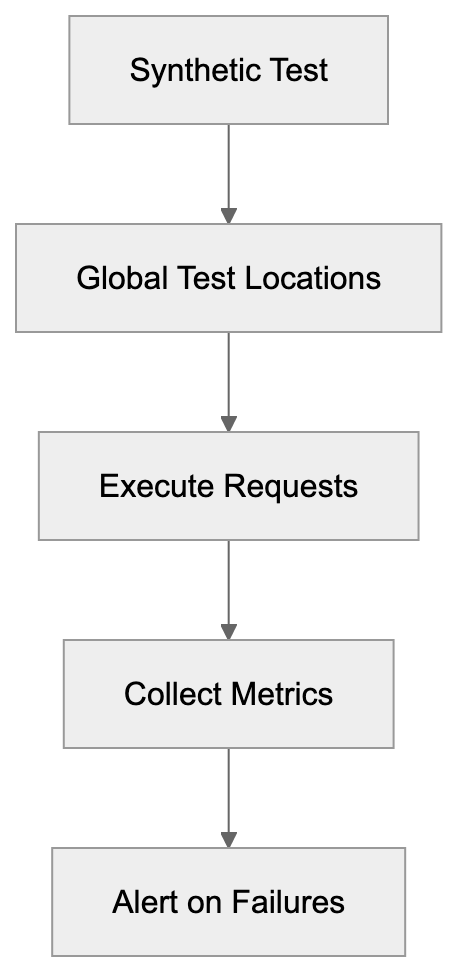
Websites and APIs can fail for numerous reasons, such as database downtime, third-party service timeouts, or code deployment bugs. Traditional monitoring alerts you only after real users report issues, which is often too late. Synthetic monitoring preemptively tests your services even without real traffic, acting like a tireless robot user. For e-commerce sites, downtime results in lost revenue, while for SaaS platforms, it erodes user trust. Marketing professionals require flawless landing pages during campaigns, and developers need to catch issues before customers do. Datadog Synthetics executes tests every few minutes from multiple regions. If a test fails, alerts are instantaneous, allowing teams to address problems during low-traffic periods. The ROI is substantial, as preventing a major outage can offset costs for years.
How Datadog Synthetics Works
The system functions through scheduled synthetic tests. Users configure URLs and test frequency, while Datadog’s infrastructure runs these tests globally. Each test yields metrics on response time, status codes, and content validation. The monitoring crawler uses specific Datadog user-agent strings for transparency in synthetic traffic logs, such as “Mozilla/5.0 (Windows NT 10.0; Win64; x64) AppleWebKit/537.36 (KHTML, like Gecko) Chrome/91.0.4472.124 Safari/537.36 Datadog Synthetic Test.” Tests include browser-based testing for JavaScript rendering and simpler HTTP checks for APIs. Results feed into Datadog’s dashboard for trends and alerts. Multistep tests can simulate user journeys like logins or checkouts. All test data integrates with other Datadog metrics for effective APM.
How Synthetic Monitoring Works:

Enterprise Deployment and Integration
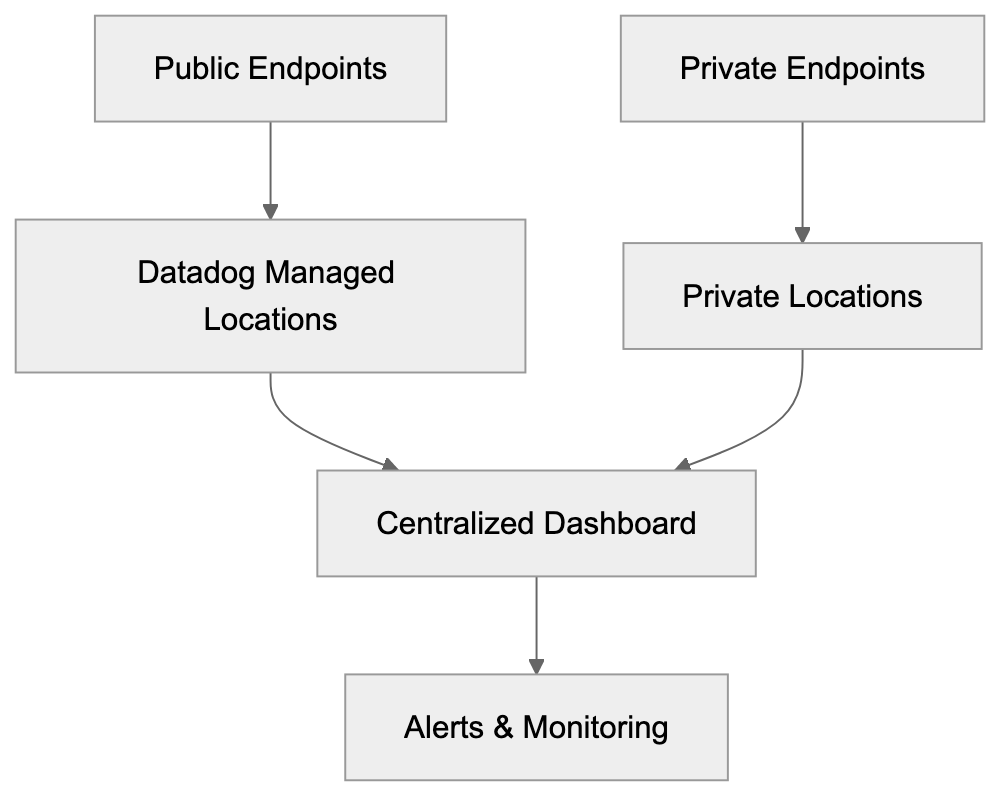
Large companies deploy Datadog Synthetics across vast endpoint numbers. The platform supports both public and private testing locations. Public sites use Datadog’s managed infrastructure, while private locations run tests internally for inaccessible applications. Integration occurs through Datadog’s API and existing installations, requiring minimal setup. SEO experts verify landing pages’ speed, while developers integrate tests into CI/CD pipelines. Failed tests can automatically block production deployments. The platform tracks SLOs using synthetic test results, with uptime percentages defined and monitored. Pricing scales with test runs, starting from approximately $15 monthly for basic plans.
Blocking Datadog Synthetics Crawler
Sometimes blocking synthetic monitoring traffic is necessary for cleaner analytics or troubleshooting. The Datadog user-agent string facilitates blocking, as requests containing “Datadog Synthetics” can be filtered in web server configurations. For instance, Nginx uses simple if statements, while Apache employs mod_rewrite. Most CDNs and WAFs support user-agent-based rules, such as Cloudflare’s firewall capabilities. However, blocking should be carefully considered; filtering in analytics tools like Google Analytics is often preferable. Companies sometimes exclude synthetic traffic from rate limits, as robots.txt files do not apply to monitoring bots.
Comparison with Alternative Monitoring Tools
Datadog Synthetics stands out among synthetic monitoring tools due to its comprehensive observability platform, combining logs, metrics, traces, and synthetic testing. Here’s a comparison:
| Tool | Global Locations | Browser Testing | API Testing | Starting Price | Key Difference |
|---|---|---|---|---|---|
| Datadog Synthetics | 100+ | Yes | Yes | ~$5 per 10k tests | Full observability platform integration |
| Pingdom | 70+ | Yes | Yes | ~$10/month | Simpler interface, fewer advanced features |
| New Relic Synthetics | 35+ | Yes | Yes | ~$100/month | Strong APM integration, higher entry cost |
| Uptime Robot | 50+ | Limited | Yes | Free tier available | Best for basic monitoring on a budget |
Datadog Synthetics Deployment Architecture:
 | StatusCake | 60+ | Yes | Yes | ~$25/month | Middle ground for price and features |
Datadog offers unparalleled integration for teams already utilizing its ecosystem, while Pingdom is noted for its ease of use. New Relic provides similar depth but at a higher cost, and Uptime Robot is ideal for small businesses. StatusCake strikes a balance between features and price.
Understanding User-Agent Strings
Datadog rotates various user-agent strings to simulate diverse browsers and devices. Each user-agent contains the Datadog Synthetics identifier, making synthetic traffic easily identifiable in server logs. Strings are updated periodically to maintain current browser accuracy. Synthetic tests can specify user-agents to simulate real user experiences, accommodating different content on mobile versus desktop. Developers should check analytics for synthetic traffic, typically a small percentage of total requests. Most sites handle the frequency well, but rate-limited APIs require consideration.
Platform Integration Details
Datadog Synthetics connects seamlessly to the broader observability platform through shared data pipelines. Tests appear in the same dashboard as infrastructure metrics. Monitors can trigger alerts on synthetic testing failures via channels like Slack, PagerDuty, and email. The API enables programmatic test creation and retrieval, integrating into deployment processes. Infrastructure as code tools like Terraform support Datadog configurations. Detailed timing breakdowns provide insights into performance bottlenecks, with APM integration revealing backend service issues. Such comprehensive features distinguish enterprise monitoring from basic uptime checks.
Security and Privacy Considerations
While synthetic monitoring raises security questions, Datadog’s tests originate from external IP ranges. Security teams should be informed of synthetic testing setups, with IP ranges allowlisted if needed. Authentication test credentials are stored securely, best using dedicated test accounts. Regulations like GDPR apply to third-party data processing; companies should use fake information in test scenarios to protect real customer PII. Private locations offer additional security, especially for regulated industries.
Cost Optimization Strategies
Synthetic monitoring costs correlate with test frequency and complexity. Browser tests cost more than simple HTTP checks, so prioritize crucial user journeys and necessary endpoints. Adjust test frequency; not all endpoints require constant testing—hourly or daily checks often suffice. Use API tests for speed and cost efficiency, reserving browser tests for JavaScript-heavy applications. Geographic distribution impacts pricing, so choose locations wisely. Set up alerts to avoid notification fatigue, with retries before alerting to minimize false positives.
Datadog Synthetics offers robust synthetic monitoring within a comprehensive observability platform. Its monitoring crawler actively tests websites and APIs globally, identifying issues before users do. The Datadog user-agent allows easy traffic identification. Strong APM integration, scalable pricing, and a focus on security and compliance make it ideal for developers, marketers, and business owners seeking reliable application performance monitoring.
Frequently Asked Questions
What benefits does Datadog Synthetics provide for my business?
Datadog Synthetics helps ensure website and API availability by identifying issues before they affect users. This proactive monitoring can significantly reduce downtime, which is critical for e-commerce sites and SaaS platforms that rely on continuous service availability and user trust.
How are synthetic tests configured in Datadog Synthetics?
Users can configure synthetic tests by specifying the URLs to be tested and the frequency of those tests. Datadog runs these tests globally, collecting metrics on response times and status codes, which are then displayed on the Datadog dashboard for monitoring.
Can I block Datadog's synthetic monitoring traffic?
Yes, you can block synthetic monitoring traffic to maintain cleaner analytics by filtering out requests containing the Datadog user-agent string. However, it's advisable to manage such filtering carefully to avoid missing out on valuable monitoring data.
What types of tests does Datadog Synthetics support?
Datadog Synthetics supports various test types, including browser-based testing for dynamic content and simpler HTTP checks for APIs. Multistep tests can also simulate complete user journeys, such as logins or transactions.
How does pricing scale for Datadog Synthetics?
Pricing for Datadog Synthetics is based on the number of test runs, starting at around $15 per month for basic plans. Costs will increase with the frequency and complexity of tests, so optimizing test configurations can help manage expenses.
Does Datadog Synthetics integrate with other tools?
Yes, Datadog Synthetics integrates seamlessly with the broader Datadog observability platform, allowing users to view synthetic test metrics alongside other performance data. It also supports integrations with alerting tools like Slack and PagerDuty.
What security measures should I consider when using Datadog Synthetics?
When using Datadog Synthetics, ensure that any test credentials are handled securely, preferably using dedicated test accounts. If your tests involve sensitive data, consider employing fake information during testing to comply with privacy regulations like GDPR.
Track Your AI Visibility
See how AI chatbots like ChatGPT, Claude, and Perplexity discover and recommend your brand.