Understanding Discordbot: The Discord Link Preview Crawler
Comprehensive guide to Discordbot, the link preview crawler for Discord. Discover its purpose, user-agent string, and customization options.
What is Discordbot and Why Does it Matter
Discordbot, the essential Discord crawler, plays a crucial role in enhancing user engagement by generating link previews. Whenever a URL is shared in servers or direct messages, Discordbot fetches this data to create visually appealing embed cards displaying the page title, description, and image.
The crawler identifies itself with a specific Discord user-agent string, enabling website owners to recognize Discord traffic in their logs. By implementing Open Graph Discord meta tags, website administrators can customize what Discord users view. Discordbot enhances user experience by eliminating the need to click on blind links, allowing users to ascertain the value of content before clicking, as detailed in Discord’s Fetcher Documentation.
For developers and website owners, understanding Discordbot is vital, as it respects robots.txt, allowing control over content visibility. Control over your content’s appearance on Discord influences click-through rates and engagement from the community. Discordbot adheres to standard web protocols and robots.txt files, avoiding server overload by following proper crawling etiquette.
How Discord Link Previews Actually Work
Discord Link Preview Process:
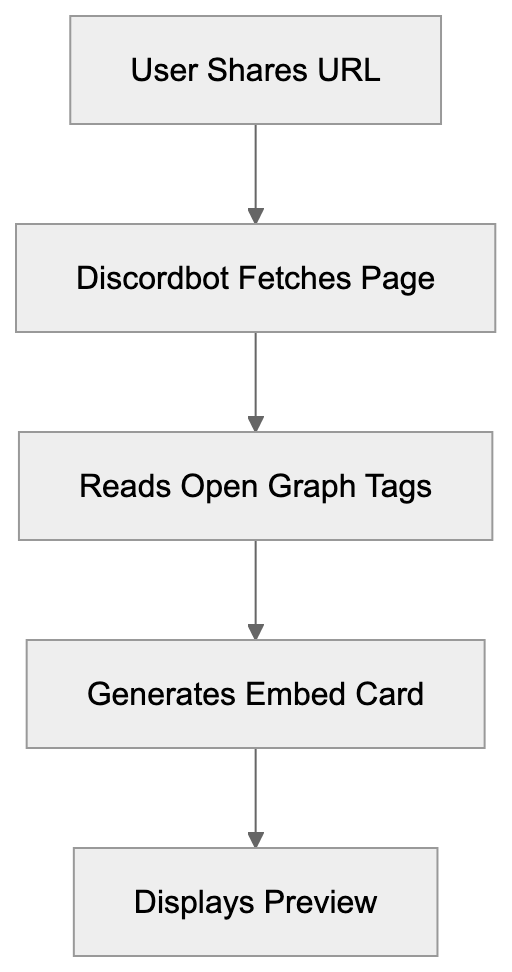
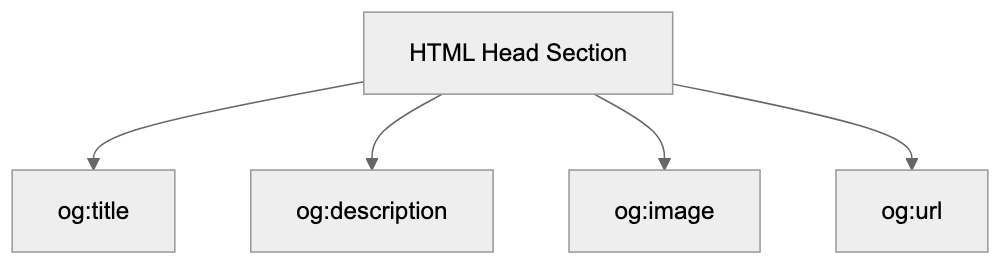
When a URL is pasted into Discord, Discordbot, a Discord embed bot, makes an HTTP request to retrieve the webpage content. It searches for crucial Open Graph tags in the HTML header section, such as og:title, og:description, and og:image. These tags instruct Discord on what to display in the embed card. If Open Graph tags are absent, Discordbot reverts to standard HTML meta tags.
The process is rapid, with Discord caching the data to minimize repetitive requests, thereby improving performance and reducing server load. Based on the Discord client, the preview appears below or next to your message.
Discordbot uses the user-agent string “Mozilla/5.0 (compatible; Discordbot/2.0; +https://discordapp.com)”. Although version numbers may differ, the format remains consistent, allowing website analytics to track Discord referral traffic separately.
Why Discord Created This Crawler
Discord implemented this crawler to provide richer, safer link sharing. Before such previews, the lack of context made URLs a security risk, with malicious links indistinguishable from safe ones. Preview cards help users recognize dubious websites, encouraging safer clicks.
Engagement within Discord communities improves with rich previews, as they make conversations more visual and engaging. Previews entice users to explore content, benefiting creators who share their work on Discord.
Open Graph Tag Structure:
Competing with platforms like Slack, Microsoft Teams, and Telegram necessitated link preview features for Discord. By controlling the preview generation process internally, Discord doesn’t rely on third-party services, ensuring better performance, reliability, and user privacy.
Customizing Discord Embeds with Open Graph Tags
Website owners can influence Discord URL previews by adding Open Graph meta tags to their HTML. Include basic tags like title, description, and image in the head section.
- The og:title tag sets the bold heading in the embed. Limit to 60 characters.
- Use og:description for the text beneath the title. Aim for 150-200 characters.
- The og:image specifies the preview image URL. Discord recommends a minimum of 1200x630 pixels.
Include og:url for setting the canonical link to ensure accurate URL representation. The og:type tag indicates content type—options include website, article, video, or music.
Advanced customization options include the og:site_name tag for branding your embed, while Twitter Card tags serve as fallbacks if Open Graph tags are absent. Use the theme-color meta tag for color customization, affecting the embed’s left border color in some Discord clients. Due to varying rendering on different platforms, testing your embeds is vital.
Discordbot Compared to Other Social Media Crawlers
Understanding differences among web crawlers can improve content optimization across platforms.
| Crawler | User-Agent Identifier | Primary Tags | Image Size Recommendation | Special Features |
|---|---|---|---|---|
| Discordbot | Discordbot/2.0 | Open Graph, Twitter Cards | 1200x630px | Respects theme-color tag |
| Facebookbot | facebookexternalhit | Open Graph | 1200x630px | Video preview support |
| Twitterbot | Twitterbot | Twitter Cards, Open Graph | 1200x675px | Player cards for media |
| LinkedInBot | LinkedInBot | Open Graph | 1200x627px | Article-specific metadata |
| Slackbot | Slackbot-LinkExpanding | Open Graph, oEmbed | 560px width | oEmbed protocol support |
Discordbot is lightweight compared to Facebookbot, making fewer requests with aggressive caching. Although Twitterbot has stricter Twitter Card validation requirements, LinkedInBot focuses on professional content. Slackbot supports the oEmbed protocol for more interactive embeds, a feature Discordbot currently lacks.
All these crawlers respect robots.txt directives. Blocking them, however, stops users from seeing previews when sharing your content, which typically diminishes engagement.
Technical Details for Developers and SEO Experts
Discordbot Request Flow:
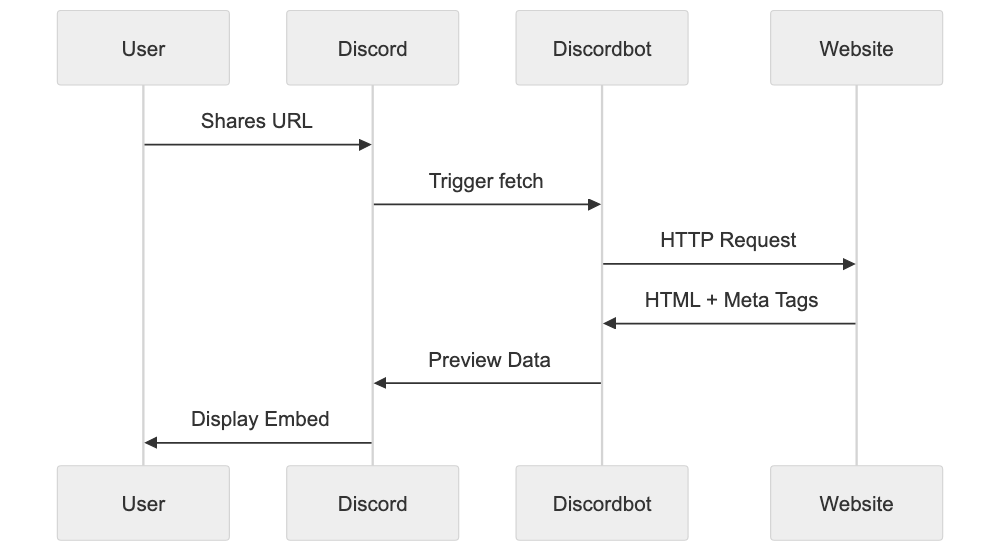
Discordbot adheres to standard HTTP protocols and accepts gzip compression to save bandwidth. The crawler supports HTTPS and properly validates SSL certificates—expired or self-signed certificates may impede preview generation.
The bot respects robots.txt on your domain, allowing you to block it with “User-agent: Discordbot” followed by “Disallow: /”. Partial blocking hides only specific directories. The crawler honors the Crawl-delay directive to avoid server overload.
Response time is crucial for preview generation as Discord enforces timeout limits. Aim for responses within 3-5 seconds to prevent preview failures, as delays can result in “No preview available” messages.
The crawler doesn’t execute JavaScript by default, reading only raw HTML. JavaScript-generated content requires server-side rendering for Discord visibility. Pre-rendering services can assist with single-page applications.
Discord caches preview data for prolonged periods; while new shares fetch updates. For authentication-restricted content, keep public pages accessible, as Discordbot can’t bypass login barriers.
Common Issues and How to Fix Them
Website owners often face problems with Discord previews not appearing correctly due to missing or incorrect Open Graph tags. Use meta tag validators to check your setup. While Discord’s embed tester isn’t publicly available, numerous third-party tools exist.
Image issues are frequent—Discord may not display images that are too small or incorrectly formatted. Stick to JPEG or PNG formats and ensure image URLs use HTTPS to avoid mixed content warnings.
CDNs and hosting providers may block bot traffic by default. Adjust security settings and firewall rules to whitelist Discordbot, permitting preview generation. Sometimes services like Cloudflare erroneously flag crawler traffic as suspicious.
Excessive redirects confuse Discordbot; keep redirect chains short, ideally a single hop. Use 301 redirects for permanent moves and 302 for temporary ones.
Content delivery networks often serve different content to bots—ensure Discordbot gets the same HTML as regular users. User-agent detection on servers shouldn’t alter content for crawlers.
Privacy and Security Considerations
Discordbot doesn’t store sensitive page information, solely caching preview metadata. It doesn’t index entire websites like search engines but fetches certain pages when shared.
Website owners can spot Discordbot traffic in server logs thanks to its distinct user-agent string, enabling analysis of frequently shared pages on Discord.
The crawler respects user privacy by not transmitting personal info—it keeps link sharing anonymous from the site’s viewpoint.
Protect sensitive content by blocking Discordbot using robots.txt, preventing preview generation while still allowing link sharing. Consider the privacy-versus-engagement trade-off.
Discord keeps crawler data private, not selling or sharing with third parties. Analytics from Discordbot visits belong to you and your provider.
Best Practices for Optimizing Discord Link Previews
Implement complete Open Graph tags on all shareable pages. Sole dependence on fallback meta tags isn’t ideal.
Test your tags with online validators before deployment; they catch common errors like incorrect tag names. Customized social media images for important pages enhance previews, especially with text overlays describing page offerings.
Keep titles concise and descriptive—front-load important keywords even if they’re truncated. Persuasive descriptions encourage clicks.
Review server logs to identify Discordbot traffic patterns and extend similar content that resonates with the Discord community. Track referrals from discord.com in your analytics.
Update Open Graph tags when content changes significantly. While Discord caches previews, new shares fetch updated metadata, ensuring embeds remain current.
Consider Discord-specific landing pages for campaigns. Tailor Open Graph tags to appeal to Discord users and use URL parameters to track Discord traffic separately from other sources.
Understanding Discord’s Crawler Infrastructure
Discord’s global data centers power Discordbot, reducing latency in preview generation. Requests arise from different IPs depending on server location, improving reliability and performance.
The infrastructure scales with Discord activity: more crawler requests occur during peak usage as users share more links. Discord’s system handles millions of previews daily, designed for high availability and fault tolerance.
Crawler updates enhance functionality. User-agent string version numbers change with updates, introducing new features or tag support. Monitor Discord’s developer announcements for updates.
The crawler uses connection pooling and keep-alive headers efficiently, reducing overhead fetching previews from identical domains. Discord’s infrastructure optimizes speed and minimizes resource consumption.
Combining with Discord Bots and APIs
Developers can create custom embeds using Discord APIs, offering more customization than standard link previews. Bot-generated embeds support features like custom colors, footer text, and multiple fields, ideal for notifications, dashboards, or interactive content.
Bot embeds don’t require Open Graph tags since they’re server-side generated. The bot submits formatted JSON directly to Discord’s API, giving developers complete control over appearance and content.
Automatic link previews and bot embeds coexist in messages—bots may suppress previews to prevent redundancy. The Discord API provides options for preview generation per message.
Webhook integrations also support custom embeds minus a full bot. Suitable for automated notifications from external services, many third-party platforms provide Discord webhook integrations with embed support.
Future of Discord Link Previews
Driven by user feedback, Discord continuously evolves its preview system, experimenting with new embed formats and interactive elements. Future enhancements could include video or audio playback.
Discord focuses on improving preview accuracy and resilience, addressing edge cases and unusual website configurations. Continuous investment in crawler infrastructure supports platform growth.
Security remains a priority, with ongoing efforts to detect and block malicious websites exploiting embeds. Sophisticated phishing detection and warnings may emerge.
Integration with Discord’s forums and threads progresses, potentially leading to context-aware previews based on shared link environments. Community feedback steers the roadmap for preview feature development.
End
Discordbot is integral to Discord’s link preview experience, fetching webpage metadata to produce useful embed cards when users share URLs. The bot, distinguished by its specific user-agent string, aligns with web standards, while Open Graph Discord meta tags allow website owners to tailor previews.
The crawler enhances user experience and safety, providing essential link context before users engage. Competitive with rival platforms, Discordbot is effective without overburdening target servers.
For developers and website owners, optimizing for Discord is important. Properly configured Open Graph tags boost community engagement. Understanding Discordbot facilitates control over your content’s presentation. Testing and monitoring ensure optimal brand representation. As Discord evolves, Discordbot will also advance, integrating new features and improvements into its platform.
Frequently Asked Questions
What are Open Graph tags and why are they important for Discord?
Open Graph tags are metadata added to a website's HTML that dictate how the content appears when shared on social media platforms like Discord. They are crucial for customizing link previews, allowing website owners to specify the title, description, and image that will be displayed, thereby enhancing user engagement.
How can I troubleshoot issues with Discord link previews not appearing?
If Discord link previews are not displaying correctly, ensure that your Open Graph tags are properly configured. You can use meta tag validators to check for errors. Additionally, review your server settings to ensure that bot traffic is not being blocked.
Why is my image not appearing in the Discord preview?
Your preview image might not display if it is too small, incorrectly formatted, or if the URL doesn't use HTTPS. Discord typically recommends images of at least 1200x630 pixels and only supports JPEG and PNG formats for optimal results.
What is the recommended way to use robots.txt with Discordbot?
To control how Discordbot interacts with your site, you can use the robots.txt file. For example, adding 'User-agent: Discordbot' followed by 'Disallow: /' will block Discordbot from crawling your entire site, whereas partial disallow rules can fine-tune access to specific directories.
How does Discordbot compare to other crawlers?
Discordbot differs from other crawlers like Facebookbot and Twitterbot in several ways, including its user-agent string and the types of tags it prioritizes. It is designed to be lightweight and respect caching, leading to fewer requests which reduces server load.
What practices can improve my content's visibility on Discord?
To enhance visibility, implement complete and accurate Open Graph tags on your pages, monitor server logs for Discordbot traffic patterns, and update your tags whenever significant changes occur in your content. Creating Discord-specific landing pages can further optimize engagement.
Will future Discord updates affect how link previews work?
Yes, Discord regularly updates its crawler and preview features based on user feedback and technological advances. These updates may include improved accuracy, new embed formats, or enhanced security measures aimed at protecting users from malicious links.
Track Your AI Visibility
See how AI chatbots like ChatGPT, Claude, and Perplexity discover and recommend your brand.