Understanding DotBot: Moz's SEO Crawler for Domain Authority
Explore DotBot, Moz's powerful SEO crawler used in domain authority calculations and link data collection.
Introduction
DotBot is Moz’s web crawler powering their SEO analysis tools and metrics. Every day, thousands of websites encounter DotBot as it scans the web, collecting link data. SEO professionals rely on tools like DotBot, the SEO analysis bot, for accurate link analysis and domain metrics to improve search rankings. Web crawlers like DotBot gather massive amounts of web data that help calculate important metrics like Domain Authority and Page Authority. Without these crawlers, companies like Moz couldn’t provide the link intelligence SEO experts depend on. DotBot specifically focuses on discovering links between websites, analyzing page content, and building the index that powers Moz’s link database. The crawler respects robots.txt files and crawl-delay directives while maintaining one of the largest link indexes in the SEO industry.
What is DotBot
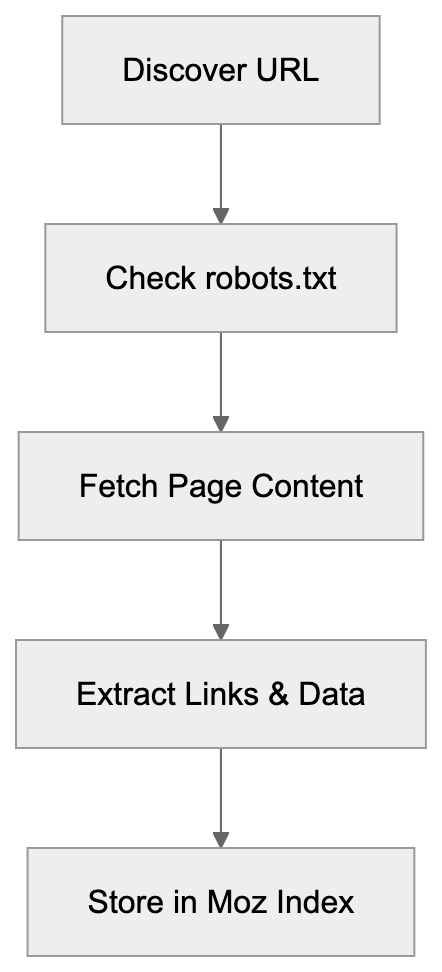
DotBot, the SEO analysis bot from Moz, is a web crawler that systematically browses websites to collect data about links and page content. Think of it as a robot that visits web pages and reads everything on them, including links pointing to other sites. The Moz crawler identifies itself with a specific user-agent string so website owners can recognize it in their server logs. DotBot’s main job is to build and maintain Moz’s link index, containing billions of URLs and their connections. When DotBot visits a page, it extracts information about outbound links, analyzes page structure, and records metadata that feeds into Moz’s ranking algorithms. The bot runs continuously, crawling new pages and revisiting existing ones to keep the index fresh. Website owners see DotBot in their analytics as a regular visitor with a user-agent containing “DotBot.” This crawler is different from search engine bots as it’s not indexing content for search results but collecting link data for SEO tools.
DotBot’s Web Crawling Process:
Why DotBot Exists and Its Purpose
Moz created DotBot to power its suite of SEO tools, including Moz Pro, Link Explorer, and Domain Authority metrics. SEO professionals need to understand which websites link to them and how authoritative those links are. Without a complete web crawler, Moz couldn’t provide this important data. DotBot exists because link analysis requires constant scanning of the web to find new links and track changes. The crawler’s primary purpose is feeding data into Moz’s proprietary metrics like Domain Authority and Spam Score. These metrics help marketers evaluate website quality and plan their SEO strategies. DotBot also supports competitive analysis by showing which sites link to competitors but not to you. The crawler needs to be fast and effective because the web contains billions of pages, and new content appears every second. Moz uses the data DotBot collects to help customers identify link-building opportunities and diagnose SEO problems. The bot’s continuous operation ensures that Moz’s tools reflect current web conditions rather than outdated information.
How DotBot Works and Technical Details
DotBot identifies itself with a specific user-agent string: “Mozilla/5.0 (compatible; DotBot/1.3; http://www.opensiteexplorer.org/dotbot; [email protected])”. Website administrators can find this in their server logs when the crawler visits. The bot respects standard web protocols, including robots.txt files where site owners can specify crawling rules. To slow down DotBot’s crawling speed, a crawl-delay directive can be added to your robots.txt file. The crawler follows links it discovers on pages to map out the web’s link structure and observes nofollow attributes on links, still recording them for analysis. DotBot runs from IP addresses owned by Moz and their infrastructure providers. It downloads HTML content and extracts relevant link and content information. It’s designed to be polite and not overload web servers by spacing out requests. Most sites see DotBot visits spread throughout the day, preventing performance impact.
How DotBot Powers Moz Metrics:

Blocking or Managing DotBot
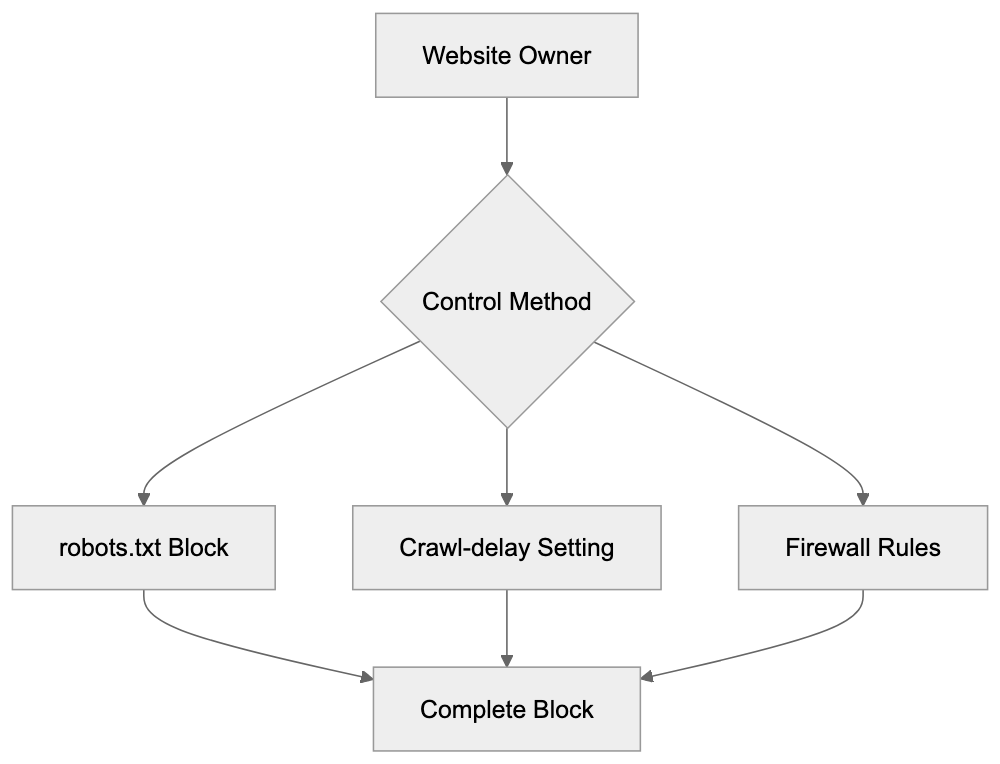
Website owners have several options for controlling DotBot’s access to their sites. The simplest method is using robots.txt to block the crawler entirely. To block DotBot, add the following lines to your robots.txt file:
User-agent: DotBot
Disallow: /
This tells DotBot not to crawl any part of your site. To allow crawling but slow it down, you can use:
User-agent: DotBot
Crawl-delay: 10
This instructs the bot to wait 10 seconds between requests. You can also block DotBot at the firewall level using its IP addresses, though Moz may change these over time. Some content management systems and security plugins offer bot management features where you can specifically block or rate-limit DotBot. Keep in mind that blocking DotBot means your site won’t appear in Moz’s link index, and competitors using Moz tools won’t see links to your site. For most legitimate websites, there’s no reason to block DotBot since it provides valuable SEO data, but sites with bandwidth concerns or wanting to keep their link profile private might choose to block it. Note that blocking DotBot doesn’t affect your search engine rankings since it’s not a search engine crawler.
DotBot Integration with Moz Pro Tools
The data DotBot collects powers multiple tools within the Moz Pro platform. Link Explorer is the primary tool relying on DotBot’s crawling to show backlink profiles for any domain. When you search for a domain in Link Explorer, you’re seeing data that DotBot discovered and indexed. The crawler’s findings also feed into Domain Authority calculations, analyzing link patterns to predict ranking potential. Moz’s Spam Score feature uses DotBot data to identify potentially spammy websites based on link characteristics. Keyword Explorer benefits from DotBot’s page analysis to understand content and ranking factors. The SERP analysis features in Moz Pro tools use DotBot data to compare link profiles of ranking pages. Campaign tracking in Moz Pro monitors your site’s link growth over time using DotBot’s continuous crawling. When you set up a campaign, Moz uses DotBot to regularly check your site for new links and changes. The crawler is essentially the foundation for all link-related features across the Moz platform. Without DotBot’s constant web scanning, these tools couldn’t provide fresh and accurate link intelligence.
Comparing DotBot to Alternative SEO Crawlers
Several companies operate similar crawlers for SEO analysis purposes. Here’s how DotBot compares to major alternatives:
| Crawler | Company | Primary Use | Index Size | User-Agent |
|---|---|---|---|---|
| DotBot | Moz | Link analysis, DA calculation | 43+ billion URLs | DotBot/1.2 |
| AhrefsBot | Ahrefs | Backlink index, SEO metrics | 400+ billion pages | AhrefsBot |
| SemrushBot | Semrush | SEO analysis, competitor research | 43+ billion URLs | SemrushBot |
| MJ12bot | Majestic | Link intelligence, Trust Flow | 400+ billion URLs | MJ12bot |
| BLEXBot | BLEXBot/Webmeup | Backlink analysis | Not disclosed | BLEXBot |
Managing DotBot Access:
DotBot’s index is smaller than some competitors’, but Moz focuses on quality over quantity. AhrefsBot is known for aggressive crawling and maintaining the largest commercial link index. SemrushBot serves a broader SEO platform beyond just link analysis. MJ12bot from Majestic is one of the oldest SEO crawlers still in operation. Each crawler has different crawling frequencies and methodologies. Website owners often see multiple SEO crawlers in their logs as different tools scan the web. The choice between these services usually comes down to which platform’s metrics and tools you prefer. Many SEO professionals use multiple platforms and benefit from several of these crawlers indexing their sites. Blocking one crawler doesn’t affect the others since they operate independently.
DotBot Crawling Frequency and Behavior
DotBot doesn’t crawl all websites with the same frequency. Popular high-authority sites get crawled more often than smaller sites. The crawler prioritizes pages changing frequently and having many inbound links. A major news site might see DotBot multiple times per day, while a small blog might see it weekly or monthly. The crawling schedule adapts based on new content found on a site. If your site publishes fresh content regularly, DotBot will visit more frequently. The bot also recrawls pages when it discovers new links pointing to them from other sites. Getting mentioned on popular sites can trigger more frequent DotBot visits. Server response times affect crawling behavior since DotBot will slow down for sites that respond slowly. The crawler aims to be a good web citizen by not overwhelming servers. Most webmasters never notice DotBot’s impact on server resources, but very small sites on shared hosting might want to use crawl-delay if they notice performance issues. Understanding DotBot’s behavior helps you improve when to publish new content for maximum link discovery.
Privacy and Data Collection Considerations
DotBot collects publicly accessible web content just like search engines do. It only accesses pages that are publicly available and not behind authentication. If content requires login, DotBot won’t access it unless the login page itself is publicly accessible. The data DotBot collects includes page URLs, link structures, anchor text, and basic content analysis. Moz uses this data to provide SEO intelligence to their customers. Website owners concerned about privacy should know that blocking DotBot is straightforward using robots.txt, but blocking the crawler means losing visibility in Moz’s tools, which could be a disadvantage. DotBot respects meta robots tags, including noindex and nofollow directives. The crawler doesn’t execute JavaScript by default, so dynamically loaded content might not be fully captured. Personal information on public pages could theoretically be indexed, though Moz’s focus is on link relationships, not personal data. For businesses handling sensitive information, proper authentication and robots.txt configuration prevent unwanted crawling. Most commercial websites benefit from DotBot crawling since it increases their visibility in SEO tools used by potential partners and customers.
End
DotBot serves as the backbone of Moz’s SEO intelligence platform by continuously crawling the web to find and analyze links. Understanding this crawler helps website owners and SEO professionals make informed decisions about managing bot access and interpreting Moz’s metrics. The crawler identifies itself clearly through its user-agent string and respects standard web protocols like robots.txt. While smaller than some competitor crawlers, DotBot’s index powers trusted metrics like Domain Authority that many SEO experts rely on. Website owners can easily control DotBot’s access through robots.txt directives or block it entirely if needed. The data this crawler collects feeds directly into Moz Pro tools, providing valuable link intelligence for SEO strategy and competitive analysis. Compared to alternatives like AhrefsBot and SemrushBot, DotBot focuses on quality link data that supports Moz’s unique metrics and analysis features.
Frequently Asked Questions
What are the benefits of allowing DotBot to crawl my website?
Allowing DotBot to crawl your site can enhance its visibility in Moz's SEO tools, helping you track backlinks and find new linking opportunities. This data can help improve your site's Search Engine Optimization (SEO) strategy and performance metrics such as Domain Authority.
How can I see if DotBot has visited my website?
You can check your server logs for entries that list the user-agent string "DotBot/1.3". This will confirm that DotBot has accessed your site, along with the specific pages it crawled.
Is it possible to prevent DotBot from crawling certain pages?
Yes, you can use the robots.txt file to specify which pages DotBot can or cannot access. By adding rules such as "Disallow: /private-page" to the robots.txt, you can restrict DotBot's crawling access to these specific areas of your site.
How does DotBot's crawling frequency work?
DotBot's crawling frequency is based on site authority, the frequency of updates, and the number of inbound links. High-authority sites or those with regularly published content are typically crawled more frequently than smaller, less active sites.
What impact does DotBot have on my website's performance?
DotBot is designed to be polite and will space out its requests to avoid overloading your server. Most site owners experience minimal impact on performance, but very small sites might want to implement a crawl-delay if they encounter issues.
What happens if I block DotBot from my site?
If you block DotBot, your site will not be included in Moz's link index, which means you might miss out on valuable SEO analytics and visibility. However, blocking DotBot does not affect your search rankings in search engines as it is not a search engine crawler.
Can I manage DotBot's crawling speed?
Yes, you can manage the crawling speed by adding a "Crawl-delay" directive to your robots.txt file. For instance, specifying "Crawl-delay: 10" instructs DotBot to wait 10 seconds between requests, reducing its impact on your server's resources.
Track Your AI Visibility
See how AI chatbots like ChatGPT, Claude, and Perplexity discover and recommend your brand.