Understanding FacebookBot: Meta's Key AI Training Crawler
Learn about FacebookBot's role in AI training for Meta's models, user-agent details, documentation, and how to block it from your website.
What is FacebookBot and Why Should You Care
FacebookBot is Meta’s web crawler designed specifically for collecting data to train AI models. This Meta crawler visits websites across the internet and gathers content that later gets used in developing Meta’s AI products like Meta AI assistant and Llama language models. The crawler works similarly to search engine bots, but instead of indexing content for search results, it collects training data for machine learning.
Web developers and site owners need to understand FacebookBot because it actively scrapes content from public websites. If you run a website, your content might already be part of Meta AI training datasets. The bot respects standard web protocols like robots.txt, which means you have control over whether it can access your site or not. This becomes important for businesses concerned about how their content gets used in AI model development.
The existence of FacebookBot reflects the massive data requirements of modern AI systems. Large language models need billions of text examples to learn language patterns and generate human-like responses. Meta joins other tech companies in deploying specialized crawlers for this purpose.
Why FacebookBot Exists and Its Purpose
Meta created FacebookBot to support its AI research and product development efforts, as discussed in Fortune’s coverage. The company needed a dedicated crawler to gather varied web content for training large language models and other AI systems. Without access to broad internet data, these models would have limited knowledge and reduced capability.
FacebookBot Operation Overview:
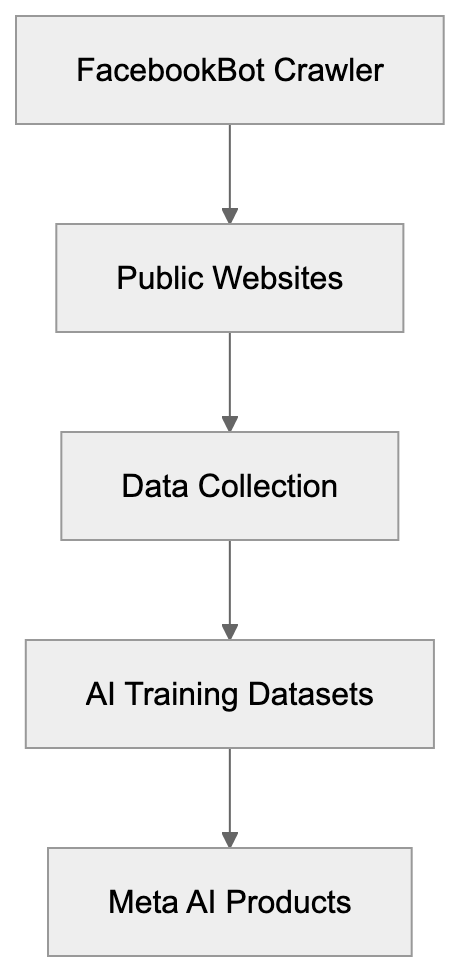
The bot specifically targets publicly available web content. It crawls websites similar to how GoogleBot or Bingbot operate, but with different end goals. Instead of building a search index, FacebookBot collects text, images, and other data types that help AI models understand language context and generate relevant responses.
Meta uses the collected data across multiple AI projects. The Llama series of language models relies on web-scraped content as part of training datasets. Meta AI, the company’s chatbot assistant, also benefits from this AI data collection. The crawler helps Meta compete with other AI developers like OpenAI and Google, who also scrape web content for model training.
The purpose extends beyond just collecting text. FacebookBot helps Meta understand current web trends, language evolution, and varied perspectives found online. This variety improves AI model performance across different topics and use cases, but this raises questions about content ownership and fair use that website owners should consider.
How to Identify FacebookBot in Your Server Logs
FacebookBot uses specific user-agent strings that identify it in web server logs. The current user-agent format looks like this:
FacebookBot/1.0 (+http://www.facebook.com/externalhit_uatext.php)
Some variations exist depending on the specific crawling task. You might also see:
facebookexternalhit/1.1 (+http://www.facebook.com/externalhit_uatext.php)
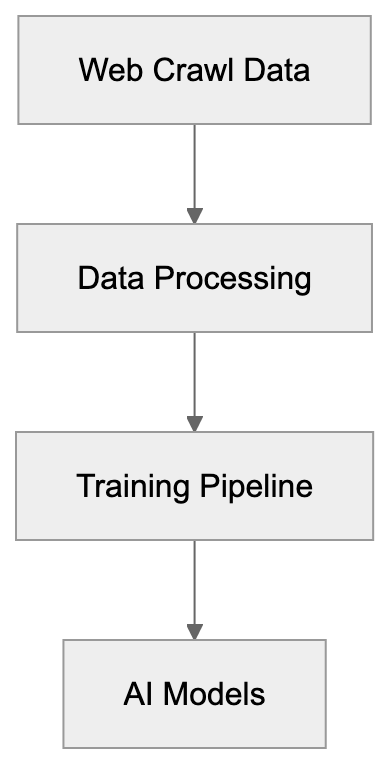
Meta AI Data Usage Flow:
This second variant relates to content preview generation when users share links on Facebook. While similar, it serves a different purpose than the AI training crawler. Website administrators should check their access logs for these user-agent strings to see if Meta is crawling their content.
Meta provides documentation about its crawlers at facebook.com/externalhit_uatext.php. This page explains the different bots Meta operates and their purposes. The documentation helps site owners understand what each crawler does and why it visits websites.
You can also verify FacebookBot through reverse DNS lookups. Legitimate FacebookBot requests come from IP addresses that resolve to facebook.com domains. This verification prevents spoofing, where other bots pretend to be FacebookBot. Always verify bot identity before making decisions about blocking or allowing access.
How Meta Uses FacebookBot Data
Meta incorporates FacebookBot data into training pipelines for multiple AI products. The Llama language models represent the most visible use case. These open-source models compete with GPT-4 and Claude, requiring massive training datasets assembled from web crawls, academic papers, and other sources.
The Meta AI assistant, launched in 2023, also relies on data collected through web crawling. This chatbot needs current information and varied knowledge to answer user questions effectively. Web-scraped content provides the breadth of information needed for general-purpose AI assistants.
Meta’s AI research teams use collected data for experiments and model improvements. They test different training approaches, evaluate model performance, and develop new AI capabilities. The continuous data collection supports ongoing research efforts across computer vision, natural language processing, and multimodal AI.
The company combines web-scraped data with other sources. User-generated content from Facebook and Instagram contributes to training datasets, though Meta states it handles this data differently than public web content. Licensed datasets purchased from data providers supplement web scrapes. This multi-source approach aims to create well-rounded AI models.
Meta claims it filters and processes collected data before using it for training. This includes removing personal information, duplicate content, and low-quality text, but the specifics of these processes remain mostly undisclosed. Website owners have limited visibility into exactly how their content gets used once collected.
How to Block FacebookBot from Your Website
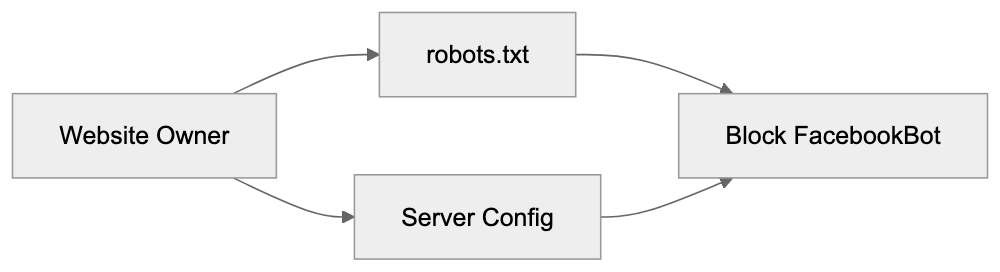
Website owners can block FacebookBot using robots.txt files. This standard protocol tells crawlers which parts of your site they can or cannot access. To block FacebookBot completely, add these lines to your robots.txt file:
User-agent: FacebookBot
Disallow: /

User-agent: facebookexternalhit
Disallow: /
The first rule blocks the AI training crawler. The second blocks the preview generation bot. You can choose to block one or both, depending on your preferences. Place these rules in the robots.txt file at your website root directory.
If you want to allow FacebookBot on some pages, but not others, you can specify paths:
User-agent: FacebookBot
Disallow: /private/
Disallow: /premium-content/
Allow: /public/
This approach gives you granular control over what content Meta can access. Keep in mind that robots.txt relies on voluntary compliance. Well-behaved bots respect these rules, but enforcement is not guaranteed.
Some website owners implement server-level blocking through .htaccess files or web server configurations. This provides stronger enforcement than robots.txt. You can block requests based on user-agent strings or IP ranges associated with FacebookBot, but this requires more technical knowledge and can accidentally block legitimate traffic if configured incorrectly.
FacebookBot Blocking Methods:
 Meta states it respects robots.txt and provides contact information for concerns about its crawlers. If you notice FacebookBot ignoring your robots.txt rules, you can report the issue through Meta’s developer channels. Documentation at facebook.com/externalhit_uatext.php includes additional guidance.
FacebookBot Compared to Other AI Training Crawlers
Multiple tech companies operate web crawlers for AI training purposes. Each has different characteristics, policies, and respect for website owner preferences. Understanding the scene helps you make informed decisions about which crawlers to allow.
| Crawler | Company | User-Agent | Robots.txt Support | Documentation Quality |
|---|---|---|---|---|
| FacebookBot | Meta | FacebookBot/1.0 | Yes | Good |
| GPTBot | OpenAI | GPTBot/1.0 | Yes | Excellent |
| Google-Extended | Google-Extended | Yes | Excellent | |
| CCBot | Common Crawl | CCBot/2.0 | Yes | Good |
| Amazonbot | Amazon | Amazonbot/1.0 | Yes | Fair |
OpenAI’s GPTBot crawls web content for training ChatGPT and GPT models. The company provides clear documentation and respects robots.txt directives. OpenAI even allows site owners to opt out retroactively by filling out a form, though this doesn’t guarantee data removal from existing models.
Google-Extended is Google’s AI training crawler, separate from regular GoogleBot. It collects data for Bard and other AI products. Google provides detailed documentation and makes blocking straightforward. The separation between search indexing and AI training gives website owners more control.
CCBot from Common Crawl creates public datasets used by many AI researchers and companies. This bot has operated for years, and its data feeds numerous AI projects beyond just one company. Blocking CCBot affects a wider range of AI development efforts.
Amazonbot supports Amazon’s AI initiatives, including Alexa improvements and other machine learning projects. Amazon provides less detailed information about how collected data gets used compared to other companies.
All these crawlers claim to respect robots.txt, but enforcement varies. Some website owners report continued crawling after implementing blocks, suggesting imperfect compliance. Regular monitoring of server logs helps verify whether blocking rules work as intended.
Legal and Ethical Considerations
The use of web-scraped content for AI training exists in a legal gray area. Copyright law doesn’t clearly address whether training AI models constitutes fair use. Several lawsuits against AI companies, including Meta, challenge this practice. Website owners should understand these ongoing legal debates.
Meta argues that publicly available content can be used for AI training under fair use doctrines. Critics counter that this interpretation stretches fair use beyond its intended scope. Courts have not yet provided definitive rulings that settle these questions. The legal scene continues evolving as more cases progress through the system.
Ethical concerns extend beyond legal questions. Many content creators feel their work should not train commercial AI products without permission or compensation. The opt-out model, where you must actively block crawlers rather than opt-in, favors AI companies over content creators.
Website owners face practical decisions regardless of legal outcomes. Blocking AI training crawlers might reduce your content’s influence on AI model development. Allowing them means your content contributes to systems you may not fully understand or agree with. There is no universally correct answer.
Some publishers negotiate licensing deals with AI companies to allow crawling in exchange for payment. This represents an alternative to blanket blocking or allowing but most small website owners lack use for such arrangements. The power imbalance between individual site owners and large tech companies shapes this ecosystem.
Meta’s Official Documentation and Resources
Meta maintains documentation about FacebookBot at facebook.com/externalhit_uatext.php. This page explains the crawler’s purpose, user-agent strings, and how to control access. The documentation covers both the AI training crawler and other Meta bots.
The page specifies that FacebookBot respects robots.txt protocol and provides examples of blocking configurations. Meta updates this documentation periodically as their crawling practices evolve. Website administrators should check it regularly for changes.
Meta also provides IP range information for verifying legitimate FacebookBot requests. This helps distinguish real Meta crawlers from imposters using fake user-agent strings. The verification process involves reverse DNS lookups confirming that requests originate from Meta’s infrastructure.
For specific concerns or issues, Meta directs users to their developer support channels. Response times and helpfulness vary based on the nature of the inquiry. Large publishers typically receive more attention than individual website owners.
The documentation does not provide detailed information about data retention, model training processes, or how to request data deletion. This lack of transparency frustrates website owners who want more control over their content’s use. Meta follows similar patterns to other tech companies in limiting disclosure about internal AI development practices.
Impact on Website Performance and Bandwidth
AI training crawlers can impact website performance and hosting costs. These bots make numerous requests to collect complete data. High crawling frequency consumes bandwidth and server resources, potentially affecting legitimate user experience.
FacebookBot generally crawls at reasonable rates to avoid overwhelming websites. Meta implements rate limiting and respects crawl-delay directives in robots.txt, but impact varies based on website size, traffic levels, and hosting infrastructure.
Small websites on shared hosting might notice performance degradation when multiple AI crawlers visit simultaneously. Dedicated servers and cloud hosting typically handle crawler traffic better. Monitoring server resources helps identify whether crawler activity causes problems.
You can implement crawl-delay directives to slow down FacebookBot:
User-agent: FacebookBot
Crawl-delay: 10
This tells the bot to wait 10 seconds between requests. Not all crawlers respect crawl-delay, but well-behaved ones do. Adjusting this value balances allowing access while protecting server resources.
Some content delivery networks and security services offer crawler management features. These can rate-limit or block excessive crawling activity automatically. CloudFlare, Akamai, and similar services provide these capabilities, though configuration requires technical knowledge.
End
FacebookBot represents Meta’s effort to gather training data for AI model development. The Meta crawler visits public websites collecting content that feeds into products like Meta AI and Llama language models. Understanding how it works helps website owners make informed decisions about allowing or blocking access.
Meta provides documentation and respects standard blocking protocols like robots.txt. Website administrators can control FacebookBot access through configuration files or server-level rules. Deciding whether to allow or block FacebookBot depends on individual preferences regarding AI training data collection.
The broader scene includes multiple AI training crawlers from different companies. Each has similar purposes, but varying levels of transparency and respect for website owner preferences. Staying informed about these crawlers helps you maintain control over your content.
Legal and ethical questions surrounding web scraping for AI training remain unresolved. Website owners should monitor developments in this area and adjust their policies. Whether you choose to allow or block FacebookBot, understanding its role and impact matter for managing your web presence.
Frequently Asked Questions
How can I check if FacebookBot is crawling my website?
You can identify FacebookBot in your server logs by looking for specific user-agent strings such as 'FacebookBot/1.0' or 'facebookexternalhit/1.1'. Monitor your access logs to see if these user agents have been recorded while accessing your site.
Is it possible to block FacebookBot without affecting other traffic?
Yes, you can selectively block FacebookBot by adding rules to your robots.txt file or using .htaccess for more granular control. With robots.txt, you can specify certain directories to block while allowing access to others, enabling you to protect specific content without impacting overall web traffic.
What are the consequences of allowing FacebookBot to crawl my site?
Allowing FacebookBot to crawl your site means your content may be used for AI training, which could raise concerns about content ownership and fair use. However, it may also provide benefits if your content is featured in AI applications that enhance your visibility.
What should I do if FacebookBot ignores my robots.txt rules?
If you observe that FacebookBot continues to crawl your site despite having rules in your robots.txt file, you can report the issue through Meta's developer channels. Ensure your rules are correctly implemented, as improper syntax may lead to oversight.
How does FacebookBot's crawling frequency compare to other crawlers?
FacebookBot generally respects crawl rates and implements rate limiting to avoid overwhelming websites. However, the impact may vary based on the size and traffic of your site, so monitoring server performance during crawler activity is advisable.
Are there legal considerations I should be aware of regarding FacebookBot?
Yes, using web-scraped content for AI training is currently a legal gray area. While Meta claims fair use, ongoing lawsuits challenge this stance, so website owners should stay informed about regulatory developments and consider their content strategies accordingly.
How often does FacebookBot visit websites?
The frequency of FacebookBot visits can vary depending on the site's content and traffic. While the crawler is designed to avoid overwhelming servers, sites with more relevant or high-quality content may experience more frequent visits as FacebookBot looks to gather diverse data.
Track Your AI Visibility
See how AI chatbots like ChatGPT, Claude, and Perplexity discover and recommend your brand.