FeedFetcher-Google: Complete Guide to Google Feed Crawler
Learn about FeedFetcher-Google bot, how it crawls RSS feeds for Google services, user-agent details, and blocking considerations for publishers.
Introduction
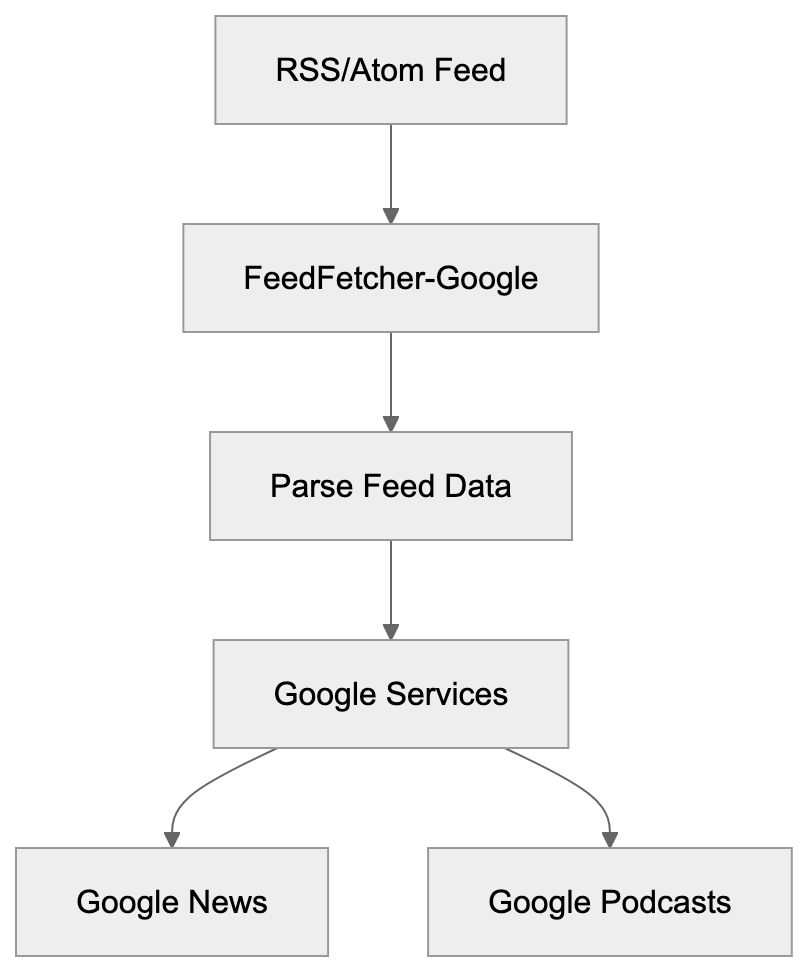
FeedFetcher-Google is a specialized web crawler operated by Google. It’s designed to fetch and parse RSS and Atom feeds across the internet, serving as a user-triggered fetcher for services like Google News and WebSub. Unlike the regular Google bot that indexes web pages, this bot focuses exclusively on syndication feeds. The Google feed crawler supports various Google products, including Google News, Google Podcasts, and other services that rely on feed data. For publishers and developers managing RSS feeds, understanding how FeedFetcher-Google operates is important as it helps improve feed delivery and control bot access. The bot respects standard web protocols and can be managed through robots.txt files. Many website owners encounter this RSS feed bot in their server logs without knowing what it does or why it exists.
What is FeedFetcher-Google
FeedFetcher-Google is Google’s dedicated bot for retrieving syndication feeds. It crawls RSS 2.0, RSS 1.0, and Atom format feeds and identifies itself through a specific user-agent string in HTTP requests. When it visits your feed, it appears in server logs with a distinctive identifier. The RSS crawler operates separately from Googlebot and serves a different purpose. While Googlebot indexes web content for search, FeedFetcher-Google pulls structured feed data. It reads XML-based feed files to extract article titles, descriptions, publication dates, and other metadata. The feed parser follows HTTP redirects and handles various feed formats automatically. Publishers don’t usually need to submit feeds manually as Google discovers feeds through various methods, including sitemap files, HTML link tags, and direct submissions to specific Google services.
How FeedFetcher-Google Works:
User-Agent Details and Technical Specifications
The FeedFetcher-Google user-agent string follows a specific format. The standard user-agent looks like this: “FeedFetcher-Google; (+http://www.google.com/feedfetcher.html)”. Some variations include additional version information or subscriber counts, such as “FeedFetcher-Google; (+http://www.google.com/feedfetcher.html; 123 subscribers)”. This number indicates how many users have subscribed to that feed through Google services. This information can help publishers understand feed popularity. The bot respects standard HTTP headers, including Last-Modified and ETag. These headers help reduce bandwidth by allowing conditional requests. If content hasn’t changed since the last crawl, the server can return a 304 Not Modified response. FeedFetcher-Google also follows HTTP caching directives, and publishers can control crawl frequency through Cache-Control headers. The bot typically crawls feeds based on update frequency and subscriber count, with more popular feeds getting crawled more often.
Why FeedFetcher-Google Exists and Its Purpose
Google created FeedFetcher-Google to power multiple products and services. The primary purpose is collecting feed content for Google News. When news publishers create RSS feeds, this bot retrieves them regularly. Google Podcasts also relies heavily on FeedFetcher-Google, as podcast RSS feeds contain episode information and audio file URLs. The crawler fetches these feeds to update podcast listings. Although Google discontinued Google Reader in 2013, the bot continues serving other products. Chrome’s Follow feature uses feed data to show content updates, and some Google Assistant features pull information from RSS feeds too. The bot helps Google maintain fresh content across various services without manually indexing every page. Feeds provide structured data that’s easier to parse than regular HTML, making content combining faster and more reliable. Publishers benefit because their content reaches Google services automatically through feeds, creating a symbiotic relationship between content creators and Google’s platforms.
How Publishers and Businesses Use FeedFetcher-Google
News organizations rely on FeedFetcher-Google for content distribution. When they publish articles, the RSS feed updates automatically. FeedFetcher-Google crawls the feed and Google News picks up new stories. This process happens without manual submission in most cases. Podcast creators use RSS feeds as the primary distribution method. They host feed files on their servers or through podcast platforms, and FeedFetcher-Google retrieves these feeds to populate Google Podcasts. Each time a new episode is published, the feed updates and Google’s crawler fetches the changes. Bloggers and content marketers use feeds for content syndication, and the Google feed crawler helps their content reach Google’s ecosystem effectively. E-commerce sites sometimes create product feeds in RSS format, though Google Shopping uses different feeds. Publishers can monitor FeedFetcher-Google in server logs to verify feed crawling. Regular crawl patterns indicate Google is successfully retrieving feed updates, while irregular patterns might signal feed errors or technical issues that need fixing.
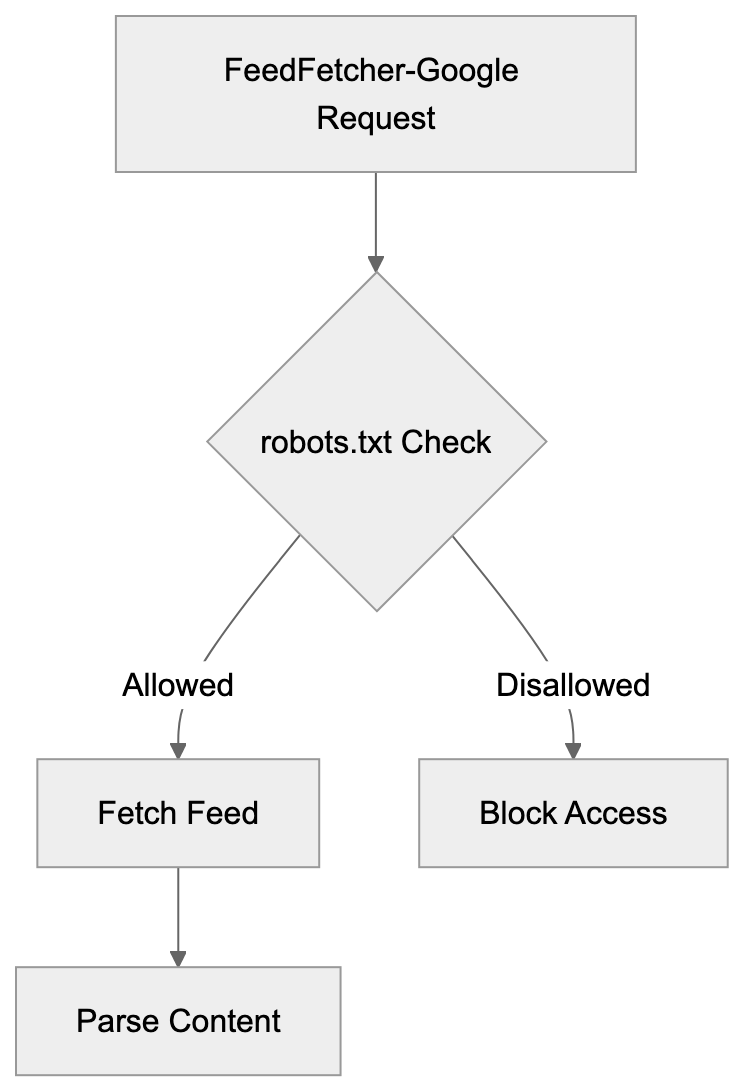
FeedFetcher-Google Request Flow:

Controlling and Managing FeedFetcher-Google Access
Website owners can control FeedFetcher-Google through robots.txt files, as the bot respects the standard robots exclusion protocol. To block the crawler completely, add this to robots.txt: “User-agent: FeedFetcher-Google” followed by “Disallow: /”. To block specific feeds, specify the feed path instead. However, blocking FeedFetcher-Google prevents content from appearing in Google services. For most publishers, this is counterproductive since feed distribution is the goal. Instead of blocking, publishers should focus on improving feed quality. Valid XML formatting is important for proper parsing. Broken feeds cause crawl errors and content won’t appear in Google products. Testing feeds with validators before deployment prevents these issues. Publishers can adjust crawl frequency through HTTP headers. Setting appropriate Cache-Control values helps manage server load. The Expires header also influences how often the bot returns. For high-traffic feeds, consider using a CDN to handle FeedFetcher-Google requests, reducing load on origin servers and improving response times.
FeedFetcher-Google Compared to Similar Crawlers
Multiple services operate feed crawlers similar to FeedFetcher-Google. Each has different characteristics and purposes. Here’s a comparison of major feed crawlers:
| Crawler Name | User-Agent String | Primary Purpose | Respects robots.txt |
|---|---|---|---|
| FeedFetcher-Google | FeedFetcher-Google | Google News, Podcasts, other Google services | Yes |
| Feedspot | Feedspot | Feed aggregation and reader service | Yes |
| Feedly | Feedly | Feed reader and content curation | Yes |
| Apple Podcasts | Apple-PubSub | Apple Podcasts platform | Yes |
| Content aggregation and personalization | Yes |
FeedFetcher-Google differs from general web crawlers like Googlebot. It only processes feed files, not regular HTML pages, making the bot more lightweight and focused than full web crawlers. Apple’s podcast crawler works similarly for the Apple Podcasts ecosystem, as both fetch RSS feeds but serve different platforms. Feedly and Feedspot operate feed readers and crawl feeds for their users, aggregating content from millions of feeds daily. Most feed crawlers respect standard web protocols and robots.txt, and they identify themselves clearly through user-agent strings. Server administrators can differentiate feed crawlers from malicious bots easily, as legitimate crawlers also respect rate limits and don’t overwhelm servers.
Technical Considerations for Feed Publishers
Publishers should implement proper HTTP status codes for feed requests, returning 200 for successful feed delivery. Use 301 for permanent feed URL changes and 302 for temporary moves. FeedFetcher-Google follows redirects, but permanent redirects update Google’s records faster. Return 410 Gone when a feed is permanently discontinued to stop future fetch attempts. For temporary issues, use 503 Service Unavailable with a Retry-After header. Feed formatting affects how well FeedFetcher-Google processes content. Valid XML is mandatory since the bot is an XML parser. Encoding should be UTF-8 for broad character support, and proper MIME types should be included in HTTP headers. RSS feeds should use application/rss+xml or application/xml, while Atom feeds should use application/atom+xml. Content-Type headers help crawlers process feeds correctly. Include full article content in feed items when possible, as full content feeds provide a better user experience in feed readers.
Monitoring FeedFetcher-Google Activity
Server logs provide detailed information about FeedFetcher-Google visits. Look for the user-agent string in access logs, as analyzing crawl patterns helps identify issues or improvement opportunities. Regular crawl intervals indicate healthy feed discovery, while sudden stops might signal problems with feed formatting or server errors. Google Search Console doesn’t currently provide feed-specific reporting, so publishers need to rely on server-level analytics. Web analytics tools can track FeedFetcher-Google as a separate bot. Configure filters to isolate feed crawler traffic from regular visitors, providing clearer metrics about human vs. bot traffic. Monitoring bandwidth usage from FeedFetcher-Google helps with capacity planning. High-traffic feeds might need infrastructure upgrades to handle crawler requests. Setting up alerts for unusual crawl patterns catches problems early, like a spike in 404 errors suggesting broken feed URLs that need fixing.
Security and Privacy Considerations
FeedFetcher-Google operates from Google’s IP address ranges. Verify crawler authenticity by performing reverse DNS lookups on requesting IPs, as legitimate Google crawlers resolve to googlebot.com domains. A forward DNS lookup should match the original IP address to prevent bot spoofing attacks, as some malicious bots fake user-agent strings to appear legitimate. Feeds should be served over HTTPS when possible, as this encrypts content during transmission and prevents tampering. While feeds are public content, HTTPS adds authentication and integrity. Password-protected feeds require HTTP authentication, though most feeds are intentionally public for wide distribution. Be cautious about including sensitive information in feeds, as feed content is publicly accessible by default.
Common Issues and Troubleshooting
Feed validation errors are the most common problem with FeedFetcher-Google. Malformed XML prevents proper parsing and content won’t appear in Google services. Use feed validators like W3C Feed Validation Service to check for formatting issues before deployment. Encoding issues cause display problems or parsing failures; ensure feed files use UTF-8 encoding consistently. Mixed encodings create invalid XML that crawlers reject. Incorrect MIME types confuse crawlers about content format. Verify that Content-Type headers match the actual feed format, as server configuration errors sometimes send wrong headers automatically. Broken links within feed items create a poor user experience, while self-crawling FeedFetcher-Google still crawls the feed, linked content should be accessible. Test all URLs in feed items before publishing. Update frequency mismatches cause stale content issues. If feeds claim hourly updates but only change daily, it affects crawl scheduling. Set realistic update frequencies in feed metadata. Large feed files might timeout during crawler requests. Consider pagination for feeds with hundreds of items, as most feed readers handle paginated feeds with proper setup.
Best Practices for Feed Optimization
Keep feed file sizes reasonable for effective crawling, limiting items to 50-100 recent entries in most cases. Older content can be archived and removed from active feeds. Include complete metadata in each feed item, as proper titles, descriptions, publication dates, and author information improve content quality. Use absolute URLs for all links and media files. Relative URLs can break when feeds are consumed outside the original context. Implement proper caching headers to improve crawl effectiveness. Cache-Control and ETag headers reduce unnecessary bandwidth usage. Update feeds promptly when new content is published. Delays between publication and feed updates hurt content distribution. Consider using feed management platforms for complex publishing workflows, as these tools handle formatting, validation, and distribution automatically. Submit feeds to Google services directly when appropriate, as Google News Publisher Center and Google Podcasts Manager accept feed submissions. Direct submission can speed up initial discovery and indexing. Monitor feed health regularly through automated checks, and set up monitoring to catch broken feeds before they affect distribution.
Conclusion
FeedFetcher-Google serves as Google’s specialized crawler for RSS and Atom feeds, powering multiple Google products including Google News and Google Podcasts. The bot operates separately from the regular Googlebot with a focused purpose. Publishers benefit from understanding how it works and improving their feed. Proper feed formatting and server configuration ensure reliable crawling. The Google bot respects standard web protocols including robots.txt and HTTP headers. Most publishers should allow FeedFetcher-Google access to increase content distribution. Blocking the bot prevents content from reaching Google’s ecosystem. Monitoring crawler activity helps identify issues and improve feed delivery. Valid XML, proper encoding, and complete metadata create high-quality feeds. FeedFetcher-Google continues evolving as Google’s services change, so understanding this crawler helps publishers maintain effective content distribution strategies across Google’s platforms.
Feed Crawler Access Control:
Frequently Asked Questions
What types of feeds does FeedFetcher-Google support?
FeedFetcher-Google supports RSS 2.0, RSS 1.0, and Atom format feeds. This allows it to fetch and parse a wide range of syndication feeds used by content publishers across the internet.
How can I check if FeedFetcher-Google is crawling my feed?
You can monitor your server logs for the presence of the FeedFetcher-Google user-agent string. Analyzing crawl patterns over time can help you identify whether the bot is accessing your feed regularly and ensure that feed updates are being retrieved correctly.
Should I block FeedFetcher-Google in my robots.txt file?
Generally, you should avoid blocking FeedFetcher-Google as it can limit your content’s visibility on Google services. Blocking this bot prevents your RSS feed from appearing in Google News or Podcasts, which is counterproductive for most content publishers.
What can cause FeedFetcher-Google to stop crawling my feed?
Common causes for FeedFetcher-Google to stop crawling include malformed XML, server errors, or incorrect HTTP status codes. It’s essential to ensure valid feed formatting and monitor server response to maintain consistent crawling.
How can I improve the frequency of FeedFetcher-Google crawling my feed?
You can improve crawl frequency by optimizing the update frequency in your feed metadata and ensuring high-quality, valid XML formatting. Additionally, using appropriate HTTP headers like Cache-Control can encourage more frequent visits from the bot.
Why is HTTPS recommended for feeds served to FeedFetcher-Google?
HTTPS is recommended because it secures the content during transmission and prevents tampering. Although feeds are primarily public, HTTPS ensures authentication and integrity, enhancing security for both publishers and users.
What are the best practices for validating my RSS feed?
Use feed validators like the W3C Feed Validation Service to check for formatting issues before deployment. Ensuring proper encoding (UTF-8), correct MIME types, and valid XML structure will help avoid common parsing errors with FeedFetcher-Google.
Track Your AI Visibility
See how AI chatbots like ChatGPT, Claude, and Perplexity discover and recommend your brand.