Understanding FeedlyBot: The Essential Guide for RSS Users
Learn about FeedlyBot, its role in feed retrieval, legitimate RSS use, and blocking implications for Feedly users.
What is FeedlyBot and Why It Matters
FeedlyBot is the web crawler employed by the Feedly platform, which is one of the leading RSS feed readers available today. The role of FeedlyBot is vital because when you subscribe to blogs or news sites through Feedly, this RSS reader bot fetches the content for you. It acts as a digital assistant, constantly monitoring your favorite websites for new articles and updates. Operating around the clock, it retrieves content from millions of RSS feeds across the internet, facilitating efficient content aggregation and distribution. For website owners and developers, understanding FeedlyBot is crucial because it represents legitimate traffic that aids in content reach and enhances visibility. For millions of Feedly users, this bot is the cornerstone of their content discovery experience. RSS technology has been around since the late 1990s and still offers a formidable way to aggregate content without the influence of social media algorithms, providing a direct channel to audiences. FeedlyBot brings this technology to modern users who desire control over their information intake, offering a personalized content discovery experience.
The Feedly Platform Explained
Feedly launched in 2008 as a visual RSS reader, experiencing significant growth after the shutdown of Google Reader in 2013. The Feedly platform allows users to organize content from blogs, news sites, YouTube channels, and other sources into customizable feeds. Users can categorize sources into different collections, save articles for later, and share content with teams. Feedly is designed for both individual users and businesses. The free version supports up to 100 sources, while paid plans offer more features. Feedly Pro is approximately $6 per month, Feedly Pro+ is around $8.25 per month, and Feedly Enterprise provides team collaboration features at a higher price point. The platform processes content from millions of websites daily and also offers Leo—an AI assistant that filters and prioritizes content based on user preferences. The service is compatible across web browsers, iOS, and Android devices. For businesses, Feedly offers competitive intelligence and market research capabilities through advanced filtering and tracking features.
How FeedlyBot Works
FeedlyBot Content Delivery Process:
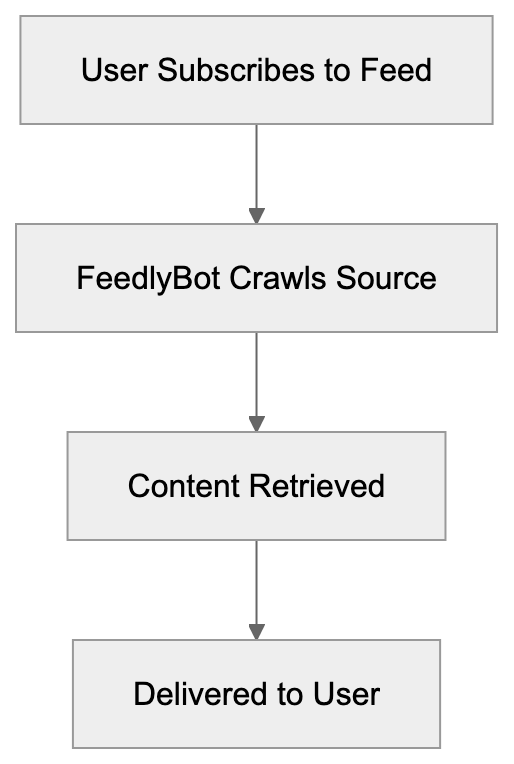
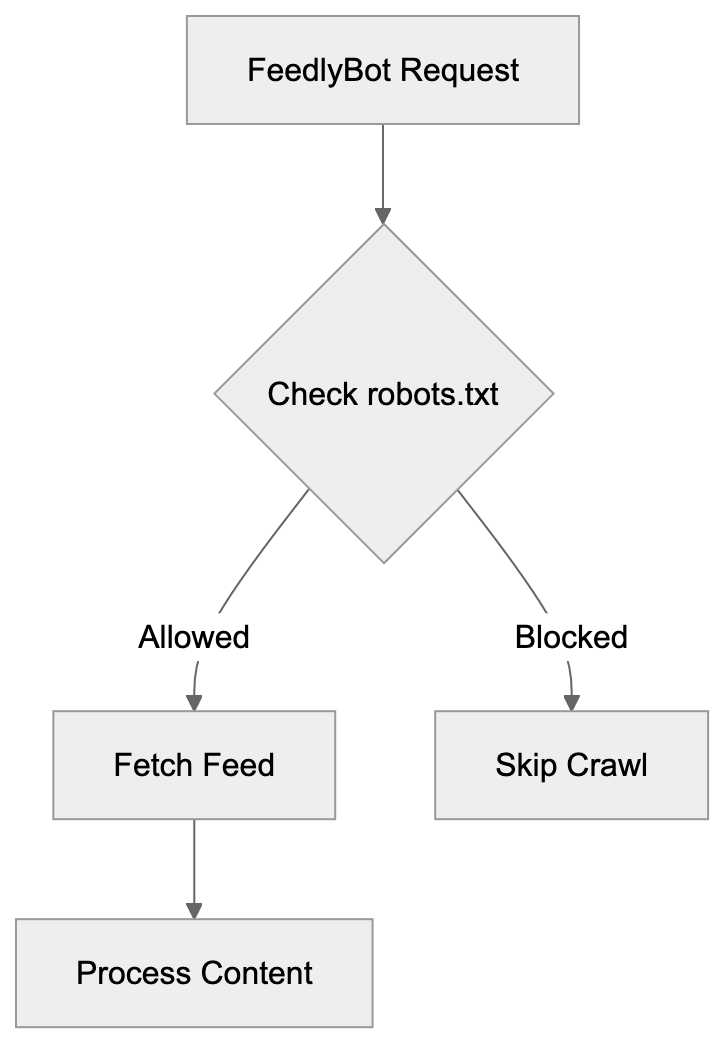
FeedlyBot functions as a web crawler to retrieve RSS feed content at regular intervals. The bot identifies itself through its user-agent string, usually resembling “Feedly/1.0 (+http://www.feedly.com/fetcher.html)” or variations based on the version. When a Feedly user subscribes to a feed, the bot adds it to its crawling schedule. Crawling frequency depends on how often the source publishes new content, with more frequently updated sites being crawled more often. FeedlyBot respects the robots.txt file, allowing website owners to control bot access. It primarily fetches RSS or Atom feeds instead of scraping full web pages, seeking standard feed formats at common URLs like /feed/, /rss/, or /atom.xml. The retrieved content is processed and delivered to subscribed users. To manage the high volume of feeds, FeedlyBot operates from multiple IP addresses and data centers and is designed to be lightweight and respectful of server resources.
Why FeedlyBot Exists and Its Purpose
FeedlyBot solves a fundamental issue in content consumption. Without it, users would need to manually visit numerous websites to check for new content—a time-consuming and inefficient process. By automating this process, the bot provides content creators with RSS feeds that deliver their work directly to interested readers without relying on social media platforms or search engine rankings. RSS feeds offer publishers direct access to their audiences, and FeedlyBot facilitates this by ensuring reliable content delivery. The bot is also used for business intelligence purposes, enabling companies to monitor competitors, track industry trends, and stay informed on specific topics or keywords. This requires the kind of consistent, automated feed retrieval that FeedlyBot excels at. By supporting an open web, FeedlyBot offers an alternative to closed platforms, giving users control over their information sources instead of relying on algorithms.
User-Agent String and Technical Details
The FeedlyBot user-agent string is how this RSS crawler identifies itself to web servers. Common variations include:
- “Feedly/1.0 (+http://www.feedly.com/fetcher.html; 1 subscriber)”
- “FeedlyBot/1.0 (http://feedly.com)”
- “Feedly/1.0 (+http://www.feedly.com/fetcher.html; like FeedFetcher-Google)”
How FeedlyBot Retrieves Content:

The user-agent sometimes includes a subscriber count, helping website owners understand how many Feedly users follow their content. Web server logs will show FeedlyBot requests similarly to other visitors. The bot usually makes GET requests to feed URLs and includes standard request headers like Accept-Encoding and Connection parameters. FeedlyBot respects HTTP status codes; for instance, a 410 (Gone) status tells the bot to stop checking that feed, while a 503 (Service Unavailable) prompts a retry later. The bot correctly follows HTTP redirects and is generally lightweight, only requesting the RSS or Atom feed unless images or other assets are specifically included in the feed. FeedlyBot supports both HTTP and HTTPS protocols, adhering to modern web standards.
RSS Best Practices for Website Owners
If you’re managing a website, following RSS best practices will ensure that FeedlyBot and other feed readers can access your content efficiently. Start by creating a valid RSS or Atom feed that adheres to specifications and use feed validation tools to identify any errors. Try to include full article content in your feed rather than excerpts to enhance the user experience for feed readers. Update your feed promptly upon publishing new content—most platforms automate this process. Set appropriate caching headers to reduce unnecessary requests; use ETags and Last-Modified headers to help FeedlyBot determine if content has changed. Avoid blocking legitimate feed readers in your robots.txt file unless you specifically want to prevent feed distribution. Allow the FeedlyBot user-agent access to URLs where your feeds are hosted. Include metadata like publication dates, author info, and categories in your feed items to aid in filtering and organizing content. Keep your feed URL stable, and if changes are necessary, use permanent redirects (301 status code) to direct from the old URL to the new one. Monitor server logs for FeedlyBot traffic patterns—unusual patterns might indicate feed-related technical issues.
Blocking FeedlyBot and Its Implications
While some website owners choose to block FeedlyBot, doing so has significant implications. Blocking FeedlyBot prevents Feedly users from accessing your content through the platform, resulting in the loss of this distribution channel entirely. To block FeedlyBot, you can add rules to your robots.txt file:
User-agent: Feedly
Disallow: /
Alternatively, configure your web server to return error codes to FeedlyBot’s user-agent. However, blocking FeedlyBot doesn’t completely stop people from reading your content—users might just visit your website directly or find it via other channels. For publishers monetizing through ads, blocking feed readers could appear advantageous since feeds generally don’t display website ads. However, this approach overlooks the relationship-building aspect of RSS: loyal feed subscribers often become direct website visitors, email subscribers, or even customers. Blocking legitimate bots like FeedlyBot contradicts the open web philosophy that RSS promotes, which is designed for content syndication and sharing. Some publishers strike a compromise by including article excerpts in feeds with links back to the full article, thereby maintaining feed presence while driving traffic to the main website. Consider your goals carefully before deciding to block FeedlyBot; if reaching a maximum audience and building reader loyalty are priorities, allowing feed access is advisable. For those concerned about content scraping or ad revenue, partial feeds might be a better compromise than outright blocking.
FeedlyBot Compared to Similar Services
FeedlyBot is not the only RSS reader bot in operation. Several other services use similar bots for feed retrieval. Here’s how FeedlyBot compares with other alternatives:
| Service | Bot Name | Monthly Users (Approx) | Key Features | Pricing |
|---|---|---|---|---|
| Feedly | FeedlyBot | 15+ million | AI filtering, team features, mobile apps | Free to $99/month |
| Inoreader | Inoreader Bot | 500,000+ | Advanced filtering, automation rules | Free to $14.99/month |
| The Old Reader | The Old Reader | 100,000+ | Simple interface, social features | Free to $6/month |
| NewsBlur | NewsBlur Crawler | 100,000+ | Intelligence trainer, story sharing | Free to $36/year |
| Feedbin | Feedbin Bot | 50,000+ | Newsletter combining, read later | $5/month |
FeedlyBot Request Flow:
 FeedlyBot serves the largest user base among dedicated RSS readers, meaning that blocking it can potentially impact more readers compared to blocking other RSS feed bots. Feedly also offers more enterprise and business intelligence features than its competitors. Although AI-powered filtering via Leo uniquely distinguishes Feedly from simpler readers, services like Inoreader provide more granular automation and filtering rules for power users. NewsBlur offers unique capabilities like intelligence training that adapts to your preferences, while The Old Reader focuses on simplicity and social sharing elements. Feedbin excels at combining newsletters, treating email newsletters similar to RSS feeds. Despite using similar crawling technology, these services vary in features and target audiences, with minimal differences for basic RSS reading. However, for professional use and content monitoring, Feedly’s extensive features make it more attractive to its substantial user base and establish its reputation.
Content Discovery and Feed Management
FeedlyBot facilitates sophisticated content discovery that extends beyond simple feed reading. Users can search for sources by topic, keyword, or publication name. Once a source is added, FeedlyBot immediately starts monitoring it. The platform’s AI capabilities help alleviate information overload. Leo, for instance, can automatically tag articles, highlight important content, and filter out irrelevant information. Users can create custom filtering rules based on keywords, authors, or other criteria. Feedly organizes feeds into collections or categories, separating work content from personal interests or different project areas. The platform also features browser extensions that suggest feeds based on the sites you visit. FeedlyBot retrieves not just blog posts but also content from YouTube channels, Reddit threads, and newsletters, making Feedly a central hub for information gathering. Team features allow organizations to share feeds and collaborate on content curation, enabling multiple team members to annotate articles and discuss findings. For competitive intelligence, users can meticulously track specific companies, products, or market trends, with FeedlyBot continuously monitoring these sources and alerting users to significant updates.
Privacy and Data Considerations
FeedlyBot itself doesn’t track individual user behavior across websites; it simply retrieves public RSS feed content. However, when using Feedly as a service, the company collects data on your reading habits and preferences, including feed subscriptions, articles read, and interactions with content. Feedly utilizes this data to enhance recommendations and AI features. According to Feedly’s privacy policy, the company does not sell personal data to third parties. Based in the U.S., Feedly adheres to applicable data protection regulations. For website owners, FeedlyBot requests are logged like any other traffic, detailing IP addresses, timestamps, and requested URLs—standard web server practice not unique to FeedlyBot. If privacy concerns arise when using Feedly, one can generally manage data collection preferences. For ultimate privacy, self-hosted solutions like FreshRSS or Tiny Tiny RSS offer complete control but require technical setup. The downside is the loss of Feedly’s convenience features and mobile apps. Understanding these privacy elements is crucial for making informed decisions about using Feedly or permitting FeedlyBot access to your website.
Troubleshooting FeedlyBot Issues
Occasionally, FeedlyBot may encounter problems retrieving feeds. Common issues include feed validation errors, server timeouts, or incorrect robots.txt configurations. If your feed isn’t updating in Feedly, first validate it using tools such as W3C Feed Validator or FeedValidator.org, correcting any XML syntax errors or missing required elements. Check server logs for FeedlyBot requests; if you encounter 403 or 404 errors, your server might be blocking the bot, or the feed URL could be incorrect. Ensure that your robots.txt file doesn’t inadvertently block FeedlyBot. Verify that the Feedly user-agent can access your feed path. Slow server responses might cause FeedlyBot to time out before retrieving a full feed; improving server response times or increasing timeout limits may resolve this. Some security plugins or firewalls might aggressively block automated traffic; whitelisting the FeedlyBot user-agent can prevent this issue. When you change your feed URL, establish proper redirects to guide Feedly users from old to new links smoothly. If subscribers experience issues, try unsubscribing from the source and resubscribing to it, forcing FeedlyBot to refresh its connection. Clear the Feedly cache through account settings if content appears stuck. Contact Feedly support if troubleshooting does not resolve persistent issues.
Conclusion
FeedlyBot functions as essential infrastructure behind one of the web’s most popular RSS readers. This Feedly crawler allows millions of users to aggregate and monitor content from across the internet without manual checking. For website owners and developers, understanding FeedlyBot aids in making informed decisions about feed access and distribution, ensuring your content connects with interested readers. While blocking FeedlyBot might serve narrow aims, it restricts your content’s reach and discoverability. RSS technology and crawlers like FeedlyBot uphold an open web where users choose their information sources rather than relying on algorithmic feeds. Adhering to RSS best practices ensures compatibility with FeedlyBot and similar services. Proper feed setup, stable URLs, and correct server configurations keep content flowing reliably to subscribers. Whether you’re a content creator aiming to reach readers or a professional tracking industry trends, FeedlyBot holds a vital role in modern content distribution and discovery.
Frequently Asked Questions
How does FeedlyBot differ from other RSS bots?
FeedlyBot stands out due to its expansive user base and advanced features like AI filtering through Leo. It is designed for both individual users and businesses, making it more versatile compared to other services. While other bots may offer basic feed reading, FeedlyBot provides comprehensive content aggregation and team collaboration tools.
What happens if I block FeedlyBot from my site?
Blocking FeedlyBot will prevent Feedly users from accessing your content through the platform, which could reduce your audience reach significantly. It may also limit your content's discoverability as loyal subscribers might miss updates. Additionally, blocking legitimate bots can go against the principles of openness in content sharing.
How can I improve my RSS feed for better compatibility with FeedlyBot?
To enhance compatibility, ensure your RSS feed is valid and includes full article content. Implement appropriate caching headers, avoid blocking FeedlyBot in your robots.txt file, and keep your feed URL stable. Regularly monitor server logs for any issues related to FeedlyBot's requests to address potential problems promptly.
What can I do if FeedlyBot is not fetching my feed?
If FeedlyBot isn't retrieving your feed, start by validating the feed for errors and checking your server logs for any access issues. Ensure that your site is not blocking FeedlyBot and verify that there are no broken links in your feed URL. Consider reaching out to Feedly support if issues persist after troubleshooting.
Can I use Feedly for personal and professional purposes simultaneously?
Yes, Feedly allows users to create collections and categories, making it easy to separate personal interests from professional content. You can customize your feed organization to track different topics or projects effectively, making it a versatile tool for various information needs.
Is my data safe when using Feedly?
Feedly adheres to privacy regulations and does not sell personal data to third parties. While it collects data on your reading habits to improve its service, users can generally manage their data preferences. If maximum privacy is a concern, consider self-hosted RSS solutions, though they come with trade-offs in convenience.
What features come with the paid versions of Feedly?
The paid versions of Feedly, including Pro and Pro+, offer enhanced features such as advanced filtering, keyword alerts, and team collaboration tools. Users can also access AI-driven content prioritization through Leo, which helps streamline information management. Pricing structures vary, catering to both individual and enterprise needs.
Track Your AI Visibility
See how AI chatbots like ChatGPT, Claude, and Perplexity discover and recommend your brand.