Understanding Friendly Crawler: The AI Training Data Bot
Discover how Friendly Crawler collects AI training data, its user-agent strings, and strategies for server log identification and blocking.
Introduction
Web crawlers are constantly scanning the internet. Some index pages for search engines, while others collect data for AI model training. One such bot is Friendly Crawler, which specifically gathers content to build datasets for machine learning. Web developers and server administrators need to know about these crawlers because they consume bandwidth and access your content.
The purpose of crawlers like Friendly Crawler is straightforward: they automate the collection of web data at scale, which would be impossible to gather manually. This data then becomes training material for large language models and other AI systems. Understanding how to identify and control these bots gives you power over your server resources and content usage. This article covers what Friendly Crawler is, why it exists, how to spot it in your logs, and methods to block it if needed.
What is Friendly Crawler
Friendly Crawler is an automated web scraping bot that visits websites to collect text, images, and other content, similar to other web crawlers like Bingbot. The data it gathers gets compiled into training datasets used for AI and machine learning models, a process that has been discussed in various publications. Like other web crawlers, it sends HTTP requests to web servers and downloads publicly accessible content.
Web Crawler Operation Flow:
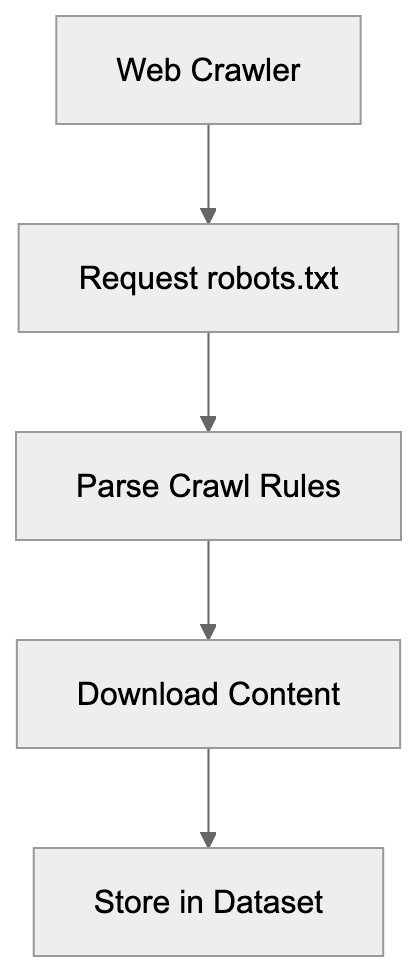
The name suggests a polite or respectful approach to crawling, but that mainly refers to following robots.txt directives and identifying itself clearly in user-agent strings. The bot operates continuously, visiting millions of pages across the internet. It targets various content types, including articles, forums, product pages, and documentation.
The collected information helps train AI models to understand language patterns, context, and generate human-like responses, a process that has been discussed in various publications. Web crawlers like this one are a needed infrastructure for modern AI development, providing the raw data that models need to learn from.
Why Friendly Crawler Exists and Its Purpose
AI models need massive amounts of text data to function properly. Companies building these models can’t manually collect enough content, so they use automated crawlers instead. Friendly Crawler exists to solve this AI data collection problem at scale. The purpose is purely about gathering training data for machine learning systems.
When you interact with a chatbot or AI assistant, that model was likely trained on data collected by crawlers similar to this one. The economics make sense too: human data collection would cost millions and take years, while a crawler can gather equivalent data in weeks or months. These bots also help create varied datasets by accessing content from different domains, languages, and topics.
Without crawlers like Friendly Crawler, the development of large language models would slow down significantly, as highlighted in recent studies. The alternative would be licensing content directly from publishers, which is expensive and complicated. So, automated crawling remains the primary method for building AI training datasets despite ongoing debates about copyright and fair use.
How Companies and Users Interact With It
Most website owners don’t directly use Friendly Crawler; instead, they’re on the receiving end of its visits. The crawler accesses your site automatically without requiring permission beyond what’s in your robots.txt file. Companies that operate AI training crawlers typically don’t publicize detailed information about their scraping operations.
Server administrators find these bots by examining access logs and noticing unfamiliar user-agent strings. Some organizations welcome these crawlers because they want their content included in AI training data for visibility. Others block them to preserve bandwidth or maintain control over content usage.
Web developers can control crawler access through robots.txt files, rate limiting, and IP blocking. The parent company operating Friendly Crawler uses the collected data internally for model training or potentially sells curated datasets to other AI companies. End users of AI models indirectly benefit from this crawler without knowing it: the responses they get from AI assistants are based on data these bots collected.
Identifying Friendly Crawler in Server Logs
Server logs are where you’ll spot Friendly Crawler activity. The bot identifies itself through specific user-agent strings in HTTP requests. Look for entries containing “Friendly” or “FriendlyCrawler” in your access logs. The exact user-agent string typically follows this pattern: “Mozilla/5.0 (compatible; FriendlyCrawler/X.X)”, where X.X represents the version number.
Some implementations may include additional information like a website URL or contact email. Check your Apache access.log or Nginx access.log files for these patterns. The crawler usually respects standard web protocols and doesn’t try to hide its identity, unlike malicious scrapers.
IP addresses associated with Friendly Crawler requests often come from cloud hosting providers or data centers, not residential networks. Request patterns can help identify it too: legitimate crawlers typically follow a consistent crawl rate and respect server response codes. You might notice the bot requesting robots.txt first before crawling other pages, which indicates rule-following behavior.
Blocking Strategies for Friendly Crawler
You have several options to block or limit Friendly Crawler access.
-
Robots.txt
The simplest method uses robots.txt to disallow the crawler from specific paths or your entire site. Add these lines to your robots.txt file:
User-agent: FriendlyCrawler
Disallow: /
Crawler Access Control Methods:
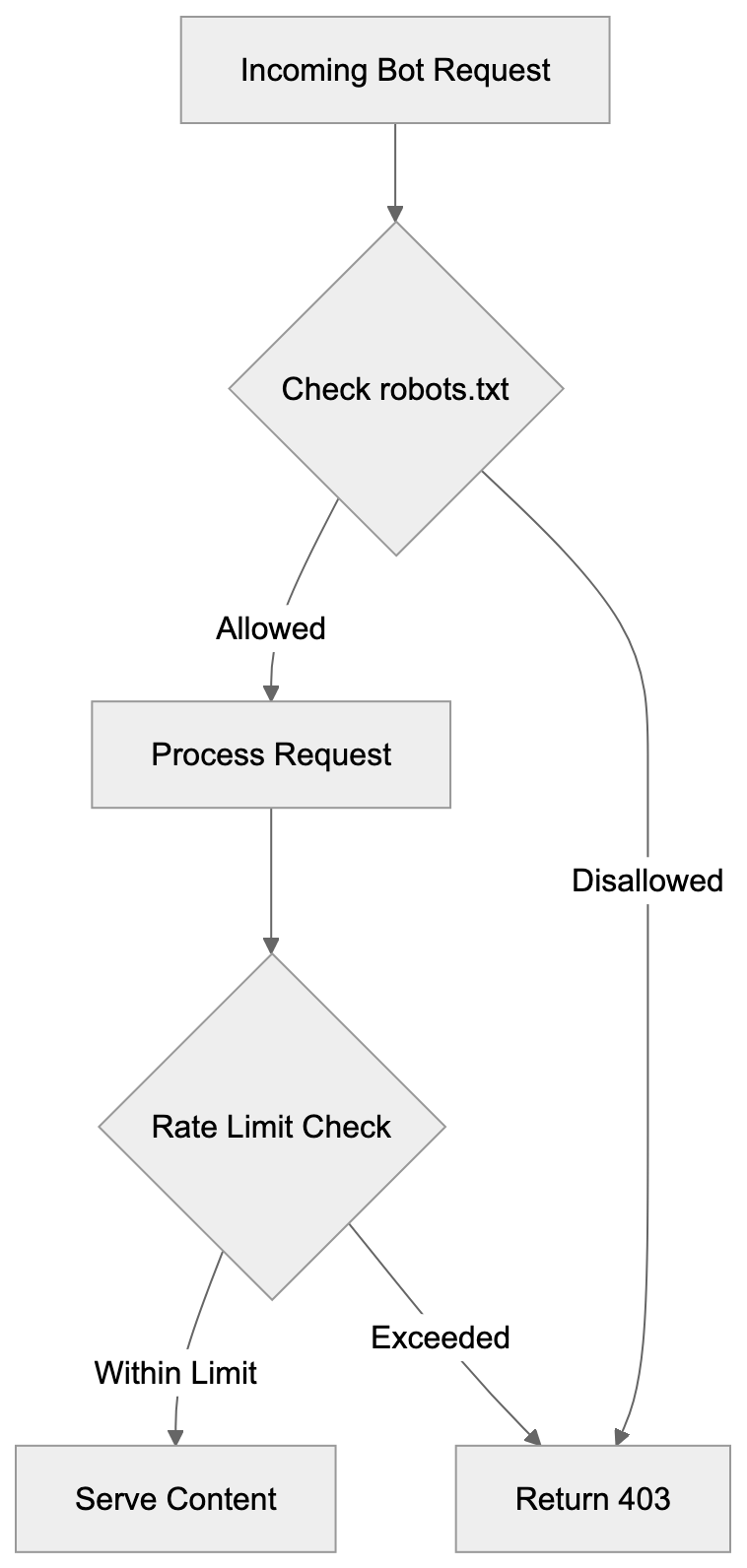
This tells the crawler not to access any part of your site. Most legitimate crawlers respect robots.txt directives, but compliance is voluntary, not enforced.
-
Server-level blocking
For stricter control, use server-level blocking through .htaccess files on Apache servers. Add this code to block based on user-agent:
RewriteEngine On
RewriteCond %{HTTP_USER_AGENT} FriendlyCrawler [NC]
RewriteRule .* - [F,L]
For Nginx servers, use this configuration:
if ($http_user_agent ~* "FriendlyCrawler") { return 403; } -
IP-based blocking
IP-based blocking works if you identify the crawler’s IP ranges, but this requires ongoing maintenance as IPs change. Firewall rules can block entire IP blocks associated with the crawler.
-
Rate limiting
Rate limiting is another strategy: instead of complete blocking, you limit requests per minute from specific user-agents. This preserves some access while preventing resource exhaustion.
Web application firewalls and CDN services like Cloudflare offer bot management features that can identify and block crawlers automatically. Consider your goals before blocking: if you want your content in AI training data, then allowing access makes sense. If bandwidth or content control matters more, then blocking is appropriate.
Comparing Friendly Crawler to Alternatives
Several web crawlers compete in the AI training data space. Here’s how Friendly Crawler compares:
| Crawler Name | Primary Purpose | Respects Robots.txt | Transparency | Dataset Usage |
|---|---|---|---|---|
| Friendly Crawler | AI training data | Yes | Moderate | Internal/Licensed |
| Common Crawl | Public web archive | Yes | High | Publicly available |
| GPTBot | OpenAI training | Yes | High | OpenAI models |
| CCBot | Common Crawl | Yes | High | Public datasets |
| Anthropic-AI | Claude training | Yes | High | Anthropic models |
| Google-Extended | AI training | Yes | High | Google AI products |
Common Crawl differs significantly because it makes collected data publicly available for research. Anyone can download Common Crawl datasets, which makes it more transparent than commercial crawlers.
GPTBot specifically collects data for OpenAI’s models and provides clear documentation on blocking methods. CCBot powers Common Crawl and follows strict ethical guidelines around crawling. Anthropic-AI crawler gathers data exclusively for Claude and related Anthropic products. Google-Extended is separate from Googlebot and focuses only on AI training, not search indexing.
Server Monitoring Strategy:
 Friendly Crawler falls somewhere in the middle for transparency: it identifies itself, but doesn’t publish detailed documentation like some alternatives. The blocking methods remain similar across all these crawlers: robots.txt and server configuration work universally. Most modern AI crawlers now respect opt-out requests because of increasing regulatory pressure and ethical concerns. Choose which crawlers to allow based on your comfort with how that company uses training data.
Documentation and Official Resources
Finding official documentation for Friendly Crawler can be challenging. Unlike well-documented crawlers like GPTBot or Common Crawl, Friendly Crawler operators don’t always maintain public-facing documentation.
Some versions of this crawler include a URL in the user-agent string pointing to information pages. Check the full user-agent string in your logs for any URLs. If present, those pages might explain the crawler’s purpose and provide contact information. Industry databases like the IAB/ABC International Spiders and Bots List sometimes include entries for known crawlers.
Web crawler directories and bot wikis maintained by the developer community can offer ideas. Server administrator forums often discuss encounters with specific crawlers, including blocking strategies that worked. The lack of complete documentation is common for smaller or newer AI training crawlers.
Larger operations like OpenAI, Anthropic, and Google publish detailed crawler documentation because of their public profiles. If you need to contact the Friendly Crawler operators, try reverse DNS lookups on IP addresses in your logs to identify the hosting company. Some crawlers include email addresses directly in their user-agent strings for questions or blocking requests. GitHub repositories and technical forums sometimes contain user-contributed information about lesser-known crawlers. The web crawling scene changes constantly, so today’s information might be outdated in months.
Technical Considerations for Server Administrators
Server resources matter when dealing with aggressive crawlers. Friendly Crawler and similar bots can generate substantial traffic that impacts server performance.
- Monitor your bandwidth usage and server load to determine if crawler traffic causes problems. Implement rate limiting even if you don’t block crawlers completely: this prevents resource exhaustion during heavy scraping.
- Log rotation becomes important because crawler activity fills log files quickly. Use log analysis tools to distinguish between legitimate users and bot traffic.
- Consider the SEO implications before blocking: some crawlers share infrastructure with search engines, so aggressive blocking might affect search rankings.
- Cache static content and use CDNs to reduce server load from bot traffic. Set up alerts for unusual traffic patterns that might indicate new crawlers or scraping attacks.
- Review your robots.txt file regularly to make sure it reflects your current policies. Test blocking rules carefully to avoid accidentally blocking legitimate traffic. Some crawlers ignore robots.txt, so server-level blocking provides better enforcement.
Database-driven sites should implement query improvements because crawlers often trigger expensive database operations. Monitor crawl patterns to identify inefficient crawler behavior, like repeated requests for the same content. Consider serving lighter versions of pages to identified bots to reduce bandwidth. Remember, blocking isn’t all-or-nothing: you can allow limited access while preventing abuse.
End
Friendly Crawler represents the growing ecosystem of AI training data collection bots. These crawlers serve an important purpose in gathering the massive datasets needed for modern machine learning models. Server administrators and web developers should know how to identify these bots in logs through user-agent strings and traffic patterns.
Blocking strategies range from simple robots.txt directives to sophisticated server-level rules and rate limiting. The crawler scene includes many alternatives like Common Crawl, GPTBot, and others, each with different transparency levels and purposes.
Understanding these tools helps you make informed decisions about content access and server resource management. Whether you choose to allow or block crawlers depends on your priorities around content usage, bandwidth costs, and participation in AI development. The technical methods for control remain straightforward but require active monitoring and occasional updates as the crawler ecosystem evolves.
Frequently Asked Questions
How can I identify if Friendly Crawler is visiting my site?
You can identify Friendly Crawler by checking your server logs for specific user-agent strings that contain "Friendly" or "FriendlyCrawler". Its requests typically follow a consistent pattern, starting with a request for the robots.txt file before accessing other pages.
What should I do if I want to block Friendly Crawler?
To block Friendly Crawler, you can add directives to your robots.txt file or apply server-level rules through .htaccess or Nginx configurations. You can also implement IP-based blocking or rate limiting to reduce its impact on your server resources.
Will blocking Friendly Crawler affect my site's SEO?
Blocking Friendly Crawler may have SEO implications, particularly if it shares infrastructure with search engines. Consider monitoring your server's traffic and performing a cost-benefit analysis before deciding to block it, as some crawlers can contribute positively to your site’s visibility.
Can I control how much data Friendly Crawler collects from my site?
While you can control access through the robots.txt file, which indicates to the crawler which parts of your site to avoid, limiting data collection fully can be challenging. Implementing server-level controls can provide greater enforcement of your desired access policies.
What are the advantages of allowing Friendly Crawler access to my content?
Allowing Friendly Crawler access can increase your site's visibility by contributing your content to AI training datasets, potentially resulting in greater exposure. This can lead to more visitors to your site through improved content recognition in AI responses.
How do other crawlers compare to Friendly Crawler?
Other crawlers like Common Crawl and GPTBot operate with varying levels of transparency and purposes. While Friendly Crawler focuses on AI datasets, Common Crawl offers accessible public data, making it more transparent, while GPTBot is tailored specifically for OpenAI's training efforts.
Where can I find more information about web crawlers?
Finding detailed information about web crawlers, including Friendly Crawler, can be challenging. You can check user-agent strings in your logs for URLs that may lead to official documentation, and explore industry databases and bot wikis for insights shared by the developer community.
Track Your AI Visibility
See how AI chatbots like ChatGPT, Claude, and Perplexity discover and recommend your brand.