Google-InspectionTool: URL Inspection & SEO Debugging Guide
Learn how Google-InspectionTool powers Search Console's URL inspection for on-demand crawling, SEO testing, and debugging website issues.
Introduction
The URL inspection tool (not Google-InspectionTool) in Google Search Console is crucial for on-demand URL testing. When you request inspection through Search Console, it fetches and analyzes the page instantly. This tool is different from the regular Googlebot, which routinely crawls the web for indexing. It’s tailored for SEO professionals and webmasters seeking to debug, test fixes, and validate updates without waiting for the next scheduled crawl. Key features include real-time page analysis, rendering similar to Googlebot, and immediate indexing feedback. For web developers and SEO experts, this tool is essential for troubleshooting crawl errors, checking page resources, and structured data verification.
What is Google-InspectionTool
Google-InspectionTool is the user-agent visible in server logs when the URL inspection tool in Google Search Console is used. Its user-agent string is Mozilla/5.0 (compatible; Google-InspectionTool/1.0). Acting as an on-demand crawler, it fetches web pages for analysis upon request by verified site owners. Unlike Googlebot that automatically crawls numerous pages, Google-InspectionTool offers detailed page data like HTTP response codes and rendered HTML on request. It respects robots.txt directives and operates using Google IP ranges, ensuring legitimate status as a Google service.
Why Google-InspectionTool Exists
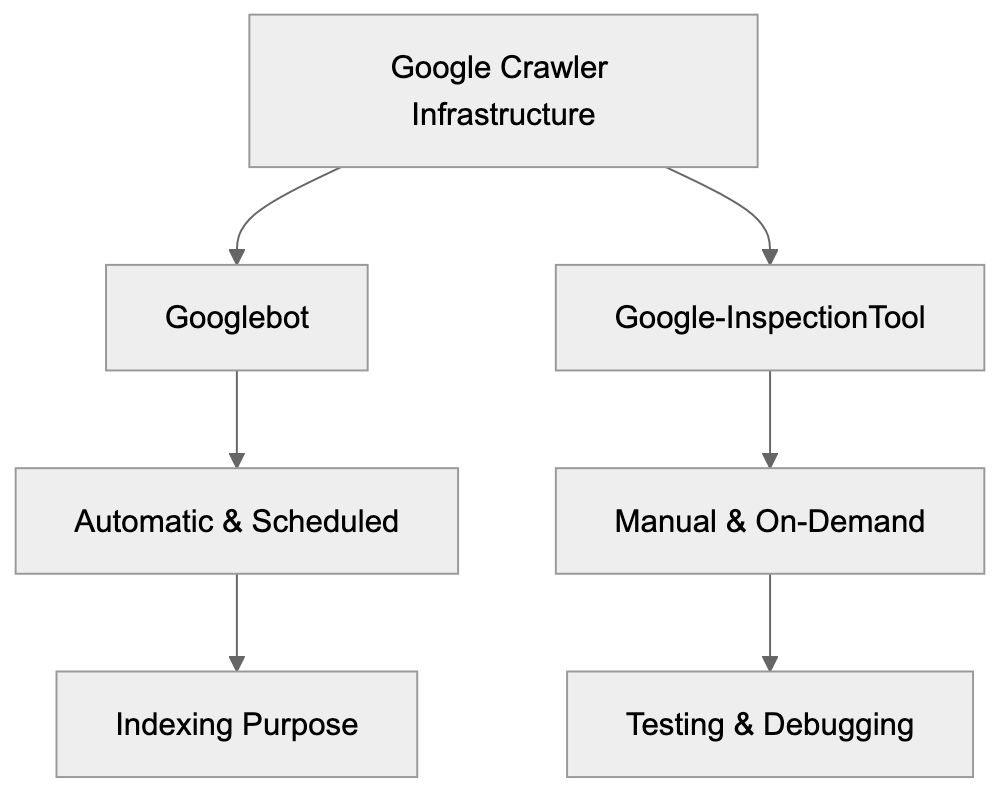
Google Crawler Infrastructure:
Google developed this specialized crawler to provide immediate feedback to website owners and SEO professionals, who need to see changes immediately without waiting for Googlebot’s scheduled recrawl. After correcting an error, the urgency for confirmation can be pivotal. Google-InspectionTool grants instant visibility into how Google perceives your webpage currently, aiding developers in faster issue debugging. It supports Google’s troubleshooting efforts by revealing precise responses Google receives when crawling a page, speeding up problem resolution without disrupting normal Googlebot operations or affecting crawl budgets.
How Google-InspectionTool Works in Practice
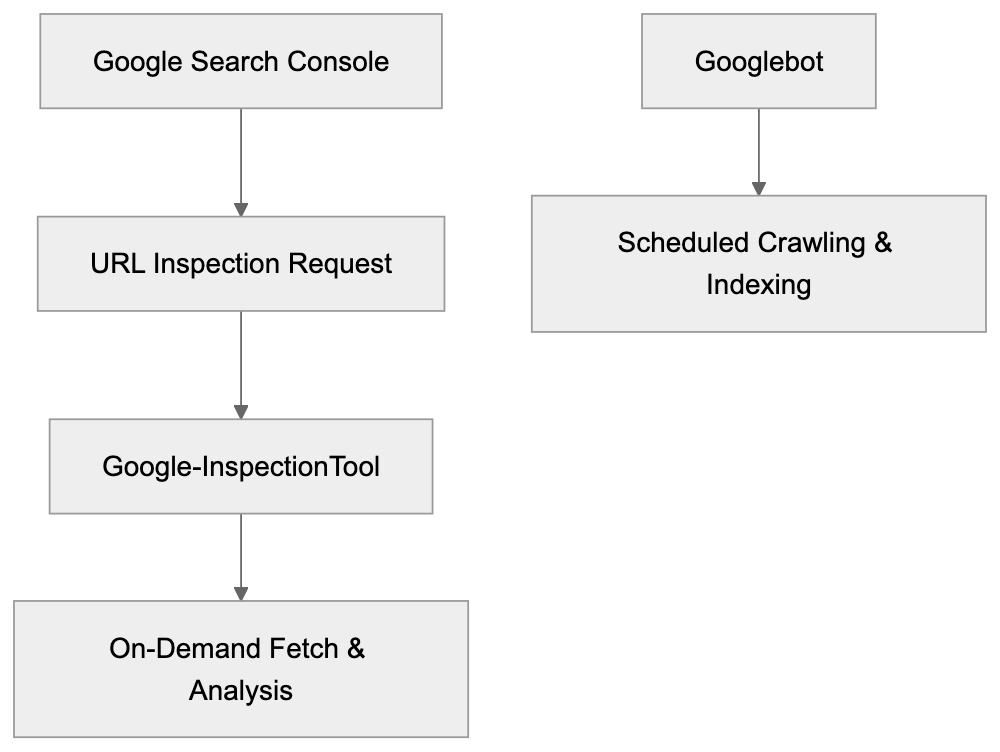
Opening Google Search Console and using the URL inspection tool triggers Google-InspectionTool. Inputting a URL and selecting “Test Live URL” sends a fetch request to your server, rendering in a headless browser, then analyzing results. This generates detailed reports with HTTP status, page load time, and more, proving vital for SEO experts in verifying schema markups, testing robots.txt changes, and checking mobile-friendliness.
User-Agent Analysis and Behavior Patterns
Google-InspectionTool Request Flow:

The Google-InspectionTool user-agent string, Mozilla/5.0 (compatible; Google-InspectionTool/1.0), includes identifiers differentiating it from other crawlers. Its behavior patterns differ from regular Googlebot by only conducting manual fetches, following crawl directives, respecting robots.txt, and emanating from Google IP blocks. Traffic is minimal but originates from Google’s verified domains, appearing in server logs as a characteristic, manual action by the verified site owner.
Relationship Between Google-InspectionTool and Googlebot
Google-InspectionTool and Googlebot complement each other within Google’s crawler infrastructure. Googlebot’s purpose is automatic content discovery and indexing, whereas Google-InspectionTool offers immediate URL-specific insight upon request for SEO testing. Both share similar rendering technologies and follow identical crawl directives, but differ in their operational timing and trigger conditions.
Comparing Google-InspectionTool to Similar Tools
Several SEO tools and crawlers provide similar functionalities. Here’s how Google-InspectionTool compares:
| Tool/Crawler | Purpose | Rendering | Real-time | Access Required |
|---|---|---|---|---|
| Google-InspectionTool | On-demand Google crawl testing | Full JavaScript | Yes | Search Console verification |
| Screaming Frog SEO Spider | Site-wide crawl analysis | Optional JavaScript | Yes | Software purchase |
| Bing URL Inspection | On-demand Bing crawl testing | Full JavaScript | Yes | Bing Webmaster Tools |
| Ahrefs Site Audit | SEO health monitoring | Limited JavaScript | Scheduled | Paid subscription |
| Sitebulb | Desktop crawler for audits | Optional JavaScript | Yes | Software purchase |
Crawler Comparison:
Google-InspectionTool is invaluable for Google-specific SEO testing. Unlike alternatives focusing on technical analysis and broader insights, Google-InspectionTool provides a precise Google perspective.
Technical Implementation Details
Google-InspectionTool adheres to standard technical protocols, mimicking Googlebot’s behavior with its user-agent identifier. It executes JavaScript and awaits complete page rendering to ensure accurate analysis. Supporting HTTP/2, the tool checks for issues like redirect loops and structured data errors, shown in server logs with its distinctive request patterns and Google IP origins.
Best Practices for Working with Google-InspectionTool
SEO experts should avoid blocking Google-InspectionTool in robots.txt to maintain testing capabilities. Critical resources like CSS and JavaScript must remain accessible for accurate rendering. Upon implementing significant changes, leverage the URL inspection capabilities to catch misconfigurations like blocked pages and server load errors, emphasizing mobile-first indexing checks.
Common Issues and Debugging
Google-InspectionTool swiftly identifies SEO and technical issues, displaying HTTP status codes and potential redirect chains or loops. When discrepancies between browser behavior and tool results arise, check server logging for request details, optimize page load speeds, and confirm JavaScript operates without hindrance. Server configuration must accommodate Google-InspectionTool’s user-agent and Googlebot equivalency to ensure seamless inspection.
End
Google-InspectionTool is a crucial SEO debugging and testing resource, offering on-demand insight into how Google perceives specific URLs through Google Search Console. It aids in verifying updates and resolving indexing issues, standing as a pivotal component of any SEO professional’s arsenal to improve search visibility efficiently.
Frequently Asked Questions
How do I access the Google-InspectionTool?
The Google-InspectionTool is accessed through the Google Search Console. You must be a verified owner of the site to utilize this tool and initiate URL inspections directly from the console.
What types of issues can the Google-InspectionTool help identify?
This tool is excellent for identifying SEO-related problems, such as crawl errors, blocked resources, structured data issues, and redirect chains. It provides immediate insight into how Google views your page, helping you rectify problems swiftly.
Does using the Google-InspectionTool impact my website's crawl budget?
No, using the Google-InspectionTool does not affect your overall crawl budget. It operates as an on-demand tool specifically designed for testing and debugging, distinct from the routine crawls performed by Googlebot.
Can I use Google-InspectionTool for mobile site testing?
Yes, the Google-InspectionTool can be used to check mobile-friendliness as it mimics mobile rendering. This capability allows you to ensure that your site performs well on mobile devices, which is crucial for SEO.
What should I ensure before using the Google-InspectionTool?
Ensure that essential resources like CSS and JavaScript are accessible and not blocked in your robots.txt file. This will help the tool render the page accurately for testing and analysis.
How often can I use the Google-InspectionTool?
You can use the Google-InspectionTool as often as needed since it is designed for on-demand URL inspections. However, be mindful to avoid excessive use in a short time frame, as this may generate unnecessary traffic on your server.
What are some best practices when using the Google-InspectionTool?
Best practices include verifying site ownership in Google Search Console, ensuring critical resources are accessible, and checking for significant changes after implementation. Regular testing can help maintain optimal performance and indexing status.
Track Your AI Visibility
See how AI chatbots like ChatGPT, Claude, and Perplexity discover and recommend your brand.