HubSpot Crawler: Marketing Automation & CRM Integration
Learn how HubSpot Crawler works for marketing automation, CRM integration, and how to manage or block it from your website.
What is HubSpot Crawler and Why It Matters
HubSpot Crawler is a web bot that scans websites and collects data for HubSpot’s marketing automation platform. Companies use HubSpot for customer relationship management (CRM) and marketing tools. The crawler helps gather information about web content to power features like link previews, social media monitoring, and content tracking. When you share a link in HubSpot or when the platform needs to analyze web content for marketing ideas, this crawler does the work. It operates similarly to search engines like Google but serves a unique purpose. It supports marketing teams who need to track content performance and understand web presence. For website owners and developers, understanding this crawler matters because it regularly visits sites and consumes server resources. Marketing professionals benefit from knowing how it enables their CRM integration and user agent string functionalities to function properly.
How HubSpot Crawler Works
HubSpot Crawler Operation Overview:
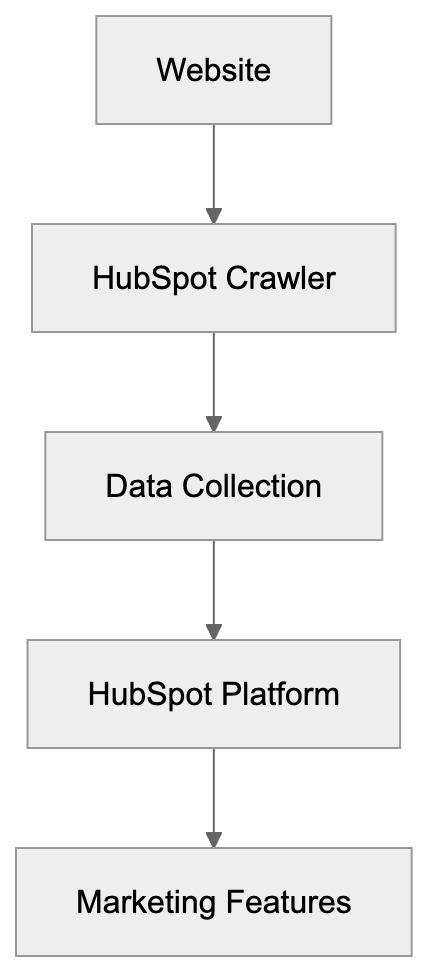
The HubSpot Crawler operates by sending HTTP requests to websites, identifying itself through a specific user agent string. This string appears as “HubSpot Crawler” or variations including version numbers. When the bot visits a page, it reads the HTML content and may follow links to gather additional information. The crawler respects standard web protocols and checks robots.txt files before accessing content. Website servers see these requests in their access logs. The frequency of visits depends on HubSpot users interacting with your domain’s content. If multiple HubSpot customers share or track links, you’ll notice increased activity. The bot typically accesses publicly available pages and does not breach login walls or password-protected areas. It collects metadata like page titles, descriptions, images, and link structures, supporting various marketing automation and CRM integration features in HubSpot.
Why HubSpot Needs a Crawler
Marketing automation platforms need crawlers to provide real-time content analysis and previews. When a marketing team shares a webpage link in campaigns via HubSpot, the platform generates preview cards with images and descriptions automatically. HubSpot’s CRM uses crawler data to enrich contact records. If a lead visits your website and later appears in HubSpot’s CRM, the system may use crawled data to provide context about your business. Content marketers track web performance and backlink monitoring, using the crawler to monitor mentions and social media shares. HubSpot’s bot blocking features and user agent string handling are integral for efficient marketing workflows.
Crawler Request Process:

How Businesses and Marketers Use HubSpot Crawler Data
Marketing professionals benefit from crawler data in several ways:
- Email Campaigns: The platform automatically generates link previews using crawled content, enhancing email visual appeal.
- Content Tracking: Marketers monitor external site backlinks for SEO analysis.
- CRM Enrichment: Sales teams receive enriched profiles when prospects visit tracked sites.
- Social Media Optimization: Managers schedule posts with consistent link previews across platforms.
- Performance Review: Analysts examine engagement data to identify trending topics and successful content formats.
Small business owners use HubSpot’s free tools that rely on the crawler for basic contact management and email marketing features. Web developers working with HubSpot’s API may encounter crawler behavior when integrating marketing features into custom applications.
Managing and Blocking HubSpot Crawler
Website owners can control HubSpot Crawler access using the robots.txt file in their site’s root directory. To block the crawler completely, add:
User-agent: HubSpot
Disallow: /
Crawler Access Control Options:
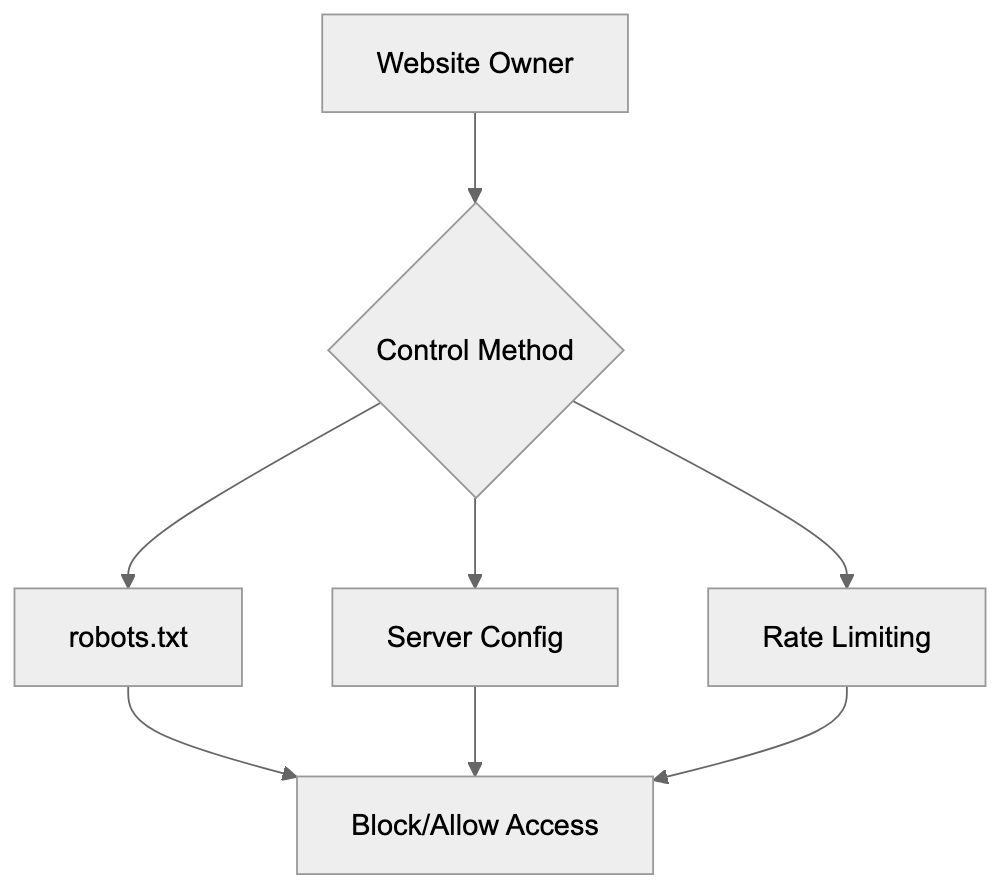
This directive prevents the crawler from accessing your entire site. You can specify paths for partial blocking. Server-level blocking is possible via .htaccess files on Apache or nginx configurations, using the user agent string to return error codes to unwanted bots. Some owners block the crawler due to bandwidth consumption or competitive concerns. However, blocking may reduce social sharing efficiency and email marketing effectiveness. Rate limiting offers a middle ground. Configure your server to restrict crawler access frequency. Most CMS and hosting platforms offer bot management tools.
HubSpot Crawler vs Other Marketing Crawlers
Understanding how HubSpot Crawler compares with others aids bot management decisions. Here’s a comparison:
| Crawler Name | Platform | Primary Purpose | Blocking Impact | Typical Frequency |
|---|---|---|---|---|
| HubSpot Crawler | HubSpot CRM | Link previews, content tracking | Affects HubSpot link sharing | Medium to High |
| Salesforce Bot | Salesforce | CRM enrichment, social monitoring | Reduces CRM data quality | Medium |
| LinkedInBot | Link previews, content cards | Breaks LinkedIn previews | Very High | |
| Marketo Bot | Adobe Marketo | Email previews, analytics | Impacts email campaign visuals | Low to Medium |
| Mailchimp Bot | Mailchimp | Link preview generation | Removes automatic previews | Medium |
HubSpot Crawler typically sits in the middle range for crawl frequency. Salesforce uses multiple bots, making robot.txt management challenging. Marketo’s activity is lower due to fewer users. Mailchimp focuses on targeted URLs. If actively using HubSpot, blocking its crawler may create internal issues.
Technical Details and Best Practices
HubSpot Crawler’s user agent string often reads “Mozilla/5.0 (compatible; HubSpot Crawler; +https://www.hubspot.com/)”. It operates from IP addresses owned by HubSpot and Amazon Web Services. Administrators can verify traffic through reverse DNS lookups. The crawler follows HTTP protocols and respects cache-control headers. Proper settings prevent redundant requests. It obeys meta robots tags, with “noindex” or “nofollow” affecting processing. Slow responses risk incomplete data collection; ensure key content is in HTML as the crawler doesn’t reliably execute JavaScript. For concerned owners, monitoring server logs helps analyze crawler impact.
Privacy and Data Collection Considerations
HubSpot Crawler accesses publicly available information and respects privacy laws like GDPR. Data collected is used for HubSpot’s marketing features, not sold to third parties. Website owners have control through robots.txt and server settings. Public posts may be crawled and cached, similar to search engines. For sensitive content protection, implement access controls rather than relying solely on bot blocking.
Conclusion
HubSpot Crawler is vital for modern marketing automation and CRM systems. It enables link previews, content tracking, and automated data enrichment. The crawler operates transparently with a clear user agent string and adheres to web protocols. Management options like robots.txt allow for customized access. Understanding the crawler’s operation helps in making informed decisions about bot management. While HubSpot’s crawler activity sits in a medium range compared to others, allowing it ensures full platform functionality for users. As marketing automation grows, web crawlers like HubSpot’s will remain essential components connecting content creators with platforms.
Frequently Asked Questions
What types of data does HubSpot Crawler collect?
HubSpot Crawler collects publicly available metadata such as page titles, descriptions, images, and link structures. This information supports HubSpot's marketing automation features, including generating link previews and enriching CRM data.
How can I check if HubSpot Crawler is accessing my site?
You can check your server's access logs to see the requests made by HubSpot Crawler. These requests will include the user agent string "HubSpot Crawler," allowing you to identify its activity on your website.
What should I do if I want to block HubSpot Crawler?
To block HubSpot Crawler, you can add specific directives to your site's robots.txt file, such as "User-agent: HubSpot Disallow: /". If you want more control, consider implementing server-level blocking methods using .htaccess or nginx configurations in addition to the robots.txt file.
Will blocking HubSpot Crawler affect my marketing efforts?
Yes, blocking the crawler can negatively impact your marketing activities. It may prevent HubSpot from generating link previews and hinder the effectiveness of email campaigns and social sharing features linked to your website.
How does HubSpot Crawler compare to other crawlers?
HubSpot Crawler operates with a medium to high frequency and primarily focuses on link previews and content tracking. Compared to other crawlers like Salesforce or LinkedInBot, it sits in the middle range in terms of frequency and user impact when blocked.
Can I limit the frequency of HubSpot Crawler visits?
Yes, you can implement rate limiting on your server to restrict how often HubSpot Crawler accesses your site. This approach allows you to manage server resources effectively while still benefiting from some level of access by the crawler.
Does HubSpot Crawler comply with privacy laws?
Yes, HubSpot Crawler adheres to privacy regulations such as GDPR by only accessing publicly available content. The data collected is utilized for enhancing HubSpot's marketing features and is not sold to third parties, ensuring user privacy is respected.
Track Your AI Visibility
See how AI chatbots like ChatGPT, Claude, and Perplexity discover and recommend your brand.