Master Guide to All AI and ML Crawlers with Blocking Strategies
Discover all AI/ML crawlers and learn successful blocking strategies. Protect your data with this definitive guide.
Introduction
AI and machine learning crawlers, also known as machine learning bots, are specialized bots that scan websites to collect data for AI training data. These AI crawlers work similarly to search engine bots, but their purpose is different. They gather text, images, code, and other content to build massive datasets. Companies like OpenAI, Google, Anthropic, and many others constantly deploy these bots. For website owners and developers, this raises important questions about data usage and control. Understanding which crawlers exist and how to manage them has become crucial. While some site owners want to contribute to AI development, others prefer to protect their content. This guide covers all major AI crawler lists, how to identify them, and proven methods to block AI bots if needed.
What Are AI and ML Crawlers
AI Crawler Purpose Overview:
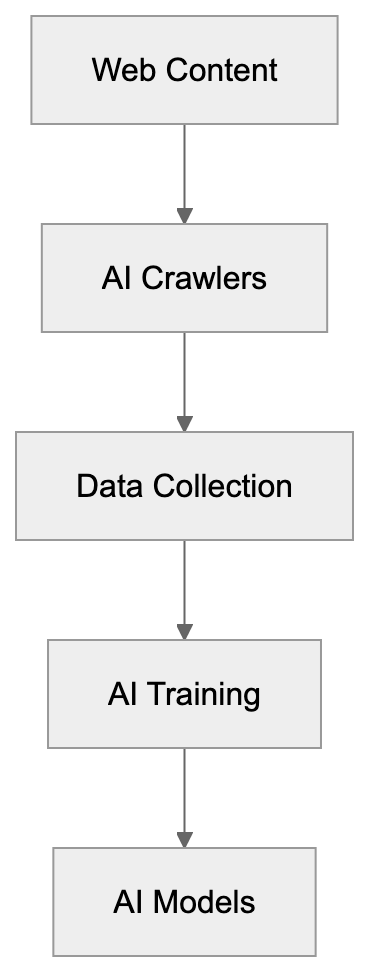
AI crawlers are automated programs that visit websites to extract content for machine learning purposes. Unlike search engine crawlers that index content for search results, AI crawlers collect data to train language models, image recognition systems, and other AI technologies. These bots read your HTML, download images, copy text, and sometimes execute JavaScript to access changing content. Most AI companies operate their crawlers continuously across billions of web pages. The data collected becomes part of AI training data, including anything from blog posts to product descriptions to code repositories. Web scraping for AI training has grown significantly since 2022 when ChatGPT launched. Now, dozens of companies operate their own crawlers. Some respect the robots.txt for AI crawlers, while others ignore these directives completely. The crawlers typically identify themselves through user agent strings, but not all do this transparently.
Why AI Crawlers Exist and Their Purpose
AI companies need massive amounts of text and visual data to train their models effectively. Crawling the public web provides this data at scale, as a single large language model might train on hundreds of billions of words scraped from millions of websites. This approach is cheaper and faster than creating original content or licensing data from publishers. The crawlers help AI companies build general knowledge into their systems. When you ask ChatGPT about cooking or coding, it draws from web content these crawlers collected. Image generators like DALL-E and Midjourney trained on billions of images scraped from websites. The purpose is to create AI systems with broad capabilities across many topics and domains. However, this creates tension with content creators who may not want their work used this way. Some argue that public web content should be fair game for AI training, while others believe creators deserve compensation or at least the choice to opt out. This debate continues in courts and legislatures worldwide, but the crawling continues regardless.
How Companies and Users Deploy AI Crawlers
AI companies typically run their crawlers from cloud infrastructure with massive bandwidth. They configure the bots to visit millions of URLs per day, following links and sitemaps. Most set rate limits to avoid overwhelming servers, but these limits vary widely. The crawlers store collected content in data lakes or specialized storage systems. Data scientists then clean and process this raw content for training. Some companies, like Common Crawl, make their crawled data publicly available, while others keep their datasets proprietary. Website owners rarely receive notification when crawlers visit unless they actively monitor server logs. The crawlers often rotate IP addresses, making them harder to block by IP alone. Many respect robots.txt files, which website owners can use to control access, but enforcement is voluntary, and some crawlers ignore these directives. Companies justify this by claiming fair use for AI training, though legal precedent remains unclear. Users of these AI systems indirectly benefit from the crawled data through better model capabilities.
Complete List of Known AI and ML Crawlers
Over 40 crawlers exist, each using distinct user agent strings for crawler identification. Here are the major ones organized by company:
| Crawler Name | Company | User Agent String | Respects robots.txt |
|---|---|---|---|
| GPTBot | OpenAI | GPTBot | Yes |
| ChatGPT-User | OpenAI | ChatGPT-User | Yes |
| Google-Extended | Google-Extended | Yes | |
| GoogleOther | GoogleOther | Yes | |
| CCBot | Common Crawl | CCBot | Yes |
| ClaudeBot | Anthropic | ClaudeBot | Yes |
| cohere-ai | Cohere | cohere-ai | Yes |
| Amazonbot | Amazon | Amazonbot | Yes |
| FacebookBot | Meta | FacebookBot | Partial |
| Applebot-Extended | Apple | Applebot-Extended | Yes |
| Bytespider | ByteDance | Bytespider | Partial |
| Diffbot | Diffbot | Diffbot | Yes |
| ImagesiftBot | ImagesiftBot | ImagesiftBot | Yes |
| Omgilibot | Omgili | Omgilibot | Yes |
| PerplexityBot | Perplexity | PerplexityBot | Yes |
| YouBot | You.com | YouBot | Yes |
Additional crawlers include PetalBot (Huawei), Timpibot, VelenPublicWebCrawler, Webzio-Extended, and others. New crawlers appear regularly as more companies enter the AI space. Many smaller AI startups run unnamed or poorly documented crawlers. Some research institutions also operate academic crawlers for AI research.
Crawler Identification Techniques
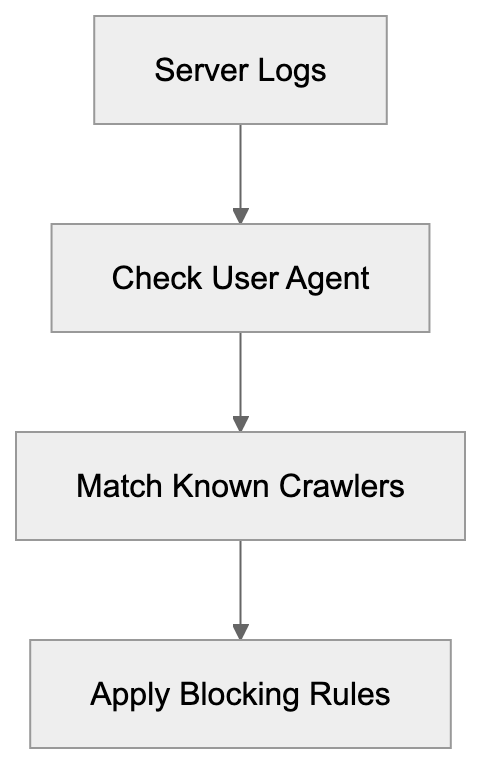
Identifying AI crawlers requires examining server logs and request headers. The primary method is checking user agent strings, which most legitimate crawlers include. Access your web server logs through your hosting control panel or log management tools. Look for entries containing crawler names from the list above. User agents appear in the HTTP request headers that browsers and bots send. For Apache servers, check the access.log file. For Nginx, look in access.log or your configured log location. Cloud platforms like Cloudflare and AWS provide dashboard analytics showing bot traffic. You can also use real-time monitoring tools to spot crawlers as they visit. Some crawlers rotate user agents or use generic strings to avoid detection. In these cases, look for patterns in IP addresses, request timing, and accessed URLs. Legitimate crawlers typically follow links systematically and respect rate limits. Malicious scrapers often grab content faster and more erratically. DNS reverse lookups can verify if an IP belongs to a known AI company, but some crawlers use proxy services or residential IPs, making this harder.
Blocking Strategies Using Robots.txt
The robots.txt file is the standard method for controlling crawler access. This text file sits in your website root directory and tells crawlers which parts of your site to avoid. Most major AI crawlers respect robots.txt directives, though compliance is voluntary. To block all AI crawlers, add specific user agent rules to your robots.txt file. Here is a complete robots.txt configuration:
Crawler Identification Process:
User-agent: GPTBot
Disallow: /

User-agent: ChatGPT-User
Disallow: /

User-agent: Google-Extended
Disallow: /

User-agent: GoogleOther
Disallow: /

User-agent: CCBot
Disallow: /

User-agent: ClaudeBot
Disallow: /

User-agent: cohere-ai
Disallow: /

User-agent: Amazonbot
Disallow: /

User-agent: FacebookBot
Disallow: /

User-agent: Applebot-Extended
Disallow: /

User-agent: Bytespider
Disallow: /

User-agent: Diffbot
Disallow: /

User-agent: ImagesiftBot
Disallow: /

User-agent: Omgilibot
Disallow: /

User-agent: PerplexityBot
Disallow: /

User-agent: YouBot
Disallow: /
Place this in a file named robots.txt in your website root directory. The Disallow: / directive blocks access to all pages. You can allow specific sections by using Allow: directives or partial paths. Remember, robots.txt is publicly visible, so anyone can see your blocking rules. Update the file whenever new AI crawlers appear. Test your robots.txt using online validators to ensure proper syntax.
Advanced Blocking with Server Configuration
For stronger enforcement beyond robots.txt, use server-level blocking. This prevents crawler requests from even reaching your application. Apache and Nginx both support user agent blocking in their configuration files. For Apache, add these rules to your .htaccess file or main configuration:
SetEnvIfNoCase User-Agent "GPTBot" bad_bot
SetEnvIfNoCase User-Agent "ChatGPT-User" bad_bot
SetEnvIfNoCase User-Agent "Google-Extended" bad_bot
SetEnvIfNoCase User-Agent "CCBot" bad_bot
SetEnvIfNoCase User-Agent "ClaudeBot" bad_bot
SetEnvIfNoCase User-Agent "cohere-ai" bad_bot
SetEnvIfNoCase User-Agent "Amazonbot" bad_bot
SetEnvIfNoCase User-Agent "PerplexityBot" bad_bot
Deny from env=bad_bot
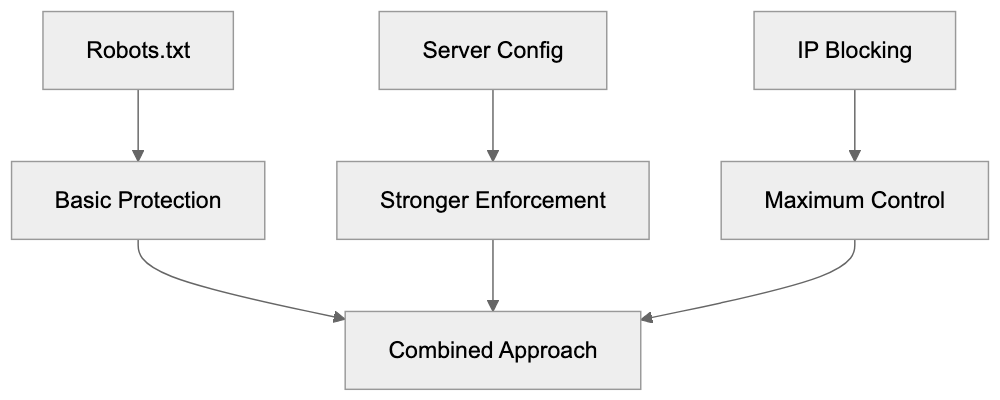
Blocking Methods Hierarchy:
For Nginx, add this to your server block configuration:
if ($http_user_agent ~* (GPTBot|ChatGPT-User|Google-Extended|CCBot|ClaudeBot|cohere-ai|Amazonbot|PerplexityBot)) {
    return 403;
}
These rules return a 403 Forbidden response to matching crawlers. You can also return 404 or redirect to another page. Server-level blocking works even if crawlers ignore robots.txt, but crawlers can still evade this by changing their user agent string. For maximum protection, combine server blocking with IP-based blocking and rate limiting.
IP-Based Blocking and Firewall Rules
Blocking by IP address provides another layer of web scraping prevention. Most AI companies crawl from known IP ranges that you can block at the firewall level. However, this approach has limitations because IP ranges change frequently. Companies like OpenAI and Anthropic publish their crawler IP ranges in their documentation. You can configure your firewall or web application firewall to block these ranges. Cloud platforms like Cloudflare offer managed rulesets that automatically block known AI crawler IPs. The advantage is that IP blocking works regardless of user agent strings. The disadvantage is maintenance overhead, as you must update rules when companies change their infrastructure. Some crawlers use residential proxy networks or cloud services, making IP blocking ineffective. Geographic blocking can help if crawlers originate from specific regions, but this may also block legitimate users. Rate limiting by IP address provides a middle ground by allowing some access while preventing aggressive scraping.
Monitoring and Detection Tools
Several tools help detect and monitor AI crawler activity. Log analysis tools like GoAccess, AWStats, and Webalizer can filter and visualize bot traffic. These parse your server logs and generate reports showing which crawlers visited and what they accessed. Real-time monitoring solutions like Cloudflare Analytics provide dashboards with bot traffic breakdowns. Google Analytics and similar platforms filter out most bot traffic by default, but you can enable bot reporting. Specialized bot detection services like DataDome and PerimeterX use machine learning to identify suspicious crawlers. These services analyze behavioral patterns beyond just user agent strings. For developers, middleware libraries exist for popular frameworks to block bots at the application level. WordPress plugins like Wordfence and Sucuri include bot blocking features. Setting up alerts for unusual traffic spikes helps catch new or aggressive crawlers early. Regular log reviews should become part of your security routine.
Legal and Ethical Considerations
The legal scene around AI crawling remains unsettled. Several lawsuits are ongoing against AI companies for allegedly violating copyright through web scraping. The outcomes will significantly impact how crawlers operate. Currently, most AI companies claim fair use allows them to train on public web content. Content creators and publishers increasingly disagree with this interpretation. Some jurisdictions have enacted or proposed laws requiring opt-in consent for AI training. The EU AI Act includes provisions around data collection for AI systems. California and other US states are considering similar legislation. From an ethical standpoint, website owners should have control over how their content gets used. The current system often defaults to collection unless owners actively opt out, but many argue this should be reversed. Professional and business considerations also matter. Blocking AI crawlers might reduce your site’s visibility in AI-powered search tools. Some new search engines rely entirely on AI, and blocking their crawlers means exclusion from results.
Alternative Approaches and Selective Blocking
Not everyone wants to block all AI crawlers completely. Some website owners prefer selective approaches. You might allow certain crawlers while blocking others based on company reputation or terms of service. For example, you could allow OpenAI while blocking less transparent operators. Another approach is allowing crawler access to some content while protecting premium or original material. Use robots.txt to disallow specific directories containing sensitive content. Some sites create separate sections for AI training data with appropriate licensing. Watermarking content can help track if your material appears in AI outputs. Adding metadata or hidden markers lets you identify when AI systems have ingested your content. Rate limiting provides access while preventing aggressive scraping that impacts server performance. You can also negotiate direct licensing deals with AI companies for controlled access to your content. Organizations like publishers and news outlets increasingly pursue this path. Individual creators might join collective licensing platforms that negotiate on their behalf.
Impact on SEO and Site Performance
Blocking AI crawlers can affect your website in several ways. The most obvious impact is on AI-powered search engines and answer tools. Services like Perplexity and You.com rely on crawler access to include sites in their results. Blocking these crawlers means your content will not appear in their answers. Traditional search engine rankings should not be affected if you only block AI-specific crawlers. Google-Extended is separate from Googlebot, so blocking it does not hurt regular Google Search ranking. However, the line between AI features and search is blurring. Google search results now include AI-generated summaries. Future search may rely more heavily on AI crawlers. Performance-wise, blocking aggressive crawlers can improve server response times and reduce bandwidth usage. Some AI crawlers are poorly programmed and can slow down sites. Others respect rate limits and cause minimal impact. Monitor your server metrics before and after implementing blocks to measure the difference. Consider your audience and goals when deciding on a blocking strategy. Tech-focused sites might want AI visibility while creative portfolios might prioritize protection.
Future of AI Crawling and Web Access
The AI crawling scene will continue evolving rapidly. More companies will launch AI products that require training data and deploy new crawlers. Expect the crawler list to grow significantly over the next few years. Regulation will likely increase as governments respond to copyright concerns and creator rights. This might lead to mandatory opt-in systems or compensation requirements. Technical measures will also advance with better detection methods and blocking tools. AI companies might respond by making crawlers harder to identify or using more sophisticated collection methods. We may see the emergence of standard protocols for AI training data access similar to how RSS and APIs work. Blockchain-based systems could track content usage and automate licensing. Some predict a split internet where AI-accessible content separates from protected content. Content management systems will likely build in AI crawler controls as standard features. The tension between open access for AI development and creator rights will shape the web’s future. Website owners should stay informed and regularly review their crawler policies.
Conclusion
AI and machine learning crawlers represent a significant shift in how web content gets used. Understanding which crawlers exist and how they operate is essential for anyone publishing online. This guide covered over 40 known crawlers from major AI companies and provided complete blocking strategies. Robots.txt remains the primary control method, but server-level blocking and IP filtering offer stronger enforcement. Monitoring tools help detect crawler activity while legal and ethical considerations continue evolving. Website owners must balance protecting their content with maintaining visibility in an AI-powered web. The strategies outlined here give you control over your content while staying flexible as the scene changes. Regular updates to your blocking rules and staying informed about new crawlers will keep your approach effective. Whether you choose to block all crawlers, some crawlers, or none at all, make that decision intentionally based on your goals and values.
Frequently Asked Questions
What types of data do AI crawlers collect?
AI crawlers collect a wide range of data, including text from articles, blog posts, product descriptions, images, and code snippets. The data they gather is primarily used for training machine learning models, enhancing their ability to understand and generate human-like responses.
How can I check if my website has been crawled by AI bots?
You can check your server logs for requests that match known AI crawler user agents. Utilizing log analysis tools or cloud platform analytics can also help you identify bot traffic and understand which crawlers have accessed your site.
What is the significance of robots.txt in managing AI crawler access?
Robots.txt is essential for directing crawlers on which parts of your site they can access. While most major AI crawlers respect the robots.txt directives, compliance is voluntary, and some may ignore it. This means that while it is a good first step, additional measures may be necessary for stronger access control.
Can I block specific AI crawlers from accessing my site?
Yes, you can block specific AI crawlers by configuring your robots.txt file or employing server-level rules. Server configurations can provide stronger enforcement than robots.txt alone, allowing you to effectively prevent certain bots from accessing your content.
What are the legal considerations surrounding AI web crawling?
The legal landscape around AI crawling is still evolving, with ongoing debates about copyright and fair use. Many AI companies claim that public web data can be freely scraped, while content creators argue for compensation and greater control over their material. Laws and regulations may shift as these issues are addressed in courts and legislatures.
How does blocking AI crawlers affect my website's SEO?
Blocking AI crawlers can impact visibility in AI-powered search tools but should not typically affect traditional search engine rankings if configured properly. However, as AI integration in search engines grows, it is crucial to consider the potential effects on your site's presence in future search results.
What alternatives do I have to completely blocking AI crawlers?
Instead of blocking all AI crawlers, you could allow access to certain reputable ones while blocking others. Implementing selective access through robots.txt, negotiating licensing agreements, or watermarking content for tracking are alternative strategies to manage how your content is utilized.
Track Your AI Visibility
See how AI chatbots like ChatGPT, Claude, and Perplexity discover and recommend your brand.