LinkedInBot Guide: LinkedIn's Preview Crawler Explained
Complete guide to LinkedInBot crawler: user-agent strings, link preview generation, blocking implications, and how it works for LinkedIn posts.
What is LinkedInBot and Why It Matters
LinkedInBot is the web crawler operated by LinkedIn, acquired by Microsoft in 2016. This LinkedIn crawler automatically visits websites when users share links on LinkedIn, fetching metadata to generate link previews. When you paste a URL into a LinkedIn post or message, the LinkedInBot scrapes the page for the title, description, and images, creating the preview card seen below posts.
For web developers and content marketers, LinkedInBot is crucial, directly affecting how your content appears when shared on LinkedIn. The bot respects robots.txt files and crawls responsibly, designed by LinkedIn to work quickly and efficiently without overloading servers, as detailed in LinkedIn’s Fetcher Documentation.
Understanding LinkedInBot’s Technical Details
LinkedInBot identifies itself through a specific user-agent string, indicating what is requesting the page. The current user-agent string appears as: “LinkedInBot/1.0 (compatible; Mozilla/5.0; Apache-HttpClient +http://www.linkedin.com).” Variations exist based on the LinkedIn service making the request.
Web developers can detect this LinkedIn bot in server logs by looking for this user-agent. Typically, it makes GET requests to fetch page content, follows standard HTTP protocols, and respects cache headers. Upon visiting your site, it primarily seeks Open Graph meta tags, originally created by Facebook but now widely used. In their absence, it checks for Twitter Card tags, and if neither is present, it resorts to basic HTML elements like title and meta description tags.
LinkedInBot Preview Generation Process:
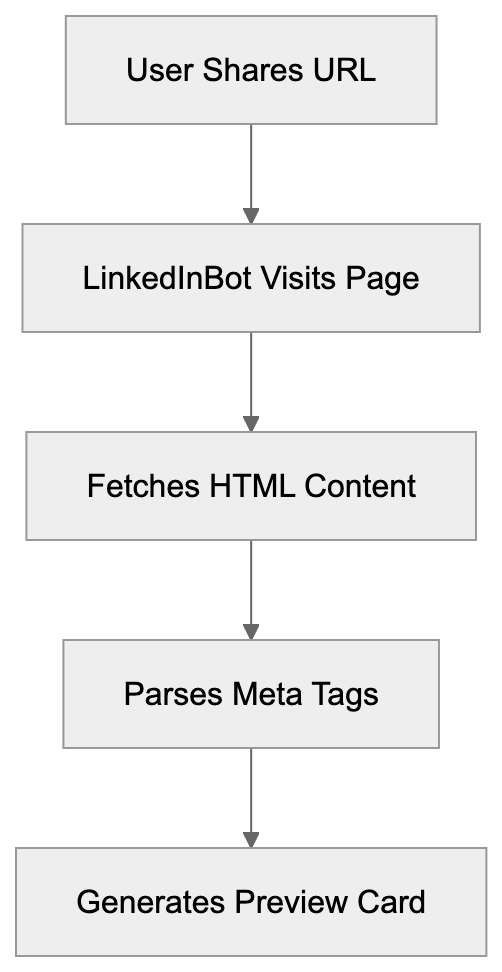
How LinkedInBot Generates Link Previews
The link preview generation process is swift. When a user shares a URL, LinkedIn sends the LinkedInBot to that page immediately. The bot downloads the HTML content and parses it for specific meta tags, with Open Graph meta tags being prioritized. It seeks og:title, og:description, og:image, and og:url tags, which dictate the preview display. Properly setting up Open Graph tags lets you control how links appear on LinkedIn.
Image selection is vital for engagement. LinkedInBot favors images at least 1200x627 pixels for scenes. Smaller images may be rejected or display poorly. JPEG and PNG formats are optimal for LinkedIn previews.
Why Blocking LinkedInBot Might Hurt Your Reach
Blocking LinkedInBot in your robots.txt file can have severe implications. Without bot access, LinkedIn cannot generate previews, and users sharing your content will only see plain text links. This drastically reduces click-through rates on LinkedIn. Studies indicate posts with rich previews receive significantly more engagement. Without previews, content appears less professional and trustworthy.
Though some website owners block all bots for security reasons, specifically blocking the LinkedIn bot harms LinkedIn marketing efforts. For those selling B2B products or services, LinkedIn traffic is vital. As of 2024, the platform boasts over 1 billion members, many being decision-makers and professionals. Blocking the bot means potentially losing out on traffic from LinkedIn shares.
Meta Tag Priority Hierarchy:
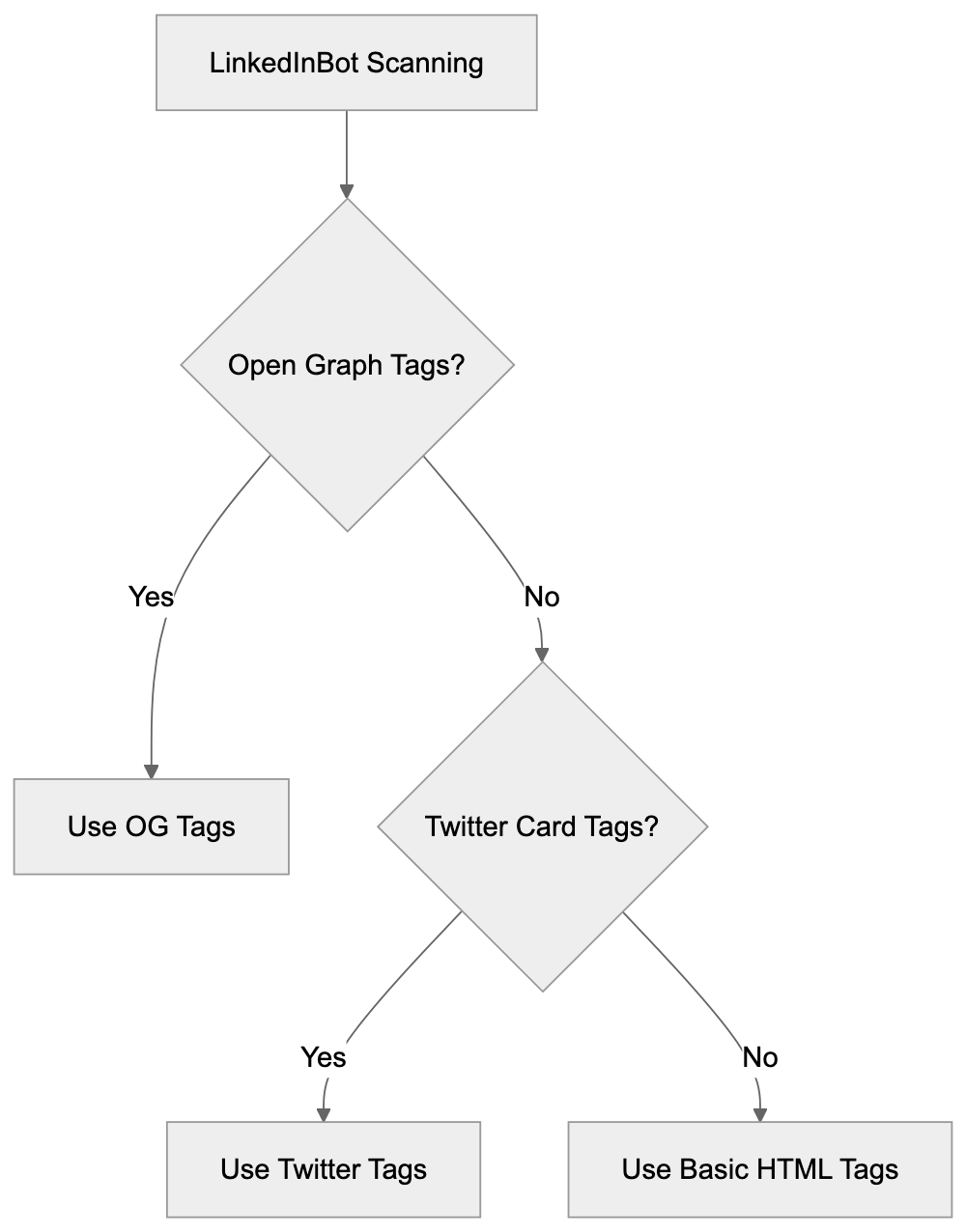
Configuring Your Site for LinkedInBot
Proper configuration ensures LinkedInBot’s access to and previewing of your content. First, check your robots.txt file at yourdomain.com/robots.txt to ensure you are not blocking LinkedInBot with a User-agent rule. If blocking all bots by default, allow LinkedInBot specifically.
Next, implement Open Graph meta tags on all shareable pages. Place these tags in the HTML head section. Minimum required tags include: og:title for the page title, og:description for a brief summary, og:image for the preview image, and og:type to specify content type.
Test your setup using LinkedIn’s Post Inspector tool, a free utility that shows precisely what LinkedInBot sees on your page. Paste your URL, and LinkedIn generates a preview. If anything appears incorrect, the tool helps identify issues. Update tags based on results and retest.
LinkedInBot Compared to Other Social Media Crawlers
Different social platforms employ various crawlers for link previews, each with specific requirements and behaviors. Understanding these differences aids in optimizing content for each.
| Crawler | Platform | User-Agent | Image Size | Special Requirements |
|---|---|---|---|---|
| LinkedInBot | LinkedInBot/1.0 | 1200x627px | Open Graph tags preferred | |
| Facebookbot | facebookexternalhit/1.1 | 1200x630px | Requires og:image | |
| Twitterbot | Twitter/X | Twitterbot/1.0 | 1200x675px | Twitter Card tags |
| Slackbot | Slack | Slackbot-LinkExpanding | 800x400px | Basic meta tags sufficient |
| Discordbot | Discord | Discordbot/2.0 | Variable | Flexible with formats |
LinkedInBot is more stringent regarding image dimensions compared to some alternatives. It also caches previews more aggressively than Twitter or Facebook. Once LinkedIn generates a preview, it stores it for a while. Updating Open Graph tags does not instantly change existing previews without using the Post Inspector tool to force a refresh. The bot crawls less frequently than Googlebot or other search engine crawlers, only visiting pages when shared on LinkedIn.
Common Issues with LinkedInBot Access
Several problems can impede LinkedInBot’s functionality. Server response time is a frequent issue. If a page takes too long to load, the bot may time out, as LinkedIn expects responses within seconds. Slow servers or heavy pages lead to failed preview generation.
Social Media Crawler Comparison Flow:

SSL certificate problems also block the LinkedIn bot. LinkedInBot requires valid HTTPS certificates on secure sites. Expired or self-signed certificates cause errors. Redirect chains can confuse the bot. If a URL redirects multiple times before reaching content, previews may not generate.
Geographic restrictions can block LinkedInBot as well. Some sites restrict access based on IP address location, and LinkedIn’s crawlers operate from specific IP ranges. Blocking these prevents preview generation. Check firewall and CDN settings if previews are not functioning.
LinkedInBot and Privacy Considerations
LinkedInBot only accesses publicly available content and does not log in to sites or bypass authentication. If content requires login, the bot cannot see it, intentional to respect content protection.
By default, the bot does not execute JavaScript, reading static HTML content only. Sites heavily reliant on JavaScript rendering may face preview issues, with server-side or pre-rendering offered as solutions. LinkedIn stores scraped data solely for preview generation, adhering to Microsoft’s privacy policies.
Respected robot.txt directives mean if access is disallowed, the LinkedInBot will not crawl pages, with no exceptions even for high-profile content.
Monitoring LinkedInBot Activity
Web developers should monitor LinkedInBot activity in server logs to identify issues and improve performance. Look for the LinkedInBot user-agent string in access logs and check response codes for these requests. A 200 status code indicates successful access, while 403 or 404 codes suggest problems.
Monitor bandwidth usage from LinkedInBot. Excessive crawling might signal a problem. While generally well-behaved, issues can occur, so set up alerts for unusual patterns.
Analytics tools can track referral traffic from LinkedIn, showing whether link previews drive clicks. Comparing engagement rates for posts with and without previews highlights the importance of proper setup. Some monitoring tools specifically track social media bot activity, providing detailed crawler behavior reports.
Future of LinkedInBot and Social Crawlers
Social media crawlers continue evolving with new technologies. LinkedInBot might incorporate JavaScript rendering capabilities in the future, allowing better previews for modern web applications. Microsoft’s resources facilitate continuous LinkedIn infrastructure improvements, including crawler technology updates.
Video preview support may expand beyond current capabilities, as LinkedIn shows video previews for some platforms. While native video hosting boasts good preview support, external video links currently have limited options. Schema.org markup may become more crucial for LinkedInBot, aiding crawlers in better content understanding, potentially generating richer previews.
Combining LinkedIn’s capabilities with Microsoft’s AI technologies might enhance preview generation, bettering image selection, text extraction, and formatting.
Conclusion
LinkedInBot significantly influences how content appears on LinkedIn, fetching metadata and generating link previews when users share URLs. Understanding its technical requirements aids in improving your content for LinkedIn sharing. Proper Open Graph setup ensures your links look professional and engaging. Blocking LinkedInBot affects your LinkedIn reach significantly, as posts without previews suffer lower engagement rates.
The LinkedIn bot respects standard web protocols and robots.txt directives and operates similarly to other social media crawlers but with specific requirements. Monitoring bot activity in your server logs identifies issues, and LinkedIn’s Post Inspector tool helps test and debug previews. With over 900 million users on LinkedIn, getting previews right is crucial for marketing and content distribution.
The platform’s professional focus makes it especially valuable for B2B companies and content creators. Proper LinkedInBot configuration should be part of every website’s social media improvement strategy.
Frequently Asked Questions
How can I check if LinkedInBot is crawling my website?
You can monitor activity by looking for the LinkedInBot user-agent string in your server access logs. Make sure to check the status codes; a 200 code means successful access, whereas a 403 or 404 code indicates issues.
What should I do if LinkedIn previews are not displaying correctly?
First, ensure that your Open Graph meta tags are correctly set up. Use LinkedIn's Post Inspector tool to see what LinkedInBot sees on your page and adjust your tags as necessary. Retest the URL in the Inspector after making changes to verify that previews display correctly.
How does blocking LinkedInBot affect my content's visibility?
Blocking LinkedInBot will prevent it from generating rich previews for your links, resulting in users seeing only plain text links. This can significantly lower engagement levels, as posts with well-crafted previews tend to attract more clicks.
What are the minimum Open Graph tags I need for effective previews?
The minimum required Open Graph tags include og:title for the title, og:description for a summary, og:image for the preview image, and og:type to specify content type. Properly implementing these tags will enhance how your links appear on LinkedIn.
Why is image size important for LinkedIn previews?
LinkedInBot favors images that are at least 1200x627 pixels, as larger images are more engaging. Images that do not meet this size requirement may not display properly or could be rejected, adversely affecting the overall attractiveness of your link previews.
Can LinkedInBot access content behind paywalls or logins?
No, LinkedInBot can only access publicly available content and cannot bypass authentication. If your content requires a login, the bot will not be able to fetch it, which could limit exposure for that content.
How can I improve my LinkedIn traffic effectively?
To improve LinkedIn traffic, ensure you’re not blocking LinkedInBot, implement all necessary Open Graph tags, and regularly monitor the performance of your posts. Engaging content along with correctly configured previews can significantly increase click-through rates from LinkedIn shares.
Track Your AI Visibility
See how AI chatbots like ChatGPT, Claude, and Perplexity discover and recommend your brand.