Understanding Meta-ExternalAgent: Meta's AI Data Crawler
Learn about Meta-ExternalAgent crawler, its role in AI training, user-agent strings, robots.txt blocking, and how it differs from FacebookBot.
Introduction
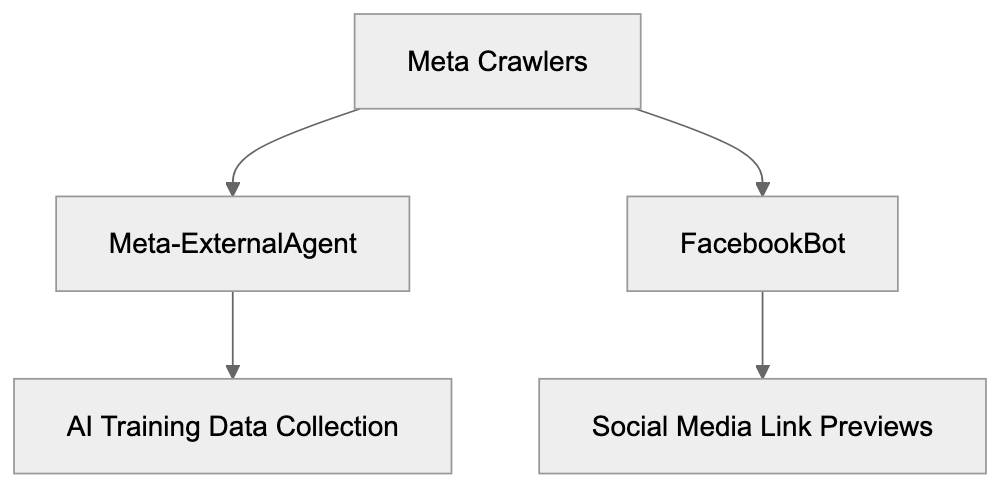
Meta-ExternalAgent, a web crawler operated by Meta (formerly Facebook), plays a crucial role in the company’s AI development and training processes. This Meta AI crawler is distinct from FacebookBot, which focuses on content previews and social media features, as it specifically targets data collection for AI training. Web developers and site owners should be aware of this Meta bot, as it regularly accesses their content to gather training data for large language models. Understanding Meta-ExternalAgent helps you control what data is collected from your website, especially if you manage content-heavy or proprietary sites. Although the crawler respects standard web protocols, it frequently visits sites to collect fresh data.
What is Meta-ExternalAgent?
Meta-ExternalAgent serves as a software program that systematically browses and indexes web pages across the internet. The Meta bot reads HTML content, follows links, and extracts information from public pages while identifying itself using a specific user-agent string in server logs. The string, “Mozilla/5.0 (compatible; Meta-ExternalAgent/1.1; +https://developers.facebook.com/docs/sharing/webmasters/crawler)”, alerts webmasters to Meta’s system access. This crawler operates independently from other Meta bots, such as FacebookBot, which focuses on link previews for social sharing. Meta-ExternalAgent focuses on aggregated data collection, and it respects robots.txt directives and crawl-delay settings when configured properly. Server administrators can track its activity through access logs by filtering for the Meta-ExternalAgent string.
Meta-ExternalAgent vs FacebookBot:
Purpose and Why Meta-ExternalAgent Exists
Meta developed this web crawler to support their AI research and development initiatives. With a need for vast amounts of text data, Meta-ExternalAgent collects examples of human language and communication patterns from public web content. This data enhances Meta’s AI products like chatbots, content understanding systems, and recommendation algorithms. Effective AI models require exposure to diverse text examples from various domains, and web crawling offers an efficient method to build these extensive datasets. Meta joins companies like Google, OpenAI, and Anthropic in using web crawlers for AI training. Meta-ExternalAgent specifically targets publicly accessible content and steers clear of private or gated information, helping Meta remain competitive in the AI industry where training data quality is vital.
How Meta Uses Data from Meta-ExternalAgent
The data compiled by Meta-ExternalAgent creates training datasets for Meta’s machine learning models. These AI systems learn language patterns, factual information, and reasoning capabilities from the content. Products like Meta AI, the conversational assistant available on Facebook, Instagram, and WhatsApp, benefit from this data. Additionally, the crawler supports features that moderate content and detect policy violations, while Meta’s recommendation systems draw from the broad knowledge base collected. Meta uses natural language processing techniques to filter low-quality content, remove duplicates, and organize data by topic, supplementing web-crawled data with public social media and licensed datasets. Despite the training pipelines being proprietary, Meta follows industry-standard practices for large language model development.
Meta-ExternalAgent User-Agent String Details
The user-agent string serves as Meta-ExternalAgent’s identification card during website visits. Server logs record this string with each request, enabling webmasters to analyze the crawler’s behavior. A typical Meta-ExternalAgent user-agent appears as “Mozilla/5.0 (compatible; Meta-ExternalAgent/1.1; +https://developers.facebook.com/docs/sharing/webmasters/crawler)”, and variations depend on the crawling task or system configuration. The user-agent string allows webmasters to establish specific rules in robots.txt files and to modify server responses. This transparency helps site owners decide on allowing or blocking access to Meta-ExternalAgent.
Blocking Meta-ExternalAgent with Robots.txt
Robots.txt provides a method to control crawler access to your website. Located in the root directory, this file contains directives for different bots. To block Meta-ExternalAgent, include these lines in your robots.txt:
User-agent: Meta-ExternalAgent
Disallow: /
Crawler Access Control Methods:
You can also block specific directories while permitting others:
User-agent: Meta-ExternalAgent
Disallow: /private/
Disallow: /admin/
Allow: /public/
Robots.txt relies on voluntary compliance, which Meta generally respects. Note that blocking Meta-ExternalAgent doesn’t affect other Meta bots like FacebookBot, so separate rules are necessary. Changes to robots.txt take effect once the crawler next checks the file. Verify correct functionality using online validation tools, but remember that robots.txt is publicly accessible, offering guidance rather than security.
Difference Between Meta-ExternalAgent and FacebookBot
Data Collection to AI Training Flow:

Meta operates multiple crawlers for various purposes, each unique in function. FacebookBot mainly handles link previews when users share URLs across Meta platforms, fetching page titles, descriptions, and images. Meanwhile, Meta-ExternalAgent focuses on data collection for AI training and operates based on Meta’s data-gathering priorities. They use different user-agent strings, distinguishable in server logs, e.g., “facebookexternalhit” for FacebookBot. Blocking one crawler doesn’t block the other, as they function independently. Understanding these differences helps site owners decide on appropriate access control.
Comparison with Other AI Crawlers
Meta-ExternalAgent competes with crawlers from other tech companies focusing on AI systems. Here’s how Meta-ExternalAgent compares:
| Crawler Name | Company | Primary Purpose | User-Agent String | Robots.txt Control |
|---|---|---|---|---|
| Meta-ExternalAgent | Meta | AI training data | Meta-ExternalAgent/1.1 | Yes |
| GPTBot | OpenAI | AI model training | GPTBot/1.0 | Yes |
| Google-Extended | AI training (non-search) | Google-Extended | Yes | |
| CCBot | Common Crawl | Open dataset creation | CCBot/2.0 | Yes |
| ClaudeBot | Anthropic | AI training data | Claude-Web | Yes |
| Bytespider | ByteDance | Search and AI | Bytespider | Yes |
Though these crawlers serve similar functions, they represent different companies’ AI efforts. Most comply with robots.txt, although it’s not legally required.
Managing Crawler Access and Data Usage
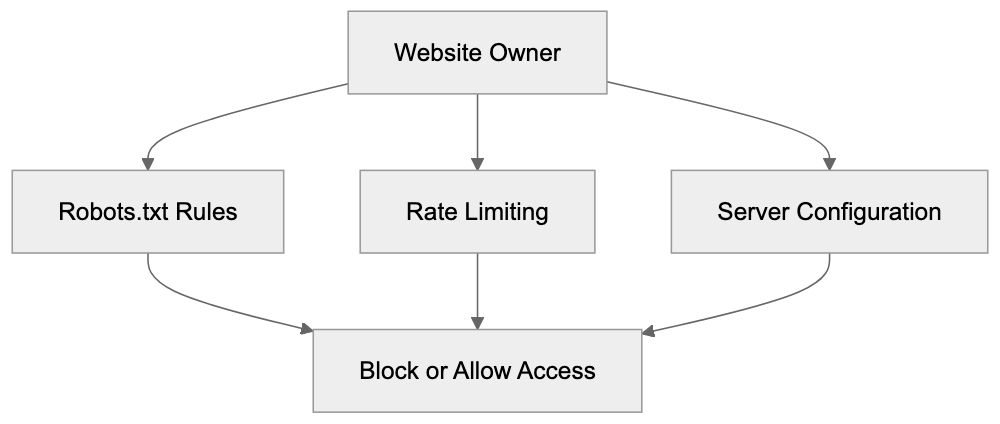
Website owners have several options for controlling Meta-ExternalAgent’s interaction with their content. Robots.txt offers the simplest way to block crawler access. Rate limiting can prevent excessive server load while allowing crawling, or you can use server configuration files like .htaccess to block specific user-agents. Content management systems may provide plugins for managing crawler access, while monitoring server logs gives insights into crawler behavior. Excessive crawling impacting performance warrants contacting Meta through developer channels. Consider your content strategy when deciding to block Meta-ExternalAgent, balancing AI training benefits against content protection. Blocking doesn’t erase previously collected data, and ongoing changes to Meta’s terms and AI regulations make staying informed essential.
Technical Implications for Website Performance
Crawlers like Meta-ExternalAgent consume server resources, potentially slowing down your site for human visitors. Analyzing server logs and performance metrics helps identify patterns of high-frequency crawling. Implement a crawl-delay in robots.txt to manage crawler speed:
User-agent: Meta-ExternalAgent
Crawl-delay: 10
While modern crawlers self-regulate, issues can still arise, and content delivery networks or caching can alleviate performance impacts. Implementing blocking or rate limiting, or serving lightweight content to known crawlers are potential solutions to crawl-induced performance challenges.
Privacy and Content Protection Considerations
Meta-ExternalAgent only accesses publicly available content, but this doesn’t imply that all such content is intended for AI training. The legal landscape regarding web scraping for AI training is unsettled, with some arguing that robots.txt offers sufficient opt-out mechanisms. Despite this, site owners with proprietary or creative work must decide on AI training usage. Additional protective measures like CAPTCHAs hinder automated crawling but don’t offer complete protection. Clearly defined terms of use may clarify data usage intentions and, while legal enforceability varies, such terms establish your position. Monitoring developments in AI regulation is vital as they may impact crawler practices.
End
Meta-ExternalAgent functions as Meta’s dedicated crawler for collecting web data to train AI systems, operating separately from FacebookBot. Understanding how to manage this crawler through technical means, like robots.txt, allows website owners to make informed decisions about AI training on their content. While Meta’s use of web crawling raises questions about data rights and consent, tools exist to either accommodate or block Meta-ExternalAgent based on your preferences. Stay aware of server performance, content protection, and business strategy when making decisions, and keep informed about evolving policies regarding AI training data.
Frequently Asked Questions
How can I check if Meta-ExternalAgent is accessing my site?
You can monitor your server logs for the user-agent string associated with Meta-ExternalAgent: "Mozilla/5.0 (compatible; Meta-ExternalAgent/1.1; +https://developers.facebook.com/docs/sharing/webmasters/crawler)". This allows you to identify and analyze the crawler's activity on your website efficiently.
What should I include in my robots.txt file if I want to block Meta-ExternalAgent?
To block Meta-ExternalAgent, your robots.txt file should contain the following lines:
User-agent: Meta-ExternalAgent
Disallow: /
This directive informs the crawler that it is not permitted to access any section of your site.
Can blocking Meta-ExternalAgent affect my website's performance?
Blocking Meta-ExternalAgent may improve your site’s performance if excessive crawling impacts server load. However, it does not erase any previously collected data by the crawler. Consider the trade-off between content protection and potential training benefits when making this decision.
What are the differences between Meta-ExternalAgent and FacebookBot?
Meta-ExternalAgent is focused on gathering data specifically for AI model training, while FacebookBot is designed for fetching link previews for social sharing across Meta platforms. They use different user-agent strings and function independently, meaning blocking one does not affect the other.
How does Meta-ExternalAgent utilize the data it collects?
The data collected by Meta-ExternalAgent is used to create training datasets for Meta's AI models, enhancing capabilities in language understanding, content moderation, and recommendation systems. This process is vital for developing effective AI products and ensuring their competitive edge in the market.
What steps can I take if Meta-ExternalAgent is impacting my website's performance?
If Meta-ExternalAgent affects your site's speed, you can implement a crawl-delay in your robots.txt file or use server configurations to restrict its access speed. Additionally, employing caching solutions or content delivery networks can help mitigate performance issues caused by crawling.
Are there legal considerations regarding the data collected by Meta-ExternalAgent?
The legality of web scraping for AI training purposes is still evolving. Although Meta-ExternalAgent only accesses publicly available content, site owners should establish clear terms of use regarding their data to protect their rights. Keeping informed about changes in AI regulations is essential for understanding how they might impact your website.
Track Your AI Visibility
See how AI chatbots like ChatGPT, Claude, and Perplexity discover and recommend your brand.