Understanding Meta-ExternalFetcher: Meta's User-Initiated Fetcher
Complete guide on Meta-ExternalFetcher covering its purpose, real-time URL previews, AI features, blocking methods, and comparison with training crawlers.
What is Meta-ExternalFetcher
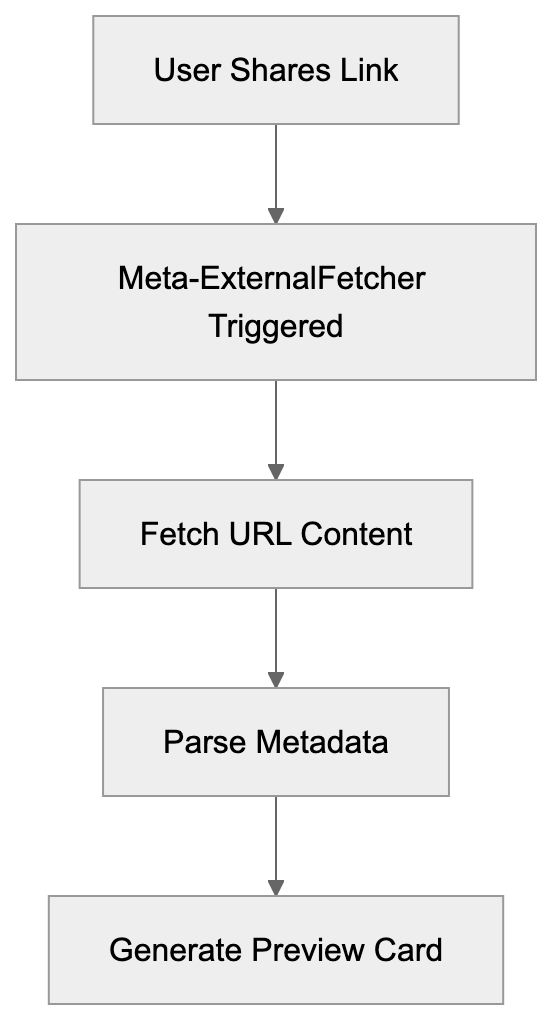
Meta-ExternalFetcher is a specialized bot deployed by Meta to fetch content from external URLs, enhancing user experience on social platforms by generating rich link previews. When users share a link on Facebook, Instagram, WhatsApp, or other Meta platforms, the system retrieves information about that URL. This bot’s role is to visit the webpage, gather metadata like titles, descriptions, and images to create link previews visible in your feed. Importantly, the fetcher activates when a user performs an action, such as pasting a URL into a post or message, at which point the bot is triggered. Unlike Meta’s other crawlers, Meta-ExternalFetcher responds to user behavior instead of automatically crawling websites. The user-agent string for this fetcher is Meta-ExternalFetcher/1.1 (+https://developers.facebook.com/docs/sharing/webmasters/crawler), which helps website owners identify fetcher visits. Processing billions of URLs daily across Meta’s platforms makes understanding how this fetcher operates crucial for web developers and SEO specialists aiming to manage how their content is presented on social media.
Why Meta-ExternalFetcher Exists and Its Purpose
The core purpose of Meta-ExternalFetcher is enhancing user experience on social platforms. Links shared without previews appear dull, whereas those with a thumbnail image, headline, and description attract more attention and clicks. Meta developed this fetcher to generate these previews in real time. As soon as a URL is shared, the fetcher visits the page within seconds, reading Open Graph tags, Twitter Card metadata, and other structured data to compile a preview card. This occurs for every link shared across Facebook, Instagram, Messenger, and WhatsApp, with speed being crucial as users expect immediate results, not waits of five minutes for a preview.
Meta-ExternalFetcher Request Flow:
Another vital role of Meta-ExternalFetcher is security, as it scans URLs for malicious content before displaying them to other users, checking for phishing sites, malware, and threats. If a URL appears suspicious, the preview might not generate, or the link could be flagged. Website owners also benefit as well-crafted previews can significantly boost social media click-through rates compared to those without.
How Meta-ExternalFetcher Works in Practice
When a user pastes a URL on a Meta platform, the fetcher process begins immediately. The system sends an HTTP request to the target URL using the Meta-ExternalFetcher user-agent string, expecting HTML content in return swiftly. Slow server responses can lead to preview generation failure. The fetcher scans for meta tags in the HTML’s head section, prioritizing Open Graph tags since Meta developed this protocol. Tags like og:title, og:description, og:image, and og:url instruct the fetcher on what to display.
Images require specific attention, needing to be 1200x630 pixels for optimal display to avoid appearing pixelated. The fetcher honors robots.txt files and respects some crawling directives, but blocking it usually results in non-optimal engagement as links won’t generate previews. Meta caches fetched data to prevent constant URL re-fetching, with variable cache durations that can be refreshed using Facebook’s Sharing Debugger.
Link Preview Enhancement Process:

Meta-ExternalFetcher vs. Training Crawlers
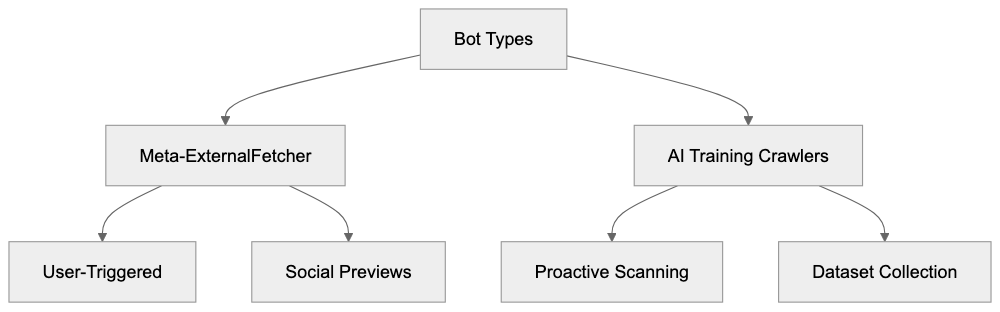
Understanding the differences between Meta-ExternalFetcher and AI training crawlers is crucial. Meta-ExternalFetcher operates on user demand, visiting URLs shared by real users on Meta platforms. Conversely, training crawlers like Meta-ExternalAgent are proactive, scanning the web to collect AI training data without needing link shares. User-agent strings differ, allowing recognition in server logs. Meta-ExternalFetcher visits occur when content is shared, whereas training crawlers systematically scrape data.
The visit frequency is disparate, with Meta-ExternalFetcher visiting occasionally based on sharing activity, while training crawlers could visit numerous pages rapidly. Their purposes diverge: Meta-ExternalFetcher generates social media previews, and training crawlers build AI model datasets. Website owners can allow the fetcher for social sharing benefits while blocking training crawlers to protect content, managing crawler permissions via user-agent distinctions.
Comparison with Alternative Social Media Fetchers
Here’s how Meta-ExternalFetcher stacks up against other social media fetchers:
| Platform | User-Agent | Trigger Method | Cache Duration | Special Features |
|---|---|---|---|---|
| Meta-ExternalFetcher | Meta-ExternalFetcher/1.1 | User-initiated sharing | Varies by platform | Supports Open Graph, security scanning |
| Twitterbot | Twitterbot/1.0 | User shares or tweets | 7 days typical | Prefers Twitter Card tags |
| LinkedInBot | LinkedInBot/1.0 | User posts link | Variable | Business-focused metadata |
| TelegramBot | TelegramBot | User shares in chat | Permanent in most cases | Instant preview generation |
| Slackbot | Slackbot-LinkExpanding | Posted in channels | 24 hours default | Unfurling customization options |
Meta-ExternalFetcher vs AI Training Crawlers:
These bots serve similar purposes but have unique traits. Meta-ExternalFetcher generally responds in 1-3 seconds, similar to Twitter’s bot. LinkedIn’s bot often acts more slowly, especially with first-time URLs. All bots respect meta tags but have preferences, with Meta prioritizing Open Graph tags as the standard it created. If page updates occur, manual cache refreshes might be necessary using debugging tools like Meta’s Sharing Debugger or Twitter’s Card Validator.
Should You Block Meta-ExternalFetcher
Blocking Meta-ExternalFetcher involves certain trade-offs. Benefits include conserving bandwidth and server resources as high-traffic sites could face numerous fetcher requests daily, which consume resources despite being small. Some sites with strict content policies may opt to block page scraping altogether. Blocking prevents Meta from accessing content, but this typically reduces benefits for most websites.
Blocking the fetcher often diminishes click-through rates since links appear as plain text rather than appealing previews, which directly affects site traffic. Implement blocking by adding the Meta-ExternalFetcher user-agent to the robots.txt disallow list or configuring the server for 403 forbidden responses to this user-agent. Note that blocking differs between the fetcher and AI training crawlers, allowing fetcher permissions while blocking training crawlers selectively.
Technical Details and User-Agent String
The Meta-ExternalFetcher user-agent string includes crucial details for server logs and analytics: Meta-ExternalFetcher/1.1 (+https://developers.facebook.com/docs/sharing/webmasters/crawler). This string not only indicates the fetcher version but also links to documentation, aiding website owners in improving their setups.
Server logs help identify fetcher visits via this string. Meta-ExternalFetcher sends standard HTTP headers alongside its user-agent, signaling it can handle HTML, XHTML, and XML formats, and typically originates from Meta’s IP ranges. Verify authenticity by cross-referencing with published Meta IP ranges, avoiding spoofed requests. The fetcher respects HTTP redirects to a reasonable extent, and response codes like 200 OK are expected for successful requests, with proper handling of errors.
Optimizing Content for Meta-ExternalFetcher
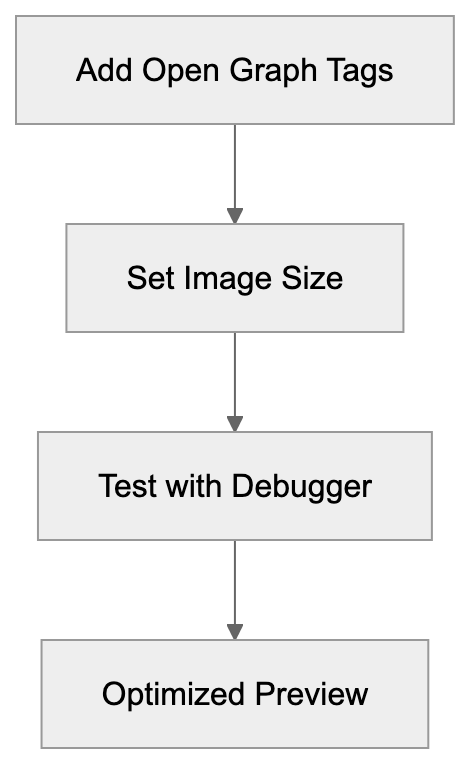
Optimizing ensures links present well on Meta platforms. Start by including Open Graph meta tags in your HTML head section, such as og:title, og:description, og:image, and og:url. Craft a compelling og:title and keep it under 60 characters. Summarize with an interesting og:description under 200 characters. Use a properly-sized og:image at 1200x630 pixels, as smaller images may not display as intended. Set og:url to your page’s canonical URL to avoid duplicate previews. Add og:type to specify content type, and for articles, include article:published_time and article:author.
Even with Open Graph tags, incorporate standard HTML elements like a descriptive title tag and meta description for fallbacks. Test with Facebook’s Sharing Debugger to see fetcher findings and refresh data as needed. Common issues like missing tags or incorrect image formats should be rectified for optimal social sharing performance.
Privacy and Data Collection Considerations
Meta-ExternalFetcher limits its data collection compared to other Meta services, accessing only publicly available content without bypassing authentication unless publicly accessible. Collected data includes URL metadata, page titles, descriptions, and specified images, stored for preview generation and caching.
Meta-ExternalFetcher data doesn’t feed directly into AI training, which involves other crawlers. However, fetched content might eventually support other systems in Meta’s ecosystem. Understanding collected data is essential, as the fetcher views content any visitor would see without transmitting personal data unless embedded publicly. Standard security measures like login walls prevent fetcher access to private areas, while directives like noindex or nofollow can exclude pages from previews.
Concerns about image hotlinking are eased as Meta caches images, reducing bandwidth usage from repeated requests. Over time, the cache expires, prompting necessary re-fetching from your server.
End
Meta-ExternalFetcher powers link previews across Meta platforms, including Facebook, Instagram, WhatsApp, and Messenger, activated by user-shared URLs. It fetches metadata promptly to enhance engagement through attractive preview cards. Unlike AI training crawlers, Meta-ExternalFetcher reacts to user actions instead of actively scanning the web. Different user-agent strings help distinguish these bots, giving website owners insight into deciding which to permit. Allowing Meta-ExternalFetcher is typically advantageous, as blocking eliminates previews and often halves social media traffic. Enhancing for the fetcher involves using Open Graph tags, correct image sizes, and ensuring fast server responses.
Content Optimization Flow:
 Technical considerations are crucial for developers configuring servers and monitoring bot activity. While the fetcher gathers public data for previews, it’s distinct from Meta’s AI training infrastructure, aiding web developers, marketers, and business owners in enhancing social media presence while managing content display across Meta’s platforms.
Frequently Asked Questions
What types of metadata does Meta-ExternalFetcher look for?
Meta-ExternalFetcher primarily looks for Open Graph tags, which include og:title, og:description, and og:image, among others. These tags provide key information for generating rich link previews. If these tags are missing, the fetcher may fall back on standard HTML elements like the title tag and meta description.
What happens if my server responds slowly to the fetcher?
A slow response from your server can lead to failure in generating link previews. The fetcher expects HTML content promptly; if it takes too long, users might see just a plain text link without any preview, which can reduce engagement.
Can I block Meta-ExternalFetcher on my website?
Yes, you can block Meta-ExternalFetcher by adding its user-agent to your robots.txt file or configuring your server to return a 403 forbidden status. However, doing so may prevent your content from being displayed attractively on Meta platforms, likely reducing your click-through rates.
How long does Meta cache the fetched data?
The caching duration for fetched data varies by platform, which facilitates efficient retrieval. Website owners can use tools like Facebook's Sharing Debugger to refresh the cache manually when they update content or make changes.
What are the implications of not using Open Graph tags?
Not using Open Graph tags can result in your links displaying as plain text without rich previews, significantly lowering user engagement and click-through rates. Implementing these tags is crucial for maximizing the appeal of shared links on social media.
How does Meta-ExternalFetcher differentiate from other crawlers?
Meta-ExternalFetcher operates only when users share links, while other crawlers may proactively scan the web. The fetcher's user-agent string and response time are also distinct, allowing website owners to manage which bots can access their content.
Will blocking fetcher affect my SEO?
Blocking Meta-ExternalFetcher primarily impacts social media sharing rather than direct SEO rankings. However, lower engagement from not displaying previews can lead to decreased traffic from social platforms, which might indirectly affect overall site visibility and rankings.
Track Your AI Visibility
See how AI chatbots like ChatGPT, Claude, and Perplexity discover and recommend your brand.