Understanding MSNBot: Microsoft's Legacy Crawler Evolution
Learn about MSNBot history, its replacement by Bingbot, user-agent strings, blocking reasons, and how to clean up your robots.txt files.
Introduction
MSNBot, Microsoft’s original web crawler, was designed to index content for MSN Search and later Live Search. This Microsoft legacy bot crawled the web, collecting data to build search indexes. Serving as the primary search engine bot from 2004 until around 2010, it was gradually replaced by Bingbot. Web developers and site administrators often encountered MSNBot user agent strings in server logs and configured robots.txt files to control its access. Understanding MSNBot’s heritage status is essential today, as many websites still contain outdated rules blocking a crawler that no longer exists. The Bingbot migration marked a significant shift in Microsoft’s search infrastructure. For SEO experts and web developers, knowing the differences between these web crawlers helps maintain clean and effective site configurations.
What Was MSNBot
MSNBot played a crucial role in Microsoft’s search engine infrastructure. This MSN search crawler systematically browsed websites to gather content for indexing. MSNBot began its operations around 2004, competing with Google and Yahoo in the search market. It used specific MSNBot user agent strings to identify itself, such as “msnbot/1.0 (+http://search.msn.com/msnbot.htm)”. Site administrators could observe these user agents in web server logs. The Microsoft legacy bot followed standard protocols and respected robots.txt directives. MSNBot adjusted its crawling rates based on site server capacities and response times, collecting text, images, and other media to build comprehensive search indexes.
The Transition to Bingbot
MSNBot Evolution and Replacement:
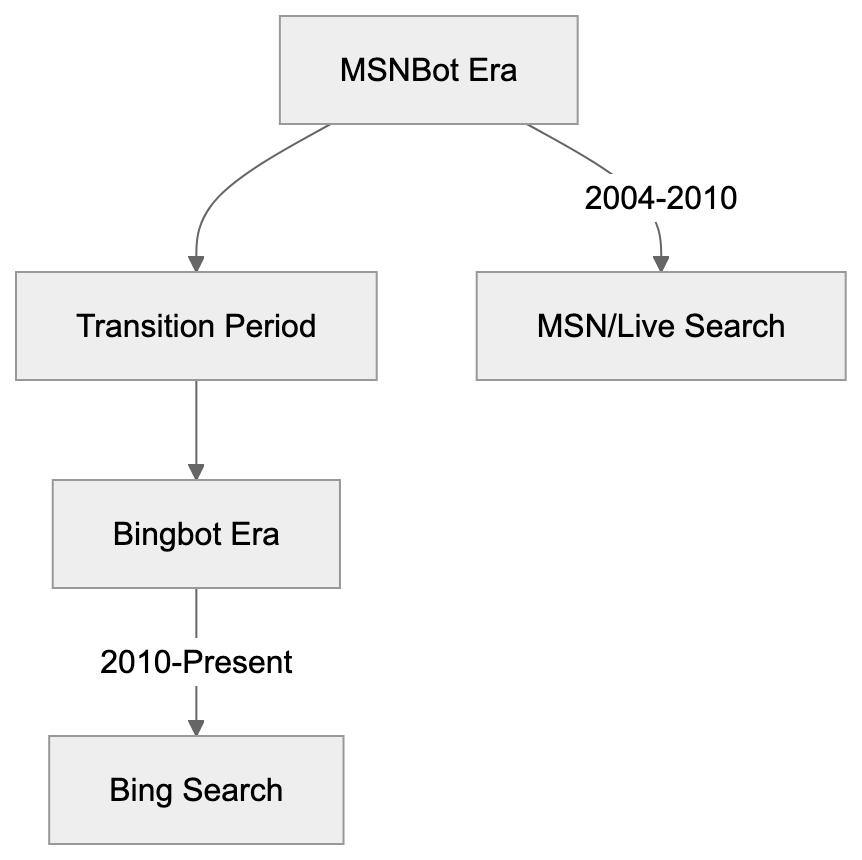
In 2010, Microsoft began the Bingbot migration, replacing MSNBot with the new crawler as they launched the Bing search engine. Bingbot, using updated user-agent strings like “Mozilla/5.0 (compatible; bingbot/2.0; +http://www.bing.com/bingbot.htm)”, brought enhanced crawling capabilities. It handled modern web technologies like JavaScript and AJAX more effectively than MSNBot. The switch to Bingbot reflected Microsoft’s broader rebranding efforts around the Bing search platform. Today, Bingbot handles all crawling for Bing, Microsoft Edge, and other Microsoft search services. Any MSNBot activity noticed now is probably from archived user-agent strings or unauthorized scrapers.
Why Websites Blocked MSNBot
During its active years, websites blocked MSNBot for several reasons. Server load was a common concern, as web crawlers consume bandwidth and processing resources. Some administrators felt MSN Search didn’t drive enough traffic to justify the overhead. E-commerce sites blocked search bots to prevent price scraping by competitors. Content publishers worried about data indexing without proper attribution. Limited server capacity led some sites to prioritize crawlers with actual visitor traffic. Aggressive crawling patterns sometimes caused server slowdowns, prompting blocks. Privacy-focused websites restricted all search engine bots, including MSNBot, while others blocked it due to data collection concerns. Regional websites sometimes blocked crawlers from less popular search engines in their markets. Database-driven sites minimized unnecessary queries by blocking bots. These rules were typically implemented via robots.txt files or server configurations.
MSNBot User-Agent Strings and Identification
Crawler Identification Process:

MSNBot employed various user-agent strings during its operational years. The main crawler used identifiers like “msnbot/1.0” or “msnbot/1.1”. Specialized versions like “msnbot-media/1.1” collected images and videos, while “msnbot-news” focused on news content. Mobile content was handled by “msnbot-mobile” variants. Each string included a URL pointing to Microsoft’s bot documentation. Server administrators used these strings to manage MSNBot access, and log analysis tools parsed them for statistics. Robots.txt files often employed these identifiers for specific rules, though the variety made complete blocking challenging.
Cleaning Up Your Robots.txt File
Outdated MSNBot rules in robots.txt files are obsolete and add unnecessary clutter. Since MSNBot hasn’t actively crawled since 2010, these entries should be removed. Search for lines containing “User-agent: msnbot” or similar strings and eliminate rules like “msnbot-media”, “msnbot-news”, and “msnbot-mobile”. After this robots.txt cleanup, ensure appropriate Bingbot rules are in place if needed. Replacing old entries with current ones for Bingbot is vital to maintain visibility in Bing search results. Clean robots.txt files are easier to manage and less prone to errors. Regular audits help keep configurations aligned with active crawlers.
Comparison of Legacy and Modern Microsoft Crawlers
| Crawler | Active Status | Primary Purpose | Current User-Agent Example | Market Share Impact |
|---|---|---|---|---|
| MSNBot | Retired (2010) | MSN/Live Search indexing | msnbot/2.0b | None (obsolete) |
| Bingbot | Active | Bing search indexing | Mozilla/5.0 (compatible; bingbot/2.0) | Medium (2-3% search) |
| Googlebot | Active | Google search indexing | Mozilla/5.0 (compatible; Googlebot/2.1) | High (90%+ search) |
| Slurp (Yahoo) | Limited | Yahoo search (uses Bing) | Mozilla/5.0 (compatible; Yahoo! Slurp) | Low (uses Bing index) |
| DuckDuckBot | Active | DuckDuckGo indexing | DuckDuckBot/1.0 | Low (own index + Bing) |
This table highlights that MSNBot has no current impact on search visibility. Bingbot is the only Microsoft crawler relevant for SEO today, while Googlebot remains dominant. Yahoo’s Slurp bot activity is limited since it relies on Bing’s search index. DuckDuckBot operates its own index but also uses Bing results. Site owners should focus on active crawlers like Googlebot and Bingbot.
Technical Details for Developers
Robots.txt Cleanup Workflow:
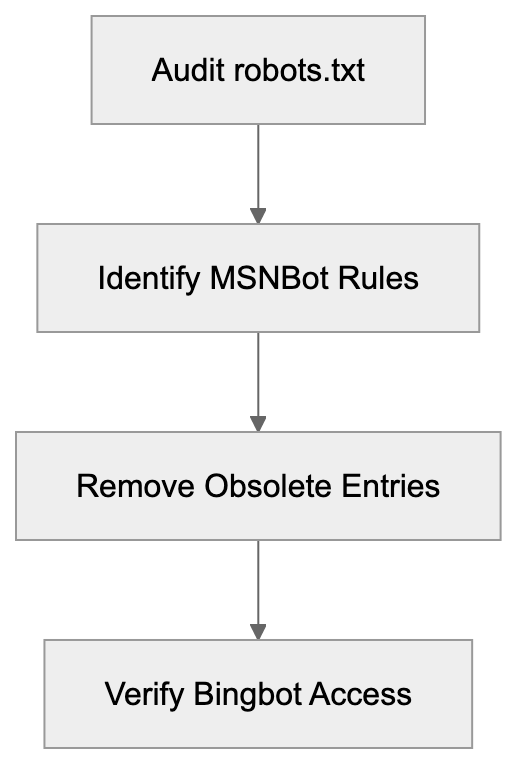
Developers should understand how to manage heritage crawlers in web infrastructure. Server logs might still show MSNBot entries from cached data or spoofing bots, as real MSNBot activity stopped over a decade ago. Removing MSNBot-specific code from crawler detection libraries is advisable. Analytics platforms should categorize MSNBot as heritage or inactive. Robots.txt parsers should flag MSNBot rules as outdated, and CMS tools shouldn’t suggest adding them. Web application firewalls need not include MSNBot in their lists. Modern bot management should rely on IP verification and current user-agent patterns.
Impact on SEO and Search Visibility
Blocking MSNBot has zero impact on SEO as it doesn’t contribute to any active search index. Your Bing search rankings rely on Bingbot’s access. If Bingbot access isn’t blocked, Bing visibility is unaffected. Sites may have inadvertently blocked both MSNBot and Bingbot with broad configurations. Check that Bingbot access isn’t restricted by outdated rules. Bing’s market share, though smaller than Google’s, still drives significant traffic, powering search for Microsoft Edge, Windows features, and partner sites. For businesses targeting enterprise users, Bing visibility is crucial. Ensure Bingbot can access important content while removing unnecessary MSNBot rules.
Best Practices for Modern Crawler Management
Effective web crawler management requires keeping configurations updated. Audit your robots.txt file quarterly to remove obsolete entries. Focus on active crawlers like Googlebot, Bingbot, and any specialized ones relevant to your goals. Document reasons for blocking specific crawlers. Use tools like Google Search Console and Bing Webmaster Tools to monitor activity and address crawl errors. Test robots.txt changes before deployment. Keep your sitemap.xml updated for optimal content discovery. Watch for unusual activity indicating scraping or attacks. Implement server-level rate limiting to manage legitimate crawler access efficiently. Stay informed about emerging crawlers and platforms.
End
MSNBot was Microsoft’s web crawler from 2004 to 2010, replaced by Bingbot during a significant transition in Microsoft’s search infrastructure. The Microsoft legacy bot no longer affects search visibility or SEO. Many websites still maintain obsolete robots.txt rules blocking MSNBot, which should be removed during routine maintenance. Focus your crawler management on active bots like Googlebot and Bingbot. Understanding the evolution from MSNBot to Bingbot helps keep site configurations clean and effective. Regular audits of your robots.txt file and crawler policies ensure you aren’t blocking essential search traffic.
Frequently Asked Questions
What should I do if my robots.txt file still contains MSNBot rules?
It's advisable to remove any MSNBot rules from your robots.txt file, as MSNBot hasn't actively crawled since 2010. Check for entries like "User-agent: msnbot" and eliminate them to streamline your file and ensure it's only managing access for active crawlers like Bingbot.
How can I verify if Bingbot is correctly accessing my website?
You can use tools like Bing Webmaster Tools to monitor Bingbot's activity on your site. Additionally, review your server logs for requests from Bingbot's user-agent string to ensure there are no blocks preventing proper indexing.
Why did websites block MSNBot during its active years?
Websites blocked MSNBot for several reasons, including concerns about server load, lack of significant traffic from MSN Search, and the prevention of data scraping by competitors. E-commerce sites were particularly motivated to block it to protect pricing information and sensitive data.
What impact does Bingbot have on my website's SEO?
Bingbot is critical for your website's visibility in Bing search results; blocking it can hinder your rankings. Ensure that your robots.txt file does not block Bingbot to maintain search visibility in Bing and associated Microsoft services.
How can I keep up with changes in web crawler technologies?
Stay informed by regularly checking industry blogs, search engine announcements, and updates from platforms like Google and Bing. Tools such as Google Search Console and Bing Webmaster Tools can also provide insights into your site's crawl status and any emerging crawlers.
Is it important to update my sitemap.xml file regularly?
Yes, keeping your sitemap.xml file up to date is essential for optimal content discovery by search crawlers. An updated sitemap helps ensure that new and modified pages are indexed promptly, enhancing your site's search visibility.
What are best practices for managing web crawlers today?
Best practices include regularly auditing your robots.txt file for outdated entries, focusing on active crawlers like Bingbot and Googlebot, and testing changes before deploying them. You should also monitor site analytics for unusual crawling activity to address potential scraping or bot attacks.
Track Your AI Visibility
See how AI chatbots like ChatGPT, Claude, and Perplexity discover and recommend your brand.