OAI-Research: OpenAI's Deprecated Research Crawler Guide
Learn about OAI-Research crawler deprecation, its historical role, transition to GPTBot, and how to update your robots.txt configurations.
What is OAI-Research and Why It Matters
OAI-Research was a web crawler operated by OpenAI for research purposes. The OpenAI research bot was designed to collect publicly available web data to support AI research and development initiatives. Web crawlers like this exist because AI companies need massive amounts of text data to train language models and conduct research studies. These bots systematically browse websites and collect information that helps improve AI systems.
OpenAI officially deprecated OAI-Research in favor of more specialized crawlers like GPTBot. The main replacement is GPTBot, which serves a similar purpose, but with clearer documentation and better webmaster controls. Understanding this transition matters for website owners and developers who manage robots.txt files. Despite the deprecation, many sites still block OAI-Research even though the bot is no longer active. Cleaning up these outdated references helps maintain organized and current robots.txt configurations.
The deprecation reflects how AI companies are becoming more transparent about their data collection practices. Modern bots like GPTBot come with official documentation and clear opt-out instructions. This shift benefits both AI developers who need training data and webmasters who want control over how their content is used.
The Historical Role of OAI-Research
OpenAI Crawler Evolution:

OAI-Research operated during the early stages of OpenAI’s web data collection efforts. The deprecated crawler accessed publicly available websites to gather text content for research projects. This data collection supported various AI initiatives, including language model development and understanding how information is structured across the internet.
The bot followed standard web crawler protocols and respected robots.txt directives. Website administrators could block OAI-Research by adding specific disallow rules to their robots.txt files. Many webmasters chose to block the crawler due to concerns about their content being used for AI training without explicit permission.
OpenAI did not extensively publicize OAI-Research compared to their current crawlers. Documentation was limited, and many website owners discovered the bot through server logs rather than official announcements. This lack of transparency contributed to confusion and prompted some sites to implement blanket blocks against all OpenAI-associated user agents.
The research crawler operated alongside other data collection methods. OpenAI has always used multiple approaches to gather training data, including licensed datasets, partnerships, and publicly available sources. OAI-Research represented just one piece of their broader data acquisition strategy.
Why OAI-Research Was Deprecated
OpenAI deprecated OAI-Research as part of a consolidation effort. The company moved toward using more clearly defined and documented crawlers for specific purposes. GPTBot became the primary crawler for collecting data that might be used to train future AI models. This change simplified the scene for webmasters who needed to make decisions about allowing or blocking OpenAI crawlers.
The deprecation also matched with growing industry pressure for transparency in AI training data collection. Companies face increasing scrutiny about where their training data comes from and how they obtain it. Using a well-documented crawler with clear opt-out procedures addresses some of these concerns.
Maintaining multiple crawlers with overlapping purposes created unnecessary complexity. By retiring OAI-Research, OpenAI reduced the number of distinct user agents that webmasters needed to track. This consolidation makes it easier for site owners to manage crawler access through robots.txt configurations.
The transition to GPTBot also provided an opportunity to implement better technical standards. Newer crawlers include improved rate limiting, more respectful crawling behavior, and clearer identification in server logs. These improvements reduce the burden on web servers and make it easier for administrators to monitor crawler activity.
How Companies and Webmasters Should Respond
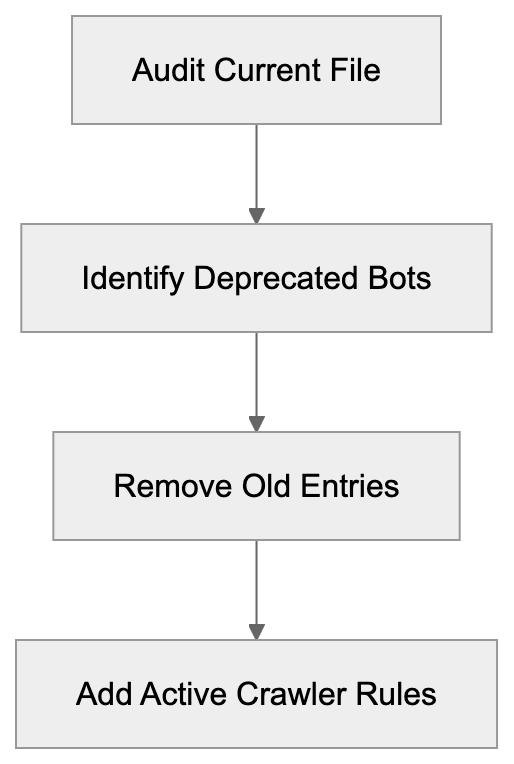
Webmasters should review and update their robots.txt files to remove outdated OAI-Research references. Since the crawler is no longer active, blocking it serves no practical purpose. Removing these entries helps keep robots.txt files clean and easier to maintain, but you should consider adding rules for active OpenAI crawlers like GPTBot if you want to control how your content is used.
To block GPTBot specifically, add this to your robots.txt file:
User-agent: GPTBot
Disallow: /
This prevents the crawler from accessing any part of your site. You can also allow partial access by specifying particular directories instead of using the root path. The flexibility lets you control exactly which content OpenAI can access for potential training purposes.
Companies managing large websites should audit their current crawler policies. Many organizations implemented blocks against OAI-Research years ago and never revisited those decisions. A complete review makes sure that robots.txt configurations reflect current business needs and technical requirements.
Developers building content management systems should implement tools that make crawler management easier. Automated systems can track which crawlers are active, identify deprecated bots, and suggest updates to robots.txt configurations. This reduces manual overhead and helps maintain accurate crawler policies across large site networks.
Comparing OAI-Research to Current Web Crawlers
Robots.txt Configuration Process:
Multiple AI companies operate web crawlers for training data collection. Understanding how these bots differ helps webmasters make informed decisions about access policies. Each crawler has distinct characteristics, documentation quality, and opt-out procedures.
| Crawler Name | Company | Status | Primary Purpose | Documentation Quality |
|---|---|---|---|---|
| OAI-Research | OpenAI | Deprecated | Historical research | Limited |
| GPTBot | OpenAI | Active | AI model training | Complete |
| Google-Extended | Active | AI product training | Good | |
| CCBot | Common Crawl | Active | Public dataset creation | Moderate |
| anthropic-ai (or anthropic-google-extended) | Anthropic | Active | AI training | Good |
| ClaudeBot (historical; now uses anthropic-ai etc.) | Anthropic | Active | AI training | Complete |
GPTBot replaced OAI-Research as OpenAI’s primary crawler. The documentation is significantly better, with clear instructions for webmasters. OpenAI provides official guidance on their website about how GPTBot operates and how to block it. This transparency represents a major improvement over the earlier research crawler.
Google operates GoogleBot-Extended specifically for AI training purposes. This is separate from their main search crawler. Webmasters can block GoogleBot-Extended without affecting their site’s appearance in Google search results. The distinction gives site owners more granular control over how their content is used.
Common Crawl’s CCBot creates publicly available datasets that many AI researchers use. Blocking CCBot prevents your content from appearing in Common Crawl datasets, which are widely used across the AI industry, but this bot has operated for many years and built extensive archives before many sites implemented blocks.
Anthropic runs multiple crawlers including anthropic-ai and ClaudeBot. These collect data for training Claude and other AI systems. Anthropic provides clear documentation about their crawlers and respects robots.txt directives. Website owners can block these crawlers using standard robots.txt syntax.
Technical Details and Implementation
Robots.txt files control crawler access through simple text directives. The file must be located at the root of your domain to function properly. Crawlers check this file before accessing other pages on your site. Understanding the basic syntax helps you implement effective crawler policies.
A typical robots.txt entry for blocking a specific crawler looks like this:
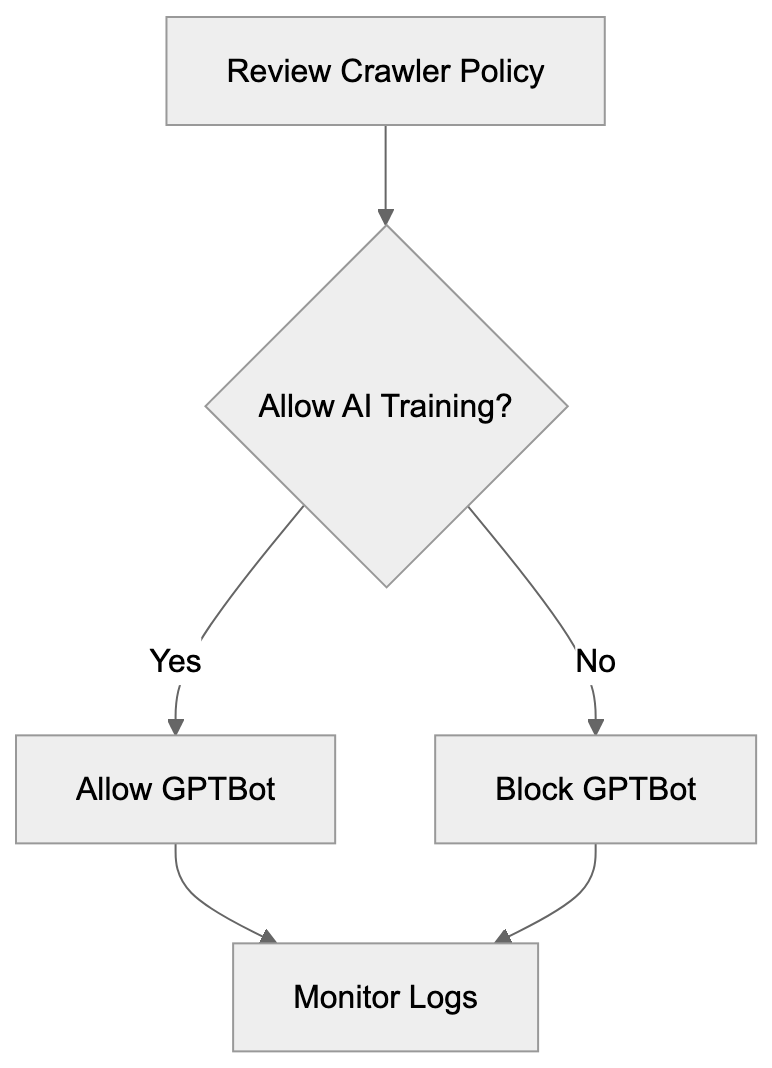
Webmaster Decision Flow:
User-agent: crawler-name
Disallow: /
The User-agent line specifies which crawler the rule applies to. The Disallow line indicates which paths the crawler cannot access. Using a forward slash blocks the entire site. You can specify particular directories or file patterns for more targeted control.
To remove OAI-Research blocks, simply delete or comment out the relevant lines. Most robots.txt files use the hash symbol for comments. Adding a hash before a line turns it into a comment that crawlers ignore. This lets you keep historical records without affecting current crawler behavior.
Some webmasters use wildcard blocking to prevent all AI crawlers at once. This approach uses patterns to match multiple user agents, but wildcard support varies across different crawler implementations. Explicit rules for specific crawlers provide more reliable control.
Testing robots.txt changes is important before deploying them to production. Several online tools let you validate robots.txt syntax and test how specific crawlers will interpret your rules. Google Search Console includes a robots.txt tester that works for any crawler user agent. These tools help catch errors before they affect your site’s crawler access policies.
Crawler activity appears in web server logs with the user agent string. Monitoring these logs helps you understand which bots access your site and how frequently they visit. If you notice deprecated crawlers like OAI-Research in recent logs, it might indicate spoofing or misconfigured bots that should be investigated.
What This Means for AI Training Data
The shift from OAI-Research to GPTBot reflects broader changes in how AI companies collect training data. Transparency has become more important as AI systems gain prominence. Companies now provide clearer documentation about their data collection practices and respect webmaster preferences more consistently.
Blocking AI crawlers does not guarantee your content won’t be used for training. Many AI models were trained on datasets collected years ago before widespread crawler blocking. Common Crawl archives contain snapshots of the web going back over a decade. Content from these archives might still appear in training datasets even if you block current crawlers.
Some websites choose to allow AI crawlers in hopes of gaining visibility through AI-generated content. When language models reference or recommend websites, it can drive traffic, but the relationship between allowing crawlers and receiving citations is not well established. AI companies do not guarantee that allowing their crawlers will result in more favorable treatment.
Licensing agreements represent an alternative to crawler-based data collection. Several publishers have negotiated deals with AI companies to provide content for training. These agreements typically include compensation and clear terms about how content can be used. For large content owners, licensing might be more attractive than relying solely on robots.txt controls.
The legal scene around web scraping for AI training continues to develop. Different jurisdictions have varying laws about automated data collection and copyright. Webmasters should stay informed about relevant regulations in their region. Technical controls like robots.txt provide one layer of protection, but legal frameworks also play a role.
Future Considerations for Webmasters
The AI crawler landscape will likely continue changing as new companies enter the field. Staying current with which crawlers are active requires ongoing attention. Subscribing to industry newsletters and following AI company announcements helps you track new developments.
More AI companies will probably launch specialized crawlers in the coming years. Each new entrant will require webmasters to make decisions about access policies. Maintaining flexibility in your robots.txt management processes makes it easier to respond quickly to new crawlers.
Industry standards for AI crawler behavior might appear over time. Trade associations and standards bodies could develop best practices that AI companies voluntarily follow. These standards might include requirements for documentation, rate limiting, and opt-out procedures. Widespread adoption would simplify crawler management for webmasters.
Some content management systems are adding built-in tools for managing AI crawler access. These features let site administrators control crawler policies through user interfaces rather than editing text files. As these tools mature, they will make crawler management more accessible to non-technical users.
The value of web content for AI training might influence business models. Some publishers are looking at premium content tiers that AI crawlers cannot access. Others are developing technical measures beyond robots.txt to protect their content. These approaches represent different strategies for dealing with AI data collection.
Webmaster Recommendations and Best Practices
Start by auditing your current robots.txt file to identify deprecated crawler references. Remove blocks for OAI-Research since the crawler is no longer active. This cleanup improves file organization and removes unnecessary clutter.
Decide whether to block active OpenAI crawlers like GPTBot based on your business needs. If you want to prevent your content from being used in AI training, add explicit disallow rules. If you are comfortable with AI companies using your public content, you can allow these crawlers.
Document your crawler policy decisions for future reference. Write down why you chose to block or allow specific crawlers. This documentation helps when you need to review policies later or explain decisions to stakeholders.
Monitor your web server logs periodically to see which crawlers actually access your site. Log analysis reveals whether your robots.txt rules are working as intended. It also helps you find new crawlers that might require policy decisions.
Set a schedule for reviewing your robots.txt file regularly. Quarterly or semi-annual reviews ensure that your crawler policies stay current. During these reviews, check for deprecated crawlers, research new bots, and verify that your rules still match with business objectives.
Consider implementing rate limiting at the server level for aggressive crawlers. While robots.txt controls access, it does not limit request frequency. Server-side rate limiting protects your infrastructure from crawlers that make too many requests too quickly.
Test any robots.txt changes in a development environment before deploying to production. Syntax errors or overly broad rules can accidentally block legitimate crawlers. Testing catches these issues before they affect your live site.
Conclusion
Understanding the transition from OAI-Research to GPTBot assists website administrators in maintaining accurate robots.txt configurations. Webmasters should remove outdated OAI-Research blocks since the crawler is no longer active. Consider adding rules for current crawlers like GPTBot based on your preferences about AI training data. Regular audits of crawler policies ensure configurations stay current as the AI scene evolves.
The shift toward more transparent crawler operations benefits both AI developers and content owners. Clear documentation and explicit opt-out procedures give webmasters meaningful control. As AI technology continues advancing, staying informed about crawler developments remains important for effective site management.
Frequently Asked Questions
What should I do with old OAI-Research entries in my robots.txt file?
You should remove any references to OAI-Research in your robots.txt file since the crawler is no longer active. Cleaning this up helps maintain an organized configuration and reduces confusion about which crawlers are active.
How can I block the new GPTBot crawler from accessing my site?
To block GPTBot, simply add the following lines to your robots.txt file: User-agent: GPTBot and Disallow: /. This will prevent GPTBot from accessing any part of your website.
How often should I review my robots.txt file?
It is recommended to review your robots.txt file regularly, at least quarterly or bi-annually. This ensures that your crawler policies are up-to-date and reflect any changes in the AI landscape or your business needs.
What are the benefits of using the GPTBot over the deprecated OAI-Research?
GPTBot comes with clearer documentation and better webmaster controls, which improve transparency regarding data collection practices. It also includes technical enhancements like improved rate limiting and identification features, simplifying the management of crawler access.
Can blocking AI crawlers prevent my content from being used in AI training?
Blocking AI crawlers may help manage current access, but it doesn't guarantee your content isn't included in older training datasets. Many AI models were trained on publicly available data collected before blocking measures were in place.
What is the significance of having clear opt-out procedures for crawlers?
Clear opt-out procedures allow webmasters to manage how their content is accessed and used for AI training. This transparency helps maintain trust and provides webmasters with control over their data and content usage.
Are there alternative ways to protect my content from being used for AI training?
Yes, licensing agreements are an alternative to blocking crawlers. Some publishers negotiate contracts with AI companies to clearly define how their content can be used, typically involving compensation and specific terms for data usage.
Track Your AI Visibility
See how AI chatbots like ChatGPT, Claude, and Perplexity discover and recommend your brand.