Pinterest Bot: SEO Guide for Rich Pins & Content Discovery
Learn how Pinterest's web crawler works, Rich Pins implementation, user-agent strings, and image-focused SEO optimizations for better visibility.
Introduction
Pinterest operates one of the most active web crawlers on the internet today, known as the Pinterest Bot. This Pinterest crawler systematically scans websites to find images and content that users might want to pin. A focus is placed heavily on visual content and structured data markup called Rich Pins. For web developers and content marketers, understanding how this bot works is important for Pinterest SEO and getting content discovered on Pinterest’s platform. The bot looks for specific metadata, high-quality images, and proper markup to create rich previews. Sites optimized for Pinterest’s crawler can see significant traffic increases from the platform. Pinterest has over 518 million monthly active users searching for ideas and products. Getting your content properly indexed by their bot means better visibility in search results and category feeds.
What is Pinterest Bot
The Pinterest Bot is the automated web crawler that Pinterest uses to scan and index web pages across the internet. This Pinterest web scraper visits websites to find new images, read metadata, and understand content context. Its primary job is to collect information about pins that users save from external websites. The crawler identifies itself through specific user-agent Pinterest strings in its HTTP requests. Website owners can see Pinterest Bot in their server logs when it visits their pages. Unlike general search engine crawlers, Pinterest Bot focuses almost entirely on visual content and related metadata. It extracts images, reads Open Graph tags, and processes schema markup. The bot runs continuously, updating Pinterest’s index with fresh content from millions of websites. When someone saves a pin from your site, the bot may revisit that page to gather updated information. It respects robots.txt files and crawl delay settings that webmasters configure.
User-Agent Strings for Pinterest Crawler
Pinterest Bot Crawling Process:
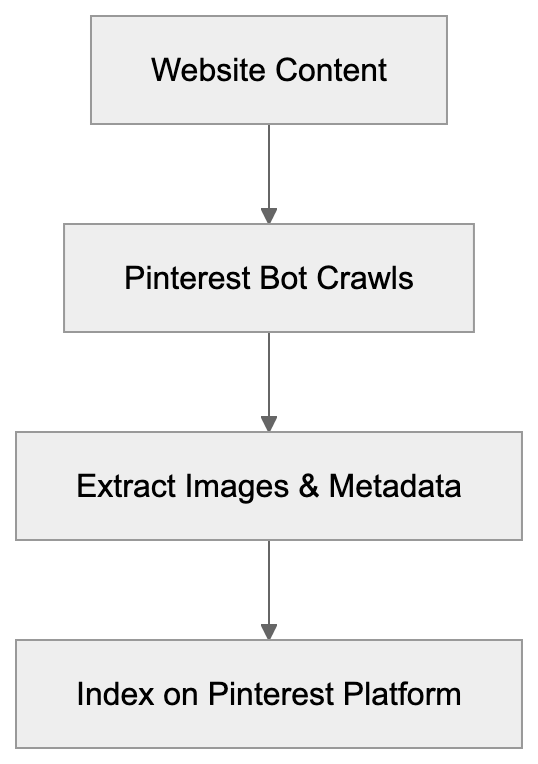
Pinterest Bot uses several different user-agent strings depending on its specific crawling purpose. The main crawler identifies itself as “Pinterest/0.2 (+https://www.pinterest.com/bot.html)” in the user-agent header. You might also see “Pinterestbot” in server logs, which is another common identifier. There’s a separate bot for processing Rich Pins that may use slightly different strings. Website analytics tools can track Pinterest Bot visits separately from regular user traffic. Knowing these user-agent strings helps developers configure proper access rules. You can set up specific crawl rates or permissions for Pinterest in your robots.txt file. Some websites choose to block the bot entirely if they don’t want content appearing on Pinterest, but blocking it means losing potential traffic from Pinterest’s massive user base. The bot typically crawls at a reasonable rate that doesn’t overload most servers. If you notice performance issues, you can request a slower crawl rate through Pinterest’s developer resources.
Rich Pins and Structured Data
Rich Pins are improved pins that display extra information directly on the pin itself. Pinterest Bot looks for specific markup on web pages to generate these Rich Pins. There are five types of Rich Pins: product, recipe, article, app, and place pins. Each type requires different schema markup or Open Graph tags. Product Rich Pins show pricing, availability, and purchase information automatically. Recipe Rich Pins display ingredients, cooking times, and serving sizes. Article Rich Pins include headlines, descriptions, and author information. The bot reads schema.org markup or Open Graph meta tags to extract this data.
How to Implement Rich Pins:
- Implementing Rich Pins requires adding structured data to your HTML pages.
- Validate your pins through Pinterest’s Rich Pin Validator tool after adding the markup.
- Once validated, Pinterest’s crawler will automatically create Rich Pins when users save content from your site.
Rich Pins get more engagement than regular pins because they provide useful context. They also maintain updated information by periodically re-crawling your pages. This means price changes or content updates appear automatically on existing pins.
How Pinterest Bot Crawls Images
The Pinterest Bot has specific requirements and preferences for image discovery and indexing. It looks for images that are at least 600 pixels wide for optimal display. Smaller images may still be crawled, but won’t perform as well on the platform. The bot extracts images from img tags and also checks CSS background images in some cases. Image file names and alt text help the bot understand image content and context. High-quality JPG and PNG files work best for Pinterest’s visual search features. The crawler also evaluates image aspect ratios, with vertical images performing particularly well. Pinterest recommends a 2:3 aspect ratio for maximum visibility in feeds. The bot respects image exclusion through robots meta tags; adding the “nopin” attribute to img tags prevents that image from being saved. Pinterest’s crawler also processes the og:image tag, which specifies the preferred image for sharing. Sites with multiple images should use this tag to control which image appears by default. The bot periodically re-crawls pages to find new images added to existing content.
Pinterest SEO and Optimization Strategies
Rich Pins Data Flow:

Improving for Pinterest Bot requires a different approach than traditional search engine improvement.
Key Pinterest Optimization Strategies:
- Focus on image quality, using clear, well-lit photos with strong visual appeal and vertical orientation when possible.
- Add descriptive alt text to all images as the bot uses this for understanding content.
- Include relevant keywords naturally in your image file names before uploading.
- Implement Rich Pins optimization marks up to make your content stand out in search results.
- Regularly publish new images to take advantage of Pinterest’s preference for fresh content.
- Create dedicated pin-worthy images for blog posts rather than relying on random photos.
Use Pinterest’s business tools to verify your website and claim your content. Verified domains get special badges and better analytics about pin performance. Add the Pinterest Save button to your website to make pinning easier for visitors. Monitor your Pinterest Analytics to see which content performs best and create more of it. Consider creating multiple pin images for the same content with different designs. The bot will index all versions, giving you more chances to appear in searches. Write detailed pin descriptions with keywords, as these help with Pinterest’s internal search.
Pinterest Bot vs Other Social Media Crawlers
Different social platforms use different crawling approaches and priorities for content discovery. Here’s how Pinterest Bot compares to other major social media crawlers:
| Platform | Bot Name | Primary Focus | Key Markup | Crawl Frequency |
|---|---|---|---|---|
| Pinterestbot | Images, visual content | Rich Pins, og:image | High, continuous | |
| Facebookexternalhit | Link previews, metadata | Open Graph tags | Medium, on-demand | |
| Twitterbot | Card previews, links | Twitter Cards | Medium, periodic | |
| LinkedInBot | Professional content | og tags, articles | Low to medium | |
| Instagram Bot | Limited external crawling | Basic metadata | Very low |
Pinterest Bot stands out for its heavy focus on image content and visual search. Facebook’s crawler prioritizes link preview generation when content is shared. Twitter’s bot creates card previews, but doesn’t actively find content like Pinterest does. LinkedIn focuses more on article content and professional information. Instagram rarely crawls external sites since it’s primarily a closed platform. Pinterest’s crawler is more aggressive than most because discovery is core to the platform. The bot needs constant fresh content to feed user searches and recommendation algorithms. Most other social bots only activate when someone shares a specific link. Pinterest proactively searches for new pinnable content across the web. This makes proper Pinterest improvement more important for organic discovery compared to other platforms.
Controlling Pinterest Bot Access
Website owners have several options for controlling how Pinterest Bot interacts with their content.
Ways to Control Bot Access:
- Use the robots.txt file to block the bot entirely or restrict specific directories.
- Set crawl delays to slow down the bot if it’s causing server load issues.
- Use a “nopin” meta tag to prevent all images from being pinned.
- Block individual images using the “nopin” attribute on img tags.
Some e-commerce sites block Pinterest to prevent price comparison or unauthorized product showcasing, but blocking Pinterest means losing free traffic and brand exposure to millions of users. Most content sites benefit from allowing Pinterest Bot full access to their pages. If you want Pinterest traffic but need to protect certain content, use selective blocking. You can allow the bot to access blog posts while blocking private or sensitive pages. Pinterest respects standard crawling protocols and won’t circumvent properly configured restrictions. The platform also offers a formal process to request content removal if something is pinned without permission. For most marketing professionals and content creators, welcoming Pinterest Bot makes strategic sense. The traffic potential and brand awareness opportunities usually outweigh concerns about content being shared.
Technical Implementation for Rich Pins
Setting up Rich Pins requires adding specific code to your website’s HTML. You can use either Open Graph markup or schema.org structured data.
Steps for Implementing Rich Pins:
- Add meta tags in your page’s head section with required properties for your pin type.
- Validate your setup using Pinterest’s Rich Pin Validator tool.
- Once approved, the improved data appears automatically on pins from your domain.
Most developers find Open Graph tags easier to implement for basic Rich Pins. For product Rich Pins, include og:title, og:description, og:price:amount, and og:price:currency. Article Rich Pins need og:title, og:description, og:article:author, and og:article:published_time tags. Recipe Rich Pins require specific schema markup with ingredients, instructions, and cooking details. After adding the markup, validate your setup using Pinterest’s Rich Pin Validator tool. Enter your URL, and the validator will show what data Pinterest Bot extracts. Fix any errors the validator identifies before requesting approval for Rich Pins. You don’t need to resubmit for each new page as long as the markup structure stays consistent. Test your Rich Pins regularly to ensure they’re working correctly after site updates. Many content management systems offer plugins that automatically generate Rich Pin markup. WordPress users can install Pinterest-specific plugins that handle the technical setup, but a custom setup gives you more control over exactly what data appears on pins.
Pinterest Bot Crawl Patterns and Behavior
Pinterest Bot follows specific patterns when crawling websites that developers should understand. The bot typically crawls more frequently after detecting new content or user activity. When someone pins from your site, the bot may revisit within hours to gather updated information. High traffic pages get crawled more often than pages with little pinning activity. The crawler is generally polite and follows standard web crawling best practices. It processes robots.txt rules and respects crawl delay settings when specified. Pinterest Bot uses distributed crawling from multiple IP addresses, which is normal for large-scale crawlers. Server logs might show requests from different locations as the bot operates globally. The crawler downloads images to analyze them for Pinterest’s visual search technology. It also extracts text content around images to understand context and relevance. Pages with faster load times tend to get crawled more effectively and completely. The bot may abandon crawls of very slow loading pages to conserve resources. Mobile improvement matters as Pinterest Bot also crawls mobile versions of websites. Responsive images and proper mobile markup help ensure complete indexing. The crawler handles JavaScript-rendered content, but server-side rendering works more reliably. Sites built entirely with client-side JavaScript may not get fully crawled or indexed.
Monitoring Pinterest Bot Activity
Pinterest vs Other Social Media Crawlers:
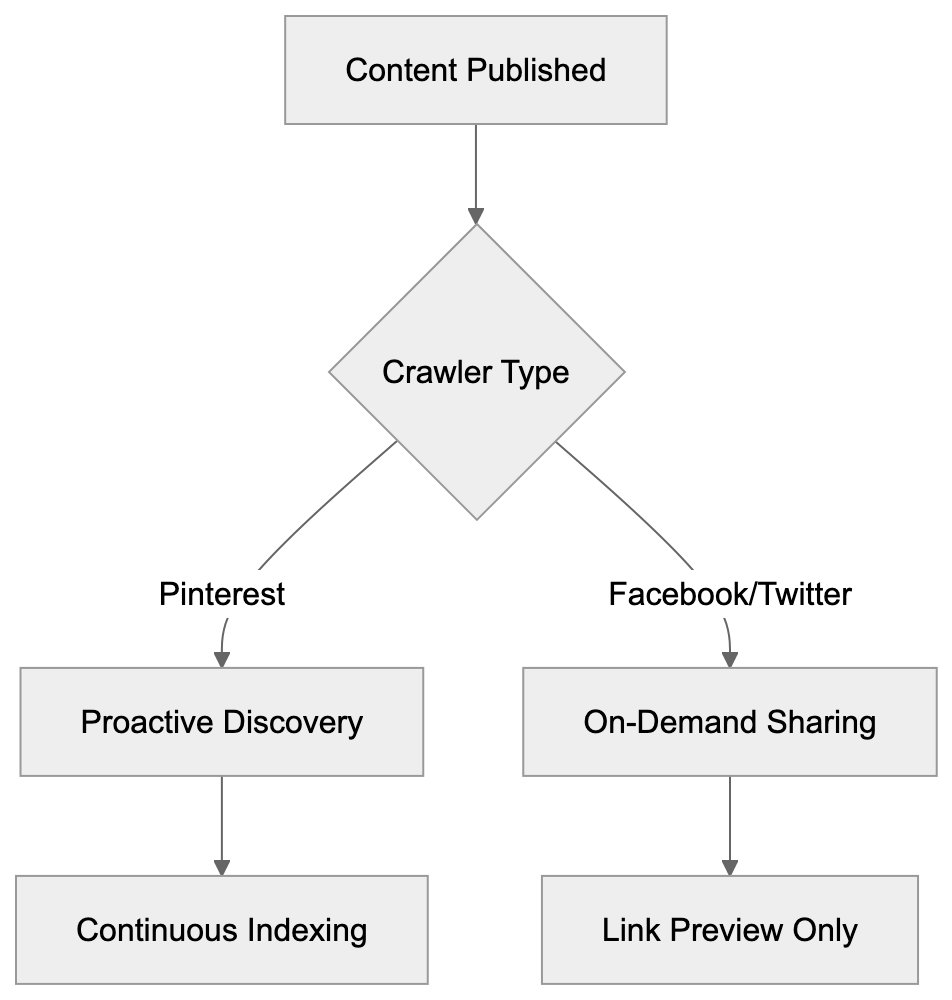
Tracking Pinterest Bot visits helps you understand how the platform interacts with your content.
How to Monitor Bot Activity:
- Check your web server logs for requests containing Pinterest user-agent strings.
- Most analytics platforms can segment traffic from bots separately from human visitors.
- Use Pinterest Analytics dashboard to see which of your pages get pinned most often.
- Set up alerts for significant changes in Pinterest referral traffic to your site.
High crawl rates might indicate your content is trending on Pinterest and getting saved frequently. Sudden drops in Pinterest Bot activity could signal technical issues blocking the crawler. Use tools like SEMrush or Ahrefs to track your content’s performance on Pinterest over time. Regular monitoring helps you refine your Pinterest strategy based on actual bot behavior. You can identify which types of content attract more crawling and pinning activity.
Conclusion
Pinterest Bot plays an important role in content discovery for millions of users searching for ideas and products. Understanding how this crawler works helps developers and marketers optimize their websites for better Pinterest visibility. The bot focuses heavily on images, Rich Pins markup, and visual content quality. Implementing proper structured data creates improved pins that drive more engagement and traffic. Unlike other social media crawlers, Pinterest Bot actively discovers content rather than just processing shared links. Website owners should generally allow Pinterest Bot access unless they have specific reasons to block it. The potential traffic and brand exposure from Pinterest’s massive user base make optimization worthwhile. Monitor your site’s interaction with the bot and adjust your strategy based on performance data. Rich Pins setup, high-quality images, and proper metadata are key to Pinterest SEO success. As visual search continues growing, Pinterest Bot’s importance for content discovery will likely increase further. { “content”: “
Frequently Asked Questions
\n\nHow can I optimize my website for Pinterest Bot?
\nTo optimize for Pinterest Bot, focus on high-quality images with a minimum width of 600 pixels and a 2:3 aspect ratio. Implement descriptive alt text and relevant keywords in your image file names. Additionally, utilize Rich Pins to enhance visibility and engagement.
\nWhat are Rich Pins and how do they differ from regular pins?
\nRich Pins are enhanced pins that automatically include additional information directly on the pin, such as price, availability, or recipe details, based on the structured data from the webpage. This added context can lead to higher engagement compared to standard pins that only display a basic image.
\nHow do I monitor Pinterest Bot activity on my website?
\nYou can monitor Pinterest Bot activity by checking server logs for requests with the bot’s user-agent strings. Tools like SEMrush or analytics platforms can help track bot traffic separately from human visitors, providing insights into which content attracts the most engagement.
\nIs it advisable to block Pinterest Bot access to my site?
\nBlocking Pinterest Bot can limit your content’s visibility on the platform, potentially losing out on significant traffic. Unless there are specific concerns, such as protecting sensitive information, it is generally beneficial to allow Pinterest Bot to crawl your website.
\nWhat types of content does Pinterest Bot prefer?
\nPinterest Bot prefers visually appealing and high-quality images, particularly those that are vertically oriented. It also favors content marked up with Rich Pins and metadata that provide clear context about the images.
\nHow can I create Rich Pins for my website?
\nTo create Rich Pins, you need to add specific structured data markup to your HTML pages. Following that, you can validate your setup using Pinterest’s Rich Pin Validator tool, and once approved, Pinterest Bot will automatically generate Rich Pins when you save content from your site.
\nWhat should I do if Pinterest Bot is affecting my website’s performance?
\nIf you experience performance issues due to Pinterest Bot, consider setting a crawl delay in your robots.txt file to slow down its requests. Alternatively, you can use the “nopin” attribute on images to prevent certain images from being pinned.
\nTrack Your AI Visibility
See how AI chatbots like ChatGPT, Claude, and Perplexity discover and recommend your brand.