Understanding Rogerbot: Moz's Key Crawler for Link Insights
Learn about Rogerbot, Moz's essential link explorer crawler: its function, relationship with DotBot, and how to manage its activity.
What is Rogerbot and Why It Matters
Rogerbot is Moz’s SEO crawler that underpins the Moz Link Explorer, a key part of their SEO tools suite. As an SEO crawler, it plays a crucial role in collecting link analysis data and other SEO-related information from websites across the internet. By understanding backlink connections and site authority, Rogerbot helps SEO professionals and marketing teams create more effective link-building strategies, as detailed in Moz’s Rogerbot guide.
Rogerbot exists because link analysis is vital for SEO success. Without web crawlers like Rogerbot, tools like Moz Link Explorer wouldn’t provide the comprehensive link data that SEO experts depend on. Crawling millions of web pages, Rogerbot maps site connections, forming a vast index of the web’s link structure.
Moz launched in 2004 and has since become a leader in search engine optimization software, as recognized by Forbes. Rogerbot is a testament to their commitment, operating continuously to ensure their link database is up-to-date, offering users accurate insights into their websites and competitors.
Understanding Rogerbot’s Purpose and Function
Rogerbot’s primary function is simple: collect extensive link data to bolster Moz’s link index, essential for powering the Moz link explorer. This index is a daily tool used by SEO professionals for comprehensive site and link analysis.
Rogerbot’s Crawling Process:
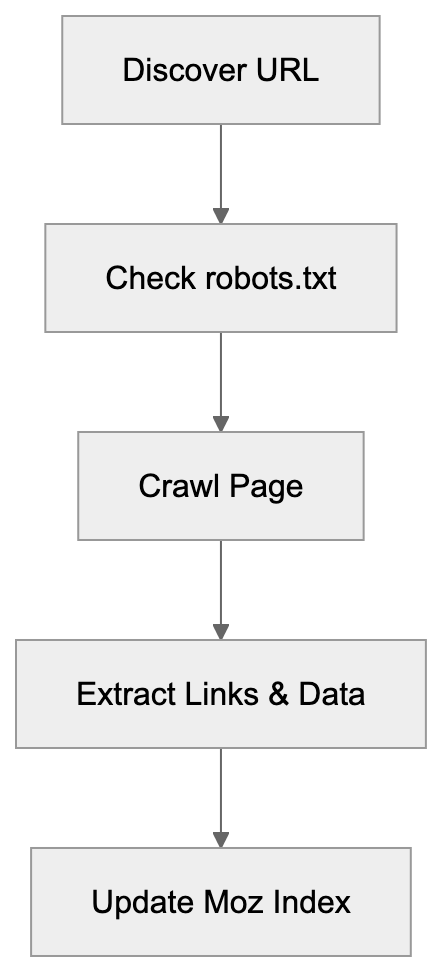
The SEO crawler follows links from page to page, similar to search engines like Google. As Rogerbot visits each page, it records details about links, anchor text, and the page’s structure, feeding this data into Moz’s database.
For effective link analysis, current data is imperative because the web is ever-changing, with new links and updates occurring frequently. Continuous crawling by Rogerbot ensures that the Moz Link Explorer remains a reliable resource for SEO decision-making.
Rogerbot respects robots.txt and crawl rate limits, allowing website owners to dictate how it interacts with their sites. This helps prevent excessive crawling, which is vital for smaller websites with limited server resources.
How Moz and Users Utilize Rogerbot Data
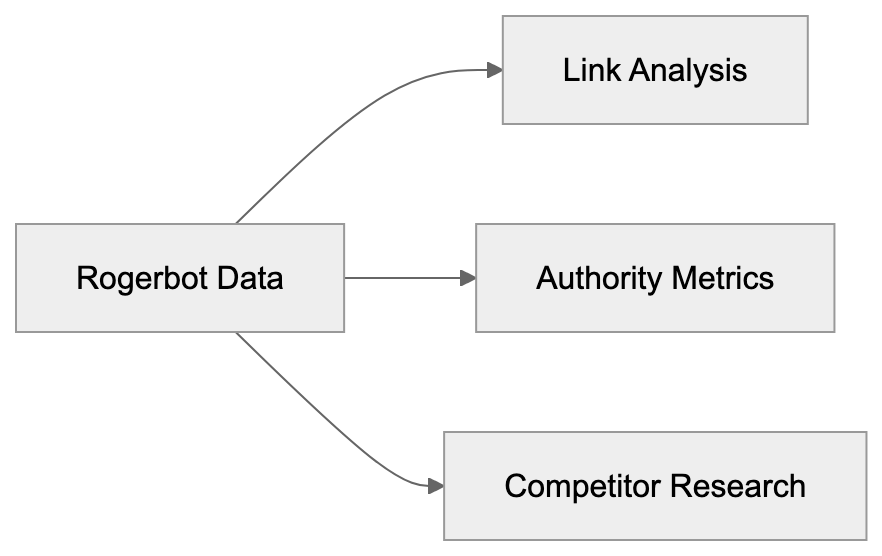
Rogerbot’s data powers several features in Moz’s Link Explorer, primarily for backlink analysis. SEO experts leverage Link Explorer to assess which sites link to their content and the authority level of these links.
Business owners and web developers analyze their site’s link profile to uncover linking opportunities, identify broken links, and examine competitor backlink strategies. Marketing professionals use this data to gauge the effectiveness of content marketing and outreach campaigns.
Additionally, Rogerbot’s data contributes to calculating Moz’s Domain Authority and Page Authority metrics, which, while not official Google ranking factors, serve as benchmarks for SEO planning.
Content marketers use the crawler’s data to identify influential websites for guest posting and collaborations based on their strong link profiles.
How Link Explorer Uses Rogerbot Data:
Rogerbot’s Relationship with DotBot
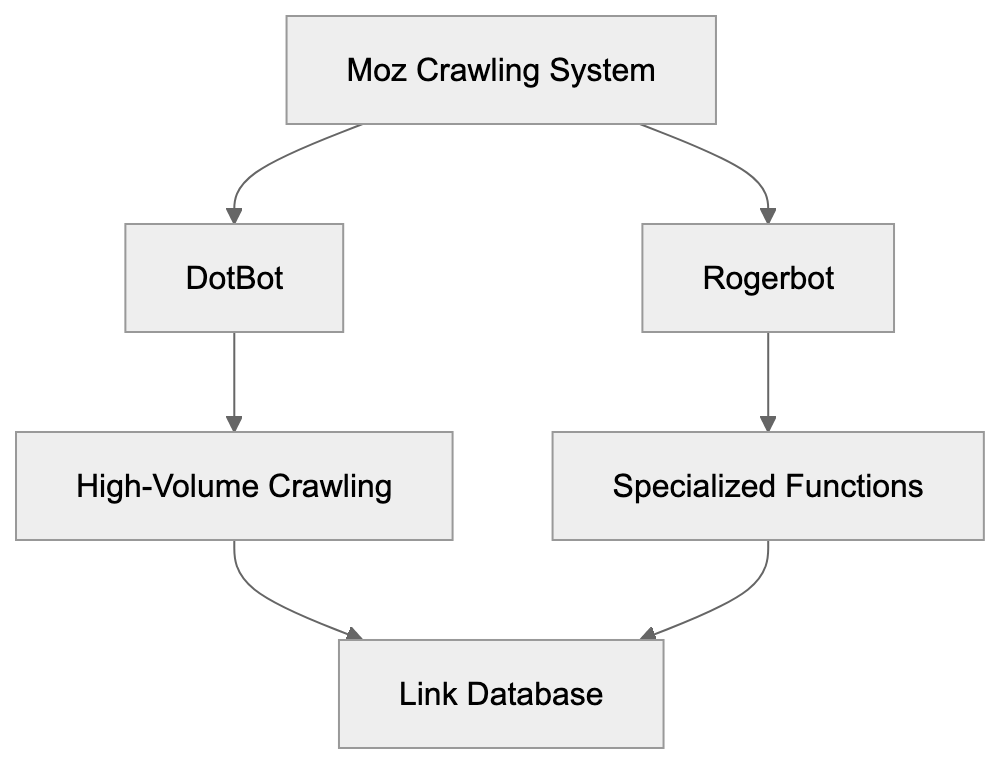
Moz employs two distinct web crawlers: Rogerbot and DotBot, each serving unique roles. DotBot, the newer and faster crawler, handles the bulk of Moz’s web crawling operations, using modern technology for efficient data processing.
Rogerbot, while still operational, focuses on niche roles within the crawling strategy. Both contribute to Moz’s extensive link databases but differ in execution. DotBot manages most web crawling, and Rogerbot supports specific functions, ensuring comprehensive coverage.
Website owners can distinguish between the two through their user agent strings, implementing separate block rules as needed to manage server load.
This dual-crawler system offers Moz flexibility, improving data gathering efficiency and minimizing individual site impact by distributing crawl requests.
Technical Details and User Agent String
Moz Dual-Crawler Architecture:
The Rogerbot user agent string uniquely identifies the crawler during site visits:
Mozilla/5.0 (compatible; rogerbot/1.0; http://moz.com/help/pro/what-is-rogerbot-)This string informs that Rogerbot is accessing the site, typically with a variable version number. The included URL directs to Moz’s crawler documentation.
Website administrators can use this string to create targeted crawl rules. Server logs will display this agent, making it straightforward to trace Rogerbot’s site interactions.
Adhering to standard conventions, the user agent includes compatibility details, the bot’s name, version, and a documentation link, aiding site owners in understanding and managing site access.
DotBot employs a distinct user agent string:
Mozilla/5.0 (compatible; DotBot/1.2; http://www.opensiteexplorer.org/dotbot)Both agents declare their identity clearly, avoiding any disguise or impersonation of standard web browsers.
How to Block or Control Rogerbot
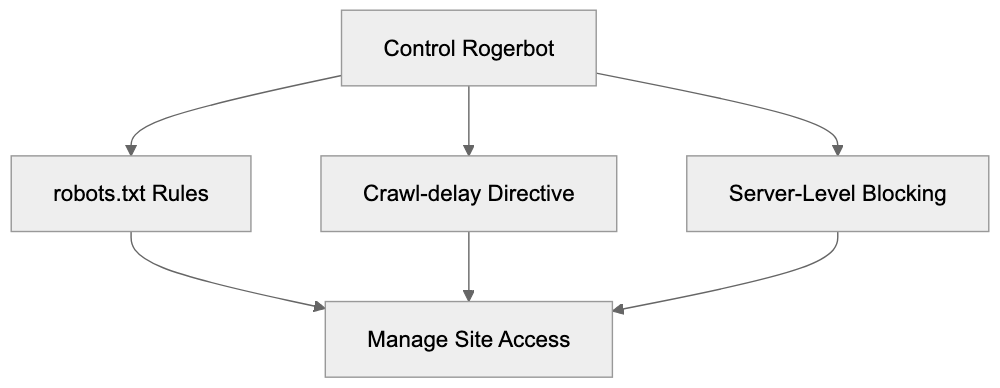
Website owners can control or block Rogerbot using various strategies. The most common method utilizes the robots.txt file to dictate site access.
To block Rogerbot entirely, include the following in robots.txt:
User-agent: rogerbot
Disallow: /
To restrict specific areas, replace / with the desired path. Crawl rate control can also be managed using:
User-agent: rogerbot
Crawl-delay: 10
This applies a 10-second delay between requests, adjustable according to server capacity.
Alternatively, server-level blocking through .htaccess on Apache servers is possible:
RewriteEngine On
RewriteCond %{HTTP_USER_AGENT} rogerbot [NC]
RewriteRule .* - [F,L]
Crawler Access Control Methods:
For blocking both Moz crawlers, duplicate rules with “DotBot” instead of “rogerbot.”
Comparing Rogerbot to Other SEO Crawlers
Comparison of Rogerbot with other major SEO crawlers highlights their unique features:
| Crawler | Company | Main Use | Index Size | Frequency |
|---|---|---|---|---|
| Rogerbot/DotBot | Moz | Link Explorer | 40+ billion URLs | Continuous |
| AhrefsBot | Ahrefs | Site Explorer | 400+ billion pages | 15-30 min |
| SemrushBot | Semrush | Backlink analysis | 43+ trillion URLs | Daily |
| Majestic | Majestic SEO | Link intelligence | 400+ billion URLs | Continuous |
| BLEXBot | WebMeUp | Backlink discovery | Not disclosed | Continuous |
AhrefsBot is notable for its vast index and rapid updates, capturing new links swiftly. SemrushBot provides comprehensive backlink analytics and SEO tools. Majestic offers unique historical link data, a distinctive service among crawlers. BLEXBot, though smaller, is active for WebMeUp’s service.
Rogerbot maintains a balanced index size, with Moz’s authority metrics being industry standards. While not the largest, the data quality is a significant Moz characteristic.
Server Impact and Crawl Behavior
Rogerbot is designed to crawl responsibly, adhering to robots.txt guidelines and respecting crawl delays. Nevertheless, any crawler poses potential server performance issues if unmanaged.
Small business owners with limited hosting resources should monitor crawler impacts by checking server logs. Performance issues can often be mitigated by implementing crawl delay rules or excluding less critical pages.
Moz emphasizes being a good web citizen, pacing requests over time to prevent server overwhelm. The crawler adjusts its rate based on server responses.
Web developers can ensure sites are better prepared for crawler traffic by implementing caching, optimizing database queries, and ensuring sufficient server resources. Modern hosting solutions generally handle such traffic effectively.
For issues related to Rogerbot specifically, contacting Moz support can yield tailored solutions, including adjusting crawler behavior or offering management guidance.
Privacy and Data Collection Considerations
Rogerbot collects only publicly accessible web data, never seeking password-protected areas or bypassing security levels. The crawler assembles data normally visible to any web visitor.
Collected data informs Moz’s Link Explorer and associated metrics like Domain Authority. This information is stored securely and aids SEO professionals in promoting web content.
Webmasters concerned about specific page visibility can employ robots.txt directives to prevent crawler access.
Moz operates under U.S. data protection laws, and their business model prioritizes delivering reliable SEO data to clients rather than trading personal information.
Understanding that blocking all SEO crawlers could affect visibility is critical. While not search engines, these crawlers’ data helps professionals find and promote online content.
Rogerbot Updates and Evolution
Over the years, Moz has refined Rogerbot to enhance effectiveness. The introduction of DotBot marked significant advancement in their SEO crawler strategy, adopting contemporary technology for rapid data processing.
Continuous optimizations focus on crawl speed, data precision, and server impact reduction. Moz communicates significant crawler changes via the company blog and documentation.
Web developers and SEO specialists are advised to routinely review Moz’s documentation. As user agent strings evolve, so too must blocking rules.
The dual-crawler setup is expected to persist, with DotBot managing most new crawling and Rogerbot fulfilling specialized functions, providing flexibility in data collection.
Future updates will likely emphasize crawl efficiency and data quality. As the web expands, emphasis on prioritizing and revisiting significant pages will grow. Moz’s investment in these areas keeps their Link Explorer competitive among SEO tools.
Conclusion
Rogerbot, as Moz’s established web crawler, is pivotal for compiling the data that drives Moz Link Explorer, operating alongside DotBot to create an authoritative link database in the SEO realm. SEO professionals, content marketers, and small business owners leverage this data for backlink analysis and search ranking enhancement.
The crawler operates consistently, adhering to robots.txt rules and minimizing server impacts. Website owners can manage Rogerbot access using standard blocking techniques if needed. A clear understanding of Rogerbot’s mechanisms supports informed decisions regarding site access control.
When compared to alternatives like AhrefsBot and SemrushBot, Rogerbot maintains a solid position, supported by Moz’s authoritative link metrics. Comprehensive knowledge about managing Rogerbot is essential for anyone involved in SEO or web development, ensuring a professional online presence.
Frequently Asked Questions
What should I do if I want to block Rogerbot from crawling my site?
You can block Rogerbot by adding specific directives to your robots.txt file. For example, include "User-agent: rogerbot" followed by "Disallow: /" to prevent it from crawling your entire site. Alternatively, you can specify paths to restrict access to certain pages only.
How can I manage the crawl rate of Rogerbot on my site?
To manage the crawl rate, you can use the "Crawl-delay" directive in your robots.txt file by specifying the desired delay in seconds. For instance, adding "Crawl-delay: 10" will instruct Rogerbot to wait 10 seconds between requests. This helps minimize server load, especially for smaller websites.
How does Rogerbot differ from DotBot?
Rogerbot and DotBot are both web crawlers used by Moz, but they serve different functions. While DotBot is designed for bulk crawling and efficient data processing, Rogerbot focuses on specific niche roles within the crawling strategy. Together, they ensure comprehensive link data is gathered for Moz's services.
What kind of data does Rogerbot collect from my website?
Rogerbot collects publicly accessible link data, including link structures, anchor text, and page details. It does not access password-protected areas or bypass security settings. The collected data is used to enhance Moz's Link Explorer and related SEO metrics.
Can blocking Rogerbot affect my site's visibility?
Yes, blocking all SEO crawlers, including Rogerbot, can impact your site's visibility in search queries. While these crawlers do not index content like search engines, they provide valuable data that helps SEO professionals promote content effectively. Carefully consider which areas to restrict access to.
How often does Rogerbot crawl websites?
Rogerbot's crawling frequency can vary based on the specific web pages and their changes. However, it operates continuously to ensure that Moz's Link Explorer maintains up-to-date link data. This responsiveness is key for SEO professionals who rely on current information for their strategies.
What should I do if Rogerbot is affecting my website's performance?
If Rogerbot is causing performance issues, first check your server logs to monitor its activity. Implementing crawl delay rules in your robots.txt file or blocking certain paths can help alleviate server load. If problems persist, consider reaching out to Moz support for further guidance on managing crawler behavior.
Track Your AI Visibility
See how AI chatbots like ChatGPT, Claude, and Perplexity discover and recommend your brand.