Understanding SeobilityBot: SEO Crawler for Website Audits
Explore SeobilityBot's functionalities as an SEO crawler. Perfect for website audits and SEO analysis. Learn about Seobility's suite of tools.
What is SeobilityBot and Why It Matters
SeobilityBot is an automated web crawler that scans websites for SEO analysis and auditing purposes. The bot belongs to Seobility, a German company providing comprehensive SEO tools for website improvement. When you see SeobilityBot in your server logs, it means the crawler is analyzing your site’s structure, content, and technical setup. SEO audit bots like this one help website owners find issues that could hurt search engine rankings, as detailed in SEObot crawler Bot Documentation. The Seobility crawler checks aspects like broken links, missing meta tags, page speed issues, and duplicate content. For web developers and SEO experts, understanding what SeobilityBot does is vital, as it frequently appears in analytics and provides useful feedback about site health, as discussed in Seobility - Tech Details. It operates as part of a larger suite that includes free and paid website audit tools, ensuring continuous site monitoring and enhancement.
The Purpose Behind SEO Crawlers Like SeobilityBot
SEO crawlers exist because search engines like Google use similar bots to index and rank websites. Companies need to know how these crawlers see their sites before search engines do. SeobilityBot simulates how search engine bots move through and interpret web pages. The SEO crawler identifies technical problems that could prevent proper indexing or cause ranking penalties. Website owners use the data from these crawls to fix issues proactively. The bot checks HTTP status codes, redirect chains, XML sitemaps, robots.txt files, and meta robots tags. It also analyzes internal linking structure and finds orphaned pages with no internal links pointing to them. For small business owners without technical expertise, website audit tools like Seobility make complex SEO audits accessible. The crawler runs automatically at scheduled intervals, so you don’t need to remember to check your site manually. Marketing professionals rely on these bots to track their website’s SEO health over time and measure improvement after making changes.
How SeobilityBot Works and What It Checks
SEO Crawler Operation Flow:
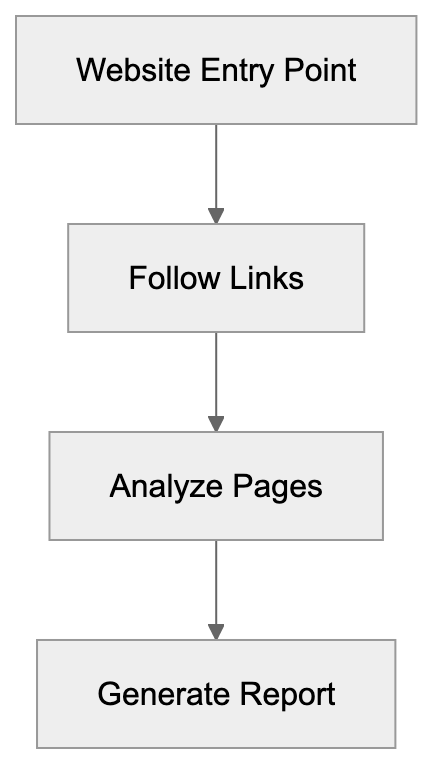
The Seobility crawler accesses websites just like a regular visitor but follows a systematic approach to analyze every discoverable page. Starting from your homepage or sitemap, it follows links to other pages on your domain. Its user agent string identifies it as SeobilityBot, enabling webmasters to recognize it in server logs. The user agent typically looks like this: Mozilla/5.0 compatible; SeobilityBot. Website owners can control the crawler’s access through robots.txt files if needed. The bot respects crawl delay directives and won’t overload your server with excessive requests. During each crawl, SeobilityBot checks various SEO factors, including title tags, heading structure, image alt attributes, canonical tags, and schema markup. It measures page load times and identifies resources that slow down rendering. The bot also detects duplicate content issues and flags thin pages with little text. For web developers, the bot provides detailed reports about HTML validation errors and deprecated code. The Seobility crawler can handle JavaScript-rendered content, though this capability varies based on your subscription level.
Seobility Company and Its Free Tool Integration
Seobility GmbH operates from Nuremberg, Germany, providing SEO tools since 2012. The company focuses on making professional SEO analysis accessible to businesses of all sizes. Unlike competitors who only offer expensive enterprise plans, Seobility offers a genuinely useful free tier. Free users can monitor one project with up to 1000 pages, making it suitable for small business websites. This free version grants access to the SeobilityBot crawler for regular site audits and basic reporting features. Additionally, the company offers a free standalone SEO checker tool for analyzing individual pages without an account. For content marketers and SEO experts managing multiple sites, paid plans start at reasonable price points. The premium plans increase crawl limits, add competitor analysis, and enable white label reporting. Seobility integrates with Google Search Console, blending crawl data with actual search performance metrics. The platform sends email alerts when important issues are detected during automated crawls.
Comparing SeobilityBot to Alternative SEO Crawlers
The SEO tool market includes several established players with their own crawler bots. Each tool has different strengths depending on your specific needs and budget. Here’s how SeobilityBot stacks up against major alternatives:
Technical SEO Audit Process:

| Tool | Crawler Name | Free Tier | Page Limit (Free) | Key Strength |
|---|---|---|---|---|
| Seobility | SeobilityBot | Yes | 1000 pages | Generous free tier with full audits |
| Screaming Frog | Screaming Frog SEO Spider | Yes | 500 URLs | Desktop app with deep technical control |
| Ahrefs | AhrefsBot | No | N/A | Massive backlink database |
| Semrush | SemrushBot | Trial only | Varies | Complete marketing suite |
| Sitebulb | Sitebulb Crawler | Trial only | N/A | Advanced visualization and reporting |
Seobility is ideal for users wanting cloud-based monitoring without desktop software. Screaming Frog requires downloading an application but offers more granular control over crawl settings. Ahrefs and Semrush focus heavily on competitive analysis and keyword research beyond just technical audits. Although these tools cost significantly more, they provide broader marketing insights. Sitebulb excels at presenting complex data in visual formats that simplify issue interpretation. For small business owners with tight budgets, the Seobility crawler offers the best value with its permanent free option. Web developers needing to crawl sites locally often prefer Screaming Frog’s desktop approach. Marketing professionals managing large campaigns typically choose Ahrefs or Semrush for their all-in-one capabilities. Your choice depends on whether you prioritize cost, features, or ease of use.
Understanding the SeobilityBot User Agent
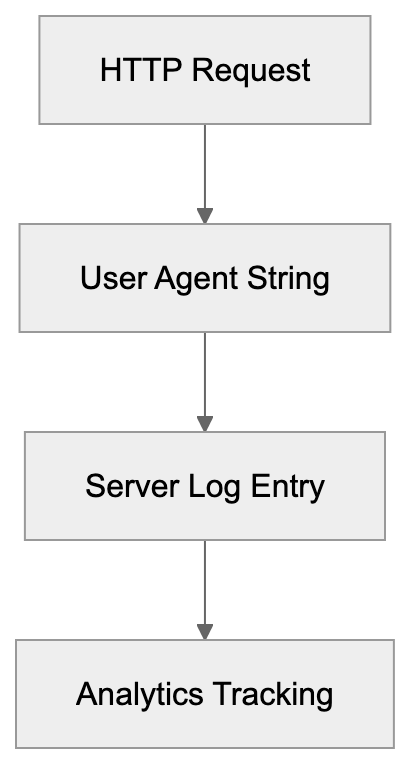
When SeobilityBot crawls your site, it identifies itself through its user agent string in HTTP requests. The standard user agent is: Mozilla/5.0 compatible; SeobilityBot. Some variations include additional details, like the Seobility website URL for reference. Recognizing this user agent helps you distinguish legitimate SEO crawls from potentially harmful bot traffic. You can check your server logs or use analytics tools to see when and how often SeobilityBot visits. If you’re running a Seobility audit yourself, you’ll see increased activity from this user agent during crawl periods. Website owners who want to block the crawler can add rules to their robots.txt file, but blocking SEO audit bots means you won’t be able to use those services to analyze your site. Most sites should allow SeobilityBot because it doesn’t harm server performance and provides useful diagnostic data. The crawler respects standard robots.txt directives, including crawl-delay and disallow rules. For developers managing multiple environments, you might want to block crawlers from staging sites while allowing them on production. Conditional rules can also allow specific bots only from verified IP ranges.
Practical Use Cases for Different Professionals
SEO experts use SeobilityBot to perform regular health checks on client websites and catch issues before they affect rankings. The crawler’s automation allows you to set it and forget it, receiving alerts only when problems occur. Small business owners benefit from the simple dashboard that translates technical issues into plain language with clear priorities. Instead of learning complex SEO terminology, you receive straightforward recommendations like fixing broken links or adding missing alt text. Web developers integrate Seobility checks into their workflow before launching new sites or major updates. Running a pre-launch audit catches common mistakes, such as noindex tags left on production pages or broken internal links. Content marketers ensure new pages follow SEO best practices for title tags, headings, and meta descriptions. The tool highlights thin content that needs expansion and duplicate content that should be consolidated or canonicalized. Marketing professionals can monitor multiple sites from one dashboard with paid plans. Historical data shows trends over time, making it easy to prove ROI from SEO improvements. For agencies, white label reporting lets you present audit results under your own branding to clients.
Technical Details About Crawl Frequency and Limits
The Seobility crawler runs at different frequencies depending on your account type and settings. Free accounts get weekly crawls of their monitored project, sufficient for most small sites. Paid plans offer daily crawls to catch and fix issues more quickly. The crawler processes pages at a reasonable rate to avoid overwhelming your server resources. You can adjust crawl speed in settings if you have a particularly slow or resource-limited hosting environment. The free tier’s 1000-page limit covers most small business websites completely. If your site has more pages, the crawler prioritizes based on internal link structure and sitemap entries. Paid plans scale up to 25,000 pages or more depending on subscription level. Large e-commerce sites or content publishers typically need higher tier plans to crawl their full inventory. The bot follows up to 5 redirect hops before marking a redirect chain as too long. It times out on pages that take longer than 30 seconds to respond. JavaScript-heavy sites might need the premium crawler that can render changing content properly. The standard crawler sees only the initial HTML response without executing scripts.
SeobilityBot User Agent Recognition:
Privacy and Data Handling Considerations
When SeobilityBot crawls your website, it collects information about your site structure, content, and technical setup. This data is stored on Seobility’s servers in Germany, subject to European data protection regulations. The crawler only accesses publicly available pages not blocked by robots.txt or authentication. It doesn’t attempt to bypass login forms or access private site areas. Seobility uses the crawl data exclusively to provide SEO analysis to the website owner. The company doesn’t sell or share your site data with third parties for marketing purposes. For sites handling sensitive information, review what pages you allow bots to crawl. Use robots.txt or meta robots tags to prevent crawling of pages with confidential content. The crawler respects these directives and won’t force access to restricted areas. If you’re concerned about competitors using Seobility to analyze your site, remember crawl data is only visible to the account that initiated it. Other users can’t see your audit results unless you share them. For agencies and consultants, Seobility offers user permission controls to manage client access appropriately.
Interpreting SeobilityBot Results and Taking Action
After a crawl completes, Seobility presents findings in a dashboard organized by issue severity and category. Significant errors appear first as they have the most impact on SEO performance. These might include server errors, redirect loops, or pages unintentionally blocked from indexing. Warnings highlight issues that should be fixed, like missing meta descriptions or slow page speeds, but aren’t immediately critical. Notices identify improvement opportunities that could boost performance but aren’t pressing issues. The Seobility crawler provides specific URLs affected by each issue, so you know exactly what to fix. For web developers, the technical depth helps identify root causes rather than just symptoms. You can export reports as PDF or CSV files to share with team members or clients. The platform also tracks your progress over time, showing resolved issues and ongoing problems. Marketing professionals appreciate the priority scoring that helps allocate limited resources effectively. Fix important errors first, then work through warnings based on potential impact. Small business owners can tackle issues gradually without needing to understand every technical detail immediately.
End
SeobilityBot is a practical SEO crawler that makes website auditing accessible to businesses of all sizes. The bot systematically checks sites for technical issues, content problems, and improvement opportunities. Unlike expensive enterprise tools, Seobility offers a genuinely useful free tier that small business owners and web developers can use indefinitely. The crawler integrates with Seobility’s broader platform for ongoing monitoring and alerts. For SEO experts and marketing professionals, it represents a cost-effective alternative to pricier competitors while delivering complete audits. Understanding how SeobilityBot works helps you make better use of the tool and interpret results accurately. The crawler respects standard web protocols and won’t harm your site or server performance. Whether launching a new site, maintaining an existing property, or managing multiple client projects, the Seobility crawler provides actionable ideas that enhance search visibility. The combination of automated crawling, clear reporting, and reasonable pricing makes it a solid choice for technical SEO analysis.
Frequently Asked Questions
What types of issues can SeobilityBot help me identify?
SeobilityBot is designed to identify a range of SEO issues, including broken links, missing meta tags, page speed problems, and duplicate content. It also checks for HTTP status codes, internal linking structures, and elements like schema markup. The insights provided can help improve your search engine rankings significantly.
How frequently does SeobilityBot crawl my website?
The crawl frequency depends on your account type. Free accounts are limited to weekly crawls, while paid subscriptions can set crawls to occur daily. This ensures that any potential issues are identified and can be addressed in a timely manner.
Can I control what SeobilityBot crawls on my website?
Yes, you can control SeobilityBot's access via your robots.txt file. You can specify which pages or sections of your site the bot can crawl, allowing you to protect sensitive information while still benefiting from the SEO analysis.
Is SeobilityBot a good option for small businesses?
Absolutely. Seobility offers a generous free tier that allows small businesses to monitor one project with up to 1000 pages. This makes it a cost-effective solution for small business owners looking to improve their website's SEO without significant investment.
What should I do after receiving a crawl report from SeobilityBot?
Once you have the crawl report, prioritize fixes based on severity. Address critical errors first, such as server errors and redirect loops, followed by warnings like missing meta descriptions. Using the export feature, you can share findings with your team or clients for collaborative action.
How does SeobilityBot compare to other SEO tools?
SeobilityBot stands out with its generous free tier and comprehensive auditing features, making it ideal for users prioritizing cost. While tools like Screaming Frog offer more detailed control, Seobility's cloud-based solution simplifies the process without requiring desktop software. Your choice should depend on your specific SEO needs and budget.
Can SeobilityBot handle JavaScript on my website?
SeobilityBot can crawl JavaScript-rendered content, though the effectiveness of this feature depends on your subscription level. Higher-tier plans offer better capabilities for handling JavaScript, ensuring that your site's dynamic elements are properly analyzed.
Track Your AI Visibility
See how AI chatbots like ChatGPT, Claude, and Perplexity discover and recommend your brand.