Understanding Slackbot: The Slack Link Preview Crawler
Complete guide to Slackbot for link unfurling in Slack. Learn about its user-agent, customization options, and blocking implications.
Introduction
When you paste a URL into Slack, something interesting happens behind the scenes. Within seconds, a nice preview card appears with the page title, description, and maybe an image. This is called link unfurling, and it’s powered by Slackbot. The Slack link unfurling feature helps teams quickly understand what a shared link is about without clicking through.
Slackbot is essentially a web crawler that visits URLs posted in Slack channels and retrieves metadata to generate these previews. This automated process saves time and improves communication flow in workplace environments. Understanding how Slackbot works is important for developers, system administrators, and anyone managing web servers that interact with Slack workspaces. The tool exists to make sharing information faster and more visual, which is crucial for modern team collaboration.
What is Slackbot and How Does It Work
Slackbot is Slack’s automated web crawler designed specifically for link unfurling. When someone posts a URL in any Slack channel or direct message, Slackbot automatically visits that URL to fetch metadata. The bot looks for Open Graph tags, Twitter Card metadata, and standard HTML meta tags to build a preview card. This preview typically includes the page title, description, thumbnail image, and sometimes additional information like author or publication date.
Slackbot Link Unfurling Process:
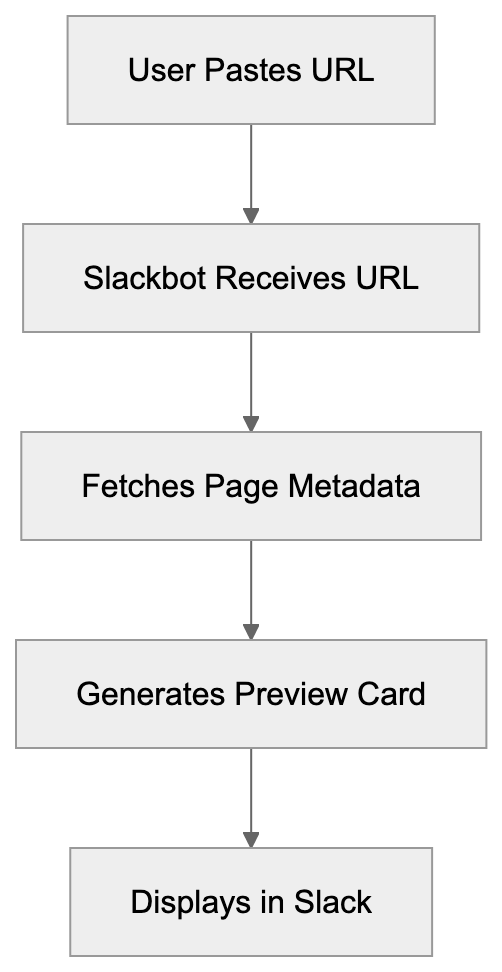
The whole process happens in milliseconds and requires no user interaction beyond pasting the link. The Slackbot user-agent string identifies itself when making requests to web servers. The typical user-agent looks like this: Slackbot-LinkExpanding 1.0 (+https://api.slack.com/robots). Some variations include Slackbot 1.0 or more specific version identifiers. Web server administrators can identify Slackbot traffic by looking for these user-agent strings in their access logs. The bot respects standard robots.txt directives and can be blocked or allowed like any other crawler.
Slack URL preview generation happens automatically for most public URLs, but workspace administrators can customize which domains get unfurled. Users can disable unfurling for specific links by using angle brackets around the URL. The system is designed to be smooth and non-intrusive while providing maximum value to users sharing information.
Why Slackbot Exists and Its Purpose
The primary purpose of Slackbot link unfurling is to improve communication by being effective. Before link previews became standard, team members had to click every link to understand its content. This created friction in conversations and slowed down information sharing. Slackbot solves this by providing visual context immediately. Teams can quickly scan previews and decide which links are worth their time without leaving the Slack interface.
Slackbot Metadata Retrieval:

Another key purpose is maintaining conversation flow. When someone shares a news article, blog post, or documentation page, the preview keeps everyone in the loop without breaking their workflow. This is particularly valuable in fast-paced environments where context switching costs time and focus. The Slack preview bot essentially acts as a personal assistant that summarizes links for the entire team.
Slackbot also serves a security function. By previewing URLs, team members can spot suspicious links or phishing attempts before clicking. The preview shows the actual destination domain and page title, which helps users verify legitimacy. This passive security layer adds value beyond just convenience. Workplace environments benefit significantly from this feature as it reduces the risk of employees clicking malicious links shared accidentally or intentionally.
How Businesses and Users Utilize Slackbot
Most Slack workspaces use Slackbot link unfurling with default settings enabled. The feature works automatically without any configuration needed, but larger organizations often customize unfurling behavior to match their security policies and workflow requirements. Workspace administrators can control which domains are allowed to unfurl and can disable unfurling entirely for sensitive channels.
Developers building websites and web applications need to improve their pages for Slackbot. This means implementing proper Open Graph tags and meta descriptions. A well-improved page will generate attractive previews that encourage clicks and engagement. Many content management systems and website builders now include Slack preview improvement as a standard feature because the platform is so widely used in business environments.
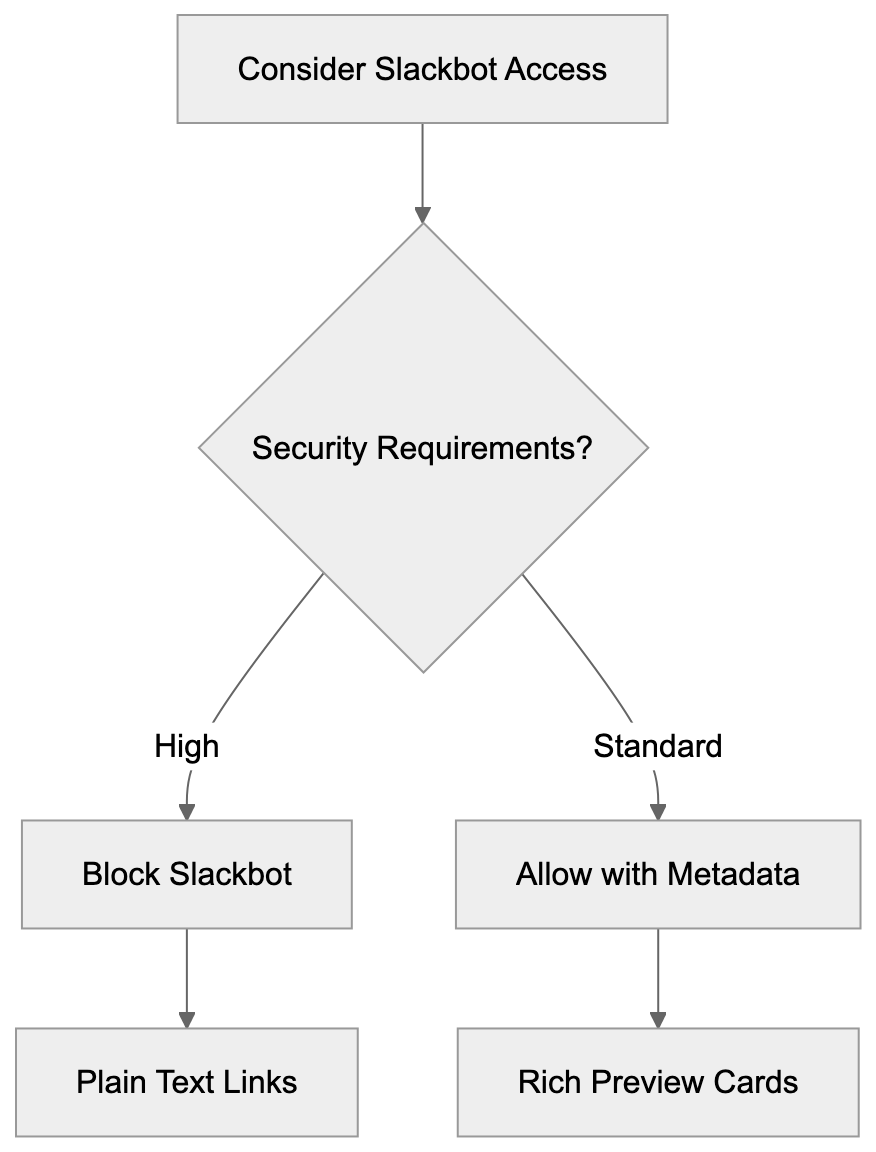
Some companies block Slackbot entirely for security reasons. This is common in highly regulated industries or organizations with strict data access policies. Blocking Slackbot means no automatic link previews, which can impact user experience but may be necessary for compliance. The decision to block or allow Slackbot depends on balancing convenience against security and privacy requirements.
Custom Slack apps and integrations often use unfurling APIs to create rich previews for their own content. For example, a project management tool might create custom previews for task links that show status, assignees, and deadlines. This extends the basic Slackbot functionality and provides even more context within conversations.
Technical Details and User-Agent Information
The Slackbot user-agent identifies itself clearly in HTTP requests. The most common variants are:
Slackbot-LinkExpanding 1.0 (+https://api.slack.com/robots)Slackbot 1.0 (+https://api.slack.com/robots)Slackbot-ImgProxy
These user-agents help server administrators identify and manage Slackbot traffic. The bot typically makes GET requests to fetch page content and follows redirects up to a certain limit. Request frequency depends on how often URLs from a particular domain are shared in Slack workspaces worldwide.
Slackbot respects standard web protocols, including robots.txt files. Website owners can block Slackbot by adding specific directives to their robots.txt file, but blocking the preview bot means Slack users won’t see previews for your content, which might reduce engagement if your audience uses Slack heavily.
The bot does not execute JavaScript and relies primarily on server-rendered HTML and meta tags. This means single-page applications need to implement server-side rendering or pre-rendering to generate proper Slack previews. Many modern frameworks now include this functionality by default.
Slackbot also includes an image proxy component that caches images from link previews. This improves loading performance and provides some privacy protection by not requiring direct connections to external image hosts every time a preview is displayed.
Comparison with Similar Link Preview Services
Slackbot isn’t the only link preview crawler out there. Many messaging and social platforms use similar technology. Here’s how Slackbot compares to alternatives:
| Service | User-Agent | JavaScript Support | Customization | Preview Format |
|---|---|---|---|---|
| Slackbot | Slackbot-LinkExpanding 1.0 | No | Workspace admin controls | Rich cards with images |
| Discord | Mozilla/5.0 (compatible; Discordbot/2.0) | Limited | Server permissions | Embed cards |
| Microsoft Teams | Microsoft Teams | No | Admin policies | Cards with metadata |
| Telegram | TelegramBot | No | None | Simple preview |
| WhatsApp/2.0 | No | None | Basic title and image |
Slackbot offers more strong customization options compared to WhatsApp or Telegram. Workspace administrators can control unfurling behavior at the domain level and even disable it for specific channels. Discord and Microsoft Teams offer similar flexibility but with different interface approaches.
The preview quality across these services depends heavily on how well websites implement metadata tags. Slackbot tends to generate more detailed previews because it checks multiple metadata sources, including Open Graph, Twitter Cards, and standard HTML meta tags. Discord has similar capabilities, while Telegram and WhatsApp provide more basic previews.
From a technical perspective, none of these bots execute JavaScript extensively. This means websites relying on client-side rendering need special handling to work with any of these preview services. The industry-standard solution is implementing server-side rendering or using pre-rendering services.
Blocking Slackbot and Implications
Blocking Slackbot is straightforward but comes with trade-offs. To block the bot, add these lines to your robots.txt file:
User-agent: Slackbot
Disallow: /
This prevents Slackbot from crawling your entire site. You can also block specific paths while allowing others. Some organizations block Slackbot for legitimate reasons, including security policies, bandwidth concerns, or content access restrictions.
The main implication of blocking Slackbot is reduced engagement from Slack users. When someone shares your content in Slack without a preview, it appears as plain text. This makes links less appealing and can significantly reduce click-through rates. Studies show that rich previews increase engagement by 30 to 50 percent compared to plain URLs.
Another consideration is that blocking Slackbot might signal to users that your content has access restrictions. This isn’t always negative, but it’s worth considering how your audience perceives it. Some users might assume the content requires authentication or has privacy concerns.
For password-protected or paywalled content, blocking Slackbot makes sense because the bot can’t authenticate anyway. In these cases, the preview would fail or show generic error information. It’s better to block the bot entirely and let users understand that the content requires a login.
Workplace environments where internal tools are shared in Slack need to carefully consider Slackbot access. Internal dashboards, admin panels, and sensitive applications should definitely block external crawlers, including Slackbot, but internal documentation or knowledge bases might benefit from allowing previews to improve discoverability.
Customizing Link Unfurling for Your Content
Improving your website for Slack link unfurling enhances how your content appears when shared. The key is implementing proper metadata tags. Open Graph tags are the most important, and Slackbot prioritizes them when generating previews.
Needed Open Graph tags for Slack previews include:
Link Preview Decision Flow:
og:title- The title that appears in the previewog:description- The description text below the titleog:image- The thumbnail image URLog:url- The canonical URL of the page
Twitter Card tags serve as fallbacks if Open Graph tags are missing. The card type should be “summary” or “summary_large_image” for best results. Standard HTML meta tags like title and description are the final fallback option.
Image improvement matters significantly for Slack previews. The recommended image size is 1200x630 pixels, and the file should be under 5MB. Slack caches images through its proxy service, so changes to images might not appear immediately in existing previews.
Testing your Slack previews before going live is possible through Slack’s Card Validator tool or by sharing links in a test workspace. This helps catch formatting issues or missing metadata before your content gets widely shared.
Changing content poses challenges for link unfurling because Slackbot doesn’t execute JavaScript. Solutions include server-side rendering, pre-rendering services, or generating static metadata at build time. Many modern frameworks handle this automatically, but custom applications might need special configuration.
Privacy and Security Considerations
Slackbot link unfurling has privacy implications worth understanding. Every time someone shares a URL in Slack, Slackbot’s servers make a request to that URL. This means the destination server sees traffic from Slack’s IP addresses, not the individual user’s IP. This provides some privacy protection, but also means server logs won’t show the actual user who shared the link.
The image proxy feature adds another privacy layer. When Slack displays preview images, it serves them through its own CDN rather than loading directly from the source. This prevents external sites from tracking which Slack users are viewing previews, but it also means Slack has cached copies of these images.
For sensitive or internal content, it’s important to implement proper access controls. Slackbot respects authentication requirements and won’t preview content behind login walls, but if your content is publicly accessible even temporarily, Slackbot might cache preview information. This cached data persists in Slack even if you later restrict access to the original content.
Phishing and malware risks are reduced by link previews because users can see destination information before clicking, but previews can be spoofed if attackers control the destination server and implement fake metadata. Users should still verify URLs and use judgment before clicking links, even with previews available.
Workspace administrators should review unfurling settings regularly and adjust them based on security policies. Some organizations disable unfurling for external domains entirely and only allow it for trusted internal resources. This reduces the risk of data leakage through preview metadata.
Conclusion
Slackbot is Slack’s automated link preview crawler, making shared URLs more informative and engaging through rich preview cards. The system works by fetching metadata from posted URLs and generating visual previews that display instantly in conversations. This functionality exists to improve communication by being effective and reduce the friction of information sharing in workplace environments.
Understanding Slackbot is important for developers improving websites for preview display, administrators managing workspace security policies, and anyone curious about how modern collaboration tools work. The bot uses identifiable user-agent strings, respects standard web protocols, and can be customized or blocked based on organizational needs. While similar services exist across other platforms, Slackbot offers strong customization options and generates detailed previews when websites implement proper metadata. The decision to allow or block Slackbot depends on balancing user experience against security and privacy requirements in your specific context.
Frequently Asked Questions
What types of metadata does Slackbot retrieve for link previews?
Slackbot primarily looks for Open Graph tags, Twitter Card metadata, and standard HTML meta tags to generate previews. Key tags include `og:title`, `og:description`, and `og:image`, which help create an engaging preview card that compiles the essential details of the linked content.
Can I disable Slackbot link unfurling for specific links?
Yes, users can disable unfurling for specific links by placing the URL within angle brackets. This allows you to share links without generating a preview, which may be useful for certain types of content.
How can I improve my website for Slackbot link previews?
To enhance how your website appears in Slack previews, implement proper Open Graph tags and ensure that your images meet size requirements (1200x630 pixels recommended). Utilize the Slack Card Validator tool to test how links will appear before sharing.
What should I consider when blocking Slackbot?
Blocking Slackbot means users will not see rich link previews, which can decrease engagement. Assess the balance between security needs and user experience, as well as considering the potential negative impact on click-through rates when making this decision.
What are the security implications of using Slackbot for link previews?
While Slackbot provides a layer of security by allowing users to see the destination domain before clicking, it may also cache information about publicly accessible content. It's essential to enforce proper access controls and regularly review unfurling settings to align with security policies.
Can I customize how Slackbot behaves in my workspace?
Yes, workspace administrators can customize Slackbot's unfurling behavior, including which domains to allow for previews. This is particularly useful in workplaces that need to adhere to specific security protocols or policies regarding shared content.
Does Slackbot execute JavaScript when retrieving link previews?
No, Slackbot does not execute JavaScript and relies on server-rendered HTML and metadata tags. Therefore, web pages that use client-side rendering may require additional configuration to properly display previews in Slack.
Track Your AI Visibility
See how AI chatbots like ChatGPT, Claude, and Perplexity discover and recommend your brand.