Snapchat's Link Preview Crawler: How It Works & Optimize
Learn how Snapchat's link preview crawler works, identify its user-agent, and optimize or block it. Complete guide for developers and marketers.
What Is Snapchat’s Link Preview Crawler
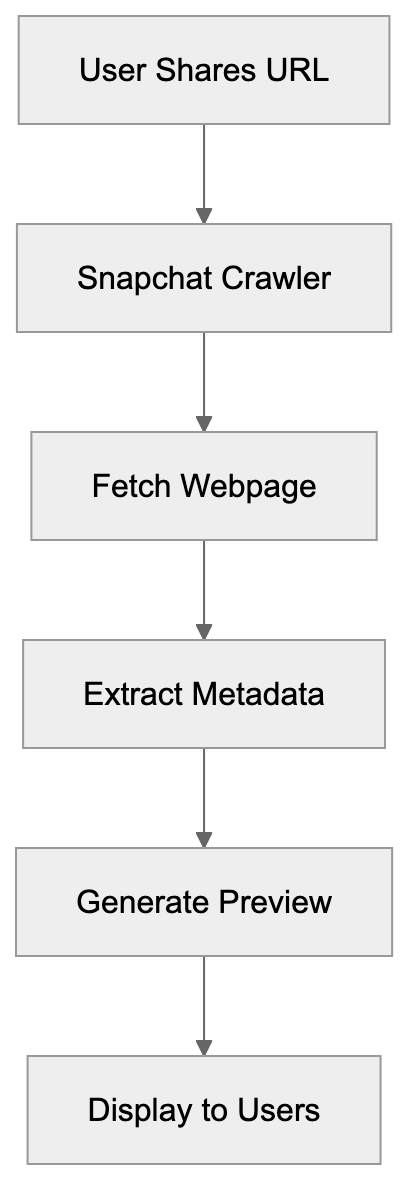
When you share a link on Snapchat, the Snapchat crawler, also known as the Snapchat preview bot, generates a preview of that webpage. This shows a thumbnail image, title, and description of the linked content. Snapchat’s crawler visits the URLs shared by users, extracting metadata to create these previews, a process known as URL unfurling Snapchat. This makes shared links more engaging and gives users context before clicking. Snapchat’s crawler operates automatically whenever a user shares a URL in a chat or story, as detailed in Snapchat’s official documentation.
For web developers and site owners, understanding how Snapchat’s crawler works is crucial for link preview optimization. The quality of the preview can affect click-through rates and user engagement significantly, as discussed in this article. Link preview crawlers are common across social media platforms like Facebook, Twitter, and LinkedIn, each with specific behaviors and user-agent strings. Snapchat’s setup focuses on extracting Open Graph tags, Twitter Card metadata, and standard HTML elements.
Snapchat Link Preview Process:
Why Snapchat Uses a Link Preview Crawler
Snapchat uses a link preview crawler primarily to enhance user experience. Without these previews, users would see plain text URLs, which are unappealing and provide no context. Rich previews with images and descriptions make conversations more engaging. This encourages more link sharing and retains users within the app.
The crawler fetches webpage content before users click links, operating server-side at Snap Inc.’s infrastructure. It makes HTTP requests to shared URLs, downloads HTML content, and parses it for metadata. This information is cached, allowing faster loads on subsequent URL shares and reducing server load on crawled websites.
For businesses and content creators, optimized previews are valuable marketing tools. A good preview acts as a mini-advertisement, increasing the likelihood of click-throughs. Snapchat also uses crawler data to detect malicious or inappropriate links, maintaining platform safety and user trust.
Crawler Request Flow:

How to Identify Snapchat’s Crawler User-Agent
Web crawlers identify themselves through user-agent strings in HTTP requests. The Snapchat crawler uses a specific user-agent, allowing website owners to identify these requests. This typically includes strings like “Snapchat” or “SnapchatAds,” followed by version info, such as Snapchat Ads/1.0. Note that Snap Inc. has used variations, so you may see different formats in server logs.
To find Snapchat crawler requests, search web server logs for “Snapchat” in the user-agent field. Web analytics tools often categorize crawler traffic separately. Check Apache or Nginx access logs for these patterns. The crawler makes GET requests, follows standard HTTP protocols, and respects robots.txt directives and meta tag instructions.
Improving Your Website for Snapchat Link Previews
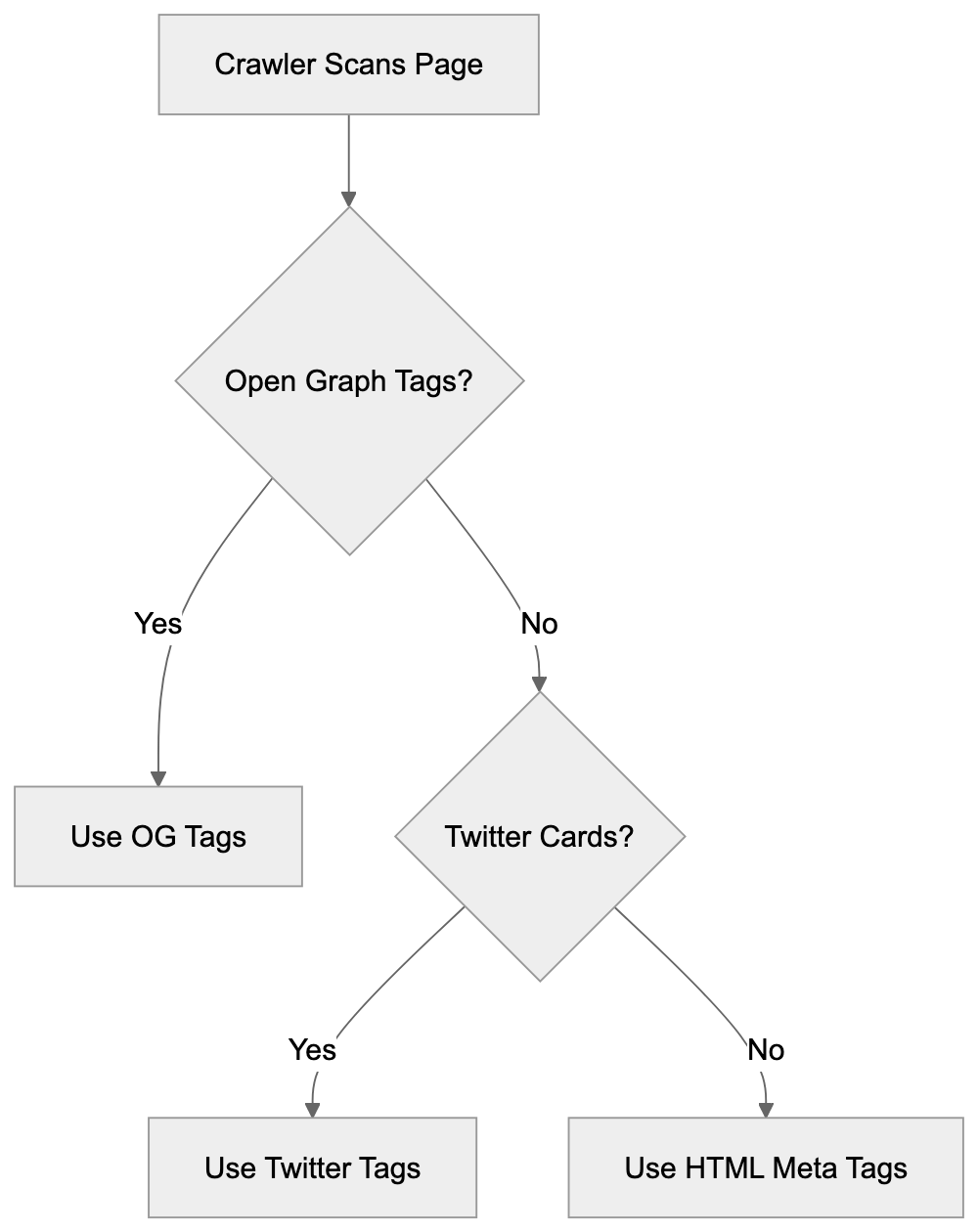
To ensure your content displays properly on Snapchat, implement proper metadata tags, focusing on Open Graph protocol tags. Add og:title for titles, og:description for descriptions, and og:image for images at least 1200x630 pixels for optimal display. Use Twitter Card tags as fallbacks (twitter:card, twitter:title, etc.).
Ensure the preview image is hosted on a reliable server. Use absolute HTTPS URLs, accessible without authentication or geo-restrictions. Test your setup with debugging tools, though Snapchat doesn’t offer a tool, Facebook or Twitter’s tools can be used as proxies. Keep og:description under 200 characters to display optimally. Ensure fast server responses to complete previews, setting suitable cache headers for Snapchat’s storage.
Metadata Tag Priority:
Blocking or Controlling Snapchat’s Crawler Access
Website owners may want to limit Snapchat crawler access to reduce server load or protect content. Use a robots.txt file in the root directory for straightforward control, adding rules to disallow Snapchat’s crawler. Experiment with different patterns due to varying exact crawler names.
For more control, check user-agent strings in server configuration. Use mod_rewrite rules in .htaccess for Apache or conditionals in Nginx server blocks to respond specifically to Snapchat’s crawler. The robots meta tag with content=“noindex, nofollow” affects all crawlers, not just Snapchat’s. Non-caching can be allowed by setting short expiration headers for only crawler requests.
Blocking the Snapchat crawler will lead to plain text URLs on Snapchat, significantly reducing engagement and click-through rates. Balance server resource savings against potential lost traffic and visibility before blocking.
Snapchat Crawler Compared to Other Platform Crawlers
Understanding different platform crawlers helps optimize cross-platform content. Here’s a comparison of Snapchat’s crawler to others:
| Platform | Primary User-Agent | Metadata Preference | Image Requirements | Refresh Rate |
|---|---|---|---|---|
| Snapchat | Snapchat Ads/1.0 | Open Graph, Twitter Cards | 1200x630px minimum | On-demand, cached |
| facebookexternalhit | Open Graph | 1200x630px recommended | Every 30 days | |
| Twitterbot | Twitter Cards, Open Graph | 800x418px minimum | On-demand, cached | |
| LinkedInBot | Open Graph | 1200x627px recommended | Every 7 days | |
| Open Graph | 300x200px minimum | Real-time, minimal |
Facebook’s crawler updates caches aggressively and offers a cache refresh tool. Twitter prioritizes Twitter Card tags but falls back on Open Graph. LinkedIn refreshes more often than most platforms. WhatsApp’s real-time previews can increase server load. Snapchat’s approach balances freshness and server efficiency. All crawlers respect robots.txt and meta robots tags, looking for similar metadata while prioritizing different formats. Using the largest recommended image size (1200x630px) ensures good cross-platform display. Platforms often extract favicon images for additional branding in previews.
Common Issues with Snapchat Link Previews
Website owners often face problems with Snapchat link previews. Missing or broken images usually stem from incorrect URLs, large files, or servers blocking crawler image file access. Truncated or incorrect titles and descriptions happen due to lacking or incorrectly formatted Open Graph tags.
JavaScript-dynamically loaded content can cause crawlers not to see metadata. Implement server-side rendering or pre-rendering services to solve this. Cache issues occur when updated metadata doesn’t appear due to Snapchat’s caching. While Snapchat doesn’t offer public cache clearing, adding a query parameter (e.g., ?v=2) can force a fresh crawl.
Preview generation can fail if server responses are slow or error-prone, so check logs for failed requests. Geo-blocking can prevent crawler access if Snap’s servers are located in blocked regions. HTTPS mixed content warnings occur when a page is HTTPS, but the image URL isn’t, so use HTTPS for all resources. Ensure UTF-8 encoding to avoid garbled text in previews.
Privacy and Security Considerations
Snapchat’s crawler raises privacy and security considerations by accessing public site content like any visitor. Content behind authentication or paywalls is usually safe, but shared private page URLs might expose structures or parameters publicly.
The crawler reads content without interacting with forms or POST endpoints. Ensure private content uses authentication checks at the server level, not relying on obscure URLs. The process stores copies of metadata and preview images for unknown durations, so manage sensitive content cautiously.
For security, don’t include sensitive information in visible Open Graph tags. HTTPS is respected by the crawler, though any system can be impersonated, so regularly check access logs for suspicious activity. Legitimate requests originate from Snap Inc.’s infrastructure.
End
Snapchat’s link preview crawler is vital in how content is shared. It generates rich previews by parsing webpage metadata, enhancing user engagement. The Snapchat crawler, identified through specific user-agent strings, looks for Open Graph and Twitter Card metadata.
Proper tag setup ensures appealing Snapchat link previews. Crawler access can be controlled via robots.txt, server configuration, or meta tags, though blocking reduces visual appeal and click-through rates. Compared to other social platform crawlers, Snapchat’s behavior is standard with reasonable caching, balancing user experience and efficiency. Addressing common issues like metadata setup and server configuration improves shared link effectiveness on Snapchat.
Frequently Asked Questions
How does Snapchat's crawler improve link sharing?
Snapchat's crawler generates rich previews by extracting metadata from shared URLs. This process enhances user engagement by providing context through thumbnails, titles, and descriptions, making it more appealing for users to click on links.
What should I include in my metadata for optimal previews on Snapchat?
To optimize previews on Snapchat, include Open Graph tags such as `og:title`, `og:description`, and `og:image`, with the image dimensions ideally set to at least 1200x630 pixels. Additionally, using Twitter Card tags as fallbacks can help ensure compatibility across platforms.
Can I block Snapchat's crawler from accessing my site?
Yes, you can block Snapchat's crawler by using a robots.txt file to disallow its access. However, be cautious, as blocking the crawler may reduce user engagement and click-through rates from Snapchat.
What are common issues users face with Snapchat link previews?
Common issues include missing or broken images, incorrect titles, and problems with JavaScript-dynamically loaded content. Ensuring proper metadata setup and server responsiveness can help mitigate these problems.
How can I identify requests from Snapchat's crawler on my server?
You can identify Snapchat's crawler requests by searching your server logs for strings in the user-agent field that include "Snapchat" or "SnapchatAds." Web analytics tools may also help classify this traffic.
What privacy concerns should I consider regarding Snapchat's crawler?
Snapchat's crawler accesses publicly available content, so ensure that sensitive information isn't included in your Open Graph tags. Use proper authentication checks for private content to maintain security.
How often does Snapchat's crawler refresh cached data?
Snapchat's crawler fetches previews on demand and caches the information for subsequent requests. The cached data can vary in refresh rates based on different factors like server performance and content updates.
Track Your AI Visibility
See how AI chatbots like ChatGPT, Claude, and Perplexity discover and recommend your brand.