Understanding TelegramBot: The Link Preview Crawler
Learn how TelegramBot crawler works, its user-agent string, Instant View features, and how to customize or block link previews on Telegram.
Understanding TelegramBot: Enhancing Link Previews with Web Crawlers
When you share a link in Telegram, you may have noticed the automatic generation of a preview that includes an image, title, and description. This is not magic; it is the work of the TelegramBot, a specialized web crawler. TelegramBot visits websites, reads their metadata, and creates those link previews. Understanding TelegramBot is crucial for web developers, SEO experts, and content managers. It affects how content appears on Telegram, one of the world’s most popular messaging platforms with over 950 million monthly active users. Knowing its behavior can help improve site presentation, control information display, and manage server resources effectively.
What is TelegramBot and How Does It Work
TelegramBot Link Preview Process:
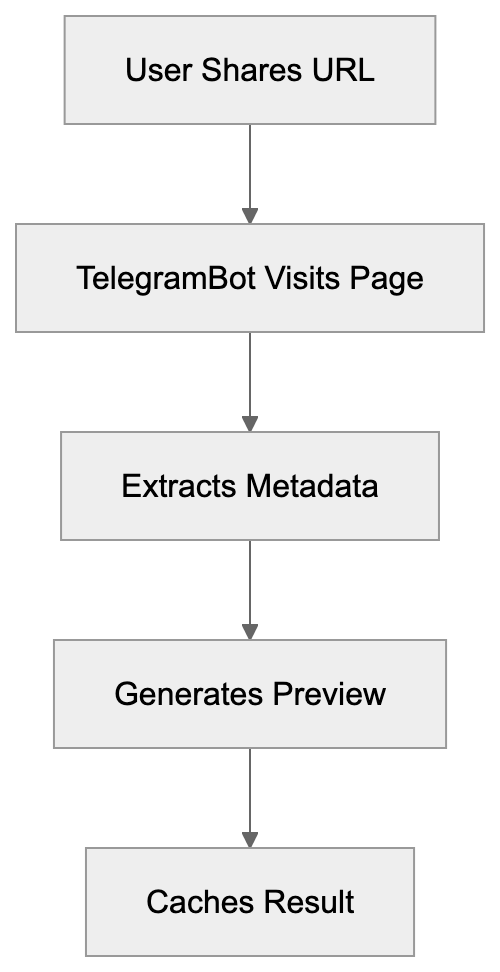
TelegramBot is the official web crawler operated by Telegram Messenger, responsible for generating link previews when URLs are shared within the app. Its primary role is generating link previews for URLs shared in conversations. When someone pastes a link into a Telegram chat, Telegram sends TelegramBot to visit the webpage and extract relevant information. This crawler identifies itself with a specific user-agent string in server logs: “TelegramBot (like TwitterBot)”. Variations include version numbers, but the core identifier is consistent.
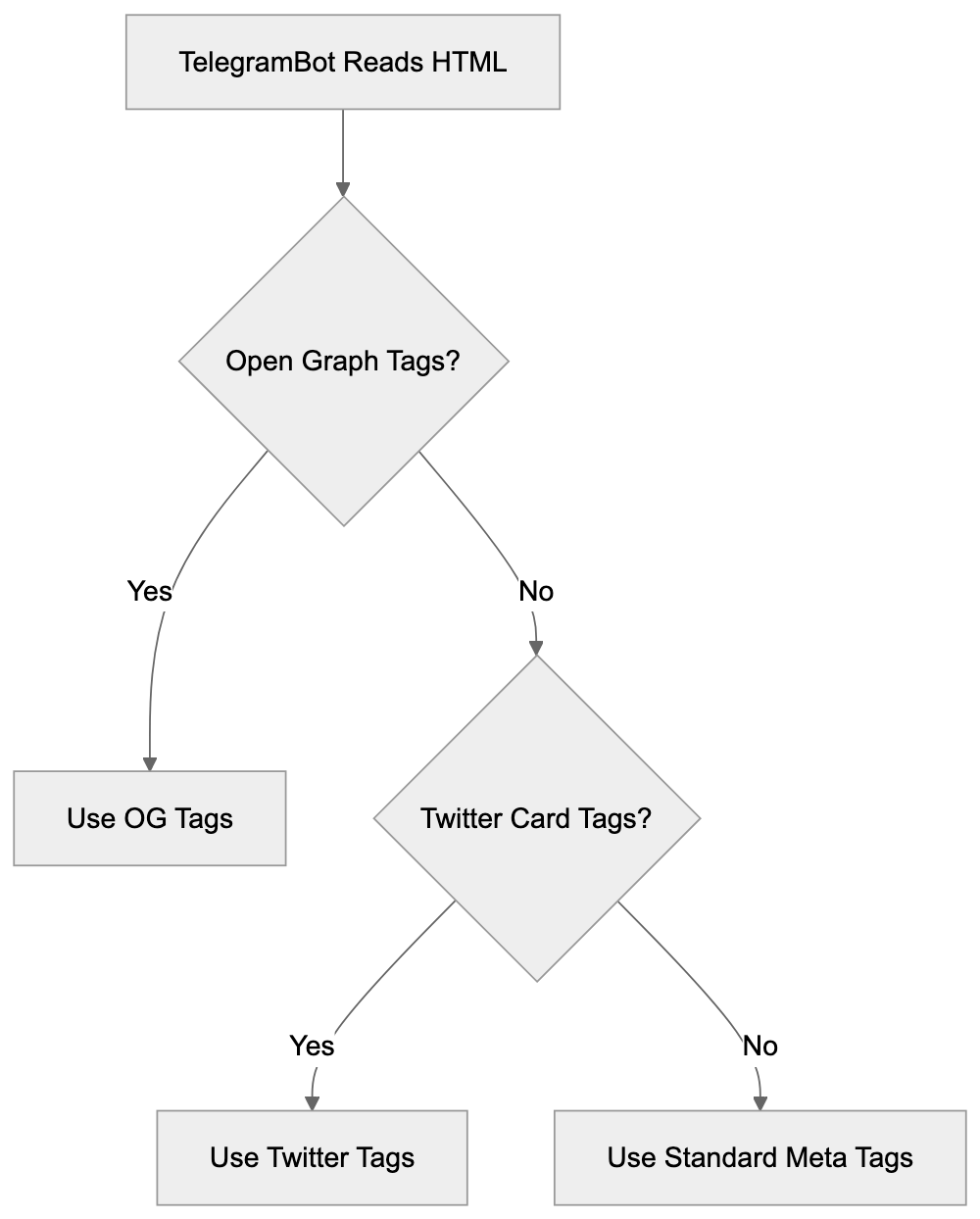
TelegramBot reads your page’s HTML looking for Open Graph tags, Twitter Card metadata, and standard HTML meta tags. It prioritizes Open Graph tags, designed for social media sharing. The crawler extracts titles, descriptions, and featured images to create the preview, enhancing user engagement. This process is quick, usually taking seconds after sharing a link. Telegram caches these previews to avoid repeated URL visits, with cache duration varying between several days to weeks based on content type and update frequency.
Why TelegramBot Exists and Its Purpose
Link preview functionality serves multiple purposes for Telegram users and content creators. For users, previews offer context before clicking links, enhancing safety by helping them avoid malicious or unwanted content. It also improves messaging by showing link content within the app. For content creators, link previews act as mini advertisements, significantly boosting click-through rates. Well-made previews with engaging images and descriptions significantly boost click-through rates, with studies showing 2-3 times more engagement compared to plain text links.
Telegram developed this crawler to compete with other platforms like WhatsApp, Facebook Messenger, Twitter, and LinkedIn, which also feature link previews. Without this, Telegram would seem outdated. The crawler supports Telegram’s Instant View, a feature that converts web articles into simplified, fast-loading formats displayed directly within Telegram, especially useful on slower mobile connections.
Metadata Priority Hierarchy:
How Websites and Developers Work With TelegramBot
Web developers can optimize their sites for TelegramBot by implementing proper metadata tags. Adding Open Graph tags to the HTML head section is the most effective approach to control what appears in previews. Basic tags include og:title, og:description, og:image, and og:url. The image should be at least 1200x630 pixels for optimal results; smaller images may appear blurry or cropped awkwardly in previews.
Some developers may wish to block TelegramBot from accessing specific pages to prevent preview generation for paywalled content, protect private sections, or reduce server load. To block TelegramBot, add the following to your robots.txt:
User-agent: TelegramBot
Disallow: /
This instructs the crawler to avoid your entire site. You can block specific directories by changing the Disallow path, such as “Disallow: /private/”. Blocking TelegramBot impacts how links appear when shared, leading to generic previews without images or descriptions, thus reducing appeal and click-through rates.
Developers can also customize previews based on content types. News sites might emphasize dates and authors, e-commerce sites could highlight prices and availability, and video platforms often use video thumbnails.
Server logs help monitor TelegramBot activity; typically, one request per shared link plus occasional rechecks for cache updates. Excessive requests might indicate abuse or technical issues worth investigating.
TelegramBot User Agent and Technical Details
Understanding TelegramBot’s technical details is crucial for proper server configuration and analytics. The crawler respects web protocols, including robots.txt directives and meta robots tags. The user-agent string typically includes:
- TelegramBot (like TwitterBot)
- Mozilla/5.0 (compatible; TelegramBot/1.0)
Even slight variations appear, but all legitimate requests include “TelegramBot” in the user-agent string. TelegramBot follows redirects and primarily reads the initial HTML response, so if JavaScript loads content or metadata, server-side rendering or pre-rendering solutions may be required.
Telegram operates separate crawlers for specific features, such as the Instant View crawler, which focuses on extracting article content rather than just preview metadata. This crawler aggressively parses page structure and content.
Comparing TelegramBot to Alternative Link Preview Crawlers
Many platforms use similar crawlers for link previews. Understanding TelegramBot’s characteristics compared to others helps improve content for multiple platforms simultaneously.
| Platform | Crawler Name | User Agent String | Special Features | JavaScript Support |
|---|---|---|---|---|
| Telegram | TelegramBot | TelegramBot (like TwitterBot) | Instant View support | Limited |
| Facebot | facebookexternalhit/1.1 | Video preview support | Moderate | |
| Twitterbot | Twitterbot/1.0 | Twitter Card validation | Limited | |
| LinkedInBot | LinkedInBot/1.0 | Professional content focus | Limited | |
| WhatsApp/2.0 | End-to-end encrypted previews | Very limited | ||
| Discord | Discordbot | Mozilla/5.0 (compatible; Discordbot/2.0) | Embed customization | Limited |
All these crawlers prioritize Open Graph tags, making them the universal standard for link previews. Implementing OG tags once enhances content across platforms.
Facebook’s crawler is sophisticated, rendering JavaScript better and validating preview data strictly, possibly rejecting images not meeting size requirements. Twitter requires separate Twitter Card tags but uses Open Graph if absent. WhatsApp—the most privacy-focused crawler—encrypts end-to-end previews. Discord offers customization beyond OG tags. TelegramBot stands mid-range in features, with Instant View advantageous for text-heavy content.
Customizing Link Previews for Telegram
Improving content for TelegramBot involves both technical and strategic efforts. Preview quality directly impacts link-sharing engagement. Start with the og:image tag, a critical visual element. Telegram shows images prominently, and strong visuals drive clicks. Use high-resolution images (1200x630 pixels or larger). Avoid text-heavy images, as they may be unreadable when scaled down.
The og:title should be concise and descriptive, with Telegram truncating long titles after about 65 characters. Front-load important keywords to encourage clicks. Your og:description provides context, keeping it under 200 characters for full display, focusing on value propositions or main content points.
Test your previews—Telegram offers a debugging tool via their Bot API. Alternatively, share your URL in a private Telegram chat to see how it renders. If previews aren’t updating post-change, Telegram’s cache might serve old data. Force a refresh with a query parameter addition, like “?v=2”.
Some content types benefit from specialized enhancement, like including publication dates for news articles or showing prices and availability on product pages. Creating platform-specific metadata variations allows precise preview control across different platforms, albeit adding complexity.
Implications of Blocking TelegramBot
Consider the trade-offs carefully before blocking TelegramBot, as it affects content spread on Telegram and broader web presence. When blocked, shared links appear as plain text URLs devoid of images or descriptions, significantly reducing appeal. Rich previews boost click-through rates by 200-300% compared to plain links.
Preview Optimization Workflow:
 For publishers, this loss of visual promotion means fewer Telegram visitors, impacting ad revenue, subscription signups, and reach. With over 950 million users, Telegram is a substantial traffic source for many sites.
Blocking is necessary for some, like paywalled content providers who block crawlers to prevent preview generation revealing content. Private or sensitive sections should block crawlers for security. Server resource management is another valid reason, but TelegramBot is generally lightweight, making minimal requests per URL.
Data privacy concerns lead some to block crawlers. If handling sensitive user data or operating in heavily regulated industries, blocking might be a compliance requirement. Partial blocking allows for TelegramBot on public content while blocking private areas, preserving marketing benefits while protecting sensitive sections.
If blocking TelegramBot, consider Telegram alternatives like official channels manually curating previews for content presentation control while maintaining platform visibility. Track analytics to assess blocking impact, monitoring referral traffic from teleegram.org and t.me domains before and after blocking to evaluate trade-offs.
Instant View and Advanced Features
Telegram’s Instant View goes beyond link previews, transforming web articles into fast-loading, mobile-optimized pages displayed within Telegram. Understanding Instant View can enhance Telegram presence for content creators.
Instant View uses templates to parse and reformat web content, with Telegram maintaining templates for thousands of popular sites. Matching a template automatically grants articles Instant View treatment.
For custom implementations, developers can create Instant View templates using Telegram’s template language, defining rules for content, images, and formatting extraction from HTML structure.
Instant View offers substantial benefits with near-instant page loads, even on slow connections. The reading experience is clear and distraction-free, without ads or navigation clutter, retaining users within Telegram and reducing abandonment.
Instant View traffic analytics appears differently in logs, with an initial crawler visit generating one request. Subsequent Instant View displays use Telegram’s cache, negating server requests.
Publishers may worry about ad revenue loss via Instant View. However, Telegram supports ads within Instant View through their platform, though setup requires joining their ad network.
Not all content suits Instant View; interactive elements, complex layouts, and JavaScript-dependent features translate poorly. Standard articles, blog posts, and news stories are ideal candidates.
Sites not wanting Instant View but allowing regular link previews can configure to reject Instant View crawlers while permitting TelegramBot access.
Conclusion
TelegramBot is Telegram’s link preview crawler, visiting websites to generate rich previews of shared URLs. The crawler reads Open Graph metadata and other tags to extract titles, descriptions, and images for shared links. Understanding TelegramBot helps web developers and content creators enhance site presentation for Telegram’s platform with over 950 million users. Considerations include implementing proper metadata tags, deciding whether to allow or block the crawler based on needs, and potentially using Instant View for improved content delivery. The crawler identifies itself through a specific user-agent string and respects web protocols like robots.txt. Blocking TelegramBot is possible and sometimes necessary for privacy or security, but it eliminates rich link previews’ marketing benefits, potentially reducing Telegram user click-through rates. Most sites benefit from optimizing for TelegramBot with high-quality images and descriptions to boost engagement when shared on the platform.
Frequently Asked Questions
What should I include in my Open Graph tags for optimal link previews?
For the best results, ensure to include og:title, og:description, og:image, and og:url tags in your HTML. The image should be at least 1200x630 pixels to avoid issues with clarity. Use concise language and focus on keywords for the title and description to enhance click appeal.
How can I test how my link will appear in Telegram?
You can check how your link will appear by using Telegram's debugging tool via the Bot API or by sharing the URL in a private chat. If updates to the preview don't appear, it might be due to Telegram's caching system. You can refresh it by adding a query parameter to the URL.
Can I block TelegramBot from accessing my site?
Yes, you can block TelegramBot by adding specific directives to your robots.txt file. For a complete block, use 'User-agent: TelegramBot' followed by 'Disallow: /'. However, be mindful that blocking it will result in generic link previews without images or descriptions, potentially reducing click-through rates.
What are the drawbacks of blocking TelegramBot?
Blocking TelegramBot will prevent rich link previews from appearing on Telegram, significantly lowering engagement potential. Shared links will show as plain text URLs, decreasing the appeal and click-through rates, which can impact traffic and revenue for publishers relying on user engagement.
How does Telegram's Instant View feature work?
Instant View converts web articles into fast-loading pages directly displayed within Telegram. It uses predefined templates to extract content, enabling quick access to articles without external navigation. While beneficial for user experience, not all content is suitable for Instant View, especially interactive or complex layouts.
What can I do if my previews are not updating after making changes?
If your link previews aren't updating, it may be because Telegram is using cached data. To prompt an update, you can add a query parameter to your URL, such as '?v=2'. Alternatively, ensure your metadata is correctly configured for TelegramBot to read.
Is there a way to customize link previews for different platforms?
Yes, you can customize link previews for different platforms by using platform-specific metadata. This may involve creating different Open Graph tags or Twitter Card metadata depending on where you want your content to appear. Specialized previews allow you to optimize how various platforms showcase your content while serving tailored information.
Track Your AI Visibility
See how AI chatbots like ChatGPT, Claude, and Perplexity discover and recommend your brand.