Understanding TikTokSpider: ByteDance AI Crawler Explained
Learn about TikTokSpider's role in TikTok development. Explore its connection to ByteSpider, user-agent string, and AI-powered features.
What is TikTokSpider
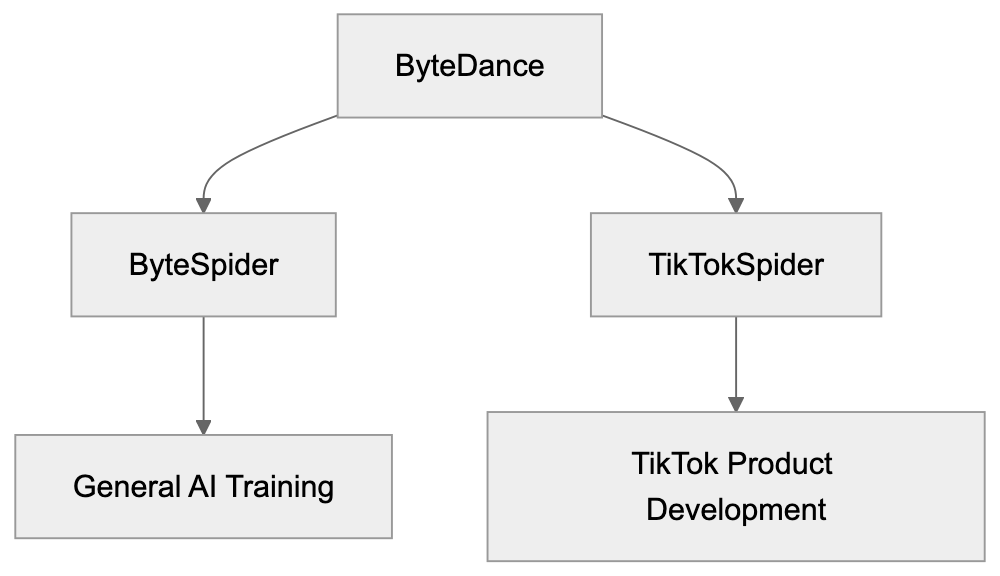
TikTokSpider is a web crawler operated by ByteDance, the parent company of TikTok. This TikTok crawler is designed specifically for product development and research purposes within the TikTok ecosystem. Web crawlers like TikTokSpider automatically browse websites and collect data to improve services and develop new features. Companies use these TikTok bots to gather information about web content, analyze trends, and train AI models that power recommendation systems. TikTokSpider plays an important role in helping ByteDance understand content across the internet and improve TikTok’s AI-driven features such as content discovery and personalization. The crawler operates separately from ByteSpider, which is ByteDance’s general-purpose web crawler used for broader AI training and search operations. Understanding TikTokSpider is crucial for web developers and site administrators who want to control how ByteDance’s crawlers interact with their websites.
The Purpose Behind TikTokSpider
ByteDance created TikTokSpider to support TikTok product development initiatives. This crawler helps the company research and analyze web content to enhance AI features in TikTok. This includes improving content recommendation algorithms, enhancing search functionality, and developing new user features. TikTokSpider collects publicly available web data that helps ByteDance understand content trends, user preferences, and emerging topics across the internet. This data collection supports machine learning models that power TikTok’s For You page and content discovery systems. Additionally, the crawler aids ByteDance in identifying potential issues with content moderation and safety features. Web crawlers like TikTokSpider are necessary because modern AI-powered platforms require massive amounts of training data to function effectively. Without these crawlers, companies cannot gather the diverse data needed to build robust AI systems that serve millions of users globally.
TikTokSpider Relationship within ByteDance Ecosystem:
TikTokSpider User-Agent String
The TikTokSpider identifies itself through a specific user-agent string when accessing websites. The user-agent string typically appears as: “TikTokSpider/1.0 (+https://www.tiktok.com/bot/spider/)”. This identification allows website administrators to recognize the crawler in their server logs and apply specific rules if needed. The user-agent string format follows standard web crawler conventions, including the crawler name, version number, and a link to more information. Website owners can use this string to configure their robots.txt file or server settings to allow or block TikTokSpider access. The provided URL in the user-agent string should lead to documentation about the crawler, although the availability of detailed documentation varies. Monitoring user-agent strings helps site administrators understand which automated bots access their content and manage server resources accordingly. Legitimate crawlers always identify themselves with clear user-agent strings rather than disguising their identity.
TikTokSpider vs ByteSpider Relationship
TikTokSpider and ByteSpider are both operated by ByteDance but serve different purposes. ByteSpider is the company’s general-purpose web crawler used for AI training, search engine development, and broader data collection activities. TikTokSpider focuses specifically on TikTok product development and research. Both crawlers respect robots.txt directives and standard web crawler protocols, but blocking one does not automatically block the other since they operate with different user-agent strings. ByteSpider typically crawls more extensively across the web for general AI model training, while TikTokSpider targets data collection relevant to TikTok features and user experience improvements. Website administrators who want to control ByteDance’s crawling activity need to address both crawlers separately in their robots.txt configuration. The relationship between these crawlers reflects ByteDance’s structure, where different teams work on distinct products and services requiring specialized data collection strategies.
TikTok AI Feature Development Cycle:

How to Block TikTokSpider
Website administrators can block TikTokSpider by modifying their robots.txt file. The robots.txt file should include specific directives targeting the TikTokSpider user-agent. To block TikTokSpider completely, add these lines to your robots.txt file:
User-agent: TikTokSpider
Disallow: /
This configuration tells TikTokSpider not to crawl any page on your website. If you want to allow partial access while blocking specific directories, you can specify paths. For example:
User-agent: TikTokSpider
Disallow: /private/
Disallow: /admin/
robots.txt Blocking Implementation:
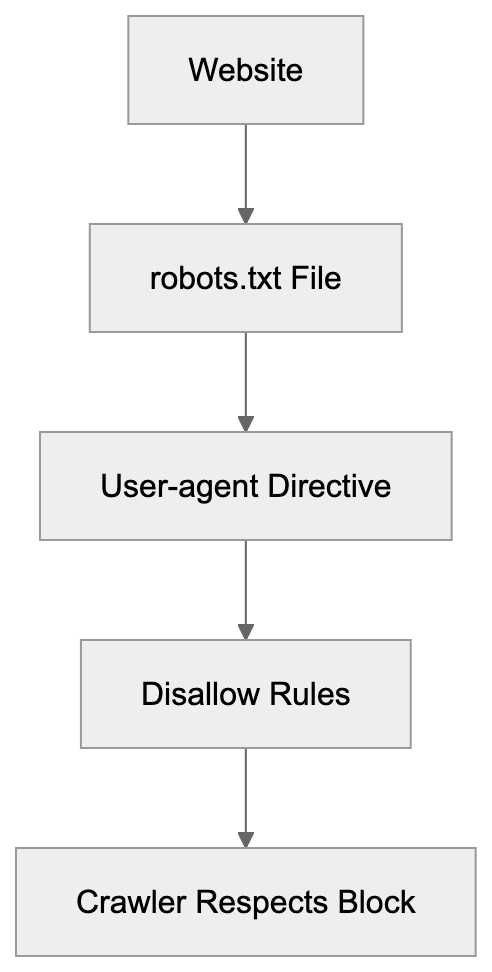
Remember, blocking TikTokSpider does not block ByteSpider. You need separate entries for each crawler. Most legitimate crawlers respect robots.txt directives, though compliance is voluntary. Some website administrators also use server-level blocking through .htaccess files or firewall rules for additional control. Monitor your server logs after implementing blocks to verify the crawler respects your directives. Keep in mind that blocking crawlers may affect how your content appears or gets discovered on related platforms.
AI Features Powered by TikTokSpider Data
TikTokSpider data collection supports several AI-powered features within TikTok. The content discovery system uses data to understand trending topics and recommend relevant videos to users. TikTok’s search functionality improves through analysis of web content and user behavior patterns. The platform’s content moderation systems benefit from a broader understanding of content types and potential safety issues. Personalization algorithms use collected data to refine user preferences and improve recommendation accuracy. TikTok’s AI features in TikTok content discovery help creators reach their target audiences more effectively. The crawler data also supports the development of new features like improved filters, effects, and interactive elements. Machine learning models trained on this data power automated captioning, translation services, and accessibility features. ByteDance invests heavily in AI development, and crawlers like TikTokSpider provide essential training data for these systems. The relationship between data collection and feature improvement is continuous, with new data informing ongoing AI model refinements.
TikTokSpider Compared to Similar Crawlers
Many tech companies operate web crawlers for AI training and product development. Here’s how TikTokSpider compares to similar crawlers:
| Crawler Name | Parent Company | Primary Purpose | User-Agent Identifier | Blocking Method |
|---|---|---|---|---|
| TikTokSpider | ByteDance | TikTok product development | TikTokSpider | robots.txt User-agent: TikTokSpider |
| ByteSpider | ByteDance | General AI training | ByteSpider | robots.txt User-agent: ByteSpider |
| GPTBot | OpenAI | AI model training | GPTBot | robots.txt User-agent: GPTBot |
| GoogleBot | Search indexing | Googlebot | robots.txt User-agent: Googlebot | |
| CCBot | Common Crawl | Dataset creation | CCBot | robots.txt User-agent: CCBot |
Each crawler serves distinct purposes, though data collection methods are similar. GoogleBot focuses on search engine indexing, while GPTBot specifically collects data for language model training. Common Crawl’s CCBot creates publicly available datasets used by researchers and developers. TikTokSpider’s narrow focus on TikTok product development distinguishes it from broader crawlers like ByteSpider. Website owners should understand these differences when configuring crawler access policies. Some crawlers offer more detailed documentation and opt-out processes than others. The crawling frequency and resource consumption also vary significantly between different bots.
Privacy and Data Collection Considerations
TikTokSpider collects publicly accessible web content, but website owners should understand the implications. The crawler only accesses pages available without authentication or paywalls. Data collected through web crawling typically includes text content, metadata, and publicly visible information. ByteDance uses this data to improve TikTok services and train AI models. The company’s data handling practices follow their stated privacy policies, though specifics about crawler data usage may not be fully transparent. Website administrators concerned about data collection should implement appropriate blocking measures. Keep in mind that blocking crawlers does not guarantee complete privacy protection since data may already be collected or available through other sources. Content creators and businesses should review their public web presence and consider what information they want accessible to automated crawlers. Some jurisdictions have regulations governing automated data collection and web scraping activities. Website terms of service may also restrict certain types of automated access regardless of robots.txt configurations.
Technical Implementation Details
TikTokSpider follows standard web crawling protocols when accessing websites. The crawler sends HTTP requests to web servers and processes responses containing HTML content. It respects crawl delay settings specified in robots.txt files to avoid overwhelming servers. The crawler typically operates from IP address ranges associated with ByteDance infrastructure. Website administrators can identify TikTokSpider traffic through server logs by examining user-agent strings and IP addresses. The crawler handles redirects, follows links between pages, and processes various content types. JavaScript rendering capabilities may vary depending on the crawler’s setup. TikTokSpider likely operates on a distributed system to effectively crawl large numbers of websites. The crawling frequency for individual sites depends on factors like content update frequency and website importance. Bandwidth consumption from crawler activity varies, but should remain reasonable for most websites. Site administrators experiencing excessive crawling can implement rate limiting or contact ByteDance through official channels.
Impact on Website Performance
Web crawlers like TikTokSpider consume server resources, including bandwidth, processing power, and memory. The impact depends on crawling frequency and website infrastructure. Most websites handle crawler traffic without issues, but high-traffic crawling can affect performance. Monitor your server logs to track crawler activity and resource consumption. Excessive crawling may slow response times for human visitors during peak periods. Implementing crawl delay directives in robots.txt helps manage crawler behavior. Some content management systems and hosting providers offer built-in crawler management tools. Caching strategies can reduce the performance impact of repeated crawler visits. Website administrators should balance crawler access with site performance requirements. Blocking crawlers entirely eliminates performance impact, but may reduce content discoverability. Consider allowing crawlers during off-peak hours or limiting access to specific sections. Load balancing and CDN services help distribute crawler traffic across infrastructure. Regular performance monitoring identifies unusual crawler patterns that may require intervention.
end
TikTokSpider is ByteDance’s specialized web crawler designed for TikTok product development and AI feature improvements. The crawler operates separately from ByteSpider and focuses specifically on enhancing TikTok’s content discovery, recommendation systems, and user experience. Website administrators can identify TikTokSpider through its user-agent string and control access through robots.txt configuration. Understanding the relationship between TikTokSpider and ByteSpider helps site owners implement appropriate blocking strategies for both crawlers. The data collected supports AI-powered features that millions of TikTok users interact with daily. While TikTokSpider respects standard web protocols, website owners concerned about data collection should actively manage crawler access. Compared to similar crawlers from other tech companies, TikTokSpider serves a narrower purpose focused on one platform’s development. Managing web crawler access requires balancing data privacy concerns with the potential benefits of content discovery and platform combinatorial enhancements.
Frequently Asked Questions
What types of data does TikTokSpider collect?
TikTokSpider collects publicly accessible web content, including text, metadata, and visible information. It does not access pages that require authentication or are behind paywalls, focusing on data that can help enhance TikTok's features.
How can I tell if TikTokSpider has crawled my site?
You can identify TikTokSpider in your server logs by looking for its specific user-agent string, "TikTokSpider/1.0 (+https://www.tiktok.com/bot/spider/)". Monitoring server logs regularly will help you track its activity.
Will blocking TikTokSpider affect my site's visibility on TikTok?
Yes, blocking TikTokSpider may limit how your content is discovered or featured on TikTok, as the crawler helps gather data for recommendation algorithms. If content discoverability is important, consider allowing some level of access.
Can I selectively block certain pages from TikTokSpider?
Yes, you can selectively block specific pages or directories in your robots.txt file by using the "Disallow" directive. This allows you to manage which parts of your site TikTokSpider can crawl while permitting access to other areas.
How does TikTokSpider compare to other web crawlers?
TikTokSpider is specifically designed for TikTok product development, unlike other crawlers like GoogleBot or ByteSpider, which serve broader purposes. Each crawler's function is tailored to its parent company's goals, impacting how they collect and use data.
Does TikTokSpider comply with web crawling ethics?
Yes, TikTokSpider adheres to standard web crawling protocols, including respecting robots.txt directives. However, while compliant crawlers typically follow these guidelines, website owners still need to monitor and manage access to ensure it aligns with their policies.
What are the potential impacts of TikTokSpider on website performance?
TikTokSpider can consume server resources, potentially affecting website performance, especially during high traffic periods. Monitoring server logs and implementing crawl delay directives can help mitigate any adverse impacts on response times for human visitors.
Track Your AI Visibility
See how AI chatbots like ChatGPT, Claude, and Perplexity discover and recommend your brand.