Understanding Twitterbot: X/Twitter Card Crawler Guide
Learn how Twitterbot generates X/Twitter Card previews, its user-agent details, and what happens when you block this crawler.
What is Twitterbot and Why It Matters
Twitterbot is the official crawler used by X (formerly Twitter) to generate link previews when users share URLs on the platform. When you post a link on X, the platform needs to show a preview card with an image, title, and description. That’s where Twitterbot comes in. It visits the shared URL, extracts metadata, and creates Twitter card previews like those you see in your timeline.
These preview cards, known as X Cards, make shared links more engaging and clickable. Without Twitterbot crawling your site, your links would appear as plain text URLs. No image or description, just the raw link. For businesses and content creators, these preview cards can significantly impact click-through rates. The bot operates 24/7, scanning millions of URLs shared across the platform daily.
Technical Details: User-Agent and Identification
Twitterbot, also referred to as the X bot, identifies itself through a specific user-agent string when visiting websites. The current user-agent is “Twitterbot/1.0.” Some variations you might see include the full string: “Twitterbot/1.0 (+https://developer.x.com/en/docs/twitter-for-websites/cards/overview).” This helps website owners and developers identify the bot in their server logs.
The Twitter Cards crawler follows standard web protocols and respects robots.txt files on websites. To block Twitterbot, you can add specific rules to your robots.txt file. The bot typically makes GET requests to fetch page content and metadata. It looks for Open Graph tags, Twitter Card meta tags, and standard HTML meta descriptions.
How Twitterbot Generates Link Previews:
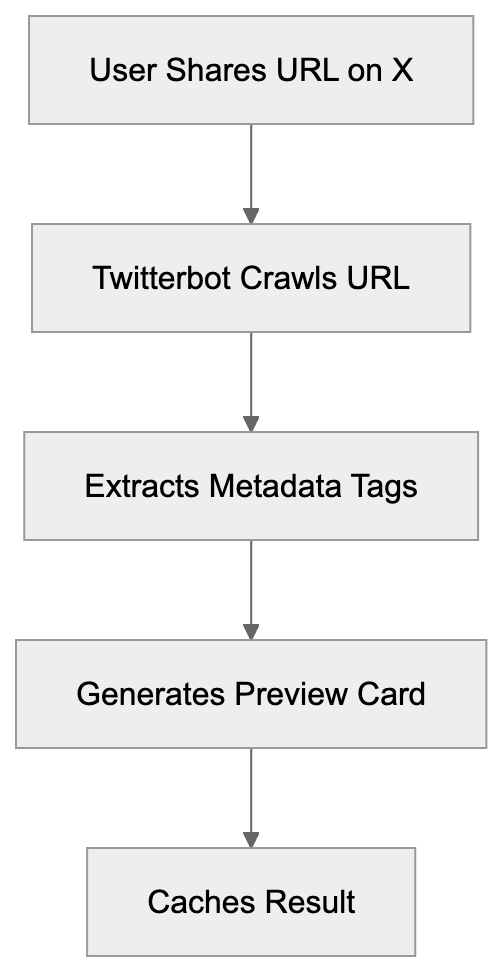
Twitterbot doesn’t execute JavaScript by default, reading only the initial HTML response from your server. If your site relies heavily on client-side rendering, the bot might not see all your content. You need server-side rendering or pre-rendering for accurate Twitter card previews.
How X Uses Twitterbot for Link Previews
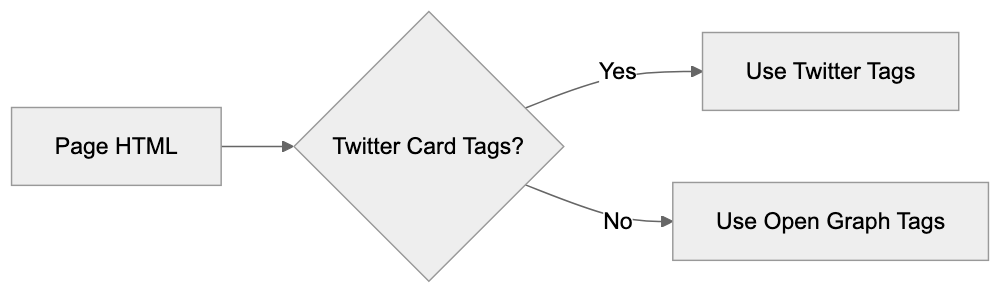
When a link is shared on X, the platform triggers the Twitterbot to crawl that URL. The bot fetches the page and extracts specific metadata tags, prioritizing Twitter Card meta tags. These include twitter:card, twitter:title, twitter:description, and twitter:image. If these tags aren’t found, it falls back to Open Graph tags like og:title, og:description, and og:image.
The extracted data is cached on X’s servers, meaning the bot doesn’t crawl the same URL each time it’s shared. Cache duration varies but typically lasts several days. To refresh the cache after updating your page’s metadata, use Twitter’s Card Validator tool. The tool forces a re-crawl and shows you exactly what the social media bot sees.
X supports different card types. The summary card displays a title, description, and thumbnail, while the summary card with a large image shows a bigger image. Player cards can embed video or audio, and app cards promote mobile applications. Each type requires specific meta tags in your HTML.
Twitterbot Metadata Priority:
Why Businesses and Developers Care About Twitterbot
For marketing professionals and content marketers, Twitter Cards directly impact engagement. Posts with rich previews get more clicks than plain links. Studies show a Twitter link preview can increase click-through rates by 50% or more, representing significant traffic potential.
Web developers need to implement proper meta tags for the Twitter link preview generator to work correctly. This means adding the right tags in the HTML head section. Without a proper setup, your links won’t display attractive previews. SEO experts also care because social signals indirectly affect search rankings. More social engagement can lead to more backlinks and traffic.
Small business owners benefit from understanding how Twitterbot works. If you’re sharing your website or blog posts on X, you want them to look professional. A broken or missing preview makes your content look unprofessional. Setting up Twitter Cards properly is a one-time technical task that pays ongoing dividends.
What Happens When You Block Twitterbot
Some website owners consider blocking Twitterbot in their robots.txt file. This prevents the bot from crawling your site, but what are the consequences? When Twitterbot can’t access your pages, X can’t generate preview cards. Your shared links appear as plain text URLs without images or descriptions.
This drastically reduces engagement and click-through rates, as users scroll past plain links faster than rich previews. You’re essentially making your content invisible on the platform. There are very few legitimate reasons to block Twitterbot. One might be if you’re running a private or members-only site where public previews would leak information.
If you block the bot, you can still share links on X, but they won’t have previews. Some sites accidentally block Twitterbot through overly restrictive robots.txt rules. Always test your robots.txt file to ensure you’re not blocking crawlers unintentionally. You can use the Card Validator to check if Twitterbot can access your pages.
Blocking Twitterbot doesn’t prevent people from sharing your links. It only prevents preview generation. The link itself remains shareable and clickable; users just won’t see what they’re clicking on before they visit.
Twitterbot vs. Similar Social Media Crawlers
Twitterbot isn’t the only social media bot out there. Facebook has Facebot, LinkedIn uses LinkedInBot, and other platforms have their crawlers. Each serves the same basic purpose, but with platform-specific requirements.
| Crawler | Platform | User-Agent | Primary Purpose | Meta Tags |
|---|---|---|---|---|
| Twitterbot | X/Twitter | Twitterbot/1.0 | Generate Twitter Cards | twitter:card, twitter:title, twitter:image |
| Facebot | facebookexternalhit/1.1 | Create link previews | og:title, og:description, og:image | |
| LinkedInBot | LinkedInBot/1.0 | Generate post previews | og:title, og:description, og:image | |
| Slackbot | Slack | Slackbot-LinkExpanding | Unfurl links in chats | og:title, og:description, og:image |
| Discordbot | Discord | Mozilla/5.0 (compatible; Discordbot/2.0) | Embed link previews | og:title, og:description, og:image |
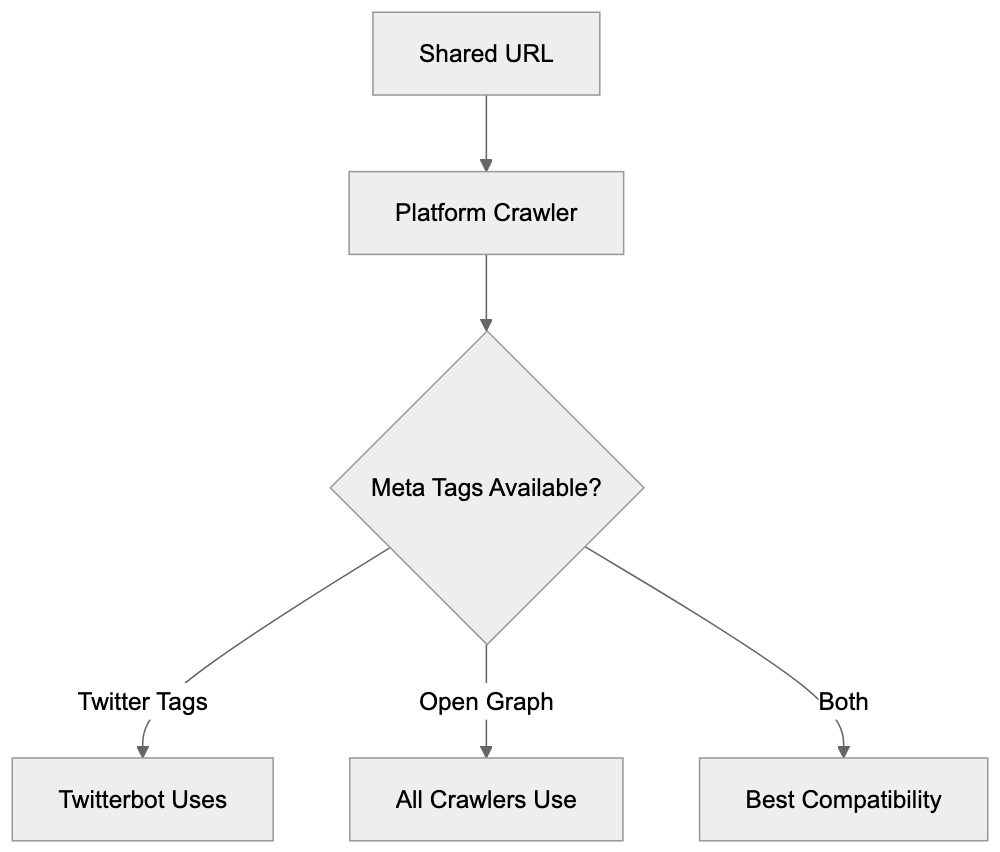
Most social crawlers prefer Open Graph tags since they’re more universal. Twitterbot accepts both Twitter Card tags and Open Graph tags. If you want maximum compatibility across platforms, implement both tag types. They can coexist on the same page without conflicts.
Twitterbot tends to be faster than some competitors. Facebot sometimes takes longer to crawl and cache pages. LinkedIn’s crawler is generally reliable, but less frequently updated. Discord and Slack rely heavily on Open Graph standards.
Implementing Twitter Cards for Twitterbot
To make Twitterbot work effectively, you need proper HTML meta tags. Here’s what a basic setup looks like in your page head section. Add these tags between your opening and closing head tags.
The most common card type is summary. It shows a title, description, and small square image. For this, you need: twitter:card set to “summary,” twitter:title with your page title, twitter:description with a brief summary, and twitter:image with an image URL. The image should be at least 144x144 pixels.
For larger images, use summary_large_image as the card type. The image should be at least 300x157 pixels, though 1200x628 works best. This format gets more visual attention in timelines. It’s ideal for blog posts, articles, and visual content.
Always include both Twitter Card and Open Graph tags. This ensures compatibility across all social platforms. The tags don’t conflict with each other. Modern content management systems and frameworks often have plugins or built-in support for adding these tags automatically.
Testing and Troubleshooting Twitterbot Issues
X provides a Card Validator tool at cards-dev.x.com/validator. This tool lets you enter any URL and see exactly what Twitterbot crawls. It shows the generated preview card and any errors encountered.
Social Media Crawler Comparison:
 Common issues include missing or incorrect meta tags. Sometimes the image URL is broken or inaccessible. Other times the image doesn’t meet size requirements. The validator shows specific error messages for each problem. It also forces a cache refresh, which is useful after updating your tags.
If your cards aren’t showing up, check your robots.txt file first. Ensure you’re not blocking Twitterbot. Then verify your meta tags are in the HTML head section, not the body. Tags in the body won’t be read by the crawler. Use the validator to confirm Twitterbot can access your page.
Another common issue is HTTPS mixed content. If your page is HTTPS, but your image URL is HTTP, some browsers and crawlers reject it. Always use HTTPS for image URLs when your site uses HTTPS. Check your server logs to see if Twitterbot is actually reaching your server.
Privacy and Data Considerations
Twitterbot collects publicly available metadata from web pages. It doesn’t collect user data or login-protected content. The bot only sees what any web browser would see when visiting your public URLs. This data gets cached on X’s servers to generate preview cards.
Website owners should be aware that shared links become part of X’s index. The preview data is stored and displayed to X users. If you change your page content or metadata, the old preview might remain cached until you force a refresh. There’s no automatic privacy concern here since you’re choosing to share public URLs.
For sites with sensitive or private content, use proper authentication and don’t share direct links publicly. Twitterbot respects standard security measures and won’t bypass login screens or paywalls. If your page requires authentication, the bot simply can’t generate a preview.
Some developers worry about bot traffic consuming server resources. Twitterbot is relatively lightweight and caches aggressively. It won’t repeatedly hammer your server for the same URL. The traffic impact is minimal compared to regular user traffic.
The Future of Twitterbot Under X
Since X took over Twitter, there have been gradual changes to various platform features. Twitterbot continues to function as before, but future updates might bring changes. The core functionality of generating link previews remains needed for the platform’s user experience.
X might improve Twitterbot’s capabilities to better handle modern web technologies. Improved JavaScript rendering would help with single-page applications. Better handling of changing content could improve preview accuracy. These are speculative improvements, not confirmed developments.
The transition from Twitter to X branding might eventually affect the user-agent string. Currently, it still identifies as Twitterbot, but this could change to Xbot or similar. Website owners should monitor for such changes and update their robots.txt rules if needed. For now, everything operates under the Twitter naming convention.
Twitterbot is vital in how links appear on X. This crawler visits shared URLs to extract metadata and generate Twitter card previews. Understanding how it works helps developers implement proper Twitter Card tags and assists marketers in maximizing their social media engagement.
The bot uses a specific user-agent string and respects standard web protocols like robots.txt. It prioritizes Twitter Card meta tags but falls back to Open Graph tags. Proper setup requires adding specific meta tags to your HTML head section. Testing with the Card Validator ensures everything works correctly.
Blocking Twitterbot removes your ability to show rich previews, significantly hurting engagement. Most websites benefit from allowing the crawler to operate and implementing proper meta tags. The technical setup is straightforward, and the engagement benefits are substantial for anyone sharing content on X.
Frequently Asked Questions
How can I improve the appearance of my links shared on X?
To enhance the link appearance on X, implement Twitter Card meta tags in your HTML. This ensures that your links generate rich previews with images and descriptions, making them more engaging for users. Utilize tools like Twitter's Card Validator to check your setup and refresh any cached data after updates.
What should I do if my links do not display previews on X?
If your links lack previews, first ensure that Twitterbot is not blocked in your robots.txt file. Then, verify that you have correctly added the required Twitter Card meta tags in the HTML head section. Use the Card Validator tool to diagnose any issues or force a cache refresh.
Can I block Twitterbot from accessing my website?
Yes, you can block Twitterbot by adding specific rules in your robots.txt file. However, doing so will prevent X from generating previews for your links, which may significantly reduce user engagement. Consider whether the benefits of rich previews outweigh the reasons for blocking the bot.
What types of metadata should I include for optimal link previews?
For optimal link previews, include both Twitter Card tags and Open Graph tags in your HTML. Essential Twitter Card tags include twitter:card, twitter:title, twitter:description, and twitter:image. Open Graph tags like og:title and og:image also enhance compatibility across social media platforms.
How often does Twitterbot refresh cached data for my links?
Twitterbot caches the extracted metadata for a few days. If you update your page's metadata and want the changes reflected quickly, you can use the Card Validator tool to force a re-crawl and refresh the cache. This is useful for ensuring that your most current information is displayed.
What are common issues I may face with Twitterbot crawls?
Common issues include missing or incorrect meta tags, broken image URLs, or images that do not meet size requirements. Additionally, ensure that HTTPS is used consistently across your site and image URLs, as mixed content can lead to failures in generating previews. Use the Card Validator to identify specific problems.
Is Twitterbot resource-intensive on my server?
No, Twitterbot is relatively lightweight and employs aggressive caching, minimizing repeated requests for the same URL. Its traffic impact on your server is generally low compared to regular user traffic. However, monitoring your server logs can help you stay informed about bot activity.
Track Your AI Visibility
See how AI chatbots like ChatGPT, Claude, and Perplexity discover and recommend your brand.