Wappalyzer: A Comprehensive Guide to Technology Profiling
Learn how Wappalyzer identifies website technologies and its comparison with BuiltWith. Complete guide to tech detection tools.
Introduction
Wappalyzer is a technology detection tool that identifies the tech stack that websites are built with. This web tech identifier scans web pages to disclose the CMS, analytics tools, frameworks, servers, and other underlying technologies. Businesses use these tools for competitive analysis, lead generation, and security research. Sales teams rely on tech profiling to find prospects using specific platforms, while security researchers utilize it to identify at-risk software versions. The Wappalyzer crawler operates through browser extensions, API access, and command-line tools, detecting over 5,000 different technologies across more than 150 categories. By understanding how the Wappalyzer API and web tech identifier function, developers and marketers can make more informed decisions regarding their tech stack and competitive positioning.
What is Wappalyzer and How Does It Work
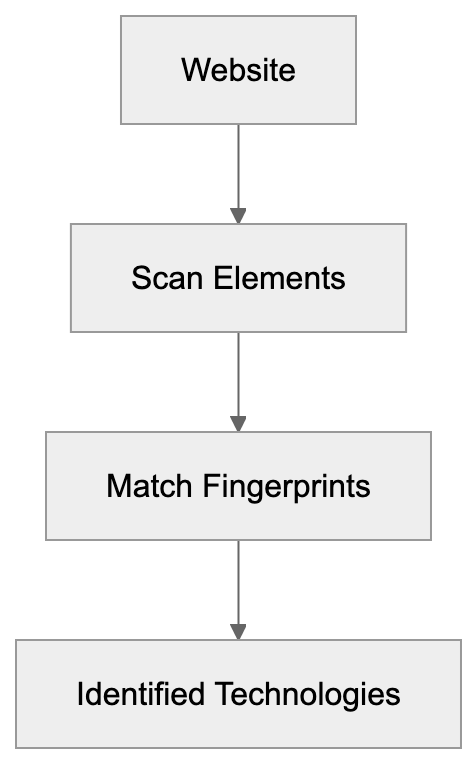
Wappalyzer is a cross-platform utility that identifies technologies on websites. This technology detection bot analyzes HTML code, JavaScript files, HTTP headers, and other web elements to match patterns. Each technology has a unique fingerprint that the tool recognizes. For instance, WordPress sites often load wp-content folders and specific JavaScript libraries. The web tech identifier maintains a vast database of these fingerprints. With the browser extension installed, it scans websites in real-time, operating client-side to ensure fast detection without sending data to external servers in basic mode. The open-source fingerprint database is regularly updated by contributors worldwide. Developers can also add custom detection rules for proprietary or niche technologies that their teams need to track.
Wappalyzer Detection Process:
Why Wappalyzer Exists and Its Core Purpose
The tool exists because understanding the technologies that competitors and prospects use is crucial for business decisions. Marketing teams need to know if a prospect uses HubSpot or Mailchimp before offering solutions. Sales professionals qualify leads faster by knowing the tech stack upfront. The Wappalyzer crawler aids them in building targeted lists without manual research. Security teams use it to find websites running outdated software versions needing patches. Developers investigate what frameworks popular sites use before selecting their own stack. This web tech identifier democratizes information that was previously challenging to gather on a large scale. Companies used to manually inspect source codes or make educated guesses based on website behavior. Now, the technology detection bot automates this process and provides structured data through APIs, effectively saving hours of research time and improving the accuracy of tech stack intelligence.
How Businesses and Users Leverage Wappalyzer
Small business owners install the browser extension to research competitors promptly. They visit rival websites to instantly see which tools power their marketing and e-commerce operations. Web developers use it during project discovery to better understand client requirements. If a client desires features similar to another site, understanding that site’s tech stack aids in scoping. Marketing professionals integrate the Wappalyzer API into their CRM systems for lead enrichment. When a new prospect enters the pipeline, the API automatically fetches their technology profile. SEO experts employ the web tech identifier to check which analytics and tracking tools competitors deploy. Content marketers research which content management systems are preferred by industry leaders. Enterprise sales teams compile lists of companies using specific technologies that they can replace. For example, a cybersecurity vendor may want to identify all e-commerce sites still using an outdated payment gateway. The technology detection bot supports these workflows at scale through programmatic access.
Browser Extension Features and Capabilities
The Wappalyzer browser extension is compatible with Chrome, Firefox, Edge, and Safari. Upon installation, it adds an icon to the browser toolbar. Click any website, and the icon reveals detected technologies with their logos. The free version presents basic tech categories like CMS, analytics, and frameworks. Paid plans provide additional data, including technology versions, contact information, and company details. The extension works offline for basic detection since fingerprints are bundled locally, while advanced features require an account and internet connection. Detected technologies can be exported as CSV files for further analysis. The web tech identifier extension also displays confidence scores for each detection, clearly distinguishing between definitive identifications and probable matches. Power users can contribute new fingerprints directly through the extension interface. The tool respects privacy, ensuring no tracking of browsing in the free tier.
Technology Detection Workflow:

API Access and Developer Integration
The Wappalyzer API offers programmatic access to technology detection at scale. Developers can check single URLs or submit batch requests for thousands of domains. The API returns structured JSON data with detected technologies, categories, and metadata. Rate limits vary by subscription tier, with enterprise plans accommodating millions of requests monthly. This technology detection bot API has endpoints for live lookups and historical data queries. Integration takes minutes using standard REST protocols and API keys. Popular use cases include CRM enrichment, market research automation, and security scanning. The API documentation includes code examples in Python, JavaScript, PHP, and other languages. Webhook support lets users receive real-time notifications when tracked websites change their tech stack. Additionally, filtering by technology category or specific vendor is possible. Response times average under 2 seconds for cached domains and 5 to 10 seconds for fresh scans.
Command Line Tools and Advanced Usage
Developers can install Wappalyzer as a Node.js package for local development and testing. The command-line interface (CLI) accepts URLs and outputs detected technologies to the terminal, making it ideal for CI/CD pipelines and automated testing workflows. Teams can scan staging environments before deployment to confirm all tracking codes load correctly. The technology detection bot CLI allows custom fingerprint files for proprietary technologies. Teams can maintain private detection rules without contributing them to the public database. Headless browser integration enables JavaScript-heavy sites to render before scanning. The CLI tool can process lists of URLs from text files for batch operations. Output formats include JSON, CSV, and plain text for easy parsing. Advanced users can combine it with other command-line tools like curl and jq for complex workflows. The web tech identifier CLI is compatible with Linux, macOS, and Windows environments, and Docker containers are available for consistent deployment across different systems.
Wappalyzer Compared to Alternative Solutions
Numerous tools compete in the technology detection domain, each with unique strengths:
| Tool | Free Tier | Technologies Detected | API Access | Browser Extension | Best For |
|---|---|---|---|---|---|
| Wappalyzer | Yes | 5,000+ | Paid plans | Yes | General tech profiling |
| BuiltWith | Limited | 130,000+ | Paid only | Yes | Deep historical data |
| WhatRuns | Yes | 10,000+ | No | Yes | Quick browser checks |
| SimilarTech | Trial only | 7,000+ | Paid plans | No | Market share analysis |
| NerdyData | No | Source code search | Paid only | No | HTML/CSS pattern matching |
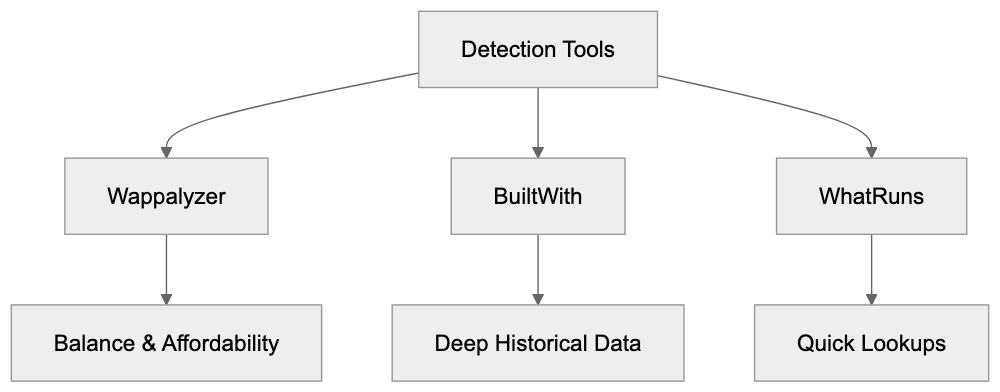
BuiltWith boasts the most comprehensive technology database but comes at a significantly higher cost. The BuiltWith crawler tracks historical changes over the years, while Wappalyzer focuses on current states. WhatRuns offers a simpler interface, suitable for casual users desiring quick lookups. SimilarTech excels in market intelligence and trend analysis across industries. NerdyData distinguishes itself by searching for specific code snippets rather than technologies. The Wappalyzer crawler strikes a balance between features and affordability for most users, offering enough value from the free tier for small teams while scaling with paid API access for enterprises. The open-source fingerprint database ensures quicker detection rule updates compared to closed alternatives.
Accuracy and Reliability Considerations
The web tech identifier achieves high accuracy for popular technologies but struggles with custom solutions. Detection relies on fingerprints that might become outdated as software evolves. Websites can intentionally obfuscate their tech stack to avoid detection. Minified JavaScript and server-side rendering complicate pattern matching. The Wappalyzer crawler reports confidence scores to indicate the certainty of detection, and it’s advisable to manually verify significant findings before making business decisions. False positives can occur when different tools share similar fingerprints, and false negatives may occur when technologies hide their identifying markers. The technology detection bot performs better on client-side technologies than backend systems, easily identifying tools like React or WordPress but leaving database choices unseen. Regular fingerprint updates from the community help maintain accuracy, and enterprise users often combine multiple detection tools for higher coverage. Cross-referencing Wappalyzer results with BuiltWith or manual inspection enhances reliability.
Privacy and Data Collection Practices
Technology Detection Comparison:
The browser extension primarily operates locally, avoiding sending browsing data to Wappalyzer servers by default. Paid features that provide contact info and company details require server lookups. The web tech identifier upholds user privacy better than many analytics tools, though websites analyzed may log visits through their own tracking. The API service collects requested URLs for detection purposes. Enterprise plans include data processing agreements for compliance needs. Wappalyzer refrains from selling individual browsing histories or creating user profiles, focusing on public website data accessible to anyone. The technology detection bot prohibits using the tool for illegal scraping or harassment. Responsible use involves respecting website terms of service and robots.txt files, as some websites forbid automated scanning. Always review legal implications before deploying large-scale detection campaigns. The open-source nature of the fingerprints means detection methods are transparent.
Pricing and Plan Options
Wappalyzer offers a generous free tier for individual users and small projects. The browser extension operates without charge for basic technology detection. API access requires paid subscriptions starting at $99 monthly for 5,000 lookups. Enterprise plans with higher limits cost several thousand per month, with the technology detection bot pricing scaling based on lookup volume and feature requirements. Annual billing provides discounts compared to monthly payments, and academic researchers and nonprofits can request special pricing. Free tier users see advertisements and limited historical data, while paid plans remove ads and unlock technology versions, contact finding, and CRM integrations. The web tech identifier charges per successful lookup and offers custom enterprise agreements supporting millions of monthly lookups with dedicated support. Pricing transparency could improve as exact costs require contacting sales for higher tiers.
Use Cases Across Different Industries
SEO experts utilize the Wappalyzer crawler to audit client websites for missing tracking codes, verifying tools like Google Analytics, Tag Manager, and conversion pixels load correctly. Marketing professionals build prospect lists filtered by advertising platforms or email tools, with a marketing automation vendor potentially targeting companies using Mailchimp but not full marketing suites. Web developers research framework adoption trends before choosing technologies for new projects. Security researchers identify at-risk software versions across vast website portfolios, using this technology detection bot to find sites running outdated WordPress or Drupal installations. Content marketers analyze which publishing platforms successful blogs use, while venture capitalists track technology adoption to spot growing software companies. Sales teams qualify inbound leads faster by checking existing tech stacks, with the web tech identifier supporting competitive intelligence across various industries. E-commerce companies track what platforms competitors migrate to, and SaaS companies monitor customer tech stacks to predict churn risk.
Limitations and What Wappalyzer Cannot Do
The tool cannot detect technologies that leave no client-side fingerprints. Backend databases, internal APIs, and server infrastructure remain invisible. The Wappalyzer crawler only sees what browsers see and cannot access password-protected areas or authenticated sections of websites. Detection accuracy diminishes for heavily customized or proprietary solutions, with the web tech identifier finding difficulty in sites that aggressively minify and obfuscate code. It provides snapshots, not continuous monitoring unless users pay for tracking features. The free tier lacks historical data on when technologies were added or removed, and API rate limits prohibit real-time monitoring of large website portfolios on basic plans. The technology detection bot cannot determine why a company chose certain technologies, only indicating what exists without business context or decision-making insights. Legal restrictions may prevent scraping some websites, even if technically possible, and the tool works best for public-facing websites rather than internal corporate applications.
Getting Started with Wappalyzer
Begin by installing the browser extension from the Chrome Web Store or Firefox Add-ons. Visit familiar websites to check what technologies are detected. Use it on your website to verify whether the web tech identifier identifies everything correctly. Create a free account to unlock basic API access for testing purposes, and review the fingerprint database on GitHub to understand the detection process. Developers should consider the npm package for local installations. Read the API documentation before building integrations. The technology detection bot community provides tutorials and examples, and joining discussion forums can aid in asking questions and sharing use cases. Start with manual checks before investing in paid API plans, testing accuracy on specific use cases as results vary by industry. Export sample data to evaluate its fit for your workflow, and consider combining Wappalyzer with other tools for complete tech intelligence. Set up alerts for competitors’ technology stack changes. Remember that the Wappalyzer crawler performs best when its limitations are understood.
Wappalyzer offers accessible technology profiling to businesses of all sizes. The web tech identifier integrates free browser extensions with paid API access for scalability, aiding marketers in finding prospects, developers in researching frameworks, and security teams in identifying vulnerabilities. The Wappalyzer crawler detects over 3,000 technologies with reasonable accuracy for most use cases. Compared to alternatives such as BuiltWith, it presents better value for small teams and individuals. This technology detection bot integrates into existing workflows via APIs and command-line tools, providing competitive advantages across sales, marketing, and development. While not perfect, Wappalyzer delivers substantial value, justifying its adoption for tech stack intelligence. Start with the free tier and expand to paid plans as your requirements grow.
Frequently Asked Questions
How can I install the Wappalyzer browser extension?
You can install the Wappalyzer browser extension from the Chrome Web Store or Firefox Add-ons. Simply search for "Wappalyzer" in your browser's extension store and follow the prompts to add it to your browser.
What kind of data can I access with the Wappalyzer API?
The Wappalyzer API provides structured JSON data that includes detected technologies, their categories, and additional metadata for single URLs or batch requests. You'll need a subscription plan to access higher volumes and advanced features.
What is the difference between the free and paid versions of Wappalyzer?
The free version of Wappalyzer offers basic technology detection but limits features such as technology versions and contact finding. Paid plans provide advanced data, ad-free usage, and increased lookup limits, catering to larger teams and enterprises.
Can Wappalyzer detect any technology on a website?
Wappalyzer primarily identifies client-side technologies visible to browsers, such as JavaScript libraries and content management systems. It cannot detect server-side components, proprietary solutions, or technologies that do not leave identifiable fingerprints.
Is Wappalyzer suitable for competitive analysis?
Yes, Wappalyzer is an excellent tool for competitive analysis as it allows businesses to understand the technologies their rivals use. This insight can guide decisions related to marketing, development, and security by highlighting tech trends within an industry.
How frequently is Wappalyzer's fingerprint database updated?
The fingerprint database is regularly updated by contributors worldwide to ensure its accuracy. Users can also contribute new fingerprints for technologies not currently included, helping to expand the tool's detection capabilities.
What should I do if I encounter an inaccurate detection?
If you find an inaccurate detection, it's advisable to verify the technology with manual inspection. Users can also contribute corrections or new fingerprints to the database to enhance its accuracy for future use.
Track Your AI Visibility
See how AI chatbots like ChatGPT, Claude, and Perplexity discover and recommend your brand.