WhatsApp Link Preview Crawler: Complete Technical Guide
Learn how WhatsApp's crawler generates link previews, URL unfurling mechanics, and technical implementation tips for developers.
Introduction
WhatsApp handles billions of messages daily, with many containing URLs. When you share a link on WhatsApp, the app automatically generates a preview with an image, title, and description through a process called URL unfurling. This feature is powered by WhatsApp’s link preview crawler, a bot visiting shared URLs to extract necessary metadata. This crawler has been part of Meta’s infrastructure since the Facebook acquisition of WhatsApp in 2014. Understanding the workings of this crawler is crucial for developers and website owners because it influences how content appears when shared on WhatsApp, potentially affecting click-through rates and user engagement. This guide delves into the technical details of WhatsApp’s crawler, its relation to Meta’s other crawlers, and how to optimize your links.
What is WhatsApp’s Link Preview Crawler
The WhatsApp link preview crawler is an automated bot that fetches webpage content. When a user shares a URL in a chat, WhatsApp sends this crawler to visit the webpage. The crawler reads the HTML and extracts metadata like the title, description, and preview image. This information is used to create the link preview card shown in the chat. The crawler identifies itself through a specific user agent string in its HTTP requests, allowing website servers to serve appropriate content. It prioritizes Open Graph tags but also considers Twitter Card metadata and standard HTML meta tags. This process happens quickly, usually within seconds of pasting a URL. WhatsApp caches these previews to avoid repeated crawling of the same URL. While the crawler respects robots.txt files, it may not honor all crawl-delay directives due to real-time messaging.
Meta’s Crawler Infrastructure and Ownership
Meta acquired WhatsApp in 2014, making it part of a family of apps that includes Facebook, Instagram, and Messenger, all of which use similar crawler technology for link preview generation. The Facebook crawler, formerly Facebookbot, shares infrastructure with WhatsApp’s crawler. They use similar user agent patterns and follow comparable protocols. Meta’s unified approach to web crawling means improvements to Facebook’s crawler often benefit WhatsApp previews as well. As some of the most active web crawlers globally, Meta’s crawlers process millions of URLs daily, supported by massive data centers. This frequent site visit means website owners can expect regular visits from Meta’s crawlers if their content is shared on Meta platforms.
How URL Unfurling Works in WhatsApp
URL unfurling in WhatsApp works as follows:
- A user pastes or types a URL into a chat.
- WhatsApp detects the URL pattern.
- Before sending the message, WhatsApp triggers its crawler to fetch the page.
- The crawler sends an HTTP GET request to the URL.
- The server responds with HTML content.
- The crawler looks for specific meta tags, prioritizing Open Graph tags.
- Relevant data is extracted and sent back to WhatsApp’s servers.
- WhatsApp generates a preview card with the extracted information.
- The preview gets attached to the message.
WhatsApp Link Preview Architecture:
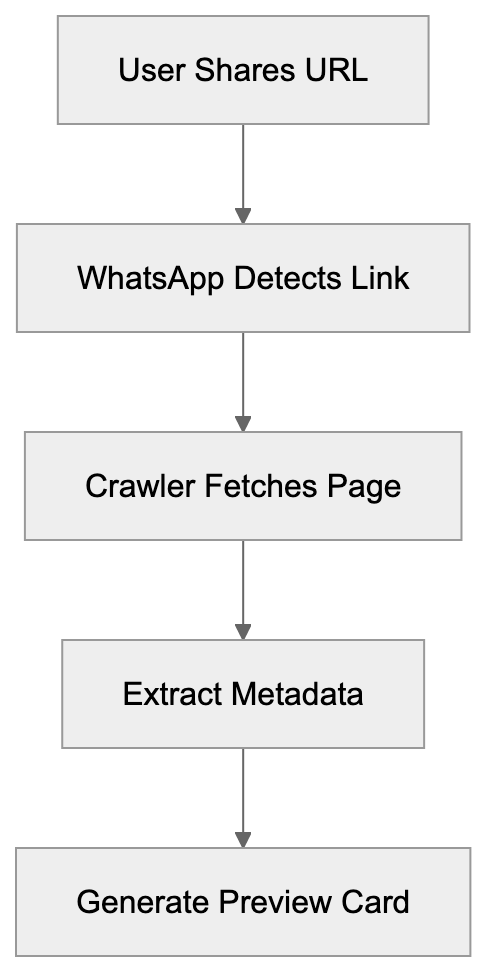
This process usually completes in 2-5 seconds. If the crawler can’t access the URL or finds no metadata, WhatsApp displays the raw URL without a preview. The preview generation happens on the sender’s side before the message is sent, and recipients see the same preview.
Technical Implementation for Developers
To achieve optimal link previews, developers need to implement proper metadata tags. The key tags are Open Graph protocol tags, placed in the HTML head section:
- og:title for the preview title (under 60 characters).
- og:description for the preview text (under 200 characters).
- og:image with a URL pointing to the preview image (min 300x200 pixels, ideally 1200x630 pixels).
- og:type to specify content type (e.g., article or website).
- og:url with the page’s canonical URL.
URL Unfurling Process Flow:
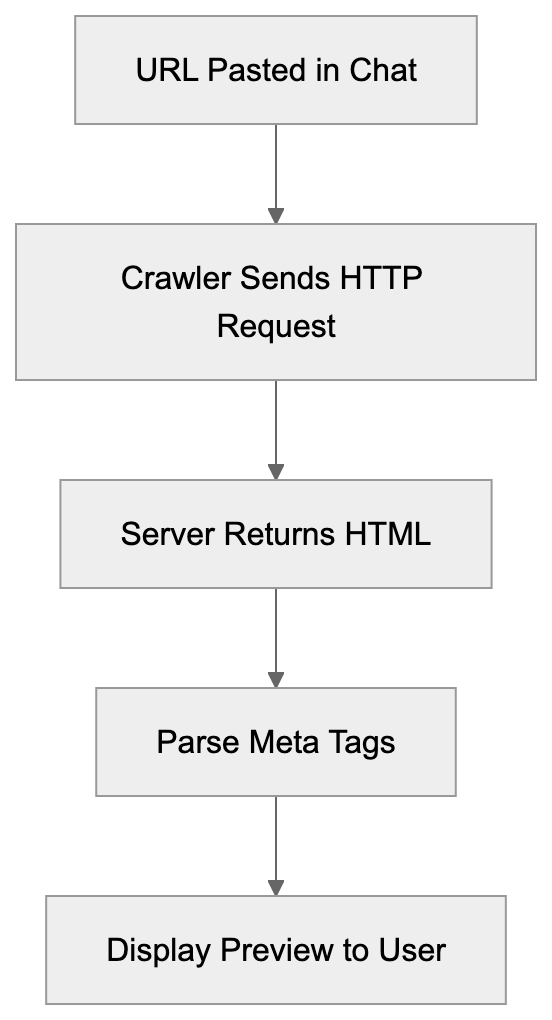
Ensure the og:image URL is absolute and publicly accessible. WhatsApp’s crawler won’t execute JavaScript, so metadata should be in the initial HTML response. Server-side rendering is necessary for single-page applications. Test your setup by sending the URL in a WhatsApp chat or using Facebook’s Sharing Debugger tool.
Comparing WhatsApp Crawler to Alternatives
Here’s how WhatsApp’s crawler compares to major alternatives:
| Platform | User Agent | Primary Metadata | Image Size | JavaScript Support | Cache Duration |
|---|---|---|---|---|---|
| WhatsApp/2.x | Open Graph | 300x200 min | No | 7-30 days | |
| Telegram | TelegramBot | Open Graph | 400x400 min | No | 24 hours |
| Slack | Slackbot | Open Graph | 512x512 min | Limited | 4 hours |
| Discord | Mozilla/5.0 Discord | Open Graph | 320x320 min | No | Variable |
| iMessage | AppleBot | App Links | 300x300 min | Limited | Unknown |
WhatsApp’s crawler is more conservative than some alternatives, as it does not support JavaScript execution, meaning changing content may not appear in previews. Telegram’s bot refreshes previews more frequently. Slack offers limited JavaScript support, and Discord’s cache depends on engagement. iMessage uses Apple’s AppleBot, prioritizing App Links metadata. All these crawlers have varying degrees of respect for robots.txt. For maximum compatibility across platforms, implement complete Open Graph tags.
Meta Tag Priority Hierarchy:

Privacy and Security Considerations
The link preview crawler has privacy implications. When you share a URL, the crawler visits that page before sending your message, resulting in the destination server seeing a request from Meta’s IP addresses. If the URL contains tracking parameters or session tokens, this can leak information. Some users disable link previews for this reason. Note that crawler visits do not represent actual user traffic. The crawler respects HTTPS and fetches secure pages but does not authenticate, so pages behind login walls won’t preview properly. For sensitive URLs, consider that metadata extraction temporarily processes content on Meta’s servers. WhatsApp claims previews are securely generated and not used for advertising. End-to-end encryption applies to messages, but previews are generated server-side before encryption.
Troubleshooting Common Issues
If your links don’t preview correctly, check these common issues:
- Verify Open Graph tags are properly formatted using a validator tool.
- Ensure all required tags are present, including og:title, og:description, and og:image.
- Check image URLs are absolute and accessible.
- Confirm fast server response times (under 3 seconds).
- Review robots.txt to ensure Meta’s crawlers aren’t blocked.
- Ensure your server doesn’t block Meta’s IP ranges.
- Verify SSL certificate validity if using HTTPS.
- Implement server-side rendering for dynamic content.
If previews suddenly stop working, it could be due to WhatsApp caching an old version. Changing the URL slightly can force a fresh crawl. Use Facebook’s Sharing Debugger to diagnose issues.
Best Practices for Improvement
To optimize for WhatsApp’s crawler:
- Use high-quality images, at least 1200x630 pixels, with good contrast.
- Keep titles concise and descriptive (under 60 characters).
- Write strong, encouraging descriptions (under 200 characters).
- Ensure metadata accurately represents page content.
- Implement canonical URLs to avoid duplicates.
- Test links across different WhatsApp clients.
- Monitor server logs for crawler traffic.
- Update metadata with significant content changes.
- Consider different preview images for varying contexts using Open Graph tags.
- Regularly audit shared pages to maintain optimal previews.
End
WhatsApp’s link preview crawler enriches messaging with rich content previews and is part of Meta’s extensive infrastructure. It fetches metadata using Open Graph protocol to generate preview cards swiftly. Developers and website owners can ensure proper display of shared links by implementing the right metadata tags. The crawler doesn’t execute JavaScript and relies on server-side HTML. Understanding privacy implications and resolving common issues like missing metadata enhances link preview effectiveness. Following best practices for image quality, title length, and metadata accuracy can significantly impact shared link visibility and engagement. As WhatsApp’s user base, now exceeding 2.5 billion globally, grows, optimizing for its crawler becomes increasingly crucial for content visibility.
Frequently Asked Questions
How can I ensure my links generate a proper preview on WhatsApp?
To generate a proper preview, ensure you have correctly formatted Open Graph tags in your HTML. Essential tags include og:title, og:description, and og:image. Additionally, the image should be publicly accessible and meet the minimum size requirements.
What should I do if my link previews stop appearing on WhatsApp?
If your link previews suddenly stop working, it could be due to WhatsApp caching an outdated version of your content. Changing the URL slightly or checking your Open Graph tags for issues can help. Using Facebook's Sharing Debugger tool can assist in diagnosing the problem.
Does the WhatsApp crawler respect robots.txt files?
Yes, the WhatsApp crawler does respect robots.txt files; however, it may not honor all crawl-delay directives. If you need the crawler to access your content for link previews, ensure it isn’t blocked in your robots.txt file.
What are the privacy implications of using WhatsApp's link previews?
The crawler fetches URL content before messages are sent, meaning the destination server can see requests from Meta's IP addresses. This could potentially leak tracking parameters or session tokens from URLs shared. Users concerned about privacy may opt to disable link previews.
How long does the WhatsApp crawler cache link previews?
WhatsApp caches link previews for approximately 7 to 30 days, depending on various factors. If updates are made to the content, consider modifying the URL or using the Facebook Sharing Debugger to prompt a fresh crawl.
What types of metadata does the WhatsApp crawler prioritize?
The WhatsApp crawler primarily prioritizes Open Graph tags for generating previews. It also considers Twitter Card metadata and standard HTML meta tags if Open Graph tags are absent.
Is there a specific image size requirement for link previews?
Yes, the recommended minimum size for images used in link previews is 300x200 pixels, with larger images (ideally 1200x630 pixels) preferred for better visibility and engagement.
Track Your AI Visibility
See how AI chatbots like ChatGPT, Claude, and Perplexity discover and recommend your brand.