Algolia: AI-Powered Search API Guide for Developers
Complete guide to implementing Algolia's AI search API. Learn key features, integration steps, pricing, and best practices for adding fast search to your apps.
Table of Contents
Overview of Algolia’s Search Workflow
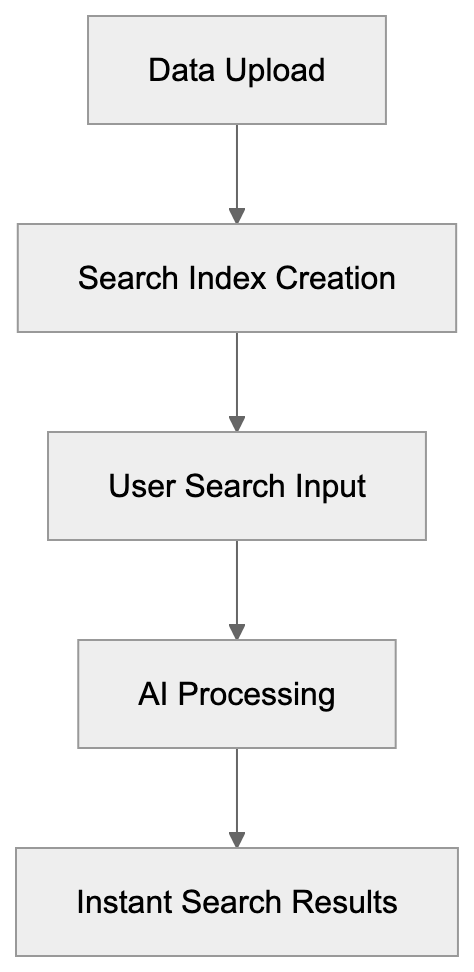
Here’s a visual representation of the core workflow that powers Algolia’s search capabilities across global data centers.
Algolia is a search-as-a-service platform enabling developers to incorporate fast and AI-driven search capabilities into their applications. As a pioneer in AI search, Algolia boasts over 17,000 clients, handling more than 1.5 trillion searches each year via over 90 global data centers.
Key Features
Algolia offers an array of features valuable for search implementation by developers:
- Instant search results in under 50ms
- AI-powered result ranking
- Typo tolerance for searches
- Customizable ranking rules
- Comprehensive analytics dashboard
- Mobile SDK support for seamless integration
- Location-based search capabilities
- Voice search options
Integrating Algolia Search in a Project
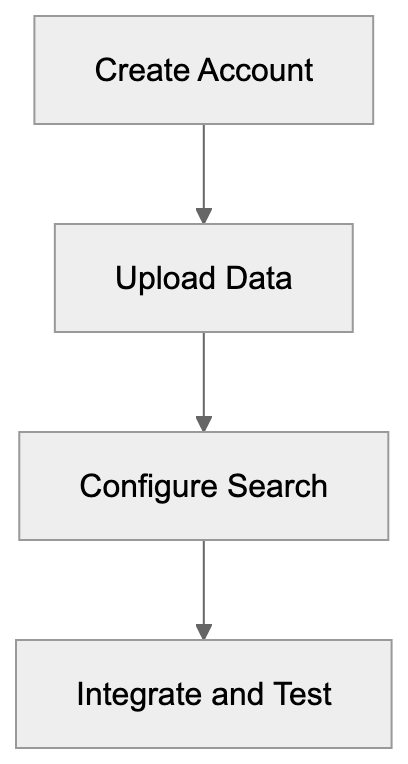
Below is a simplified flow of steps for setting up Algolia in your project.
With the inclusion of NeuralSearch, Algolia’s AI search mechanism deciphers user intent beyond simple keyword matches.
How Algolia Works
Algolia employs a global network of servers to deliver rapid search results. Here’s a straightforward breakdown of the process:
- You upload your data to Algolia’s servers.
- Algolia creates search indexes from your data.
- Users input their searches on your site.
- Algolia leverages AI to process searches.
- Users receive search results almost instantaneously.
Data remains updated automatically, ensuring immediate reflections in search results when content changes are made.
Setting Up Algolia
To implement Algolia search in your project:
- Create an Algolia account.
- Upload your data to the platform.
- Configure the search options.
- Integrate search into your site.
- Test and refine search results.
Algolia supports multiple programming languages for ease of site search implementation:
- JavaScript
Algolia vs. Alternatives
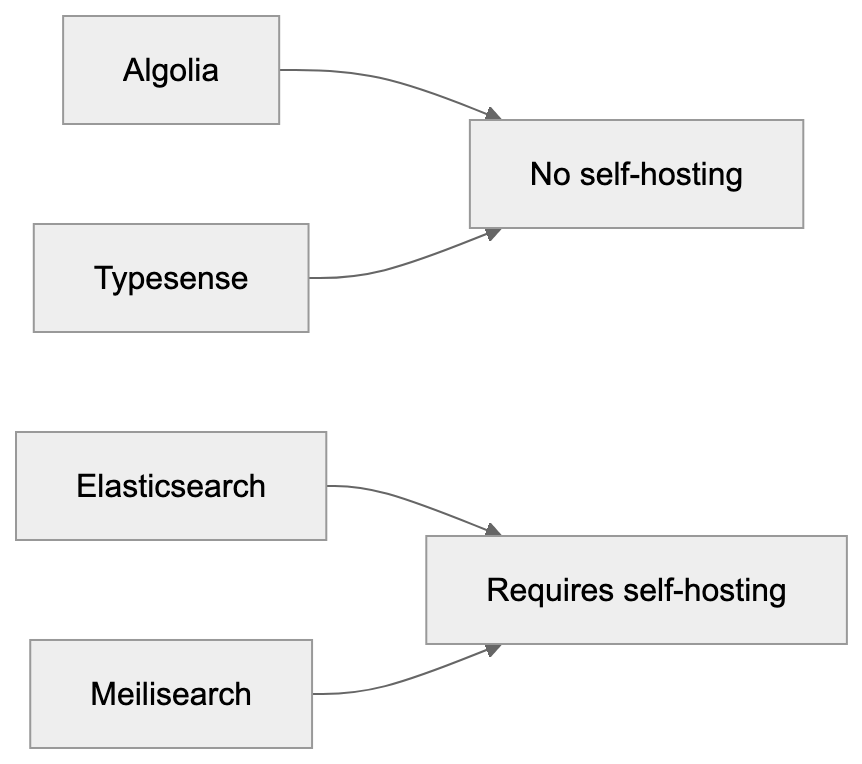
Visualize the comparison of Algolia with Elasticsearch, Typesense, and Meilisearch in terms of hosting and setup complexity.
- Python
- PHP
- Ruby
- Java
- Swift
- Kotlin
- Go
- C#
- Scala
Pricing Model
Algolia’s pricing is based on:
- Number of stored records
- Frequency of search requests
- Utilization of API calls
The free plan includes:
[- 10,000 records
- 10,000 monthly searches with basic features](https://www.algolia.com/pricing).
Paid plans are priced at:
[- $0.50 per 1,000 searches
- $0.40 per 1,000 records](https://www.algolia.com/pricing).
Comparing Algolia to Alternatives
Elasticsearch
- Requires self-hosting
- More complex setup process
- Lower direct costs
- Higher maintenance demands
Typesense
- Emerging competitor
- Comparable features
- More economical
- Smaller community support
Meilisearch
- Open source option
- Simple to set up
- Free for self-hosting
- Limited feature set
Optimizing Algolia for Best Results
To improve search outcomes:
-
Structure your data effectively.
- Use descriptive names.
- Include all desired searchable content.
- Add useful additional information.
-
Configure result ranking precisely.
- Prioritize important attributes.
- Establish custom ranking rules.
- Incorporate typo tolerance.
-
Regularly evaluate performance.
- Monitor analytics frequently.
- Identify and address failed searches.
- Make iterative improvements based on usage trends.
Common Use Cases
Online Stores
- Proprietary product searches
- Navigation through categories
- Filtered search results
Content Websites
- Article and content searches
- Access to documentation
- Efficient help center querying
Mobile Apps
- In-app search functionalities
- Efficient content discovery
- User directory searching
Code Examples
Basic JavaScript Example
const client = algoliasearch('APP_ID', 'API_KEY');
const index = client.initIndex('products');

index.search('query').then(({ hits }) => {
  console.log(hits);
});
React Example
import { InstantSearch, SearchBox, Hits } from 'react-instantsearch';
import algoliasearch from 'algoliasearch/lite';

const searchClient = algoliasearch('APP_ID', 'API_KEY');

function Search() {
  return (
    <InstantSearch searchClient={searchClient} indexName="products">
      <SearchBox />
      <Hits />
    </InstantSearch>
  );
}
Summary
Algolia empowers developers with robust search tools fueled by AI, offering swift and reliable search solutions. While the platform scales efficiently, costs may rise with extensive use. Assess your specific needs and budget when choosing among Algolia and its alternatives.
Key Points:
- Easy search integration
- Rapid, AI-enhanced search
- Comprehensive developer tools
- Cost-effective usage
- Versatile applications for various search needs
Frequently Asked Questions
What are the initial steps to set up Algolia in my project?
Start by creating an Algolia account and uploading your data. Next, configure your search settings and integrate the search functionality into your application. Finally, test the integration to ensure it works as expected.
How does Algolia handle data updates?
Algolia automatically updates its search index whenever you make changes to your content, ensuring that users receive the most current search results. This seamless update mechanism helps maintain data accuracy and relevancy.
What programming languages does Algolia support?
Algolia offers support for multiple programming languages, including JavaScript, Python, PHP, Ruby, Java, Swift, Kotlin, Go, C#, and Scala. This wide range allows developers to implement Algolia easily in various applications.
Can I try Algolia for free?
Yes, Algolia provides a free plan, which allows for up to 10,000 records and 10,000 monthly searches with basic features. This is a great option for developers looking to test Algolia's capabilities before opting for a paid plan.
What are some best practices for optimizing search results with Algolia?
To optimize search results, structure your data effectively with descriptive names and include relevant searchable content. It's also critical to configure result ranking accurately and regularly monitor performance through analytics to address any issues.
How does Algolia compare to other search solutions?
Algolia differs from alternatives like Elasticsearch, Typesense, and Meilisearch primarily in its ease of use and instant search capabilities. While it provides a user-friendly search-as-a-service platform, other solutions may offer lower costs but require more complex setups and hosting.
What use cases are best suited for Algolia?
Algolia is ideal for a range of applications, including online stores for product searches, content websites for efficient querying of articles, and mobile apps for in-app search functionalities. Its flexibility makes it suitable for various search needs across different platforms.