Liner AI Research Tool: Complete Guide for Students
Complete guide to Liner AI tool for academic research. Learn how to use AI search, highlighting, citations and trusted sources for better research.
What is Liner AI
The core product is a Chrome extension that works seamlessly across websites and PDFs. As you browse the web, you can highlight text and save it directly to your Liner AI account. The extension also offers quick access to its advanced search feature.
Liner AI operates on a freemium model. Basic highlighting and limited searches are free, while premium plans unlock unlimited queries and advanced features. Although primarily targeted at students and academics, Liner AI serves anyone involved in online research.
The interface is divided between the browser extension and a web app. The extension handles highlighting during browsing, while the web app organizes your saved highlights and offers the full-featured search interface. Both options sync across devices when you’re logged in.
Purpose of Liner AI
AI Research Workflow:
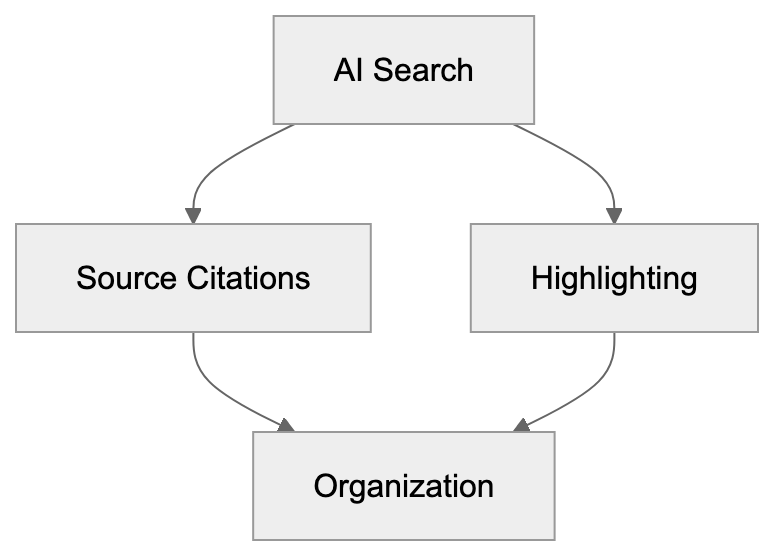
Academic research involves extensive reading from various sources, making it tough to keep track of crucial quotes and citations. Traditional note-taking apps fall short when browsing the web, requiring manual text copying, link saving, and separate organization.
Liner AI addresses this by allowing you to highlight directly on web pages. Each highlight saves automatically with source information, enabling you to add notes and organize them by topic, significantly reducing the effort needed to find and save information.
The AI search engine component solves another problem—general AI tools often provide answers without citing sources. For academic work, cited and verifiable information is crucial. Liner AI’s search includes source links with every answer.
This AI tool also filters search results to prioritize academic and trusted sources. This feature helps researchers avoid low-quality content. The combination of highlighting, organization, and AI search creates a comprehensive research workflow within a single tool.
How Students and Researchers Use Liner AI
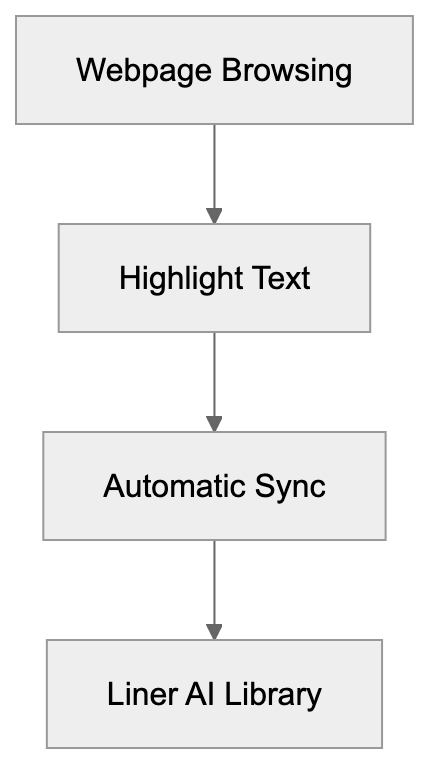
Typically, users start with the Chrome extension research tool. After installation, highlight text on any webpage by clicking and dragging to select text, then choosing a highlight color. The text saves to your Liner AI library with the page URL and timestamp.
For AI search, open the Liner AI interface and type your question. The AI generates an answer with clickable source links below, making fact-checking easier than with standard AI chatbots.
Many students use Liner AI for literature reviews, searching for papers, highlighting key findings, and organizing highlights by research theme. This tool ensures everything stays in one place instead of being scattered across bookmarks and documents.
Researchers also use it for competitive analysis and market research. The highlighting functionality works on any website, not just academic papers, allowing you to save data from news articles, company websites, and industry reports. The search feature helps synthesize information from multiple sources quickly.
Some users combine Liner AI with reference managers like Zotero, using Liner for initial research and highlighting, then exporting citations to their reference manager, creating a two-stage workflow covering both discovery and formal citation management.
Key Features and How They Work
The highlighting feature uses browser storage to save your selections. When you highlight text, Liner AI creates an overlay on the webpage. The highlight stays visible when you revisit the page if you’re logged in. All highlights sync to the cloud and appear in your Liner AI dashboard.
You can organize highlights with tags and folders, aiding your work on multiple research projects. The search function allows you to find specific highlights by keyword, and the tool also supports PDF highlighting via the browser extension.
The search utilizes a large language model akin to ChatGPT, with the key difference being the source citation system. Every AI response includes clickable references back to the source web pages and documents.
Liner AI claims to prioritize trusted sources AI in responses, filtering results to favor academic papers, established news outlets, and verified websites. This feature is crucial for researchers needing reliable information.
The Chrome extension research tool adds a sidebar to your browser. Toggle it on or off while browsing, and the sidebar displays your recent highlights, offering quick access to the search. This keeps research tools readily accessible without switching tabs.
Liner AI vs Other AI Search Tools
Liner AI stands out by merging search with research highlighting tools. If you need both functions, Liner AI provides a better-integrated experience. When only search is needed, other tools might suffice, but Liner AI excels with its combination of search and research annotation tool capabilities.
ChatGPT with Bing integration offers sourced answers, but the citation quality varies, with sources not always being academic. Liner AI’s filtering aims for higher-quality sources. ChatGPT caters better to general queries, whereas Liner AI targets research-driven use cases.
Google Scholar remains the standard for academic search, providing direct access to papers and citation counts. Liner AI’s search adds a conversational layer, letting you ask questions in natural language rather than using keywords. For deep academic work, many researchers combine both tools.
Notion and Evernote compete on the organization side but lack integrated search. These tools necessitate manual copying of web content, whereas Liner AI’s browser integration speeds up information saving during research.
Privacy and Data Usage Considerations
Liner AI collects your highlights and search queries to enhance its service, syncing this data across devices through your account. The company stores this information on their servers. Without an account, the extension can save highlights locally, albeit with limited features.
For search, your questions and the AI-generated responses are processed by Liner AI’s systems. As with most AI tools, these interactions likely get logged. Note that free users’ data may be used for service improvement, while paid plans might offer stronger privacy protections.
The Chrome extension research tool requests permission to access web page content—necessary for the highlighting feature. The extension can read and modify contents on pages you visit, a standard requirement for highlighting tools, which means the extension has broad access.
If working with sensitive research, consider what you save to Liner AI. While academic research is often public, early-stage work might be confidential. Local-only tools or self-hosted solutions offer more control over sensitive projects.
Practical Use Cases for Academic Research
Liner AI benefits literature reviews. Highlighting key findings when reading many papers keeps information organized. You can tag highlights by themes like methodology, results, or limitations, allowing you to search your highlights later instead of re-reading entire papers.
For thesis and dissertation research, maintaining source tracking over months or years is crucial. Liner AI’s cloud sync ensures your research library is accessible anywhere. Highlight on your laptop, review notes on your phone—this flexibility aids progress on long-term projects.
Highlighting and Search Integration:
Group research projects can share Liner AI collections, with team members highlighting different sources, gathering highlights in one location—better than emailing documents. Verify current version supports team features, as functionality may be limited.
News monitoring and current events research excel with Liner AI, allowing break-new highlighting and connecting events via search across multiple sources. Journalists and policy researchers often use this workflow to keep track of developing stories.
Learning new topics becomes faster with search and research annotation tool features combined. When exploring new fields, Liner AI lets you ask questions and highlight the source material it provides, creating a learning path with integrated notes and references.
Limitations and Considerations
The free tier limits searches daily, usually around 10-20 queries. For heavy research days, this fills up quickly, necessitating a paid plan for unlimited searches. Check Liner AI’s current plans for pricing details.
Highlights only function in Chrome and Chromium-based browsers. Firefox and Safari users can’t use the extension, limiting accessibility for those preferring other browsers. No official mobile app exists for highlighting, but search works on mobile browsers.
The search quality relies on available online sources. For highly specialized topics, responses might appear generic—the tool excels with subjects having substantial online documentation. Cutting-edge research might lack sufficient indexed sources for detailed answers.
Remember, Liner AI doesn’t replace formal citation management. While it captures sources, it doesn’t format citations in academic styles like APA or MLA. Tools like Zotero or Mendeley remain essential for bibliography generation, with Liner AI serving as a discovery and organizational layer.
Trusted source filtering isn’t perfect—the AI sometimes surfaces low-quality sources. Always verify crucial information with primary sources. Use Liner AI to find leads, confirming details via authoritative references.
Getting Started with Liner AI
Install the extension from the Chrome Web Store by searching for Liner AI and adding it to your browser. Create a free account to sync highlights across devices. The extension icon appears in your browser toolbar.
Start by highlighting a few articles to test functionality. Select text, choose a color, and see your highlights in the Liner AI web app under your library. Experiment with tags to understand how organization works.
Test search capabilities with questions from your current projects, comparing answers and sources to findings through Google or Google Scholar. This helps gauge where Liner AI adds value to your workflow.
Set up folders for various research projects to keep highlights organized from the start. Keeping topics separate prevents confusion later. Consistent organization enhances the tool’s long-term utility.
Explore the search function within your highlight library. As you save more content, searching becomes critical. Learn the search syntax early to quickly find information as your library expands.
Conclusion
Liner AI represents a unique convergence of search and research highlighting tools for academic research. It aids students and researchers in finding information, saving crucial quotes, and organizing sources effortlessly. The Chrome extension research feature streamlines highlighting during browsing.
The search feature offers conversational queries with source citations, differing from tools like ChatGPT by focusing on trusted sources AI. This synthesis of search and highlighting workflows supports an integrated research methodology.
Key features include web and PDF highlighting, cloud sync, search with citations, and trusted sources AI filtering. Ideal for literature reviews, thesis research, and continuous learning projects. Some limitations involve browser constraints, free tier limits, and the necessity for separate citation management.
Overall, Liner AI suits researchers seeking efficient data collection and organization. It eases the transition from discovery to source saving. For academic work demanding verified sources, the citation feature provides an edge over generalized AI chatbots. Assess your research workflow to determine if Liner AI’s highlighting and search combination meets your needs.
Liner AI User Flow:

Frequently Asked Questions
What are the main benefits of using Liner AI for academic research?
Liner AI streamlines the research process by allowing users to highlight and save text directly from web pages, maintaining citations automatically. It also integrates search capabilities that prioritize trusted academic sources, making it easier to gather and organize key information.
Is Liner AI free to use, and what features are included in the free plan?
Liner AI operates on a freemium model. The free plan includes basic highlighting and a limited number of searches per day, typically around 10-20 queries. To access unlimited searches and premium features, users need to upgrade to a paid plan.
Can I use Liner AI on browsers other than Chrome?
Currently, Liner AI's highlighting feature is only available in Chrome and Chromium-based browsers. Users of Firefox and Safari will not be able to utilize the extension, which may limit access for some users.
How does Liner AI ensure the quality of its search results?
Liner AI includes a filtering system designed to prioritize searches from trusted academic sources. The AI-generated results come with source citations, allowing users to verify information quickly against primary sources.
What should I consider regarding privacy when using Liner AI?
When using Liner AI, it's important to note that your highlights and search queries are synced to their servers. While free users' data may be utilized for service improvements, paid plans may offer stronger privacy protections. Consider your data sensitivity before saving information in the tool.
How can I organize my highlights within Liner AI?
Liner AI allows users to organize highlights using tags and folders, which is especially useful for managing multiple research projects. Creating a systematic organization from the start can significantly enhance your productivity and ease of access to saved information.
Does Liner AI replace traditional citation management tools?
No, while Liner AI captures and displays source information, it does not format citations in academic styles like APA or MLA. Users should continue using citation management tools like Zotero or Mendeley for formal bibliography generation.
Track Your AI Visibility
See how AI chatbots like ChatGPT, Claude, and Perplexity discover and recommend your brand.