Meta AI Guide: Facebook's Search Assistant Explained
Complete guide to Meta AI, Facebook's assistant on WhatsApp, Instagram and Messenger. Learn features, capabilities and how it compares to ChatGPT.
What is Meta AI
Meta AI is Facebook’s conversational assistant that works across multiple platforms, making it an integral part of Facebook AI initiatives. Think of it as Meta’s answer to ChatGPT or Google’s Gemini. Instead of being a separate service, it lives inside apps owned by Meta. The assistant can answer questions, help with research, generate creative content, and produce images. It launched broadly in April 2024 after months of testing. The technology behind it is Llama, which is Meta’s own large language model. The specific version designation varies by deployment. Meta built this from the ground up instead of licensing someone else’s tech.
The web interface at meta.ai works like any other AI chatbot website. You type questions and get responses. The real power comes from the integrations. When you’re messaging someone on WhatsApp, you can ask the Meta AI assistant a question without leaving the chat. The same goes for Instagram DMs or Facebook Messenger. The assistant understands context and can handle follow-up questions. For AI image generation, Meta AI uses a system called Imagine AI. You describe what you want, and it generates pictures based on your text.
Why Meta AI Exists and Its Purpose
Meta created this assistant to keep users inside their ecosystem. People were leaving Facebook or Instagram to ask ChatGPT questions and then returning to share the answers. Meta saw this pattern and decided to solve it. Why let users go somewhere else when you can provide the same service right where they already are? The business logic is simple. Spending more time in Meta apps means more ad revenue. If Meta AI helps you plan a trip while you’re chatting about vacation, you stay on WhatsApp longer.
The purpose extends beyond just keeping users engaged. Meta wants to position itself as an AI leader with Facebook assistant capabilities. Companies like OpenAI, Google, and Anthropic were getting all the attention. Meta needed its own flagship AI product that regular people could actually use. Another reason is data. When users interact with Meta AI, that creates valuable training data. Meta can use those conversations to improve Llama models. This creates a feedback loop: better models attract more users, which generates more data, which makes models even better.
The integration strategy also makes sense from a competition standpoint. Standalone chatbots require a conscious effort to visit. Meta AI just appears when you need it.
How Meta Uses Its AI Assistant
Meta deployed the assistant across four main platforms. WhatsApp AI got it first in select markets. Users see a Meta AI icon in their chat list. Tapping it starts a conversation with the assistant. You can also mention Meta AI in group chats by typing @MetaAI followed by your question. Everyone in the group sees the response.
Instagram AI integration works similarly. The AI appears in your DM list. You can ask it to generate images, get recommendations, or research topics. Creators use it to brainstorm content ideas or write captions. Facebook AI and Messenger AI have the same functionality. The web version at meta.ai serves those who prefer desktop browsing.
Meta also uses the assistant to improve search within its apps. When you search for something on Facebook, Meta AI can provide direct answers instead of just showing posts. This competes with Google’s search dominance. Internally, Meta likely uses conversation data to train and refine Llama models. Each interaction teaches the system how people actually talk and what they need help with. The company showcases Meta AI as proof that Llama models work at massive scale. This matters because Meta open sources many Llama versions. Showing real-world success helps adoption.
Confirmed Facts About Meta AI
Meta AI reached over 500 million users within months of its April 2024 launch. This makes it one of the fastest-growing AI assistants ever deployed. The system runs on Llama 4, though earlier versions used Llama 3. Meta confirmed that the web interface at meta.ai is available in multiple countries, though not globally yet. Some regions still can’t access it due to regulatory issues. The Imagine AI feature for image generation is built into Meta AI across all platforms. Users can create images by describing what they want in plain language.
Meta stated they use conversations to improve AI systems, though users can opt out of data collection in settings. The assistant is free to use. There’s no premium tier or subscription model as of now, differing from ChatGPT, which has both free and paid versions. Meta AI can browse the web to provide current information. It’s not limited to training data cutoffs like some older models. The system supports multiple languages, though English works best. Meta confirmed partnerships with Bing for some search functionality, meaning certain queries get routed through Microsoft’s search engine. The company has not disclosed specific accuracy rates or benchmark scores for Meta AI’s performance.
How Meta AI Works and Its Workflow
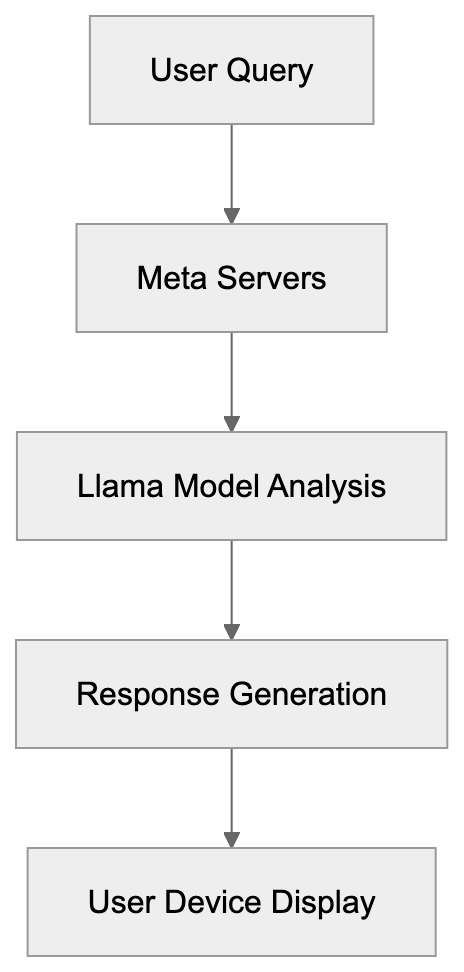
The technical workflow starts when you send a message or query. Your text goes to Meta’s servers where Llama 4 processes it. The model analyzes your question, determines intent, and generates a response. For simple factual questions, it might pull from its training data. For current events or specific information, it searches the web through its Bing integration. The response comes back to your device and appears in the chat interface.
AI Integration Across Platforms:
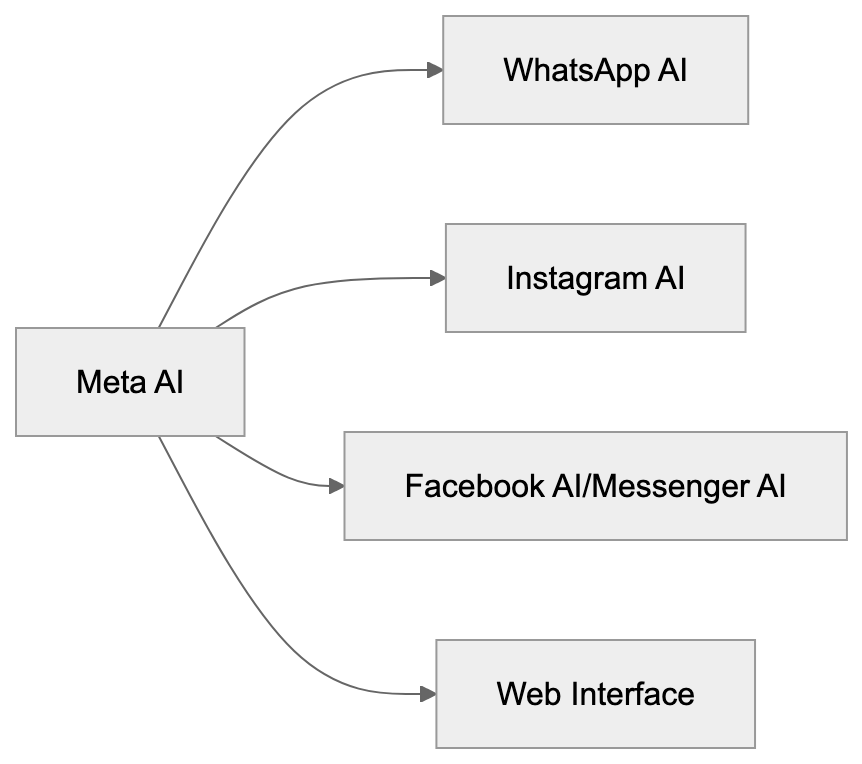
For AI image generation with Imagine, the process is different. You provide a text description. Meta AI uses a diffusion model to create the image. This happens on Meta’s servers, not your device. The generated image appears in your chat within seconds usually. In group chats, the workflow includes an additional step. When someone tags Meta AI, the system reads the recent conversation for context. This helps it provide relevant answers based on what people were already discussing.
The web version at meta.ai works similarly but without the social context. It’s a clean slate conversation each time unless you continue an existing chat thread. Behind the scenes, Meta likely logs interactions for quality control and model improvement. The system learns from corrections, thumbs up or thumbs down ratings, and follow-up questions that indicate the first answer missed the mark.
Meta AI Compared to Standalone Chatbots
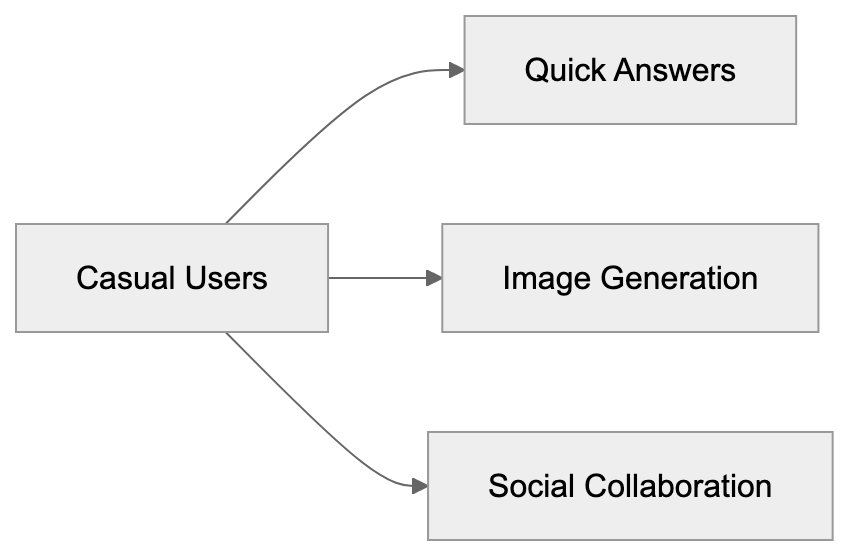
Meta AI has clear advantages over tools like ChatGPT or Claude. The biggest one is convenience. You don’t need to switch apps or open a new tab; it’s right there in your messaging app. This reduces friction significantly. For casual users who just want quick answers while texting, Meta AI wins on accessibility.
The integration with social features is unique too. You can ask Meta AI questions in group chats and everyone sees the response. This creates collaborative research opportunities that standalone chatbots don’t offer. However, standalone chatbots have their own strengths. ChatGPT offers more advanced reasoning capabilities in some cases, and Claude handles longer documents better. Both have established reputations for certain types of tasks. Developers often prefer them because the APIs are more mature. Privacy is another consideration. With standalone chatbots, your conversations are separate from your social media activity. Meta AI ties everything to your Facebook account, which some users find uncomfortable.
Feature sets differ too. ChatGPT has plugins and custom GPTs. Claude has better citation practices. Meta AI focuses on speed and integration rather than advanced features. For businesses, standalone chatbots usually offer better enterprise options and support. Meta AI currently targets individual consumers more than companies.
Using Meta AI Across Different Applications
Regular users can use Meta AI for everyday tasks. Planning events with friends becomes easier when you ask Meta AI for restaurant recommendations right in the group chat. Students use it for quick homework help or research starting points. The AI image generation feature helps people create custom memes, birthday graphics, or creative content without design skills. Content creators find value in brainstorming. Ask Meta AI for post ideas, caption variations, or trending topic suggestions. Instagram influencers use it to generate image concepts they can recreate professionally.
Small business owners use Meta AI for customer service ideas or quick market research. Developers have fewer direct use cases since Meta AI doesn’t offer robust API access like ChatGPT. However, they can study how Meta implemented conversational AI at scale. The open-source Llama models provide opportunities for building custom solutions. Marketing professionals can use Meta AI to draft social media content or analyze trends. The web interface at meta.ai works well for this since it separates work from personal chats.
The key is understanding where Meta AI fits best. Quick questions, creative generation, and social collaboration are sweet spots. Deep analysis, code generation, or specialized professional tasks still work better with dedicated tools.
Privacy and Data Collection Considerations
Meta AI collects conversation data by default, a standard practice for free AI services. The company uses this data to train and improve Llama models. Your questions and the AI’s responses help the system learn, and your interactions might influence how Meta AI responds to other users in the future. You can opt out of data collection in some regions. Go to your Facebook settings, find the AI or data section, and look for options about Meta AI data usage. The exact location varies by platform and region. Some countries have stricter privacy laws that give users more control.
WhatsApp conversations with Meta AI are handled differently than regular messages. Your regular WhatsApp chats have end-to-end encryption. But when you talk to Meta AI, that conversation goes to Meta’s servers for processing. It’s not encrypted in the same way. The web version at meta.ai ties to your Meta account if you’re logged in. Incognito or private browsing modes don’t prevent data collection. To access it without logging in, functionality might be limited. Compare this to paid services like ChatGPT Plus, where OpenAI offers options to disable training on your data. Free tiers usually don’t have this luxury. If privacy is your top concern, running local AI models on your own device is the most secure option, though it requires technical knowledge and hardware.
Conclusion and Key Takeaways
Meta AI represents a different approach to conversational AI. Instead of being a destination you visit, it lives inside apps you already use daily. Built on Llama 4, it serves over 500 million users across WhatsApp AI, Instagram AI, Facebook AI, and Messenger AI. The web interface at meta.ai provides another access point. AI image generation through Imagine adds creative capabilities beyond text. The tool exists to keep users engaged in Meta’s ecosystem while positioning the company as an AI leader. It works through simple text interactions that get processed on Meta’s servers. Responses come back quickly, and the system can search the web for current information.
Compared to standalone chatbots, Meta AI wins on convenience and social integration. But it lags in advanced features and privacy controls. Users and developers can use it for quick questions, creative tasks, and collaborative research. Privacy-minded individuals should know that conversations are collected for training by default, with opt-out options varying by region. The rapid user growth shows Meta’s integration strategy is working, making this one of the most accessible AI assistants available today.
Meta AI Usage Scenarios:
Meta AI Workflow:
Frequently Asked Questions
What platforms does Meta AI operate on?
Meta AI is integrated across several platforms including WhatsApp, Instagram, Facebook Messenger, and the web interface at meta.ai. This allows users to access its functionalities directly within the messaging apps and through the website.
How does Meta AI improve its responses over time?
Meta AI uses interaction data to train and refine its language model, Llama. Each conversation helps the system better understand user intent and improves the quality of responses through a feedback loop, where more data leads to better training outcomes.
What types of tasks can I accomplish using Meta AI?
Users can utilize Meta AI for quick tasks such as getting restaurant recommendations, generating images, brainstorming content ideas, or conducting research. It's particularly effective for collaborative tasks within group chats.
Is there a subscription fee for using Meta AI?
No, Meta AI is free to use and currently does not feature any premium tier or subscription model. This makes it accessible to a wide range of users looking for AI assistance without a cost barrier.
How does Meta AI handle user privacy and data collection?
By default, Meta AI collects conversation data to improve its services. Users can opt out of data collection in specific settings, depending on their region. It's important to note that interactions with Meta AI are not subject to the same end-to-end encryption as regular chats on platforms like WhatsApp.
Can I access Meta AI without being logged into my Meta account?
Yes, you can access Meta AI through the web at meta.ai without logging in, but functionality may be limited. Full capabilities are generally available when you are logged into your Meta account.
How does Meta AI compare to standalone chatbots?
Meta AI is more convenient as it is integrated into platforms users already frequent, eliminating the need to switch apps. However, standalone chatbots like ChatGPT may offer more advanced reasoning and features, making them preferable for certain tasks.
Track Your AI Visibility
See how AI chatbots like ChatGPT, Claude, and Perplexity discover and recommend your brand.