Microsoft Copilot Guide: AI Assistant Features & Pricing
Complete guide to Microsoft Copilot covering GPT-4 integration, Windows 11 features, DALL-E image generation, and subscription options for developers.
What is Microsoft Copilot
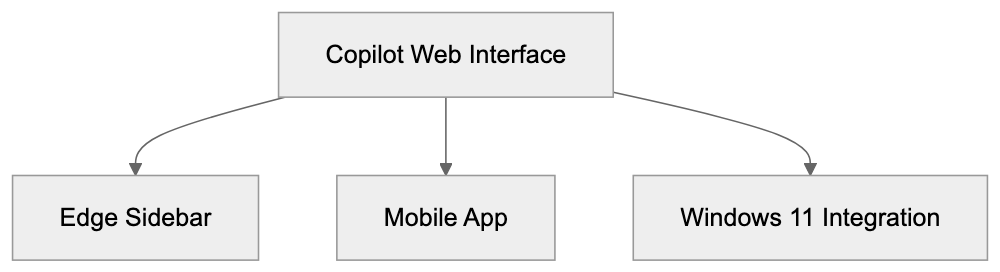
Microsoft Copilot is a conversational AI assistant based on OpenAI’s GPT-4 language model. The service started as Bing Chat in February 2023 and was rebranded to Copilot in November 2023. Unlike traditional search engines that return lists of links, Copilot provides direct answers to questions and can engage in back-and-forth conversations. The tool accesses current web information through Bing’s search index, providing up-to-date answers. Microsoft offers Copilot in multiple forms including:
- A standalone web interface at copilot.microsoft.com
- Integration within the Edge browser sidebar
- A mobile app for iOS and Android
- Built-in functionality within Windows 11
The free version allows access to GPT-4 capabilities with some limitations on conversation length and response times during busy hours, while the paid version offers priority access to GPT-4 Turbo, faster responses, and additional features.
Why Microsoft Created Copilot
Microsoft developed Copilot to compete in the growing AI assistant market following OpenAI’s release of ChatGPT in late 2022. The company invested significantly in OpenAI technology to integrate it into their products. With traditional search facing disruption from conversational AI, Microsoft aimed to make Bing stand out with AI-powered answers. Their broader goal is to make computing more accessible through natural language, reducing the need for specific commands or navigating complex interfaces. Copilot acts as both a standalone product and a foundation for AI features across Microsoft’s software lineup.
How Companies and Users Deploy Copilot
Large enterprises utilize Copilot for Business and Copilot for Microsoft 365 to boost productivity. In the Microsoft 365 version, the assistant can summarize emails, draft documents in Word, create PowerPoint presentations from prompts, and analyze Excel data. These enterprise versions connect to company data while maintaining security and compliance. Small businesses and individual developers often use the free version or Copilot Pro for research, coding assistance, and content creation. Copilot Pro helps with campaign ideas, code explanations, debugging, and more. The Edge browser integration provides web page summaries and interactive content assistance without leaving the browsing context.
Copilot Subscription Models and Pricing
Microsoft offers several tiers of Copilot access:
- Free version: Available at copilot.microsoft.com with access to GPT-4, although with limited response speeds and conversation lengths during peak times.
- Copilot Pro: Costs $20 per month, providing priority access to GPT-4 Turbo, faster responses, integration with Microsoft 365 Personal and Family subscriptions, and increased daily image creation limits with DALL-E 3.
- Copilot for Microsoft 365: Costs $30 per user per month, requiring a Microsoft 365 Business Standard or Premium subscription. It includes enterprise-grade data protection and works across various Office applications.
GPT-4 Integration and Model Details
User Interface and Access Methods:
Copilot utilizes OpenAI’s GPT-4 language model, with Microsoft having exclusive access through their partnership. The free tier uses GPT-4, while Copilot Pro offers GPT-4 Turbo for longer conversations and quicker responses. Microsoft plans to integrate future models like GPT-5, depending on partnership agreements. GPT-4 enables Copilot to understand complex questions, maintain conversation context, and generate human-like responses. However, like all large language models, it can occasionally produce incorrect information, so Copilot includes citations and links when providing web-based information.
Windows 11 and Edge Browser Integration
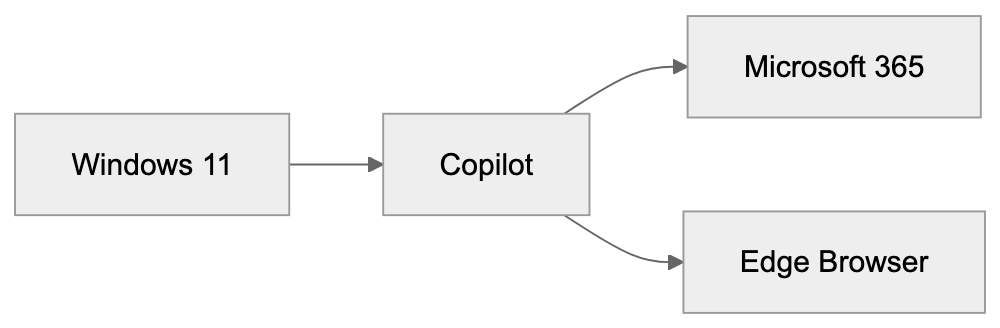
Windows 11 features Copilot integration directly in the OS. Users access it through a taskbar button, enabling them to change system settings, launch applications, or ask questions without opening a browser. This OS-level integration allows Copilot to interact naturally with Windows features. In the Edge browser, Copilot appears in a sidebar, assisting with text summaries, explanations, translations, and more. The sidebar maintains conversation history and syncs across devices, enhancing user interaction with web content.
DALL-E Image Generation Capabilities
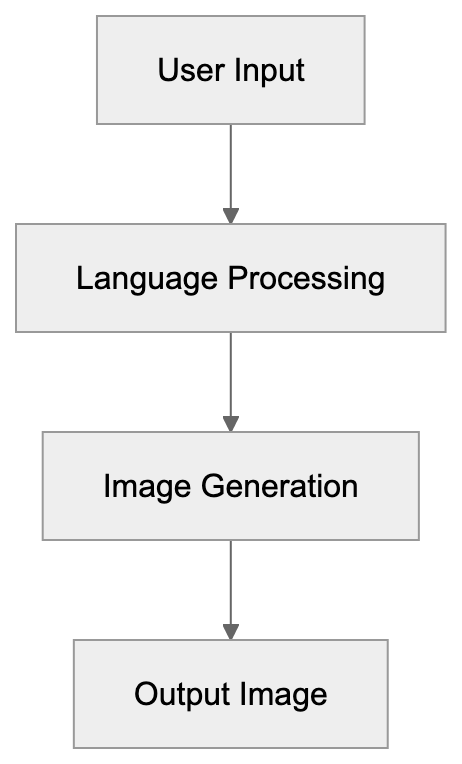
Copilot includes DALL-E 3 image generation capabilities. Users create images using natural language descriptions, with free versions allowing limited daily generations. Copilot Pro increases this limit. Generated images are 1024x1024 pixels, with built-in content filters preventing inappropriate or harmful content. Marketing professionals and content creators use this feature to prototype visual concepts and create placeholder images, with terms of service applying to commercial use.
Comparison to Other AI Assistants
Copilot competes with ChatGPT, Google’s Gemini, and Anthropic’s Claude. The main advantage of Copilot is its integration with Microsoft’s ecosystem and current web data through Bing search. While ChatGPT has broader recognition, it requires separate subscriptions for GPT-4 and lacks native web search. Google’s Gemini works similarly with Google Workspace. Claude emphasizes longer context windows and detailed analysis but lacks enterprise integration. Developers within the Microsoft ecosystem might prefer Copilot for its seamless integration and data governance.
Data Privacy and Training Policies
Microsoft’s approach to data privacy with Copilot varies by subscription tier. For the free version, conversations might be reviewed for service improvement. Business tiers offer commercial data protection, ensuring chat data isn’t saved. Copilot for Microsoft 365 includes enterprise-grade protection, keeping company data within the tenant. Microsoft’s documentation provides detailed information about data handling and privacy controls.
Technical Implementation and API Access
Microsoft doesn’t offer a direct public API for Copilot conversations, but developers can use the Azure OpenAI Service for similar capabilities. This service provides access to GPT-4 and other models through Microsoft’s cloud platform. Businesses can use Azure OpenAI endpoints for creating custom AI assistants. The technical stack behind Copilot includes GPT-4, retrieval augmented generation, content filtering, and conversation management.
Getting Started with Copilot
Starting with Copilot is straightforward, with no installation needed for the web version. Users visit copilot.microsoft.com to start. Signing in with a Microsoft account enables conversation history and personalization. Windows 11 users need a recent version for the integrated Copilot button on the taskbar. Mobile users can download the app from iOS or Google Play Store. Business users need to purchase licenses via a Microsoft account team or provider. Documentation and quick start guides are available on Microsoft’s support pages.
Conclusion
Microsoft Copilot represents Microsoft’s main AI assistant offering, built on GPT-4 technology and integrated across their product ecosystem. The tool evolved from Bing Chat, serving multiple purposes, from web search to productivity enhancement in Office apps. Key points include the free tier with GPT-4, the paid Copilot Pro, and enterprise versions with data protection. DALL-E integration adds image generation, while Windows 11 and Edge browser bring AI assistance to the OS level. Understanding Copilot’s capabilities and limitations helps developers and businesses integrate AI assistants effectively.
DALL-E Image Generation Process:
Copilot Integration Overview:
Frequently Asked Questions
What are the main features of Microsoft Copilot?
Microsoft Copilot offers AI-based web search, image generation through DALL-E, coding assistance, and deep integration with Microsoft products like Windows 11 and Microsoft 365. It allows users to receive direct answers to queries and facilitates natural language interactions.
How can businesses deploy Microsoft Copilot?
Businesses can use Copilot for Business and Copilot for Microsoft 365 to enhance productivity. These versions can help with tasks like summarizing emails, drafting documents, and analyzing data while ensuring data security and compliance.
What subscription options are available for Microsoft Copilot?
Microsoft offers a free version with basic access to GPT-4, and two paid options: Copilot Pro for $20/month, which provides priority access and faster responses, and Copilot for Microsoft 365 at $30/user/month, which includes enterprise features and enhanced data protection.
How does Copilot ensure data privacy?
Data privacy in Copilot varies by subscription. For the free version, conversations may be reviewed for service improvement, while business tiers ensure that chat data is not saved, maintaining the privacy of users' and companies' information.
Can developers access Copilot's capabilities via API?
Microsoft does not provide a direct public API for Copilot conversations. However, developers can utilize the Azure OpenAI Service to access GPT-4 and other models, which can facilitate custom AI assistant development.
How do I get started with Microsoft Copilot?
To start using Microsoft Copilot, simply visit copilot.microsoft.com and sign in with a Microsoft account. Windows 11 users will need the latest version for integrated access, while mobile users can download the app from their respective app stores.
What is the difference between Copilot and other AI assistants?
Copilot stands out due to its deep integration with Microsoft's ecosystem and its ability to provide current web data through Bing search. While other assistants like ChatGPT and Google's Gemini function similarly, they often lack such seamless integration and specific enterprise features.
Track Your AI Visibility
See how AI chatbots like ChatGPT, Claude, and Perplexity discover and recommend your brand.