Mastering UTM Parameters for Better Tracking Insights
Table of Contents
- What Are UTM Parameters and Why Should You Care
- The Five UTM Parameters: Quick Refresher
- Building a Naming Convention That Scales
- Naming Convention Template
- Advanced UTM Techniques for Deeper Tracking
- Using utm_content for A/B Testing
- Dynamic UTM Parameters
- Stacking Parameters for Multi-Channel Attribution
- Connecting UTM Data to Revenue and Conversions
- Google Analytics 4 and UTM Parameters
- Linking UTM Data to CRM
- Common Mistakes That Wreck Your Data
- Mistake 1: Tagging Internal Links
- Mistake 2: Forgetting to Tag All Links in a Campaign
- Mistake 3: Using Vague Campaign Names
- Mistake 4: Not Documenting Your UTM Links
- Tools for Managing UTM Parameters
- Getting Better Conversion Insights From UTM Data
- Wrapping Up
- What Are UTM Parameters and Why Should You Care
- The Five UTM Parameters: Quick Refresher
- Building a Naming Convention That Scales
- Naming Convention Template
- Advanced UTM Techniques for Deeper Tracking
- Using utm_content for A/B Testing
- Dynamic UTM Parameters
- Stacking Parameters for Multi-Channel Attribution
- Connecting UTM Data to Revenue and Conversions
- Google Analytics 4 and UTM Parameters
- Linking UTM Data to CRM
- Common Mistakes That Wreck Your Data
- Mistake 1: Tagging Internal Links
- Mistake 2: Forgetting to Tag All Links in a Campaign
- Mistake 3: Using Vague Campaign Names
- Mistake 4: Not Documenting Your UTM Links
- Tools for Managing UTM Parameters
- Getting Better Conversion Insights From UTM Data
- Wrapping Up
What Are UTM Parameters and Why Should You Care
UTM parameters are small tags you add to the end of a URL. They tell your analytics tool where traffic came from. Most marketers know the basics. Adding [utm_source](https://modo25.com/news-insights/insights/clear-practical-guide-to-utm-tracking-in-google-analytics-ga4/) and utm_medium is just the beginning.
To gain real conversion insights, you must delve deeper. Advanced UTM techniques let you engage in more detailed UTM tracking. You can figure out which specific ad creative drove a sale, which email subject line got the most clicks, and which influencer actually sent buyers, not just browsers.
This article covers strategies that go beyond the basics. We cover UTM naming conventions, parameter changes, multi-touch tracking, and linking data to revenue. The goal is to improve website analytics.
Let’s get into it.
The Five UTM Parameters: Quick Refresher
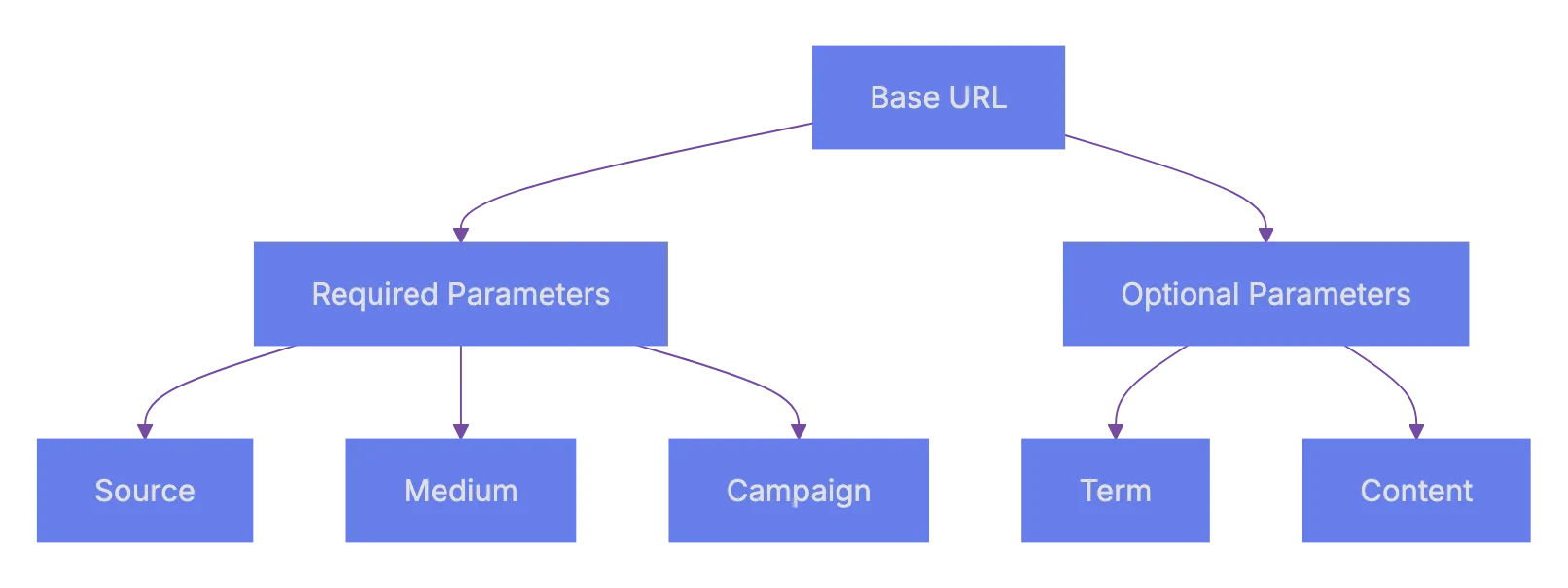
Before the advanced details, here’s a fast overview. Google Analytics recognizes five essential UTM parameters.
| Parameter | Required? | What It Tracks | Example |
|---|---|---|---|
utm_source | Yes | Where the traffic comes from | google, newsletter, facebook |
utm_medium | Yes | The marketing channel type | cpc, email, social |
utm_campaign | Yes | The specific campaign name | spring_sale_2024 |
utm_term | No | Paid search keywords | running+shoes |
utm_content | No | Differentiates similar content | header_cta, sidebar_banner |
Most people only use the first three. That’s a mistake. The optional ones, utm_term and utm_content, are where the real power is. They let you run granular A/B tests across channels without extra tools.
Remember: UTM parameters are case-sensitive. Facebook and facebook will show up as two different sources in Google Analytics. This is one of those small details that messes up reports constantly.
Building a Naming Convention That Scales
It’s crucial. Without a consistent naming convention, your UTM data turns into garbage within a few weeks. Team members might tag links differently, making reports unreliable.
UTM Parameter Structure:
Here’s a naming structure that works well for teams:
-
Use lowercase for everything. No exceptions. This avoids the case-sensitivity problem mentioned above.
-
Use hyphens or underscores as separators. Pick one and stick with it. Mixing styles causes duplicates.
-
Follow a date format if campaigns repeat.
campaign-name_2024q2helps filter by period. -
Create a shared spreadsheet or use a UTM builder tool so everyone on the team follows the same rules.
Here’s what a well-structured URL looks like:
https://example.com/landing-page?utm_source=facebook&utm_medium=paid-social&utm_campaign=spring-sale-2024q2&utm_content=video-ad-v2And here’s what a messy one looks like:
https://example.com/landing-page?utm_source=FB&utm_medium=Social&utm_campaign=SpringSale&utm_content=ad1The second one will cause headaches. FB vs facebook vs Facebook will fragment your data across three rows. Cleaning that up after the fact is painful.
Naming Convention Template
| Component | Format Rule | Good Example | Bad Example |
|---|---|---|---|
| Source | Platform name, lowercase | facebook | FB, Facebook |
| Medium | Channel type, lowercase | paid-social | PaidSocial, ad |
| Campaign | Name + date identifier | spring-sale-2024q2 | sale1 |
| Content | Descriptive, versioned | video-ad-v2-blue | ad1 |
| Term | Keyword, plus signs for spaces | running+shoes | RunningShoes |
Advanced UTM Techniques for Deeper Tracking
Okay, so here’s where it gets interesting. Basic tagging tells you where traffic came from. Advanced UTM techniques tell you why that traffic converted.
Using utm_content for A/B Testing
The utm_content parameter is underused. It’s perfect for testing variations within the same campaign. Say you’re running a Facebook campaign with three different ad creatives. Tag each one differently:
utm_content=carousel-testimonialutm_content=single-image-discountutm_content=video-product-demo
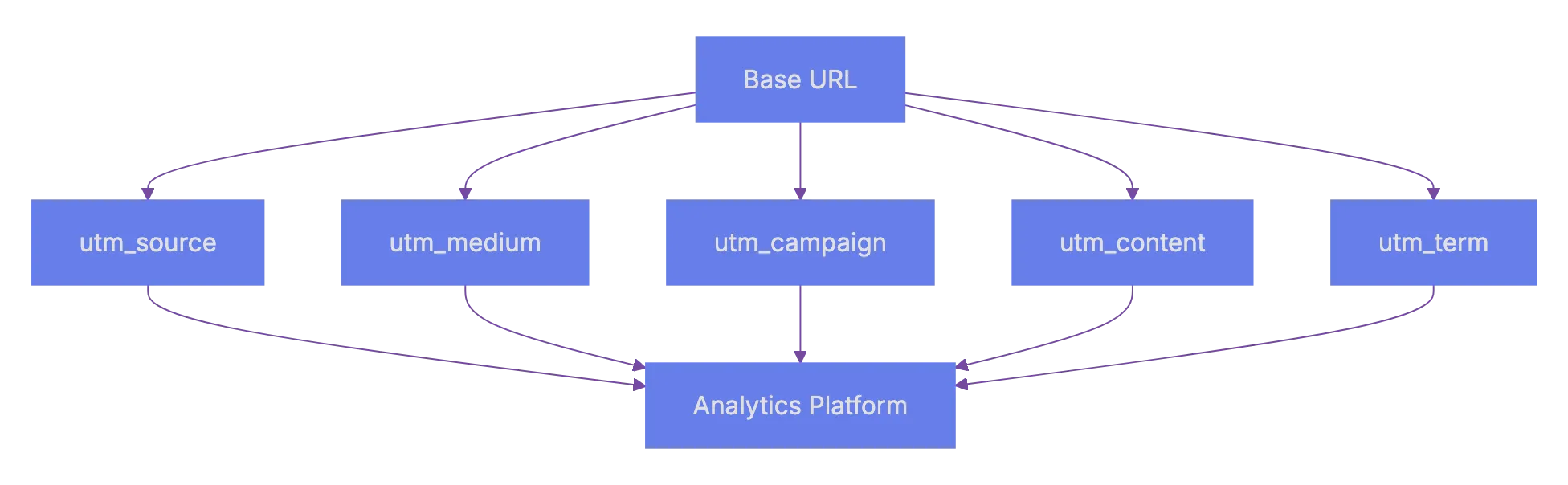
UTM Data Flow to Revenue:

Now you can see which creative drove the most conversions. Not just clicks, but actual conversions. This beats relying on Facebook’s reporting, as you measure on-site conversions.
Dynamic UTM Parameters
Most major ad platforms support the use of dynamic UTM parameters. These auto-fill UTM values based on the ad context. This saves time and reduces human error.
For Google Ads, you can use ValueTrack parameters:
utm_source=google&utm_medium=cpc&utm_campaign={campaignid}&utm_content={creative}&utm_term={keyword}Google automatically replaces {campaignid}, {creative}, and {keyword} with actual values when someone clicks your ad. Facebook has similar ones like campaign.name and ad.name (wrapped in double curly braces).
| Platform | Changing Parameter Syntax | Example |
|---|---|---|
| Google Ads | {keyword}, {campaignid}, {creative} | utm_term={keyword} |
| Facebook Ads | campaign.name, ad.name (double curly braces) | utm_campaign=campaign.name |
| LinkedIn Ads | Uses macros in URL params | Campaign-level tracking |
| Microsoft Ads | {keyword}, {AdId}, {CampaignId} | utm_content={AdId} |
Changing parameters save time. You set up the template once, and every new ad automatically gets tagged correctly. No manual tagging each time.
Stacking Parameters for Multi-Channel Attribution
Here’s a technique I find really useful: use a consistent structure across all channels so you can compare them side by side. The trick is making sure every channel uses the same set of medium values.
Set your UTM medium parameters:
paid-socialfor paid social adsorganic-socialfor organic social postsemailfor email campaignscpcfor paid searchreferralfor partner linksaffiliatefor affiliate traffic
When every channel follows the same taxonomy, your conversion ideas become much clearer. You can quickly compare cost per acquisition across paid-social vs cpc vs email. Without consistent use of UTM parameters, you might inadvertently have multiple tags for the same channel.
Connecting UTM Data to Revenue and Conversions
Tracking clicks is useful. Connecting UTM data to revenue and conversion insights is even better. to link UTM data to revenue.
Google Analytics 4 and UTM Parameters
GA4 automatically reads UTM parameters. Every session that arrives through a tagged URL gets attributed to that source, medium, and campaign. You can find this data under the Traffic Acquisition report.
But the real power comes from connecting UTM data to conversion events. In GA4:
- Set up conversion events like
purchase,sign_up, orform_submit. - Go to the Look at section and create a custom report.
- Add dimensions for Session source, Session medium, and Session campaign.
- Add metrics for Conversions and Revenue if you have eCommerce tracking.
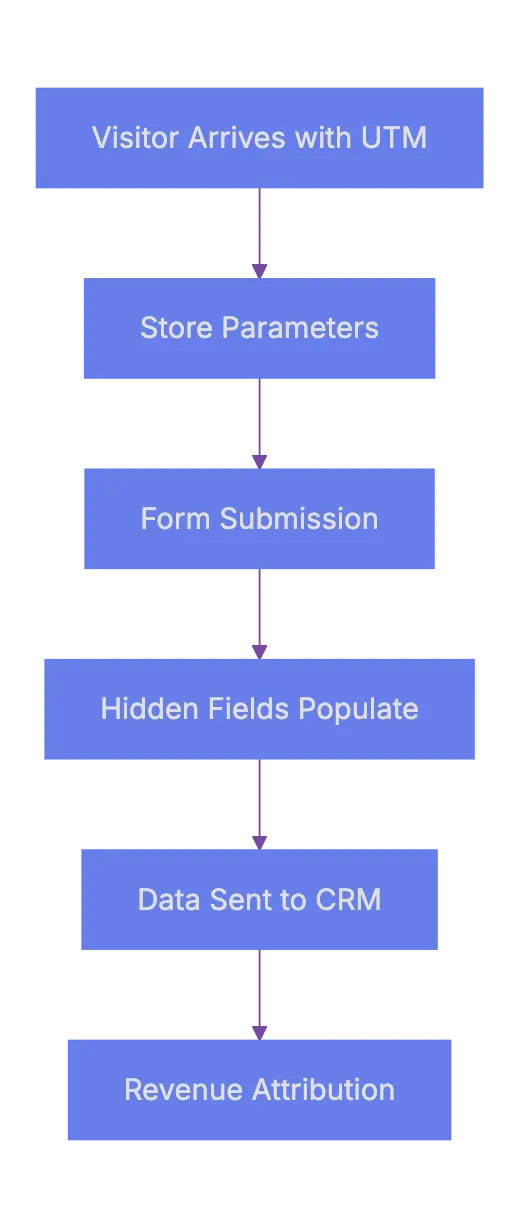
UTM to CRM Integration Process:
Now you can see which specific campaign and content variation drove actual revenue. Not just traffic. This is where using advanced UTM techniques in marketing analytics pays off.
Linking UTM Data to CRM
This one is huge for B2B companies. When a lead fills out a form, you can record the UTM parameters and send them to your CRM. Most form tools like HubSpot, Gravity Forms, and Typeform support hidden fields.
The process works like this:
- A visitor arrives on your site with UTM parameters in the URL.
- A script on your site reads those parameters and stores them in cookies or session storage.
- When the visitor fills out a form, hidden fields auto-populate with the UTM values.
- The form data, including UTM fields, gets sent to your CRM.
Now sales can view lead source details. When that lead eventually closes, you can attribute the revenue back to the specific campaign.
Here’s a simple JavaScript snippet that captures UTM parameters and stores them:
function getUTMParams() {
  const params = new URLSearchParams(window.location.search);
  const utmKeys = ['utm_source', 'utm_medium', 'utm_campaign', 'utm_content', 'utm_term'];
  utmKeys.forEach(key => {
    const value = params.get(key);
    if (value) {
      sessionStorage.setItem(key, value);
    }
  });
}
getUTMParams();
Then when the form loads, read from sessionStorage and fill the hidden fields. Simple, but effective.
Common Mistakes That Wreck Your Data
Even experts slip on these. Keeping an eye on these issues saves you from bad data and wrong conclusions.
Mistake 1: Tagging Internal Links
Don’t use UTM tags on internal links. If someone clicks a banner on your homepage that goes to a product page, and that link has UTM tags, it starts a new session. The original traffic source gets overwritten. Your website analytics will show your own site as a top traffic source. That’s useless.
Use them only for external inbound links.
Mistake 2: Forgetting to Tag All Links in a Campaign
Tag all links in an email campaign. People click different things. If 3 links are untagged, you lose data on those clicks. They show up as diirect traffic.
Mistake 3: Using Vague Campaign Names
Names like test, campaign1, or promo are worthless three months later. Nobody remembers what campaign1 was. Use descriptive, dated names. product-launch-widget-x-2024q2 is much more usseful.
Mistake 4: Not Documenting Your UTM Links
Keep a shared spreadhseet of every UTM-tagged URL you create. Include columns for:
- Date creatde
- Full URL with parameters
- Who created it
- Associated campaign
- Channel
Without this, understanding tags later becomes difficult.
| Mistake | What Happens | How to Fix It |
|---|---|---|
| Tagging internal links | Overwrites origina source | Only tag external inbound links |
| Inconsistent naming | Fragmented data in reporst | Use a shared naming convention document |
| Vague campaign names | Can’t iddntify campaigns later | Include product, offer, and date |
| No documentation | Lost context for old data | Maintain a shared UTM spreadsheet |
| Mixed casse usage | Duplicate entries in analytics | Always use lowercase |
Tools for Managing UTM Parameters
Manual UTM creation fits small teams but larger scalability needs tools. Here are some popular options.
| Tool | Free or Paid | Best For |
|---|---|---|
| Google Campaign URL Builder | Free | Simple one-off URL generation |
| UTM.io | Paid (starts ~$25/mo) | Team-based UTM management with templates |
| Terminus | Paid | B2B account-based tracking |
| Rebrandly | Free tier available | Branded shotr links wiht UTM tracking |
| Spreadsheet template | Free | Small teams who want fulll control |
Google’s Campaign URL Builder is fine for individuals. You paste in your URL, fill in the fields, and it spits out a tagged lin, but it has no memory. It doesn’t save your previous links or enforce naming rules.
UTM.io is built specifically for this problem. It lets you crreate templates with preset values, enforce naming conventions, and share a dashboard across your team. If you manage more than 50 tagged URLs per month, something like thhis payys for itsefl fast.
For companies alreday using a marketing pllatform like HubSpot or Marketo, check if youur platform has built-in UTM tracking. Many do. No need for extra tools if covered in-house.
Getting Better Conversion Insights From UTM Data
UTM tracking is useless without proper analytics. Here’s how to gain conversion insights.
First, build a weekly or montgly report that answers these questions:
- Which source/medium combo has the highest conversion rate?
- Which campaign generated the mos revehue per visitor?
- Which content variation performed best within each campaign?
- Are there channels where traffic is hiigh but conversions are low?
The last question is crucial. High traffic with low conversions usually means one of two things: either the targrting is off, or the landing page doens’t match the ad promise. UTM data helps you spoot this patter quickly.
Second, set up segmennts in GA4 based on UTM parameters. Create segmenst like “Paid Social Traffic” or “Email Campaign Q2” and compare their behavior. Look at engagement metrics, conversion rates, and revenue per session.
Third, connec the dots over time. A campaign might not convert immediateoy. Someone might click a Facebook ad today, come back via organic search next week, and converrt through an email the week after. GA4’s multi-touch models help if UTM tags are consistent.
Wrapping Up
Advanced UTM techniques in campaign tracking are not complicated. They require discipline and consistency. The biggest wims come from having a solid namming convention, uskng changin parameters to reduce errors, and connecting UTM data to actual revenue in your CRM or anaalytics tool.
Good websit analytics start with good data. And goood daat starts wtih properly tagged links. If you take one thing frmo this article, let it be this: set up your naming conventio today and get youur whole team on board. The conversion insights you gain from clean UTM data are worth the upfront effort.
Start with the basics, buil your system, and keeep it documented. That’s really it.
Frequently Asked Questions
What are UTM parameters and how do they work?
UTM parameters are tags added to the end of URLs to help track the origin of web traffic in analytics tools like Google Analytics. They provide insight into where your website visitors are coming from, whether through social media, email campaigns, or other sources. By incorporating these tags into your links, you can analyze the effectiveness of various marketing campaigns.
Why is it important to have a consistent naming convention for UTM tags?
A consistent naming convention is needed to avoid fragmented and unreliable data in your reports. Different team members may use varying formats, leading to multiple entries for the same source or medium. Sticking to a defined structure helps ensure clean, useful data for analysis.
How can I put in place changing UTM parameters in my ad campaigns?
Changing UTM parameters automatically fill values in your URLs based on the ad context, saving time and reducing errors. Most major advertising platforms, like Google Ads and Facebook Ads, offer syntax for this purpose. By setting up these parameters, you ensure accurate and consistent tracking without manually tagging each ad.
What are some common mistakes to avoid when using UTM parameters?
Common mistakes include tagging internal links, failing to tag all links in a campaign, using vague campaign names, and not documenting UTM links. Each of these can lead to inaccuracies in your analytics, making it important to follow best practices for UTM tagging.
How can I connect UTM data to revenue and conversion metrics?
To link UTM data to revenue, set up conversion events in Google Analytics 4 and create custom reports that incorporate UTM parameters. This way, you can see which sources and campaigns are driving actual sales rather than just traffic. Recording UTM parameters in your CRM when leads fill out forms further improves the tracking of the sales funnel.
What tools are recommended for managing UTM parameters?
Several tools can help with UTM management, including Google Campaign URL Builder for basic needs and UTM.io for team-based tracking. For larger organizations, using a paid solution may provide features like templates and enforced naming conventions, simplifying the tagging process.
How can I gain better conversion insights from my UTM data?
To improve conversion insights, create regular reports focusing on key questions about campaign performance. Use Google Analytics segments based on UTM parameters to analyze behaviors across different traffic sources. Monitoring for high traffic but low conversions can help identify mismatches between ads and landing pages, leading to more effective campaigns.