Technical SEO for the AI Era
Chapter 7: Technical SEO for the AI Era
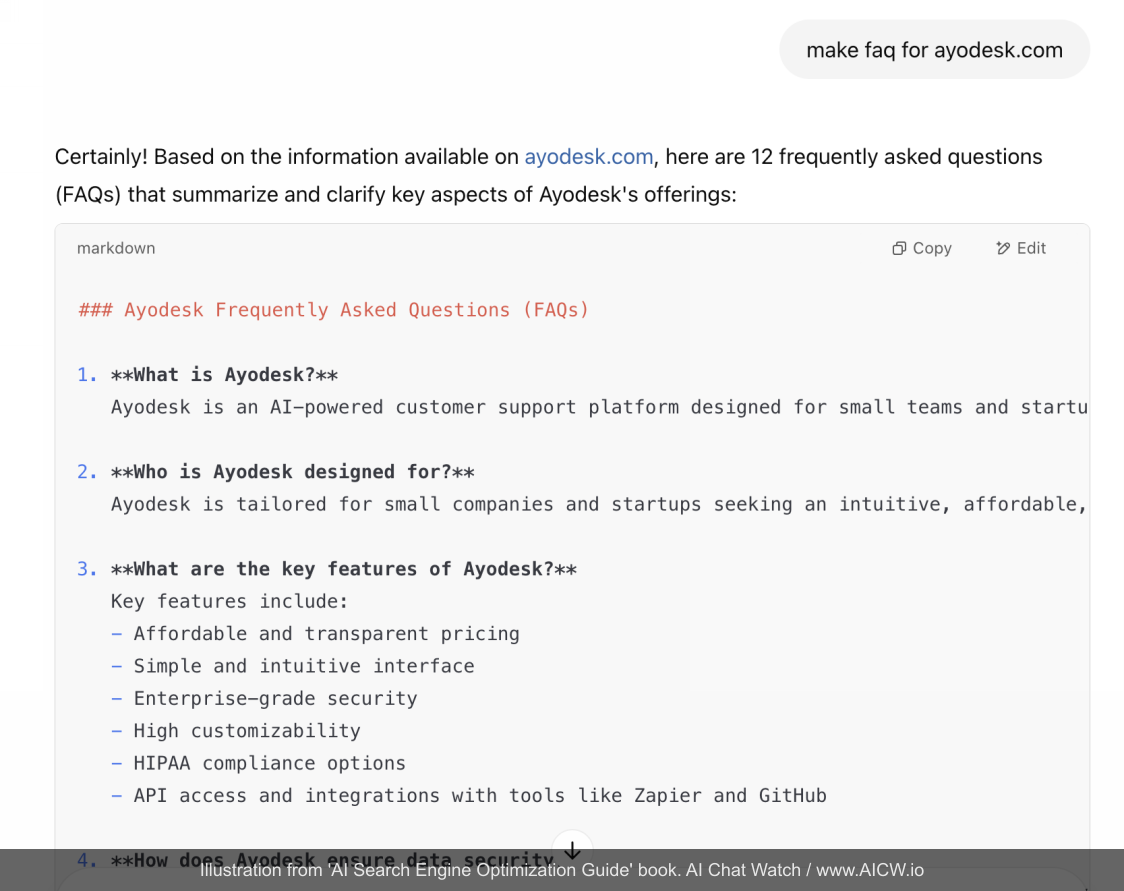
In this chapter, you’ll learn essential technical strategies for getting your website (and its content) accessible and indexable by AI crawlers. We will review and explore:
- Using /robots.txt to guide AI and non-AI crawlers;
- What is Server-Side Rendering (SSR) and its advantages over Client-Side Rendering (CSR) and why it is very important;
- How to properly implement and use embedded structured data;
- How to re-index your website for AI search engines;
Beyond content strategy, technical optimization is very critical to ensure that AI can effortlessly access, understand, and index your website’s information. Let’s explore the key technical considerations:
Robots.txt: Rules For Bots (with Cautions)
The /robots.txt file is the traditional way to provide instructions to web crawlers about which parts of your site they should or shouldn’t access.
How robots.txt works:
-
This /robots.txt a simple plain text file uploaded to your web-site into the root folder;
-
This file contains the list of blocks where each one starts with the identifier of a web bot (aka “User-Agent”) and path or a path mask to tell where this bot is allowed (“Allow” command) to go and where it is not allowed (“Disallow” command).
Example of such block:
User-agent: CCBot
Allow: /blog/?
Disallow: /login/*-
Bots running by AI and by search engines are supposed to respect these rules but they are not legally obliged to do so, and compliance is completely voluntary! Moreover, there are publications about suspecting some web scraping bots (which are ran by search engines and AI companies) not respecting these rules in some case practice[^37].
-
Major content management systems like WordPress and similar have predefined robots.txt file with predefined set of rules;
Here are some of the most active bots used by AI companies and their data providers:
- CCBot - the bot from Common Crawl which captures content for the large dataset used by all large AI companies;
- GPTBot, OAI-SearchBot - web bots used by OpenAI, the company behind ChatGPT[^38]
- PerplexityBot, PerplexityUser - web bots used by Perplexity AI for indexing content and running a search on a given website[^39]
- ClaudeBot, Claude-User, Claude-SearchBot - web bots used[^40] by Claude AI by Anthropic
Here is an example from Wall Street Journal’s robots.txt[^41] which attempts to block specific AI crawlers (like CCBot which is used by the Common Crawl dataset, anthropic-ai, ClaudeBot, Google-Extended) from reading content on wsj.com website. WSJ explicitly don’t allow AI bots to read their content:
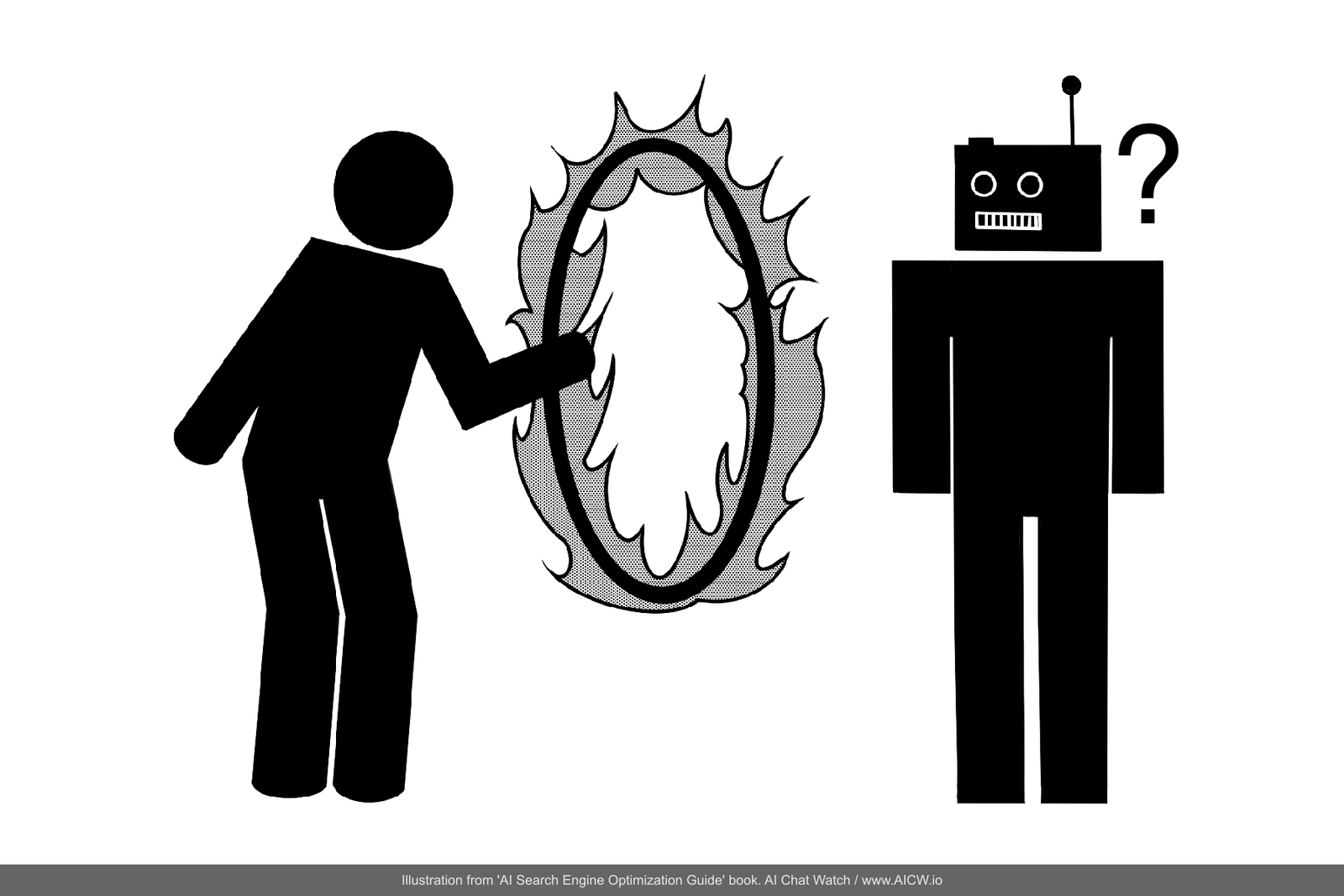
Figure 7.1. Screenshot of /robots.txt file at The Wall Street Journal’s website,
showing directives aimed at blocking various AI crawlers.
(Source: https://www.wsj.com/robots.txt, accessed Dec 2024)
Don’t rely on robots.txt for protecting content
While robots.txt remains an important technical standard so do not rely on robots.txt as your sole defense! If you need to prevent AI or any other web crawlers from accessing certain content, pages or folders then you must also protect access to your content with other methods (like login walls or IP blocking). Use authentication controls for true protection.
How to quickly create or verify Robots.txt for your website
The fastest and easiest way to verify robots.txt and generate (if needed) is to use AI like ChatGPT. I’ve created a free open-source plugin called “AI Robots.txt Assistant”[^42] that you may run right from ChatGPT.
For verifying robots.txt file, you can use online tools like Google’s own Robots.txt Tester[^43]. To dig deeper check the “Introduction to Robots.txt”[^44] guide from Google for the detailed information on how to update and define rules in robots.txt.
Server-Side Rendering For Accessibility
Dynamic JavaScript-heavy websites (also called Client-Side Rendering or CSR), where JavaScript primarily renders content in the user’s browser, can significantly slow down indexing and require more resources from crawlers because it requires crawler to run some kind of full modern browser to render a web page. That is why SSR (Server-Side Rendering), where a server is doing a heavy lifting of rendering the page and sends a complete HTML page to a browser without requiring browser itself to compute lot of things, is strongly preferred if you want your pages to be indexed by AI and search engines. If a website uses SSR then AI’s bot can simply “download” the content of the page with a very simple script on a very simple and minimal server with super limited and minimal resources but running a full browser requires a modern computer.
Tests and analysis[^45] conducted by Vercel (cloud hosting company) suggested that only web crawlers from very experienced and large companies like Google and Apple are actually capable of rendering dynamic javascript into a final page. But web crawlers from ChatGPT, Anthropic Claude, Common Crawl (super-large dataset for AI training) do not render Javascript inside pages. What does it mean? It means that if your website is programmed with so-called “modern and dynamic javascript” then it’s highly likely AI bots won’t see its content fully.
Also, there is a very significant 7x difference in speed of indexing required for such websites. In one case study[^46] shared by Onely marketing agency it took Google approximately 2 weeks to re-index complex JavaScript pages, compared to just 2 days (seven times faster!) for static HTML versions of the same content. Note that these results are context-dependent and may not apply to websites with real-time information.
| Feature | Server-Side Rendering | Client-Side Rendering |
|---|---|---|
| Indexing Speed | 1-2 days | ~2 weeks |
| Resources Required For AI to Read | Low (just downloads html) | High (need to fully render) |
| Support By Web Bots | Google Bing Common Crawl OpenAI ChatGPT Anthropic Claude all others | Google Bing Apple |
Figure 7.3. Table comparing how server-side rendered and client-side rendered pages are accessible to AI and non-AI bots.
(Source: multiple sources)
Because of all of it altogether, implementing SSR (Server-Side Rendering), where the server sends a fully rendered HTML page to the browser/crawler, dramatically improves crawl efficiency and indexing speed.
How to check if your website is accessible by search engines
One very simple approach for quickly checking if your website is SSR or not by looking if your website can change content without reloading a page in a browser is to open the “source code” (using right-click -> Inspect in your browser): if you see some scrambled programming code then highly likely your website is not using SSR. Another way is to temporarily turn off javascript in a browser and test how a website shows without javascript enabled: can you see the original content and text?
But the best way is to use Google Search Console and its “URL Inspection” tool[^47] that can show what a bot from Google (and similar bots from other search engines and AO) will see for a specific page on your website. Here is the example of using this tool for a website:
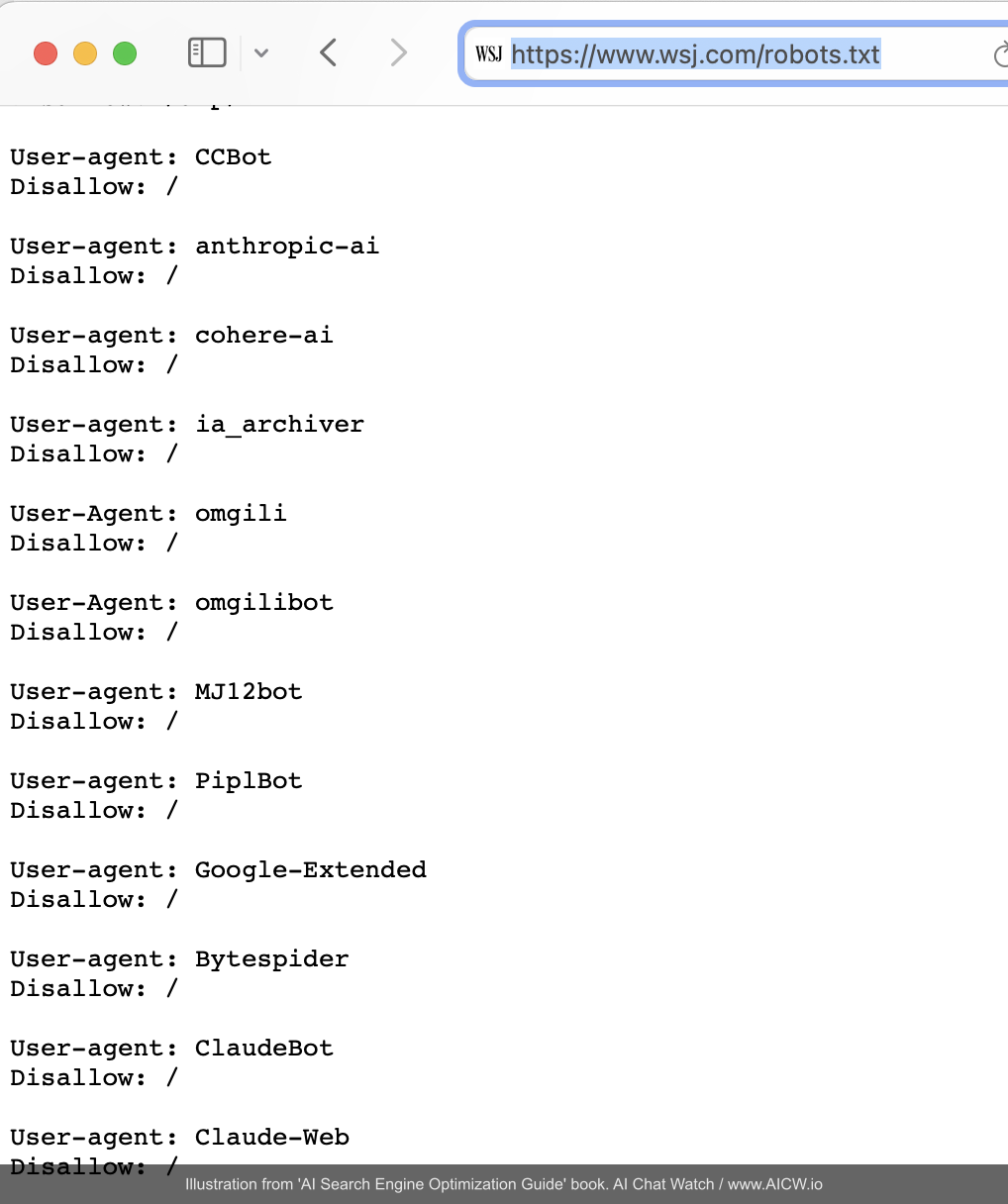
Figure 7.4. The Google Search Console - URL Inspection for Ayodesk.com/blog url.
(Source: chatgpt.com/gpts, accessed Apr 2025)
Sitemap.xml: Map To Your Website
sitemap.xml is a special structured data file that contains links to all pages on your website that should be indexed. Most modern CMS systems, like Wordpress, are generating and updating this file automatically. AI and traditional search engines are looking into this file as a map to the website.
Check if the sitemap for your website is up-to date and available at www.yourwebsite.com**/sitemap.xml**
Sitemap.xml for large websites
If your website is large and frequently updated then instead of re-generating sitemap for every update you may setup sitemap.xml entries with indicated update frequency like the template below. This way bots will know when to re-index your website again:
<urlset xmlns="http://www.sitemaps.org/schemas/sitemap/0.9" xmlns:xhtml="http://www.w3.org/1999/xhtml">
  <url>
    <loc>https://yourwebsite.com/</loc>
    <changefreq>daily</changefreq>
    <priority>1.0</priority>
  </url>
  <url>
    <loc>https://yourwebsite.com/blog</loc>
    <changefreq>daily</changefreq>
    <priority>1.0</priority>
  </url>
</urlset>
(Source: adapted from sitemaps.org standard structure[56])
If you don’t have sitemap.xml then first check why it is not generated by the content management system you most likely use? Modern website engines like Wordpress, Webflow, Ghost and all the others already do support generating sitemap.xml automatically.
JSON-LD: The Linchpin of AI Search Visibility
JSON-LD (JavaScript Object Notation for Linked Data), often called “Semantic JSON” or “Structured Data”, involves embedding machine-readable structured snippets with the content inside your page’s HTML.
These structures may explicitly describe the content and context of your page (e.g., this is an article, this is a recipe, this is a product with its price). This approach allows crawlers to quickly understand the page’s meaning directly without complex parsing or rendering.
Sample JSON-LD for AIChatWatch.com:
{
  "@context": "https://schema.org",
  "@type": "Organization",
  "name": "AICW",
  "url": "https://aichatwatch.com",
  "description": "AI Chat Watch is an free open-source tool for tracking what AI like ChatGPT say about brands, companies, products, industry.",
  "contactPoint": {
    "@type": "ContactPoint",
    "contactType": "customer support",
    "url": "https://aichatwatch.com/contact"
  }
}
The importance of structured data, particularly in the form of JSON-LD, warrants a dedicated focus. It is arguably one of the most critical technical elements for success in visibility for AI. Structured data is effectively your website and your content already parsed and ready for copying into a database of a search engine or AI scanner. Without structured data, AI and search engines have to render, parse your website which involves much more computing resources and takes more time.
Why is JSON-LD so Essential?
Quick analysis shows that almost all top-performing sources referenced in AI search results utilize JSON-LD**.** It also consistently shows that top-performing content appears in AI search results (both in Google’s AI Overviews and as primary sources for AI answers) and shares a common trait: robust implementation of JSON-LD structured data.
Look at the example below for the query “how to drink water” Google’s AI Overview and the traditional “featured snippet” both reference the same page from Healthshots.com[^48]. This page, like most top-ranking content, effectively uses JSON-LD:
Figure 7.6. Google Search results page for “how to drink water” displaying both the AI Overview and traditional featured snippet referencing the same source (Healthshots.com). Annotations indicate Google’s AI Overview and Featured Snippet. (Source: google.com, accessed Dec 2024)
The same website uses JSON-LD extensively to represent both the content of the page and content of FAQ section:
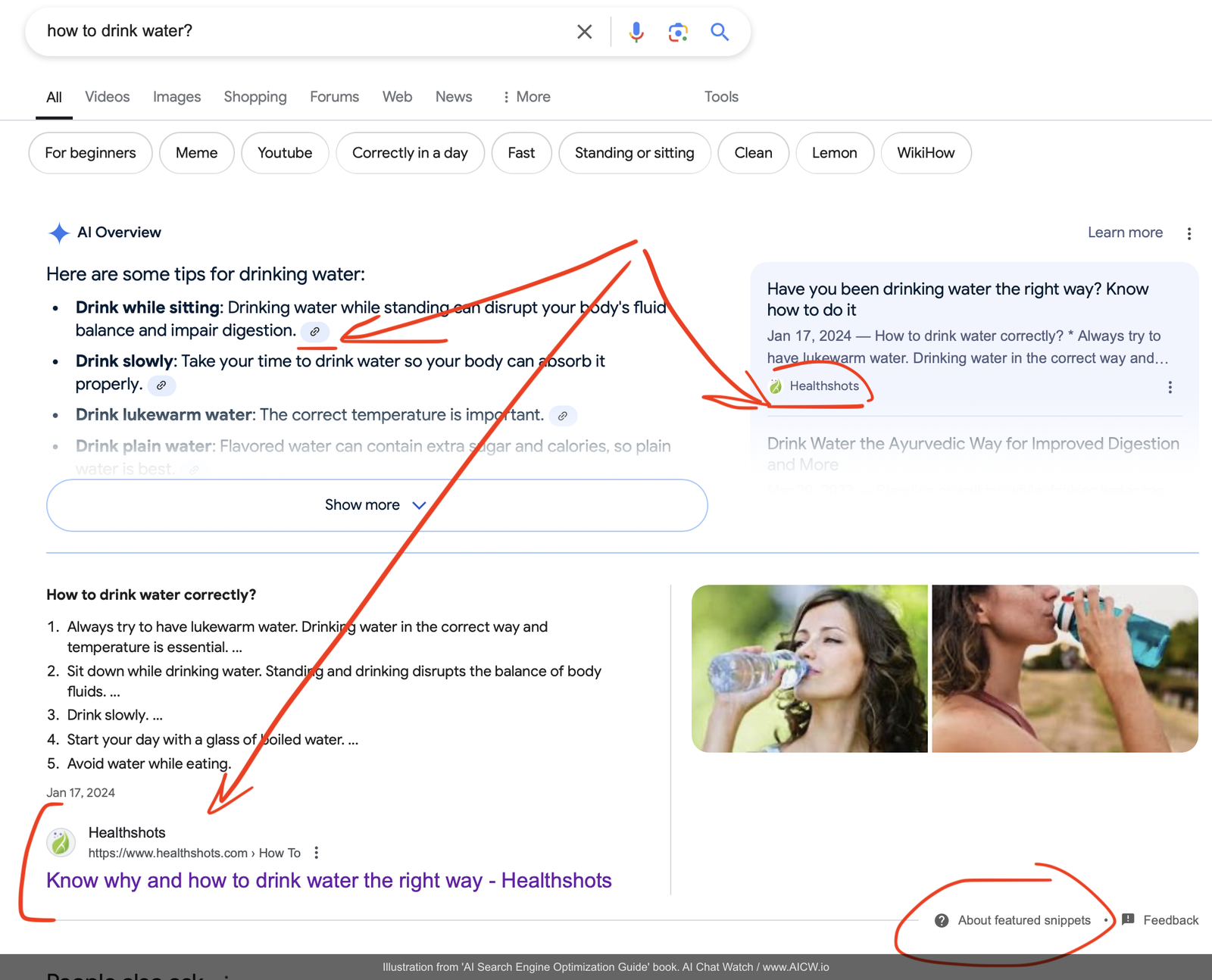
Figure 7.7. Healthshots.com article page alongside browser developer tools showing the underlying HTML source code containing JSON-LD snippets. (Source: healthshots.com, accessed Dec 2024)
Types of JSON-LD Structures:
JSON-LD allows you to embed snippets of code (usually in the <head> section of your HTML but also can be inside the main body too) that explicitly define the type and properties of your content in a machine-readable format. Looking at the source code example from the Healthshots website, we can these JSON-LD snippets:
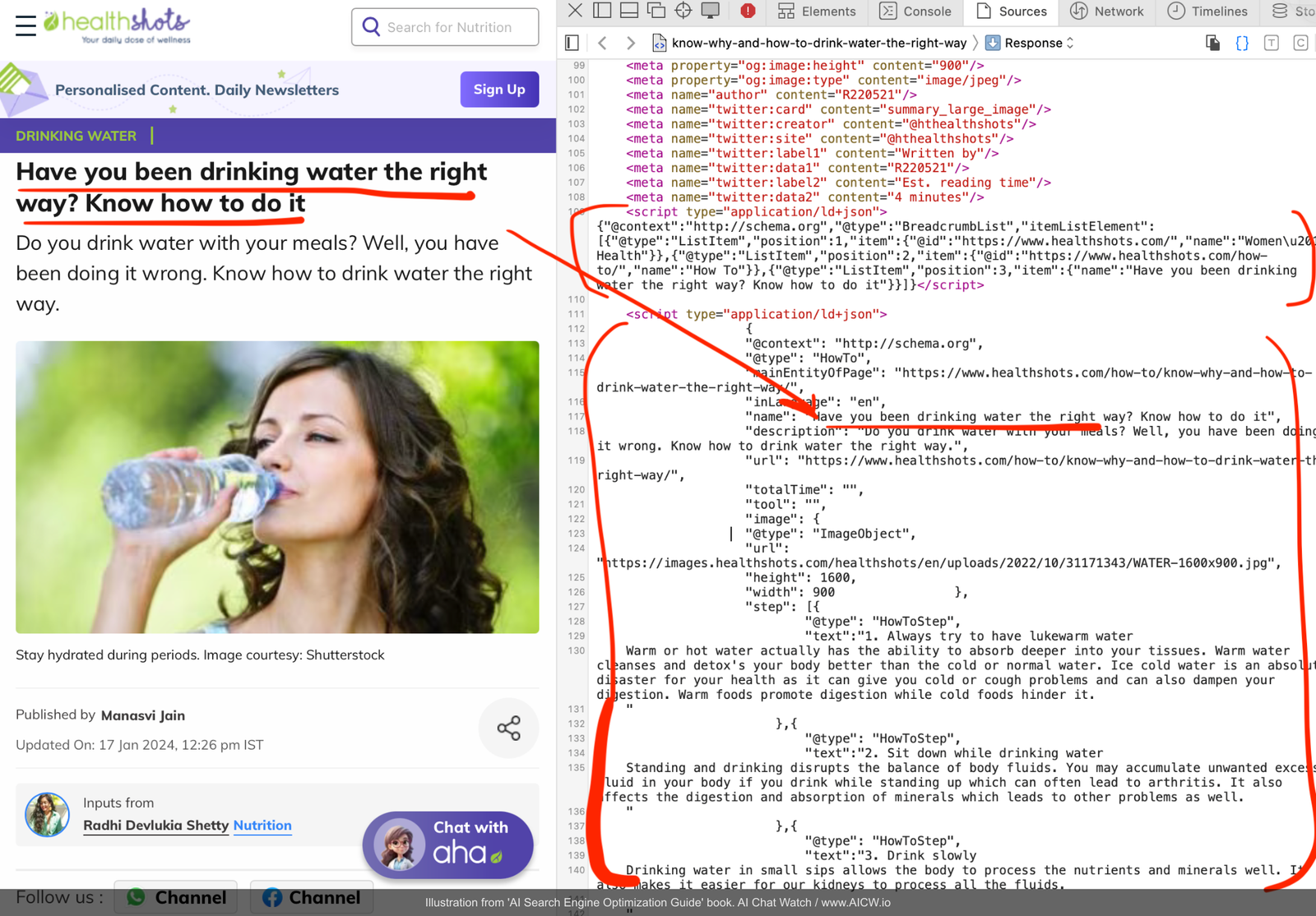
Figure 7.8. Close-up view of JSON-LD code within the Healthshots.com source, detailing @type, step, and other properties for the “HowTo” schema. (Source: healthshots.com, accessed Dec 2024)
This JSON-LD structure on the screenshot:
-
Clearly defines the page type: @type: “HowTo” tells the crawler this page provides instructions.
-
Structures step-by-step instructions: The step property organizes the “how-to” guide logically.
-
Provides necessary metadata: Includes the name (title), description, and image information in a structured way.
-
Enable understanding without rendering: Crucially, crawlers can parse this JSON-LD data and understand the page’s core content and structure without needing to execute complex JavaScript or fully render the page.
-
Maintains human readability: While machine-readable, the code remains relatively understandable to developers.
Common JSON-LD Structures
There are 815 types of JSON-LD structures[^49], and here are some of the most commonly used ones:
-
WebPage: For general pages, providing basic metadata.
-
Article: For news articles, blog posts, including author, publication date.
-
HowTo: For instructional content, outlining steps.
-
QAPage & FAQPage: For question-and-answer formats.
-
Event: For time-based content (concerts, webinars).
-
Review: For product or service reviews, including ratings.
-
Product: For e-commerce, detailing product name, price, availability, brand.
Finding existing JSON-LD inside any page
You can easily check if any page uses JSON-LD:
-
Open your browser’s developer tools (usually F12 or right-click > Inspect).
-
View the page source code.
-
Search for “schema.org” (the vocabulary standard used by JSON-LD). This will reveal any implementations of JSON-LD if any.
Creating JSON-LD
-
CMS (Content Management System) Support: Most major Content Management Systems (like WordPress, Shopify, Webflow) offer built-in JSON-LD support or 3rd party plugins/extensions available to easily add it to every page.
-
AI Assistance: Tools like ChatGPT, Claude and others can help generate JSON-LD snippets using HTML or text provided to them.
Selecting Proper JSON-LD Types
The official schema.org website[^50] (www.schema.org) is the definitive resource for exploring more than 800 structure types and their properties.
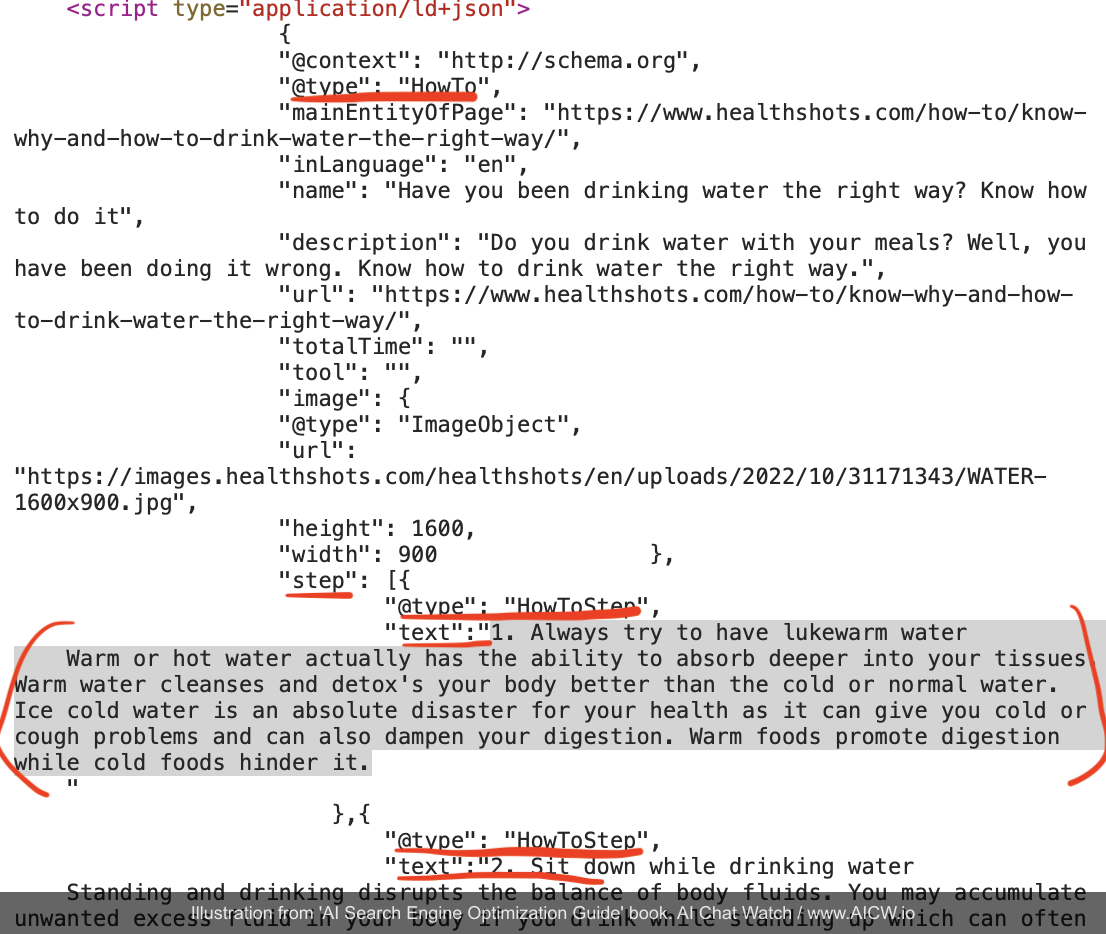
Figure 7.9. Screenshot of schema.org website with the list of JSON-LD types available . (Source: schema.org, accessed Apr 2025)
Selecting the most specific relevant schema types (e.g., choosing HowTo for a tutorial instead of Article or WebPage) provides clearer context to AI. Using a more suitable type also improves understanding of the content and the likelihood of your content being used effectively by AI.
Multiple JSON-LD structures
A single page may leverage multiple JSON-LD types working together. Previously discussed “how to drink water” page actually uses multiple structures:
-
WebPage (basic page info)
-
HowTo (the core instructional content)
-
BreadcrumbList (showing the page’s position in the site hierarchy)
-
SiteNavigationElement (defining how the page connects to other site sections)
Testing that page with Schema Markup Validator[^51] validator.schema.org shows the following detected items:
Figure 7.10. Results from the Schema Markup Validator tool for the Healthshots.com page, confirming the detection of multiple schema types (WebPage, HowTo, BreadcrumbList, etc.). (Source: validator.schema.org, accessed Dec 2024)
Validating JSON-LD implementation
Always validate your implementation:
-
Google Rich Results Test[^52]: Checks if your page supports rich results and validates the structured data.
-
Schema Markup Validator[^53]: A general validator for schema.org markup, checking for errors and warnings. Aim for zero errors and warnings for optimal implementation.
Again, the key advantage of JSON-LD is efficiency! Search engine crawlers can parse this structured information far more easily than interpreting complex HTML and JavaScript, leading to better, faster indexing and a clearer understanding of your content’s meaning which is exactly what AI search engines need.
Multi-Modal JSON-LD Content for AI Understanding
Multi-modal means combining text and media. Popular AI systems can now process images, videos, and transcripts[^54] before selecting citations. So JSON-LD may also combine text and media.
Example of Multi-Modal JSON-LD:
{
  "@context": "https://schema.org",
  "@type": "VideoObject",
  "name": "Product Demo Video",
  "description": "Comprehensive demonstration",
  "contentUrl": "https://example.com/video.mp4",
  "transcript": {
    "@type": "Text",
    "text": "Full searchable transcript..."
  },
  "hasPart": [
    {
      "@type": "Clip",
      "name": "Key Feature Demo",
      "startOffset": "PT0S",
      "endOffset": "PT2M30S"
    }
  ]
}
If you publish media content (video, images) then note that AI and search engines are also reading media’s metadata using C2PA[^55] standard which aims to provide information about image source (for example, camera or AI generator). For example, all images created with ChatGPT now include metadata to identify images as AI generated.[^56]
Checklist 2: Implementing JSON-LDPurpose: to successfully implement JSON-LD for your website to improve its accessibility and visibility to AI.
[ ] Review your website and determine the priority and secondary schema types
    (Article, HowTo, FAQ) to be used
[ ] Setup and use plugins for your website's CMS to include JSON-LD data into
    pages (or add JSON-LD snippets manually into HTML)
[ ] Validate the JSON-LD markup in your website using Schema Markup Validator
    or Google's Rich Results Test
[ ] Monitor indexing improvements in website analytics
LLMS.txt: Failed Standard or Future Proof?
A while ago, there was a proposal[^57] for uploading a special file called llms.txt (with markdown formatted content of the website). The idea was to provide AI crawlers with easy to read and to parse plain-text versions of websites. But despite initial enthusiasm, llms.txt has failed to gain traction as of 2025[^58] and has not yet become a web standard like robots.txt or JSON-LD.
Should You Still Implement It?
It is simply a text file and if you can create and place it then you can do it by uploading llms.txt into the root folder of your website. But just do not expect it to influence your ranking in AI search results. Better invest your resources into adding JSON-LD data snippets, as discussed above.
LLMS.txt file template:
# Title

> Optional description goes here

Optional details go here

## Section name

- [Link title](https://link_url): Optional link details

## Optional

- [Link title](https://link_url)
How to quickly create llms.txt for your website
You can use any text editor to compose both llms.txt and llms-full.txt files. Or just use ChatGPT and ask it to generate llms.txt for you based on the content or url you’ve provided.
Once you’ve generated llms.txt and llms-full.txt, you just need to upload them to the root folder of your website and verify they are available at www.mysite.com/llms.txt and www.mywebsite.com/llms-full.txt
How to get AI to index your content?
Understanding which search engines power AI tools is critical for optimization. In most cases, AI-powered search relies on websites databases from established “traditional” search engines:
| Search Results Provider | AI Products Using It |
|---|---|
| • Google AI Overview • Google Gemini • Meta AI | |
| Bing | • ChatGPT[^59] • Microsoft Copilot |
| Brave | • Anthropic Claude[^60] • xAI Grok[^61] |
| Perplexity | • Own index |
It means that to get AI search to know your website and to read it or re-read (re-index) it, you need to get re-indexed by “traditional” search engines in most cases.
Indexing website in Google
To index your website by Google please visit this special page[^62] listing how to re-index a specific page or a set of pages. If your website provides real-time updates (gaming scores, streaming) then you may also want to use Google’s Indexing API[^63]
Indexing website in Bing
To index your website by Bing, you may use Bing’s URL submission tool[^64] or use a special tool co-created by Bing called IndexNow[^65] which processes 3.5 billion URL submissions daily[^66] though its adoption remains fragmented as of 2025:
| Search Engine | IndexNow Support | Notes |
|---|---|---|
| Not supported | Not supported | |
| Bing | Full support | Primary advocate |
| Yandex | Full support | Original co-creator |
| Naver | Added 2024 | South-Korean market |
| Brave | Not supported yet | Not supported |
Note that Google’s absence in IndexNow means traditional sitemaps remain essential for reaching 90%+ of search traffic.
How to sync your website to IndexNow
IndexNow support is already integrated into Bing Webmaster[^67] and into many popular content-management systems[^68].
You can also run the command below (you can run it in Terminal on Mac, Unix, Windows) to submit update url to IndexNow:
curl -X POST "https://api.indexnow.org/indexnow" \
  -H "Content-Type: application/json" \
  -d '{
    "host": "EXAMPLE.COM",
    "key": "YOUR_INDEX_NOW_KEY",
    "urlList": ["https://EXAMPLE.COM/updated-page"]
  }'
Don’t forget to replace EXAMPLE.com with your website address and YOUR_INDEX_NOW_KEY with your IndexNow API key[^69]
Indexing website in Brave Search API
Brave is the maker of the privacy-focused browser Brave and it claims that Brave’s Search API is used by most top-10 LLMs[^70] including Claude AI and Grok. Brave search engine has official url submission page[^71] where you should submit the url of your website.
Alternative method (previously it was the only method) to get specific pages to be re-indexed is to to install Brave Browser app[^72], enable “Web Discovery Project” (WDP) and keep it turned on while browsing your website with this browser:
- Install Brave Browser
- Enable Settings → Web Discovery Project
- Browse your important pages
- Pages queued for indexing within 48 hours
Indexing website in Perplexity AI
There is no official way to index websites for Perplexity AI’s index yet but you can publish information about your website and your content, brand, products on Perplexity AI website using the so-called Perplexity Pages function that allows you to publish pages on Perplexity.ai. This function requires a premium subscription and is not available for free users.
Checklist 3: Technical SEO Essentials For AI CrawlersPurpose: check that AI crawlers can efficiently access, render, read and understand your content.
[ ] /robots.txt reviewed and tested
[ ] /sitemap.xml reviewed and tested
[ ] Large websites: sitemap frequency/priority tags (<changefreq>, <priority>)
    logically implemented
[ ] Server-Side Rendering (SSR) implemented
[ ] Page load speeds optimized (image compression, code minification,
    core web vitals)
[ ] JSON-LD structured data with the main content added
[ ] JSON-LD structured data with content of FAQ/PAA sections added too
[ ] Sitemap and website submitted to engines
Frequently Asked Questions
What is JSON-LD and why does it matter for AI?
JSON-LD is structured data embedded in your page that tells crawlers exactly what your content is - an article, a recipe, a product with a price. AI crawlers read it directly instead of parsing your HTML. Almost every top source in AI citations uses it.
Why is server-side rendering important for AI crawlers?
Most AI crawlers (ChatGPT, Claude, Common Crawl) don't run JavaScript. They only see the raw HTML your server sends. If your content requires JavaScript to appear, these crawlers see a blank page. Server-side rendering fixes that.
How do I get AI to index my website?
Submit to the search engines that power AI. Google Search Console and Bing Webmaster Tools cover most of it. For Brave Search (which powers Claude and Grok), submit at search.brave.com/submit-url. IndexNow works for Bing but Google ignores it.
Which JSON-LD schema types matter most?
Article for blog posts, HowTo for tutorials, FAQPage for Q&A content, Product for e-commerce. Using the right specific type (HowTo instead of generic WebPage) gives AI better context about your content.
This content is reprinted from AI Search Engine Optimization Guide by Eugene Mironichev with permission.
© 2026 Eugene Mironichev. All rights reserved.
Get the Full Book
Download for free or buy the print version